


HtmlWebShot - A python3 package which Can Create Images From url, Html-CSS, Svg and from any readable file and texts with many setup features.

Overview

HtmlWebShot

PyPI version Codacy Badge Licencse PyPI downloads

A python3 package which Can Create Images From url, Html-CSS, Svg and from any readable file and texts with many setup features.

Setup & Installation

  • Install HtmlWebShot:

    $ pip3 install htmlwebshot
  • Install wkhtmltopdf:

    • Debian/Ubuntu:
      $ apt-get install wkhtmltopdf -y  
    • MacOs:
      $ brew install homebrew/cask/wkhtmltopdf
    • Alternative Support
      $ wget https://github.com/1Danish-00/HtmlWebShot/raw/main/script.sh | sh
      
    • Win / Arch / Others
      click here

Usage

Import & Instantiate

from htmlwebshot import WebShot
shot = WebShot()
Multiple Arguments
  • size: (int , int) : tuple : height, width default: full-screen
  • quality: int : between 1 to 100
  • delay: float : delay time in sec to load page
  • flags: list : know More
  • params: dict : know more
  • config: path setup know more

Simple Method

Using Url

shot.create_pic(url="https://google.com")

Using Html File

shot.create_pic(html="myfile.html", output="picture.jpg")

Using Html with CSS

via files

shot.create_pic(html="myfile.html", css="background.css", output="picture.jpg")

via string

Hello World

Write something about the world.

""" css = "body {background: pink;} p {color: red;}" shot.create_pic(html=html, css=css, output="picture.jpg") ">
html = """

Hello World

Write something about the world.

"""
css = "body {background: pink;} p {color: red;}" shot.create_pic(html=html, css=css, output="picture.jpg")

Using Svg Or Any Other Readable File/Text

shot.create_pic(other="violin.svg", output="picture.jpg")
text = "What should I write here???"
shot.create_pic(other=text, size=(100,200))

You can use with async too

await shot.create_pic_async( # parameters are same for both

Some Examples

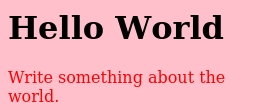
Hello World

Write something about the world.

""" css = "body {background: pink;} p {color: red;}" shot.create_pic(html=html, css=css, output="picture.jpg") ">
from htmlwebshot import WebShot
shot = WebShot()

shot.size = (110, 270)
shot.quality = 80  # maximum 100

html = """

Hello World

Write something about the world.

"""
css = "body {background: pink;} p {color: red;}" shot.create_pic(html=html, css=css, output="picture.jpg")
Click Here To See Output Image Of Above Code. sample1
from htmlwebshot import WebShot
shot = WebShot()

shot.quality = 100
shot.params = {"--crop-x":300, "--crop-w": 400}

shot.create_pic(html="profile.html", css="profile.css")
Click Here To See Output Image Of Above Code. sample2

Click For More Examples
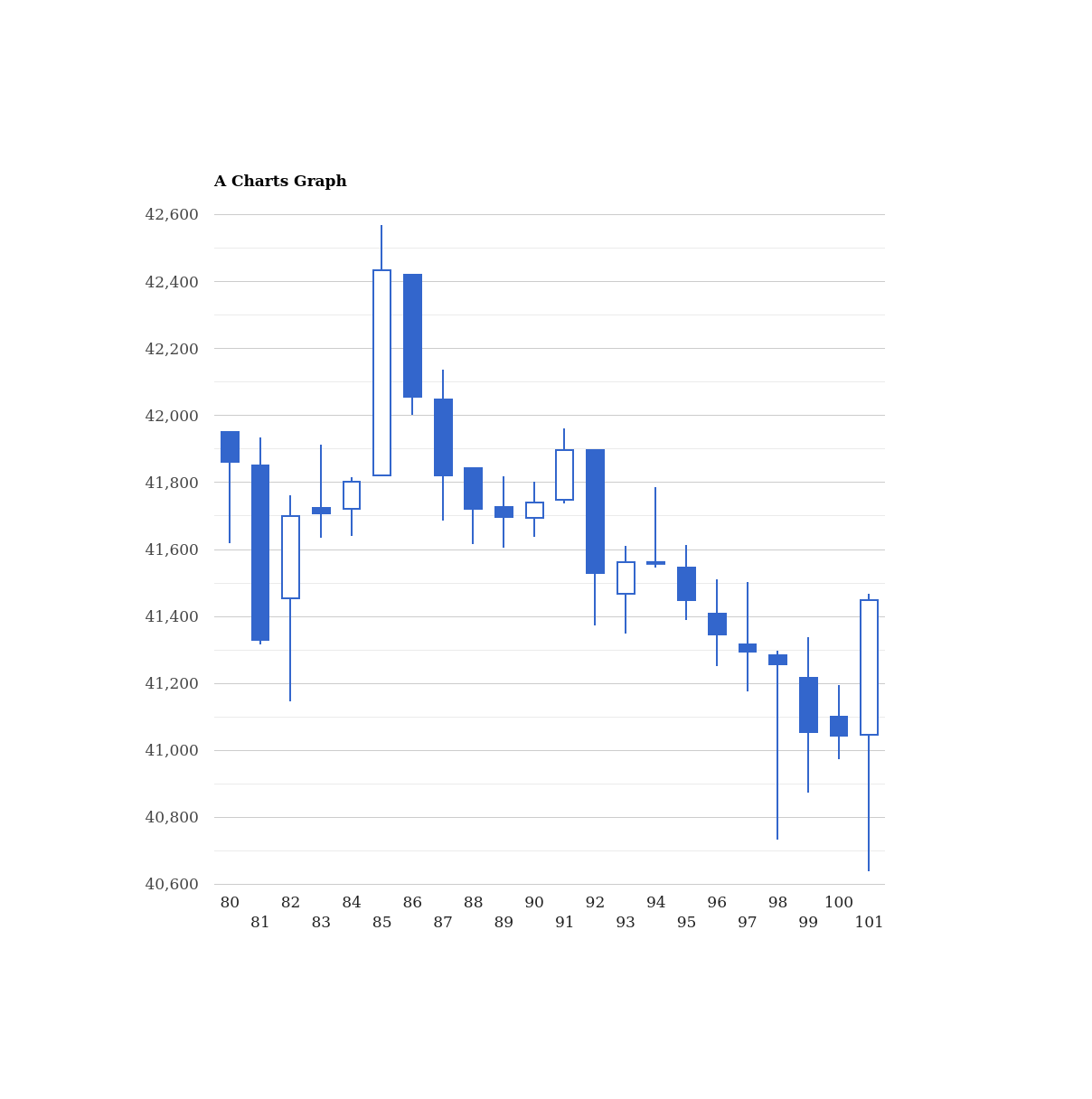
from htmlwebshot import WebShot
shot = WebShot()

shot.quality = 85
shot.flags = ["--enable-javascript"]

shot.create_pic(html="jsgraph.html")
Click Here To See Output Image Of Above Code. sample4
from htmlwebshot import WebShot
shot = WebShot()

shot.flags = ["--quiet"]
shot.quality = 100

shot.create_pic(other="violin.svg", size=(500,600))
Click Here To See Output Image Of Above Code. sample3

Flags Uses

Click Here To Check All Flags:
  • --quiet: Be less verbose
  • --disable-smart-width: To force size to be accurate
  • --custom-header-propagation: Add HTTP headers specified by flag --custom-header for each resource request
  • --no-custom-header-propagation: Don't Add HTTP headers specified by flag --custom-header for each resource request
  • --disable-javascript: Don't allow web pages to run javascript
  • --enable-javascript: Allow web pages to run javascript
  • --proxy-hostname-lookup: Use the proxy for resolving hostnames
  • --stop-slow-scripts: Stop slow running javascripts
  • --no-stop-slow-scripts: Don't Stop slow running javascripts
from htmlwebshot import WebShot
shot = WebShot()
shot.flags = ["--quiet", "--enable-javascript", "--no-stop-slow-scripts"]

Available Params

Click Here To Check All Params options:
  • --bypass-proxy-for: Bypass proxy for host (repeatable)
  • --cookie: Set an additional cookie (repeatable), value should be url encoded.
  • --cookie-jar: Read and write cookies from and to the supplied cookie jar file
  • --crop-h: Set height for cropping
  • --crop-w: Set width for cropping
  • --crop-x: Set x coordinate for cropping
  • --crop-y: Set y coordinate for cropping
  • --custom-header: Set an additional HTTP header (repeatable)
  • --encoding: Set the default text encoding, for input
  • --format: Output file format
  • --minimum-font-size: Minimum font size
  • --password: HTTP Authentication password
  • --post: Add an additional post field (repeatable)
  • --post-file: Post an additional file (repeatable)
  • --proxy: Use a proxy
  • --run-script: Run this additional javascript after the page is done loading (repeatable)
  • --ssl-crt-path: Path to the ssl client cert public key in OpenSSL PEM format, optionally followed by intermediate ca and trusted certs
  • --ssl-key-password: Password to ssl client cert private key
  • --ssl-key-path: Path to ssl client cert private key in OpenSSL PEM format
  • --user-style-sheet: Specify a user style sheet, to load with every page
  • --username: HTTP Authentication username
  • --window-status: Wait until window.status is equal to this string before rendering page
  • --zoom: Use this zoom factor
from htmlwebshot import WebShot
shot = WebShot()
shot.params = {
    "--custom-header": "Accept-Encoding gzip",
    "--minimum-font-size": 50,
    "--format": "png",
    "--zoom": 10,
    }

Config Path

If you installed pkg directly then no need to configure it, It'll auto configure.
But If u installed externally then you have to setup config path.

from htmlwebshot import WebShot, Config
shot = WebShot()
shot.config = Config(wkhtmltopdf="/path/to/wkhtmltopdf", wkhtmltoimage="/path/to/wkhtmltoimage")
You might also like...
A simple programme for converting url into a qr code (.png file)

QrTk A simple lightweight programme for converting url into a qr code (.png file) Pre-Requisites Before installing the programme , you need to run the

missing-pixel-filler is a python package that, given images that may contain missing data regions (like satellite imagery with swath gaps), returns these images with the regions filled.

Missing Pixel Filler This is the official code repository for the Missing Pixel Filler by SpaceML. missing-pixel-filler is a python package that, give

Snowfall - helpful image handling utils - abstracts various file and opencv and pil features into result oriented functions

snowfall helpful image handling utils - abstracts various file and opencv and pil features into result oriented functions usage examples: from image_h

Xmas-Tree-GIF-Tool - Convert any given animated gif file into an animation in GIFT CSV format

This repo is made to participate in Matt Parker's XmasTree 2021 event. Convert a

A collection of python scripts which help you programatically create PNGs or GIFs

A collection of python scripts which help you programatically create PNGs or GIFs and their Metadata in bulk with custom rarity rates, upload them to OpenSea & list them for sale.

A python based library to help you create unique generative images based on Rarity for your next NFT Project

Generative-NFT Generate Unique Images based on Rarity A python based library to help you create unique generative images based on Rarity for your next

📷 Python package and CLI utility to create photo mosaics.

📷 Python package and CLI utility to create photo mosaics.

Transfers a image file(.png) to an Excel file(.xlsx)

Transfers a image file(.png) to an Excel file(.xlsx)

This app finds duplicate to near duplicate images by generating a hash value for each image stored with a specialized data structure called VP-Tree which makes searching an image on a dataset of 100Ks almost instantanious

Offline Reverse Image Search Overview This app finds duplicate to near duplicate images by generating a hash value for each image stored with a specia

Comments
  • [BUG REPORT]: Query String on Local File Not Working

    [BUG REPORT]: Query String on Local File Not Working

    Your System?

    Windows 10

    Version

    3.8

    Version

    latest

    What happened?

    When I try to take a screenshot of a local file whilst providing a URL query string, it does not work. My assumption is that it tried to look for a file which contains the query string in the filename.

    Paste Your Codes.

    shot.create_pic(html=r"folder\file.html?username=hi", css=r"folder\tweet.css", output="output.jpg")
    

    Your Error Logs.

    It does not output an error
    
    bug 
    opened by i-vone 3
  • [BUG REPORT]:

    [BUG REPORT]:

    Your System?

    Ubuntu

    Python Version

    3.8

    HtmlWebShot Version

    latest

    What happened?

    Delay not working at all

    Used Code.

    //tried this
    shot.params = {"--javascript-delay": 5000}
    //and this
    shot.create_pic(html="file.html", delay=5, output="out.jpg", size=(1024,512))
    //none worked?
    

    Error Logs.

    No response

    bug 
    opened by asauce0972 1
Releases(v0.1.0)
Plots the graph of a function with ASCII characters.

ASCII Graph Plotter Plots the graph of a function with ASCII characters. See the change log here. Developed by InformaticFreak (c) 2021 How to use py

InformaticFreak 2 Apr 29, 2022
Find target hash collisions for Apple's NeuralHash perceptual hash function.💣

neural-hash-collider Find target hash collisions for Apple's NeuralHash perceptual hash function. For example, starting from a picture of this cat, we

Anish Athalye 630 Jan 01, 2023
An python script to convert images to upscaled versions made out of one-colour emojis.

ABOUT This is an python script to convert png, jpg and gif(output isnt animated :( ) images to scaled versions made out of one-colour emojis. Please n

0 Oct 19, 2022
👷 Build images with images

👷 Build images with images. About Tiler is a tool to create an image using all kinds of other smaller images (tiles). It is different from other mosa

5.5k Jan 03, 2023
EmbedToolV2 - 2.0 Version of DraKenCodeZ/ImageEmbedTool

EmbedToolV2 - 2.0 Version of DraKenCodeZ/ImageEmbedTool

DraKenCodeZ 1 Dec 07, 2021
粉專/IG圖文加工器

粉專/IG圖文加工器 介紹 給PS智障(ex:我)使用,用於產生圖文 腳本省去每次重複步驟 可載入圖片(方形,請先處理過,歡迎PR) 圖片簡易套用濾鏡 可將圖片切片 要求 Python 版本 3.9 安裝 安裝最新 python pip3 install -r requirement.txt 效果

Louis Tang 7 Aug 10, 2022
Change the image one color channel at a time.

Building-a-Contact-Sheet This hands-on Project is in Python 3 Programming Specialization offered by University of Michigan via Coursera. change the im

Eszter Pai 1 Jan 03, 2022
Repair broken bookmarks to referenced files in Apple Photos

Repair Apple Photos Bookmarks Work in progress to repair file location bookmarks in Apple Photos. Background Starting in macOS 10.15/Catalina, photos

Rhet Turnbull 10 Nov 03, 2022
Image-Viewer is a Windows image viewer based on Python 3.

Image-Viewer Hi! Image-Viewer is a Windows image viewer based on Python 3. Using You must download Image-Viewer.exe from the root of the repository. T

2 Apr 18, 2022
cmdpxl: a totally practical command-line image editor

cmdpxl: a totally practical command-line image editor Features cmdpxl has many exciting functionalities, including Editing pixels one at a time! Savin

Jieruei Chang 475 Dec 23, 2022
Image Processing - Make noise images clean

影像處理-影像降躁化(去躁化) (Image Processing - Make Noise Images Clean) 得力於電腦效能的大幅提升以及GPU的平行運算架構,讓我們能夠更快速且有效地訓練AI,並將AI技術應用於不同領域。本篇將帶給大家的是 「將深度學習應用於影像處理中的影像降躁化 」,

2 Aug 04, 2022
GTK and Python based, simple multiple image editor tool

System Monitoring Center GTK3 and Python3 based, simple multiple image editor tool. Note: Development of this application is not completed yet. The ap

Hakan Dündar 1 Feb 02, 2022
Python Digital Art Generator

Python Digital Art Generator The main goal of this repository is to generate all possible layers permutations given by the user in order to get unique

David Cuentas Mar 3 Mar 12, 2022
Simple Python package to convert an image into a quantized image using a customizable palette

Simple Python package to convert an image into a quantized image using a customizable palette. Resulting image can be displayed by ePaper displays such as Waveshare displays.

Luis Obis 3 Apr 13, 2022
Open source software for image correlation, distance and analysis

Douglas-Quaid Project Open source software for image correlation, distance and analysis. Strongly related to : Carl-Hauser Problem statement (@CIRCL)

Dominik Dancs 2 May 01, 2022
A script to generate a profile picture and a banner that show the same image on Discord.

Discord profile picture & banner generator A script to generate a profile picture and a banner that show the same image on Discord. Installation / Upd

Victor B. 9 Nov 27, 2022
An async Python library to automate solving ReCAPTCHA v2 by audio using Playwright.

Playwright nonoCAPTCHA An async Python library to automate solving ReCAPTCHA v2 by audio using Playwright. Disclaimer This project is for educational

Michael Mooney 69 Dec 28, 2022
Napari simpleitk image processing

napari-simpleitk-image-processing (n-SimpleITK) Process images using SimpleITK in napari Usage Filters of this napari plugin can be found in the Tools

Robert Haase 11 Dec 19, 2022
Convert the SVG code to PNG and replace the line by a call to the image in markdown

Convert the SVG code to PNG and replace the line by a call to the image in markdown

6 Sep 06, 2022