Docker Dev
Spin up a container to develop from anywhere!
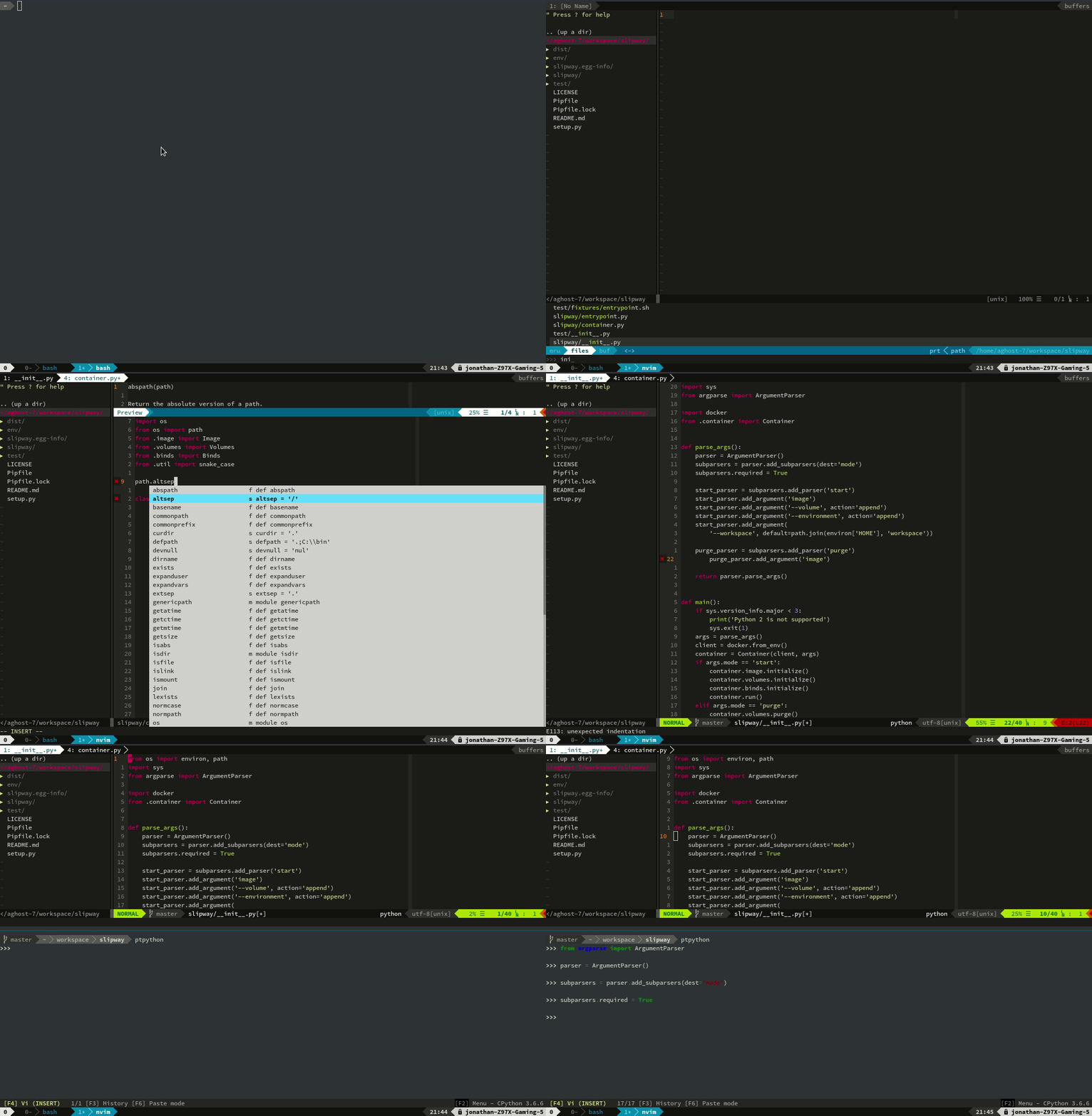
To run, just:
docker run -ti aghost7/nodejs-dev:boron tmux new
Alternatively, if on Linux:
python3 -m pip install --user slipway
slipway start aghost7/nodejs-dev:carbon
Terminal
Lately, I've been using alacritty. You can find my configurations here. Gnome terminal and/or iTerm2 works fine though.
Images
Language Images
ubuntu-dev-base: Ubuntu image with a few presets such as docker of already installed. It is also configured to allow passwordlesssudojust like those vagrant images. Tags available:focal: Ubuntu Focal Fossa (20.04) image.
power-tmux: Powerline + Tmux. Based from theubuntu-dev-baseimage. Images available:focal
nvim: NeoVim image. Based fromubuntu-tmux. Language agnostic vim setup (no language-specific plugins in there). Images available:focal
nodejs-dev: nvm + nodejs specific configurations. Tags available:focal-erbium: Ubuntu 20.04 + NodeJs 12.focal-fermium: Ubuntu 20.04 + NodeJs 14.
rust-dev: NeoVim configuration and autocomplete for the Rust language.focal-stableuses rust stable with YouCompleteMe backed by only racer.focal-nightlyuses rust nightly with deoplete backed by RLS.
py-dev: Python configuration with autocomplete for python and ptpython.focal: Ubuntu 20.04 + python 3.8
ruby-dev: Ruby image with language server. Tags:focal: Ruby 2.3 pre-installed.
c-dev: Ubuntu Bionic image for c development with cquery for completions.focal: Ubuntu 20.04 + clangd
deno-dev: Ubuntu Bionic image for deno development with bash completions. Tags Available:bionic: Ubuntu 18.4 + Deno v1.0
devops: Python image with additional tools (e.g., terraform) for devops related tasks. Images available:focal
Database Images
pg-dev: Postgresql image with pgcli, a command line client with autocompletions and syntax highlighting. Tags correspond to the Postgresql version:9.61011
my-dev: MySql image with mycli utility. Tags correspond to the mysql version:5.65.78.0
mongo-dev: Official mongodb image with Mongo Hacker added. Tags correspond to the mongdb version:4.1
redis-dev: Redis image with iredis included. Tags available:6
Vim Configuration
Vim configurations are broken down into three parts:
init.vim: This is the equivalent for.vimrcin NeoVim.plugin.vim: This contains all plugins which will be installed usingvim.plug.post-plugin.vim: Contains all plugin-specific configurations for Neovim. Configurations which aren't plugin-specific reside in theinit.vimfile.
Breaking it down this way allows one to just run cat addition.vim >> $XDG_CONFIG_PATH/file to add new plugins and configs for specific programing languages and libraries.
Calling Docker on the Host
The docker daemon run over a socket. The command line tool is just a client to the daemon. In other words, if we make the socket connectable from within the container we're in business.
For some reason it needs privileged to work as well.
docker run -ti --rm \
	--privileged \
	-v `readlink -f /var/run/docker.sock`:/var/run/docker.sock \
	aghost7/ubuntu-dev-base:latest \
	tmux new
SSH Forwarding and Git
For ssh, just pass the socket over to the container.
docker run -ti --rm \
	-v $SSH_AUTH_SOCK:$SSH_AUTH_SOCK \
	-e SSH_AUTH_SOCK=$SSH_AUTH_SOCK \
	aghost7/ubuntu-dev-base:latest \
	tmux new
I like to avoid having to reconfigure git every time, so I mount a volume for .gitconfig. ~/.ssh/known_hosts is also anoying.
Getting the Clipboard Working
Basically, X11 is built in a manner that allows sending display data over the wire. I've managed to run GUI applications from a headless server through an ssh connection in the past. The way I'm doing this is through the same old unix socket trick for controlling the docker daemon that's on the host machine.
docker run -ti --rm \
	-e DISPLAY=$DISPLAY \
	-v /tmp/.X11-unix:/tmp/.X11-unix:ro \
	aghost7/ubuntu-dev-base:latest bash
On the host you'll need to disable one of the security features in X11.
xhost +si:localuser:$USER > /dev/null
Source: http://stackoverflow.com/questions/25281992/alternatives-to-ssh-x11-forwarding-for-docker-containers
Build your own
There is a tutorial which can be found here.

 8 Oct 19, 2022
 305 Dec 30, 2022
 340 Dec 18, 2022
 1 Dec 01, 2021
 5 Dec 15, 2021
 86 Dec 19, 2022
 1.7k Jan 05, 2023
 17 Nov 07, 2022
 3 May 12, 2022
 1 Dec 14, 2021
 1 Feb 02, 2022
 11 Jun 13, 2022
 83 Dec 26, 2022
 7 Oct 08, 2022
 1 Feb 05, 2022
 4 Nov 02, 2021
 8 Dec 15, 2022
 35 Dec 23, 2022
 4 Nov 25, 2021
 28 Nov 26, 2022