Animation picker for Audodesk Maya 2017 (or higher)

Related tags

Miscellaneousdwpicker
Overview

Dreamwall Picker

Animation picker for Audodesk Maya 2017 (or higher)

Authors: Lionel Brouyère, Olivier Evers

This tool is a fork of Hotbox Designer (Lionel Brouyère). A menus, markmenu and hotbox designer cross DCC. https://github.com/luckylyk/hotbox_designer

Features

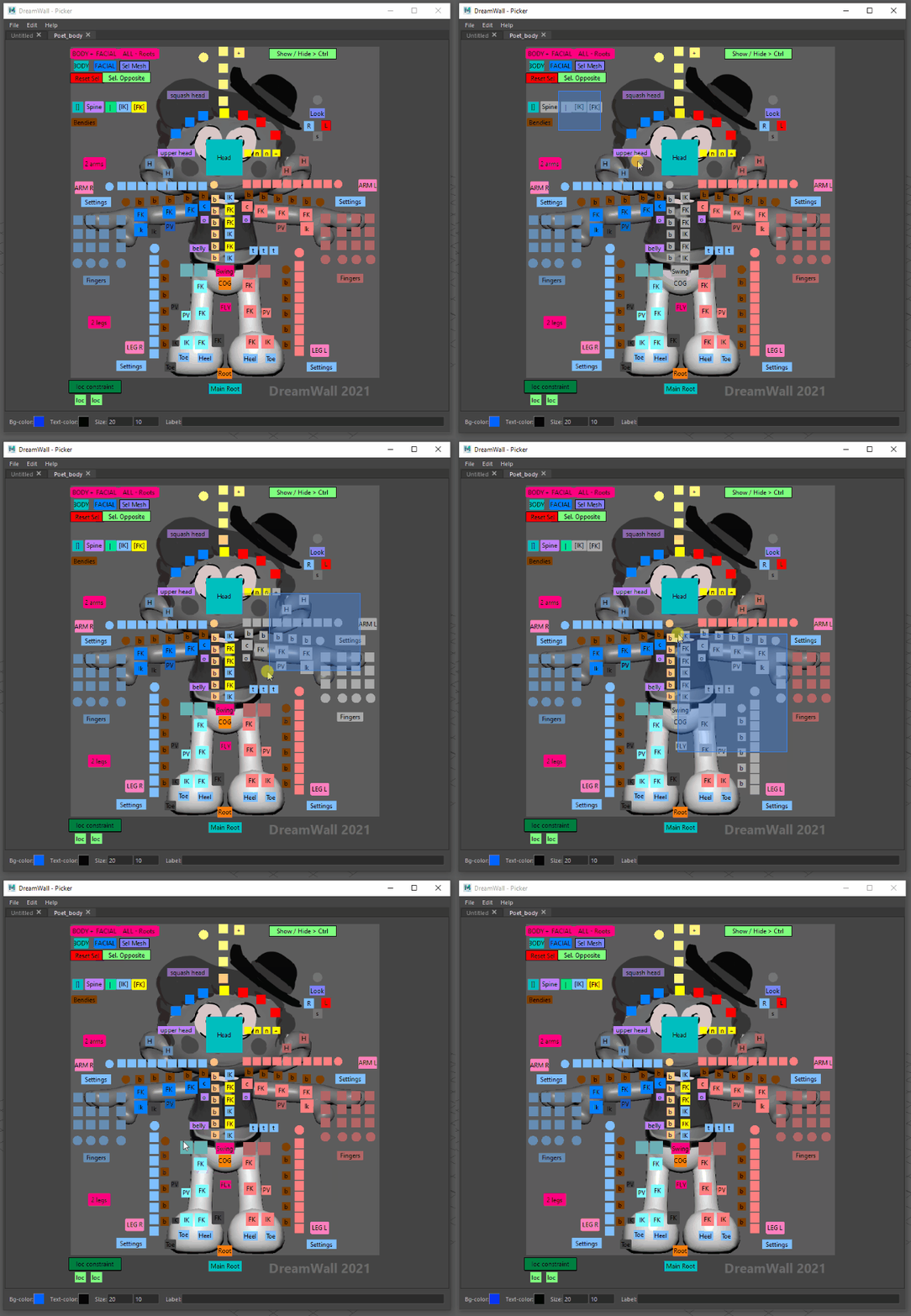
  • Easy and fast picker creation.
  • Import AnimSchool pickers done before 2022.
  • Store picker in maya scene.
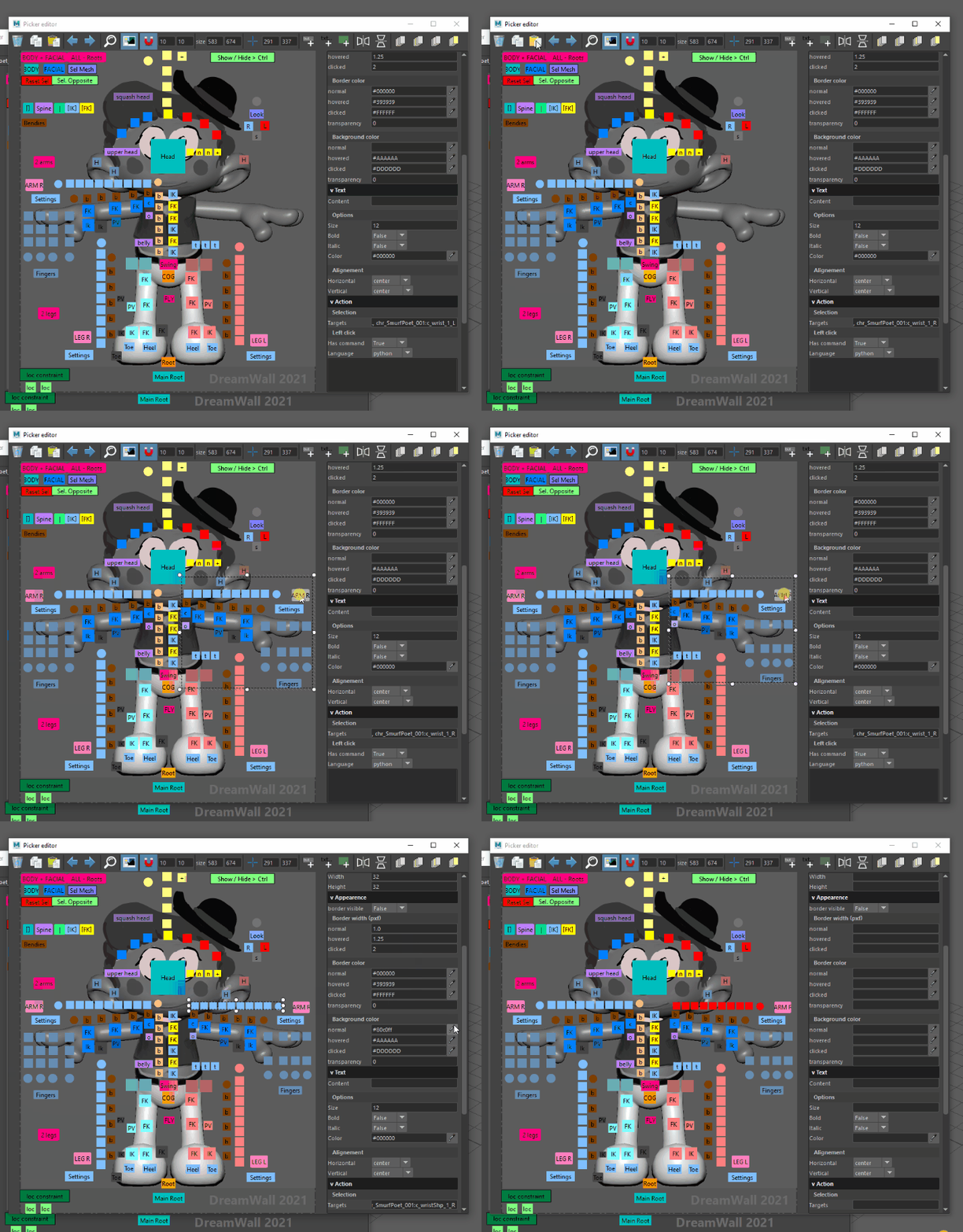
  • Advanced picker editor.
  • Does whatever AnimSchool picker does and many more ...
drawing

drawing

drawing

Installation

place the "dwpicker" folder into the maya script folder

os path
linux ~//maya/scripts
windows \Users \Documents\maya\scripts
mac os x ~/Library/Preferences/Autodesk/maya/scripts

How to run

import dwpicker
dwpicker.show()
Comments
  • It seems to mess up my default maya shortcuts a bit

    It seems to mess up my default maya shortcuts a bit

    This one I am actually not very sure, but that's the only suspection I have, cause it happen after I start using the picker. My "f" button, and ctrl -z button is not quite working as before, the f button works on the picker's window, but not working for my perspective view anymore.

    duplicate 
    opened by ann40 11
  • (nested ?) Namespace error

    (nested ?) Namespace error

    Hi!

    Im having problems with the namespace. Want to check if its from the picker side.

    When referencing a rig which changes the original rig namespace. Original rig namespace: rig_group_name Referenced rig namespace: file_name:rig_group_name

    When doing this (referencing the rig), my IK/FK switch code stops working, because it doesn't find the namespace "rig_group_name" because now it has been changed to "file_name:rig_group_name"

    Is this something the picker can control?

    Cheers.

    question 
    opened by SupZeta 11
  • ISSUE, Button Right Click Action, script, not working maya 2022

    ISSUE, Button Right Click Action, script, not working maya 2022

    Hi there, I'm playing around with the picker, and i think came out great, i just wanted to post a few issues here as I'm finding them, as suggested by your readme. (maya 2022) When setting a button to use Right Click option, and setting it to HasCommand True, using Python, inputing a python command, wont work on the picker. As i right click on the button, from the main UI view, nothing happens, and or no menu are showing for the inserted command. Also noticed, that even tho i removed a selection Target (made the string Empty), by left clicking is still selecting the object that was removed from the Targets.

    bug 
    opened by alfsici 11
  • Tell me about the problem I encountered.

    Tell me about the problem I encountered.

    Hello, this picker is very excellent, but I will encounter some problems. I will list my questions here for your reference. 1. The view zoom setting is a little anti-human in Maya, and the main performance is whether it easy to be too large or too small; 2. Is it possible to add custom button shapes? 3. The picker will be reset every time it is opened. Can you remember where I put it and the window size? 4. Can the namespace settings be placed in a prominent position?

    question 
    opened by plateauRen 11
  • Update checker

    Update checker

    As this is an ongoing project there are so many updates, and having to check github every now and then is pretty annoying. I've seen other tools have a very simple Update button which compares the localVersion with the currentVersion. Then downloads, unpacks, replaces and rehashes the Tool.

    Is there any way of implementing this onto here? That would be awesome.

    enhancement 
    opened by Alehaaaa 10
  • Wacom pen Scale View issue

    Wacom pen Scale View issue

    Hi,using wacom pen to zoom the view is not friendly and changes too fast. Similarly, “ALT + pressing the withmiddle mouse button” is as unfriendly as wacom pen. It changes too fast. The use of mouse wheel sliding zoom experience is very friendly. Can this be optimized? Quite a few animators use wacom pen

    enhancement 
    opened by Chuanzhen187 10
  • Relative path for images

    Relative path for images

    Is it possible to set relative path to images? For example, i would like to have a folder named "pickers" inside my Maya project's folder and simply set: "./pickers/mypicker.png"
    From there, i should be able to use my pickers from differents working station without having to set every time my path for the image. Thank's in advance!

    question 
    opened by AtomicPic 8
  • picker attributes copy and paste function

    picker attributes copy and paste function

    in advance editing window,If we have the function of copying and pasting the color, size, border and other attributes of picker, it will be more convenient in the production process of picker. Most pickers have the same color, size, border or other properties. The preset size of the picker window is invisible, and the effect can only be seen after creation. In the advance editing window, if we have this copy and paste instruction, we just need to adjust the size and color of one picker, and then copy it to other pickers.

    enhancement 
    opened by Chuanzhen187 8
  • Request to encode picker data in base64

    Request to encode picker data in base64

    Hi, we would like to request to change default picker data storage format from plain JSON to base64 encoded JSON.

    1. because it is compact notation in maya scene
    2. our antivirus check raises when it encounter python keyword and removes picker data from scene.

    I realize that you may not want to change that, but what if we make a patch to support storage plugins that would be passed to DwPicker constructor?

    enhancement 
    opened by kalemas 7
  • can't use add background item

    can't use add background item

    Hi, I just download the 2022 version, I am using it on maya 2017, and when I start creating a picker, I find that I was not able to use the " add background item", I saved my image in both jpg and png, but the button was not able to detect those images. it only detects msi and mp4, I am not sure why.

    question 
    opened by ann40 7
  • advance editor

    advance editor

    some how the advance editor position of the image doesnt quite match the one in the window. in advance editor position, ctrl + z undo multiple movement. when i move the image frame, i have to re-center the image by toggleing the fill

    bug 
    opened by Sidchou 6
  • Button attribute copy and paste bug

    Button attribute copy and paste bug

    When I paste the attributes of another button, the attributes of the picker are refreshed in time in the picker window, but they are not refreshed in the advance edit window. Even if I close the advance edit window and open it again, it cannot be refreshed correctly. Then I move the copied button in the advance edit window, and the previously copied information is restored to the previous state

    image

    opened by faxwang 0
  • Ability to display a submenu list of buttons(like hotbox designer)

    Ability to display a submenu list of buttons(like hotbox designer)

    Hello, i noticed that on your hotbox_designer, there is a possibility to display a subMenu clicking a button (via script), and i would like to do the same but using the picker buttons.

    Basically, i want to make certain buttons to be picker functions buttons, and these would "open" a sub-menu (these could also be other json file pickers like on the hotbox_designer), either running this as a right click action for a button or a left click.

    This would have to be displayed on top or as part of the main UI or perhaps only display as a layout widget with the buttons (no ui boarder)?

    Do you know if this is already possible?

    enhancement 
    opened by alfsici 7
  • Support buttons as both selector and command trigger

    Support buttons as both selector and command trigger

    This is actually not possible to execute a function and select shape with the same button. That would be usefull if user want to write an automation (like selection channel in the ui) directly after selection.

    enhancement 
    opened by luckylyk 0
  • Refactor storage

    Refactor storage

    Hi @luckylyk, here is a draft for what we told at #44, i will still thinking about details, but i got it working (on boxes) and if you are interested you may look at.

    • [ ] implement removing data
    • [ ] load testing
    • [ ] get native namespace for picker targets
    opened by kalemas 7
  • Store pickers with referenced maya scene

    Store pickers with referenced maya scene

    Hi, it was very desired option to AnimSchoolPicker and it is nice to have here.

    I would tell that we already implemented that on our own, but i think it is nice to have it in mainline and remove any divergence. I would tell more about our approach but you may have another points so, what do you think about this?

    enhancement 
    opened by kalemas 13
Releases(0.6.1-2022.09.16)
  • 0.6.1-2022.09.16(Sep 16, 2022)

  • 0.6.0-2022.08.29(Aug 29, 2022)

  • 0.5.4-2022.08.26(Aug 26, 2022)

    Hotfixes

    • Fix base64 encoding for py2.
    • Fix item overlapped selection. Take the upper instead of lower.

    Improvement

    • Add optional warning at tab closed time.
    • Support CTRL+SHIFT selection mode in the picker view.
    • Recenter picker at resize window time.
    Source code(tar.gz)
    Source code(zip)
  • 0.5.3-2022.06.21(Jun 21, 2022)

    Hotfixes

    • Fix refresh namespace button (namespace bar). It is now also detecting namespace only contained by picker which doesn't exists in scene.

    Improvement

    • Add a button to pick the namespace from current selection in the namespace selector dialog box
    • Add a button to pick the namespace from current selection in the namespace selector bar
    Source code(tar.gz)
    Source code(zip)
  • 0.5.2-2022-06-13(Jun 13, 2022)

  • 0.5.1-2022.05.30(May 30, 2022)

  • 0.5.0-2022.05.20(May 20, 2022)

    Hotfixes

    • Fix the picker save, was not saving at good filename.

    Improvement

    • Copy/Paste is now possible between different pickers.
    • Default Mouse Zoom is the same as Maya.
    • Images is not supporting environment variable path : '$ROOT/images/image.png'
    • Redesing of the 'Missing Image' warning, less intrusives and repetitives.
    • Add 'overwrite existing file' warning at AnimSchool import.
    Source code(tar.gz)
    Source code(zip)
  • 0.4.5-2022.04.07(Apr 7, 2022)

    Hotfixes

    • Catch exception in the painting function to avoid maya instant crashes.
    • Context manager: dwpicker.disable() does not shut down the exception anymore.
    • Fix the text typed field in the advanced editor which were not recording their changed at focusOut events

    Improvements

    • Add alignment tools for advanced editor
    • Add option to autoswitch tab at selection change. To display tab corresponding to selection.
    Source code(tar.gz)
    Source code(zip)
  • 0.4.4-2022.03.28(Mar 28, 2022)

  • 0.4.3-2022.03.28(Mar 28, 2022)

  • 0.4.2-2022.03.24(Mar 24, 2022)

  • 0.4.1-2022.03.24(Mar 24, 2022)

  • 0.4.0-2022.03.23(Mar 23, 2022)

    Features

    • Improve focus behavior: Able to Focus on selection or frame the entire picker.

    Refactoring

    • Big refactoring about picker viewport management.
    • Remove center property of picker.
    Source code(tar.gz)
    Source code(zip)
  • 0.3.1-2022.03.17(Mar 17, 2022)

  • 0.3.0-2022.03.16(Mar 16, 2022)

    Features

    • Add preference to display * instead of save icon in the picker tabs.
    • Add preference to select where to add new picker (last position or after the current picker).
    • Embed Edit Area in a QScrollArea to avoid issue when picker size is too big.
    • Add image broken path warning.
    • Add preference to disable image broken path warning.
    • Improve zoom algorithme for tablet user.
    • Add preference to disable some callback creating conflict with StudioLibrary.
    • Add possibility to rename picker from Advanced Picker.
    • Add possibility to lock a picker naviagtion.

    Fixes

    • Fix shortcut priority when the picker is docked.
    • Fix ColorEdit widget wrongly update data.
    • Fix tab order failing again.
    Source code(tar.gz)
    Source code(zip)
  • 0.2.0-2022.03.08(Mar 8, 2022)

    Scripts

    • Add codes samples for TD's.

    Features

    • Check images path at loading/import/open time
    • Animschool picker ingest: Support button with width set using spaces character
    • Add buttons to frame picker shape in the picker size.
    • Add arguments to function dwpicker.show()
    • Add retro compatibility picker function.
    • Zoom use left and righ in addition of up and down.

    Fixes

    • Fix stor_local_picker_data process
    • Fix ColorEdit widget wrongly update data
    • Fix tab order failing again
    Source code(tar.gz)
    Source code(zip)
  • 0.1.1-2022.01.27b(Jan 27, 2022)

    0.1.1-2022.01.27

    Repo

    • Add script folder: Scripts in this folder will be filled by code sample for TD's for a better understanding of the system.

    Improvements

    • Picker json file saved with a forced indent.
    • Add: "Add", "Clear" and "Replace" targets buttons in the advanced editor

    Fixes

    • Fix startup UI: If the Picker was saved in the workspace and opened at maya startup, it was not registering his callback. dwpicker.show() function was registering the callback multiple times.
    • #12 Fix the namespace toolbar oddly behaving
    • Fix 'save button' which was broken.
    Source code(tar.gz)
    Source code(zip)
  • 0.1.0-2022.01.22(Jan 20, 2022)

    Hotfixes:

    • Fix reorder tabs.
    • Fix button executions.

    Improvement:

    • Save window coordinates.

    Features:

    • Add namespace bar.
    • Add Preference window:
      • Update selection callback optional.
      • Zoom sensitivity option.
      • Zoom button changeable.
      • Different autofocus modes.
    Source code(tar.gz)
    Source code(zip)
  • 0.0.5-2022.01.10(Jan 10, 2022)

  • 0.0.4-2022.01.07(Jan 7, 2022)

  • 0.0.3-2022.01.02(Jan 3, 2022)

  • 0.0.2-2021.12.21(Dec 21, 2021)

  • 0.0.1-2021.21.07(Dec 7, 2021)

Owner
DreamWall
CG Animation Studio
DreamWall
To lazy to read your homework ? Get it done with LOL

LOL To lazy to read your homework ? Get it done with LOL Needs python 3.x L:::::::::L OO:::::::::OO L:::::::::L L:::::::

KorryKatti 4 Dec 08, 2022
A simple app that helps to train quick calculations.

qtcounter A simple app that helps to train quick calculations. Usage Manual Clone the repo in a folder using git clone https://github.com/Froloket64/q

0 Nov 27, 2021
A python script that automatically joins a zoom meeting based on your timetable.

Zoom Automation A python script that automatically joins a zoom meeting based on your timetable. What does it do? It performs the following processes:

Shourya Gupta 3 Jan 01, 2022
Provide error messages for Python exceptions, even if the original message is empty

errortext is a Python package to provide error messages for Python exceptions, even if the original message is empty.

Thomas Aglassinger 0 Dec 07, 2021
Banking management project using Tkinter GUI in python.

Bank-Management Banking management project using Tkinter GUI in python. Packages required Tkinter - Tkinter is the standard GUI library for Python. sq

Anjali Kumawat 7 Jul 03, 2022
A free website that keeps the people informed about housing and evictions.

Eviction Tracker Currently helping verify detainer warrant data for middle Tennessee - via Middle TN DSA - Red Door Collective Features Presents data

Red Door Collective 7 Dec 14, 2022
This Curve Editor, written by Jehee Lee in 2015

Splines Abstract This Curve Editor, written by Jehee Lee in 2015, is a freeware. You can use, modify, redistribute the code without restriction. This

Movement Research Lab 8 Mar 11, 2022
Use a real time weather API to apply wind to your mouse cursor.

wind-cursor Use a real time weather API to apply wind to your mouse cursor. Requirements PyAutoGUI pyowm Usage This program uses the OpenWeatherMap AP

Andreas Schmid 1 Feb 07, 2022
A functional standard library for Python.

Toolz A set of utility functions for iterators, functions, and dictionaries. See the PyToolz documentation at https://toolz.readthedocs.io LICENSE New

4.1k Jan 04, 2023
Collection of tools to be more productive in your work environment and to avoid certain repetitive tasks. 💛💙💚

Collection of tools to be more productive in your work environment and to avoid certain repetitive tasks. 💛💙💚

Raja Rakotonirina 2 Jan 10, 2022
Movie recommend community

README 0. 초록 1) 목적 사용자의 Needs를 기반으로 영화를 추천해주는 커뮤니티 서비스 구현 2) p!ck 서비스란? "pick your taste!" 취향대로 영화 플레이리스트(이하 서비스 내에서의 명칭인 '바스켓'이라 함)를 만들고, 비슷한 취향을 가진

2 Dec 08, 2021
Python scripts to interact with Upper Deck ePack online trading card platform

This script should connect to the Upper Deck ePack API using your browser cookies and download a list of your current collection and save it as a CSV.

Adrian Kent 1 Nov 22, 2021
Anki Cards for the HSK vocabulary Chinese-German

Anki-HanyuShuipingKaoshi Anki Cards for the HSK vocabulary Chinese-German Das Deck baut auf folgenden Quellen auf: China Endecken Wortschatz von wohok

1 Jan 07, 2022
GMHI: Gut Microbiome Health Index

GMHI: Gut Microbiome Health Index Description Gut Microbiome Health Index (GMHI)

Daniel Chang 2 Jun 30, 2022
Cross-platform .NET Core pre-commit hooks

dotnet-core-pre-commit Cross-platform .NET Core pre-commit hooks How to use Add this to your .pre-commit-config.yaml - repo: https://github.com/juan

Juan Odicio 5 Jul 20, 2021
A simple python project that can find Tangkeke in a given image.

A simple python project that can find Tangkeke in a given image. Make the real Tangkeke image as a kernel to convolute the target image. The area wher

张志衡 1 Dec 08, 2021
Tracking development of the Class Schedule Siri Shortcut, an iOS program that checks the type of school day and tells you class scheduling.

Class Schedule Shortcut Tracking development of the Class Schedule Siri Shortcut, an iOS program that checks the type of school day and tells you clas

3 Jun 28, 2022
A country information finder module

A country information finder module

Fayas Noushad 3 Nov 28, 2021
Manipulation OpenAI Gym environments to simulate robots at the STARS lab

liegroups Python implementation of SO2, SE2, SO3, and SE3 matrix Lie groups using numpy or PyTorch. [Documentation] Installation To install, cd into t

STARS Laboratory 259 Dec 11, 2022
Explore-bikeshare-data - GitHub project as part of the Programming for Data Science with Python Nanodegree from Udacity

Date created February 10, 2022 Project Title Explore US Bikeshare Data Descripti

Thárcyla 1 Feb 14, 2022