Google-meeter
A simple python script that uses selenium(chrome web driver),pyautogui,time and schedule modules to enter google meets automatically.
Contributor
Note-This might not work on linux or mac, i haven't tested the script on linux or mac.I suggest having a fast internet :)
Dependencies-
- python
- pip
- chrome-driver/webdriver
Pip Modules-
- selenium for python
- pyautogui
- schedule
- time
Installing the Dependencies
Python
- First you have to go to python's downloads page.
- After that you have to click the Download button which downloads the setup file for python.
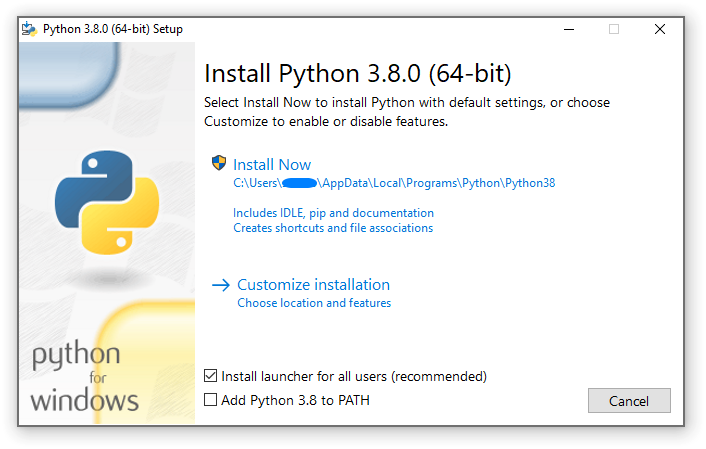
- You have to check if the option "Add python(version) to path" is ticked.
- I recommend you do "Install now".
- After that it will ask you to input the admin password.
- You have successfully installed Python
😃 .
Pip
- Pip is already preinstalled when you had installed python correctly.
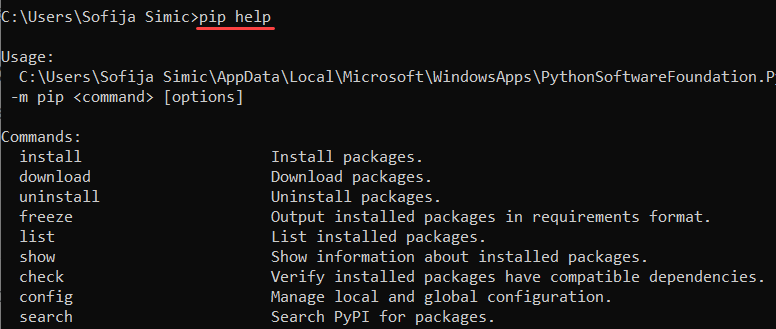
- Then check if pip is installed by searching command prompt on windows and then type "pip help" and enter if it shows up like this that means it is installed:
- Now do "pip install selenium pyautogui schedule time" and enter.
- This might take some time downloading.
- If it says "WARNING: You are using pip version (version); however, version (version) is available. You should consider upgrading via the 'C:\Python310\python.exe -m pip install --upgrade pip' command".You can upgrade if you want but it is not compulsory.
- You have successfully installed the pip modules
😃 .
Chrome-driver/webdriver
- First you have to know the chrome version of you browser by clicking the three dots at the top right.
- Then hover to help then click about google chrome.
- If you did it correctly it will showup like this:
- Notedown the version.
- Then go to chromium.org downloads
- Then look for the version you taken note of in step 4 and then click and choose chromedriver_win32.zip.
- Then i recommend moving chromedriver_win32.zip to documents and extract it BUT DONT CLICK THE EXE FILE AFTER EXTRACTION.
- You have succesfully installed the chrome-driver.

Configuration
- Now that all the dependencies are finished you can now download the zip file of this repository.
- Move it to the documents folder.
- Then extract the file which has 3 python files named main_google_meeter.py,google_meeter_back_end and Google_meets.py.
main_google_meeter.py-
- This is the main file,You have to run this in order to run the full 3 files.
google_meeter_back_end.py
- This is the backend of the programme
- You have to put your gmail and password into the programme by writing user=("your gmail account name") and pass=("the password of the gmail account") it wil be at the top of the file.
- I recommend to not touch anything in this file so it wont break,If you know what you are doing feel free
👍 .
Google_meets.py
- This is where you put the links you want to join.
- It will be in an order from the first link to the last link in corresponding with time.
Running it
- Search idle in windows search then open it.
- After that press file at the top left and click open.
- Then go to the documents folder where all the google meeter files and chromedriver.exe are.
- Then open main_google_meeter.py.
- Repeat 1st,2nd and 3rd step and this time open Google_meets.py and configure the links and save the file.
- Configure the links in Google_meets.py and run the main_google_meeter.py by clicking run at the top and press run module(f5).
- Then it will ask you for the time of the 5 meetings it is in 24 hours time(Example:-"09:00 which means 9am" while "21:00 means 9pm")
- After that you just wait and the programme will do the job for you
The options after running main_google_meeter.py
-
Fast option-
- This option helps you to manually give the programme the time in 24 hours for which the meeting occurs
- The place to give the time is in the console which it will prompt you
- This asks 5 meeting times from first to last
-
Default option-
- This is a feature for school students
- You can configure part from line 24 to line 28 by just replacing the values(Example:-schedule.every().day.at("08:30").do(meet1) you can just change the "8:30 in this case so it becomes-schedule.every().day.at("09:00").do(meet1) which will tell the programme to open the google meet at that time
IF your account has 2FA (2 Factor Authenthication)
- You only need to do this if you have errors
- You might run the program and wait for it to reach the 2FA confirmation page
- Now Stop the program And Add your Account
- Close the windows or application and restart the program
- (we are bringing an update for this but you should wait D:)
- AGAIN am mentioning, you only need to do this if you have errors after 2fa page
Windows FireWall Issue
- Windows FireWall may give a pop up about "Windows firewall blocked some features of a app :- python"
- There is no worry about it, its just python (we wont hack you or something)
- No need to allow and close the windows firewall pop up
- And then you can continue the program will run all fine
Congratualtions You Did It :)
Now wait for the programme to start,Enjoy Star the repo :)

I will Update the Programme when Needed :).
messages from kallil6454:
- How to get lazier definition
- why did we make this, we are making things more complex like its just click link off cam and mic and join instead of putting stuffs in correct file and adding time and the intense waiting and then joining in-

 1.1k Jan 09, 2023
 756 Dec 22, 2022
 1 Dec 03, 2021
 602 Jan 05, 2023
 3 Dec 15, 2022
 3.8k Jan 06, 2023
 1 Jan 03, 2022
 1 Nov 08, 2021
 137 Dec 18, 2022
 15 Sep 14, 2022
 8 Dec 08, 2022
 3.3k Jan 05, 2023
 6 Jan 28, 2022
 1 Nov 05, 2021
 2 Aug 03, 2022
 13 Apr 15, 2022
 10 Jul 21, 2022
 7 Feb 02, 2022