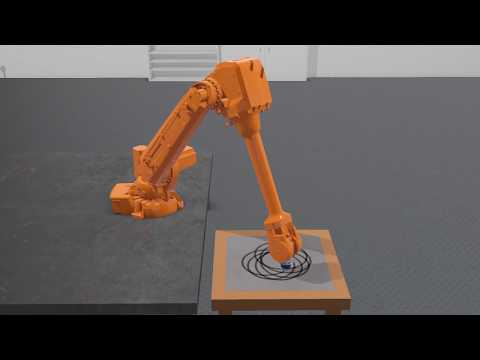
An Inverse Kinematics library aiming performance and modularity

Overview

IKPy

PyPI

demo

IKPy on the bacter robot

Demo

Live demos of what IKPy can do (click on the image below to see the video):

Also, a presentation of IKPy: Presentation.

Features

With IKPy, you can:

  • Compute the Inverse Kinematics of every existing robot.
  • Compute the Inverse Kinematics in position, orientation, or both
  • Define your kinematic chain using arbitrary representations: DH (Denavit–Hartenberg), URDF, custom...
  • Automaticly import a kinematic chain from a URDF file.
  • Support for arbitrary joint types: revolute, prismatic and more to come in the future
  • Use pre-configured robots, such as baxter or the poppy-torso
  • IKPy is precise (up to 7 digits): the only limitation being your underlying model's precision, and fast: from 7 ms to 50 ms (depending on your precision) for a complete IK computation.
  • Plot your kinematic chain: no need to use a real robot (or a simulator) to test your algorithms!
  • Define your own Inverse Kinematics methods.
  • Utils to parse and analyze URDF files:

Moreover, IKPy is a pure-Python library: the install is a matter of seconds, and no compiling is required.

Installation

You have three options:

  1. From PyPI (recommended) - simply run:

    pip install ikpy

    If you intend to plot your robot, you can install the plotting dependencies (mainly matplotlib):

    pip install 'ikpy[plot]'
  2. From source - first download and extract the archive, then run:

    pip install ./

    NB: You must have the proper rights to execute this command

Quickstart

Follow this IPython notebook.

Guides and Tutorials

Go to the wiki. It should introduce you to the basic concepts of IKPy.

API Documentation

An extensive documentation of the API can be found here.

Dependencies and compatibility

Starting with IKPy v3.1, only Python 3 is supported. For versions before v3.1, the library can work with both versions of Python (2.7 and 3.x).

In terms of dependencies, it requires numpy and scipy.

sympy is highly recommended, for fast hybrid computations, that's why it is installed by default.

matplotlib is optional: it is used to plot your models (in 3D).

Contributing

IKPy is designed to be easily customisable: you can add your own IK methods or robot representations (such as DH-Parameters) using a dedicated developer API.

Contributions are welcome: if you have an awesome patented (but also open-source!) IK method, don't hesitate to propose adding it to the library!

Links

  • If performance is your main concern, aversive++ has an inverse kinematics module written in C++, which works the same way IKPy does.
Comments
  • why

    why "forward_kinematics" is true,but "inverse_kinematics_frame" is error

    I input a joint1 to "forward_kinematics" function ,and return a position, then I input the position to "inverse_kinematics_frame", then return another joint2,but joint1 is not euqal to joint2. I use moveit in ros and verified, the result of ikpy "forward_kinematics" is true,but the result of ikpy "inverse_kinematics_frame" is error.

    wontfix 
    opened by DreamLFairy 16
  • Add blender importer

    Add blender importer

    This PR adds a blender importer (that was first intended to be used with Aversive++). The PR makes #22 outdated and useless (so that I should close it if this one is accepted).

    opened by astralien3000 15
  • Not position but Orientation for IK solver

    Not position but Orientation for IK solver

    I tested your library, pretty decent by selecting active joints. However your library minimize its IK solver error by position not by its Orientation. In other words it solves for the Position of the Homo. Transformation Matrix and after that it checks orientation.

    How I can solve for orientation as priority?

    As I see in the code:

        def optimize_target(x):
            # y = np.append(starting_nodes_angles[:chain.first_active_joint], x)
            y = chain.active_to_full(x, starting_nodes_angles)
            squared_distance = np.linalg.norm(chain.forward_kinematics(y)[:3, -1] - target)
            return squared_distance
    

    This section is specified for target which is position. Any suggestion for Orientation?

    opened by AhmetMericOzcan 13
  • Need help to create a chain from global placements

    Need help to create a chain from global placements

    Hi, I'm trying to use ikpy with FreeCAD and can't find how to create a chain from object placements.

    Placements are global coordinates and decomposable in Base (translation from origin) and Rotation (quaternion). I think I get a link origin_translation by subtraction of its Base by the last link Base but can't figure how to get the origin_rotation.

    Thanks !

    opened by FlachyJoe 9
  • When will the Prismatic Joint added?

    When will the Prismatic Joint added?

    I really like to use a prismatic joint solution in my project. Could you please tell me a date for primsatic joint support? Or could you please tell me how it can be done?

    If you can explain it I would like to do it by myself. Looking for your reply

    pinned 
    opened by AhmetMericOzcan 9
  • Changing the optimization algorithm

    Changing the optimization algorithm

    Is it possible to change the optimization algorithm with a function call, or is it only possible to statically change line 134 in inverse_kinematics.py? With L-BFGS-B and joint boundaries I noticed a jumpy behavior in the end effector positions of the kinematic model, so I changed it to SLSQP.

    The models, where this problems come up, can be found here: quadruped model

    enhancement 
    opened by ger01d 8
  • Value Error inverse_kinematics

    Value Error inverse_kinematics

    Following the getting started i got an issue with Setting the position of your chain (aka Inverse Kinematics, aka IK).

    File "C:\Users\Jonas\untitled1.py", line 46, in frame_target[:3,:3] = target_position

    ValueError: cannot copy sequence with size 4 to array axis with dimension 3

    After changing the line to "frame_target = target_position" the error is gone and the presented results appear in the console. Am i just a noob or is this broken?

    opened by HaffmannGG 8
  • Creating chain from URDF

    Creating chain from URDF

    Hi, I am trying to create a chain from URDF file of Baxter and is facing following error. I can't figure out why? What is wrong in this declaration? Any help please

    my_chain = ikpy.chain.Chain.from_urdf_file("../baxter_common/baxter_description/urdf/baxter.urdf",
        base_elements=["right_upper_shoulder", "right_lower_shoulder", "right_upper_elbow", "right_lower_elbow", 
                       "right_upper_forearm", "right_lower_forearm", "right_wrist", "right_hand"], 
        last_link_vector=[0.0, 0.0, 0.025], 
        active_links_mask=[False, True, True, True, True, True, True,True])
    

    I am using this file: Baxter URDF

    And get this error!!!

    raise ValueError("Your active links mask length of {} is different from the number of your links, which is {}".format(len(active_links_mask), len(self.links)))
    ValueError: Your active links mask length of 8 is different from the number of your links, which is 2
    
    wontfix URDF 
    opened by mjm522 8
  • Tutorial Error

    Tutorial Error

    Hi, my name is koki. I got an error like that. I use anaconda3-5.3.1 and Python 3.5.6. I want to know why was it error happened?

    `

    import ikpy my_chain = ikpy.chain.Chain.from_urdf_file("model.urdf") Traceback (most recent call last): File "", line 1, in AttributeError: module 'ikpy' has no attribute 'chain' `

    documentation 
    opened by MADONOKOUKI 7
  • Exception

    Exception "RuntimeError: generator raised StopIteration" with Python3.7

    Python 3.7 has change the behavior of generators : when they reach the end now they emit a RuntimeError exception... In the file URDF_utils.py there are two occurences of next(...) that can raise RuntimeError exception, lines 91 and 103.

    Line 103 "chain = list(next(it) for it in itertools.cycle(iters))" can be replaced by:

    chain = []
        for it in itertools.cycle(iters):
            try:
                item = next(it)
            except:
                break
            chain.append(item)
    
    opened by cjlux 7
  • error trying to import forward_kinematics

    error trying to import forward_kinematics

    Hello! I was trying to run the Quickstart tutorial for poppy-humanoid, and it's throwing an import error looking for the forward_kinematics file, which (after some digging) i found was deleted in this commit 164a5ba680191172f0177e9c59edc5939ce1d114

    Should it still be around, or should that import be removed? It looked like it wasn't just a stray import because fk functions are used throughout the code, should the forward kinematics file be re-added or should all the references be removed?

    thanks!

    opened by studywolf 7
  • Supporting ik interpolation between two positions

    Supporting ik interpolation between two positions

    First off, this project is fantastic, it seriously helps with DIY arm development! I'm mostly asking if this is something within the purview of this library, but how do y'all feel about supporting interpolated values between two points, your current, and target position? I'm working on a pick and place (of a sort) robot, and a large part of the job is picking up items from one or several places, and placing it into a narrow, deep container. I know fora fact when I first got my homemade ik model off the ground, the arm would like, "swing" into position, and the only way around it was instead of one movement, many shorter segments of movements that shortened the amount the arm could "swing" (I'm sure theres a technical term I'm butchering, sorry).

    I'm imagining an option in inverse_kinematics() that takes some sort of a parameter for tokenizing the movement into a list of movements. Maybe the value is a numSegments integer, or the default length unit, like millimeters per segment. Taking the concept to the nth degree so it doesnt feel like for loop syntactic sugar, I'm envisioning that target could be a list of values, so the model could be animated at a higher level, maybe even supporting velocity ~~suggestions~~ calculations given a max velocity value, maybe even per axis?

    If thats outside of this libraries mission, I totally get it, just wanted to know if you guys were open to those sort of features as pull requests.

    enhancement 
    opened by DoWhileGeek 2
  • how to get pose?

    how to get pose?

    now i have a human 3d keypoints file. how can i get the pose euler rotation angle or quaternion with parent-child relationship like smpl pose, i want to use it to drive skeleton in blender or UE4. i have tested to make bvh file to use it in blender, but i want to run it in real time, so ineed to change the method. can you give me some adviences?

    opened by luoww1992 0
  • Option to output as Quaternions/Euler angles/Vectors

    Option to output as Quaternions/Euler angles/Vectors

    The current output is homogeneous coordinates. For generalized use of this software, it would make sense to have an option for the outputs to be in the context of 3D engines like Blender and Unity. Cartesian coordinates.

    enhancement pinned 
    opened by Toxic-Cookie 5
  • Niryo robot - Calculation of inverse kinematis

    Niryo robot - Calculation of inverse kinematis

    Hi, I try to conduct to draw a straight line by calculating inverse kinematics with niryo one robot.

    input position (x : 0.073, y : 0.001, z : 0.168) input orientation (roll : 0.029, yaw: 1.407, pitch: 0.204) Answer of joints 1 ~ 6 axis : [ -0.007, 0.129, -1.360, 0.189, -0.183, -0.360]

    I use blow's model.urdf code. Then, calculate inverse kinematics using these code lines.

    Do you know any solution to solve this problem?

    from ikpy.chain import Chain
    my_chain = Chain.from_urdf_file("model.urdf")
    print(my_chain)
    ik = my_chain.inverse_kinematics(target_position=[0.083, 0.001, 0.168], target_orientation=[0.029, 1.407, 0.203],orientation_mode="all")
    print(ik)
    print(my_chain.forward_kinematics(ik)[:3, 3])
    print(my_chain.forward_kinematics(ik))
    

    I think the calculation of inverse kinematics is bad. The first line is correct, although the second line is wrong.

    print(my_chain.forward_kinematics([0, 0.030, 0.152, -1.334, -0.184, -0.029, -0.030, 0])[:3, 3])
    print(my_chain.inverse_kinematics(target_position=my_chain.forward_kinematics([0, 0.030, 0.152, -1.334, -0.184, -0.029, -0.030, 0])[:3, 3]))
    
    <?xml version="1.0" ?>
    <!-- =================================================================================== -->
    <!-- |    This document was autogenerated by xacro from niryo_one.urdf.xacro           | -->
    <!-- |    EDITING THIS FILE BY HAND IS NOT RECOMMENDED                                 | -->
    <!-- =================================================================================== -->
    <!--
        niryo_one.urdf.xacro
        Copyright (C) 2017 Niryo
        All rights reserved.
    
        This program is free software: you can redistribute it and/or modify
        it under the terms of the GNU General Public License as published by
        the Free Software Foundation, either version 3 of the License, or
        (at your option) any later version.
    
        This program is distributed in the hope that it will be useful,
        but WITHOUT ANY WARRANTY; without even the implied warranty of
        MERCHANTABILITY or FITNESS FOR A PARTICULAR PURPOSE.  See the
        GNU General Public License for more details.
    
        You should have received a copy of the GNU General Public License
        along with this program.  If not, see <http://www.gnu.org/licenses/>.
    -->
    <robot name="niryo_one" xmlns:xacro="http://www.ros.org/wiki/xacro">
      <!-- Properties -->
      <!-- Links -->
      <link name="world"/>
      <link name="base_link">
        <visual>
          <origin rpy="0 0 0" xyz="0 0 0"/>
          <geometry>
            <mesh filename="package://niryo_one_description/meshes/v2/collada/base_link.dae"/>
          </geometry>
        </visual>
        <collision>
          <origin rpy="0 0 0" xyz="0 0 0"/>
          <geometry>
            <mesh filename="package://niryo_one_description/meshes/v2/stl/base_link.stl"/>
          </geometry>
        </collision>
      </link>
      <link name="shoulder_link">
        <visual>
          <origin rpy="0 0 0" xyz="0 0 0"/>
          <geometry>
            <mesh filename="package://niryo_one_description/meshes/v2/collada/shoulder_link.dae"/>
          </geometry>
        </visual>
        <collision>
          <origin rpy="0 0 0" xyz="0 0 0"/>
          <geometry>
            <mesh filename="package://niryo_one_description/meshes/v2/stl/shoulder_link.stl"/>
          </geometry>
        </collision>
      </link>
      <link name="arm_link">
        <visual>
          <origin rpy="0 0 0" xyz="0 0 0"/>
          <geometry>
            <mesh filename="package://niryo_one_description/meshes/v2/collada/arm_link.dae"/>
          </geometry>
        </visual>
        <collision>
          <origin rpy="0 0 0" xyz="0 0 0"/>
          <geometry>
            <mesh filename="package://niryo_one_description/meshes/v2/stl/arm_link.stl"/>
          </geometry>
        </collision>
      </link>
      <link name="elbow_link">
        <visual>
          <origin rpy="0 0 0" xyz="0 0 0"/>
          <geometry>
            <mesh filename="package://niryo_one_description/meshes/v2/collada/elbow_link.dae"/>
          </geometry>
        </visual>
        <collision>
          <origin rpy="0 0 0" xyz="0 0 0"/>
          <geometry>
            <mesh filename="package://niryo_one_description/meshes/v2/stl/elbow_link.stl"/>
          </geometry>
        </collision>
      </link>
      <link name="forearm_link">
        <visual>
          <origin rpy="0 0 0" xyz="0 0 0"/>
          <geometry>
            <mesh filename="package://niryo_one_description/meshes/v2/collada/forearm_link.dae"/>
          </geometry>
        </visual>
        <collision>
          <origin rpy="0 0 0" xyz="0 0 0"/>
          <geometry>
            <mesh filename="package://niryo_one_description/meshes/v2/stl/forearm_link.stl"/>
          </geometry>
        </collision>
      </link>
      <link name="wrist_link">
        <visual>
          <origin rpy="0 0 0" xyz="0 0 0"/>
          <geometry>
            <mesh filename="package://niryo_one_description/meshes/v2/collada/wrist_link.dae"/>
          </geometry>
        </visual>
        <collision>
          <origin rpy="0 0 0" xyz="0 0 0"/>
          <geometry>
            <mesh filename="package://niryo_one_description/meshes/v2/stl/wrist_link.stl"/>
          </geometry>
        </collision>
      </link>
      <link name="hand_link">
        <visual>
          <origin rpy="0 0 0" xyz="0 0 0"/>
          <geometry>
            <mesh filename="package://niryo_one_description/meshes/v2/collada/hand_link.dae"/>
          </geometry>
        </visual>
        <collision>
          <origin rpy="0 0 0" xyz="0 0 0"/>
          <geometry>
            <mesh filename="package://niryo_one_description/meshes/v2/stl/hand_link.stl"/>
          </geometry>
        </collision>
      </link>
      <link name="tool_link">
    	</link>
      <!--Joints -->
      <joint name="joint_world" type="fixed">
        <parent link="world"/>
        <child link="base_link"/>
        <origin rpy="0 0 0" xyz="0 0 0"/>
      </joint>
      <joint name="joint_1" type="revolute">
        <parent link="base_link"/>
        <child link="shoulder_link"/>
        <origin rpy="0 0 0" xyz="0 0 0.103"/>
        <axis xyz="0 0 1"/>
        <limit effort="1" lower="-3.05433" upper="3.05433" velocity="1.0"/>
      </joint>
      <joint name="joint_2" type="revolute">
        <parent link="shoulder_link"/>
        <child link="arm_link"/>
        <origin rpy="1.5707963268 -1.5707963268 0" xyz="0 0 0.08"/>
        <limit effort="1" lower="-1.5708" upper="0.640187" velocity="1.0"/>
        <axis xyz="0 0 1"/>
      </joint>
      <joint name="joint_3" type="revolute">
        <parent link="arm_link"/>
        <child link="elbow_link"/>
        <origin rpy="0 0 -1.5707963268" xyz="0.21 0.0 0"/>
        <limit effort="1" lower="-1.397485" upper="1.5707963268" velocity="1.0"/>
        <axis xyz="0 0 1"/>
      </joint>
      <joint name="joint_4" type="revolute">
        <parent link="elbow_link"/>
        <child link="forearm_link"/>
        <origin rpy="0 1.5707963268 0" xyz="0.0415 0.03 0"/>
        <limit effort="1" lower="-3.05433" upper="3.05433" velocity="1.0"/>
        <axis xyz="0 0 1"/>
      </joint>
      <joint name="joint_5" type="revolute">
        <parent link="forearm_link"/>
        <child link="wrist_link"/>
        <origin rpy="0 -1.5707963268 0" xyz="0 0 0.18"/>
        <limit effort="1" lower="-1.74533" upper="1.91986" velocity="1.0"/>
        <axis xyz="0 0 1"/>
      </joint>
      <joint name="joint_6" type="revolute">
        <parent link="wrist_link"/>
        <child link="hand_link"/>
        <origin rpy="0 1.5707963268 0" xyz="0.0164 -0.0055 0"/>
        <limit effort="1" lower="-2.57436" upper="2.57436" velocity="1.0"/>
        <axis xyz="0 0 1"/>
      </joint>
      <joint name="hand_tool_joint" type="fixed">
        <parent link="hand_link"/>
        <child link="tool_link"/>
        <origin rpy="-1.5707963268 -1.5707963268 0" xyz="0 0 0.0073"/>
      </joint>
    </robot>
    
    
    pinned robot-related 
    opened by MADONOKOUKI 2
  • Numba/CUDA compatible?

    Numba/CUDA compatible?

    Hi,

    I'm interested in running say 1000 independent IK queries on a gpu. In the readme you mention that this is a pure python library which means it theory it should work with numba relatively easily. Are there any caveats or thing I should be aware of if I'm going to try this?

    Something similar to this: https://ipython-books.github.io/58-writing-massively-parallel-code-for-nvidia-graphics-cards-gpus-with-cuda/

    Thanks

    pinned 
    opened by blooop 3
Releases(v3.3.3)
  • v3.3.3(May 15, 2022)

  • v3.3.2(May 15, 2022)

  • v3.3.1(Apr 26, 2022)

  • v3.3(Feb 19, 2022)

    Release v3.3

    The IKPy IK function now uses a new optimizer that improves the performances:

    • Less computation time
    • More precise computations
    Source code(tar.gz)
    Source code(zip)
  • v3.2(Jul 10, 2021)

    Add full support for prismatic joints

    • type="prismatic" in URDF
    • forward kinematics
    • bounds
    • prismatic joints axes are plotted in dotted lines, where revolute joints are plotted in solid lines

    Fixes #96 Fixes #104

    Ex on URDF provided by https://github.com/AhmetMericOzcan. The prismatic joint is the dotted one:

    Figure 6(1)

    When sliding the prismatic joint, we see it moving: Figure 5(1)

    Additional features

    • Support for arbitrary joint types in the URDF
    • Fixed a bug in URDF parsing where fixed joints could be considered as revolute
    • Support for customizable optimization algorithms. Fixes #108

    Thanks to https://github.com/Klausstaler and https://github.com/AhmetMericOzcan for the support and resources!

    Source code(tar.gz)
    Source code(zip)
  • v3.1(Dec 6, 2020)

  • v3.0.1(May 27, 2020)

  • v3.0(May 2, 2020)

  • v2.3(Mar 17, 2019)

  • v2.0(May 3, 2016)

Owner
Pierre Manceron
Artificial Intelligence Engineer
Pierre Manceron
GARCH and Multivariate LSTM forecasting models for Bitcoin realized volatility with potential applications in crypto options trading, hedging, portfolio management, and risk management

Bitcoin Realized Volatility Forecasting with GARCH and Multivariate LSTM Author: Chi Bui This Repository Repository Directory ├── README.md

Chi Bui 113 Dec 29, 2022
Heart Arrhythmia Classification

This program takes and input of an ECG in European Data Format (EDF) and outputs the classification for heartbeats into normal vs different types of arrhythmia . It uses a deep learning model for cla

4 Nov 02, 2022
Directed Greybox Fuzzing with AFL

AFLGo: Directed Greybox Fuzzing AFLGo is an extension of American Fuzzy Lop (AFL). Given a set of target locations (e.g., folder/file.c:582), AFLGo ge

380 Nov 24, 2022
First-Order Probabilistic Programming Language

FOPPL: A First-Order Probabilistic Programming Language This is an implementation of FOPPL, an S-expression based probabilistic programming language d

Renato Costa 23 Dec 20, 2022
This repository is an unoffical PyTorch implementation of Medical segmentation in 3D and 2D.

Pytorch Medical Segmentation Read Chinese Introduction:Here! Recent Updates 2021.1.8 The train and test codes are released. 2021.2.6 A bug in dice was

EasyCV-Ellis 618 Dec 27, 2022
SE-MSCNN: A Lightweight Multi-scaled Fusion Network for Sleep Apnea Detection Using Single-Lead ECG Signals

SE-MSCNN: A Lightweight Multi-scaled Fusion Network for Sleep Apnea Detection Using Single-Lead ECG Signals Abstract Sleep apnea (SA) is a common slee

9 Dec 21, 2022
Cosine Annealing With Warmup

CosineAnnealingWithWarmup Formulation The learning rate is annealed using a cosine schedule over the course of learning of n_total total steps with an

zhuyun 4 Apr 18, 2022
Sharpness-Aware Minimization for Efficiently Improving Generalization

Sharpness-Aware-Minimization-TensorFlow This repository provides a minimal implementation of sharpness-aware minimization (SAM) (Sharpness-Aware Minim

Sayak Paul 54 Dec 08, 2022
Implementation of RegretNet with Pytorch

Dependencies are Python 3, a recent PyTorch, numpy/scipy, tqdm, future and tensorboard. Plotting with Matplotlib. Implementation of the neural network

Horris zhGu 1 Nov 05, 2021
PSML: A Multi-scale Time-series Dataset for Machine Learning in Decarbonized Energy Grids

PSML: A Multi-scale Time-series Dataset for Machine Learning in Decarbonized Energy Grids The electric grid is a key enabling infrastructure for the a

Texas A&M Engineering Research 19 Jan 07, 2023
Official Implementation of DE-DETR and DELA-DETR in "Towards Data-Efficient Detection Transformers"

DE-DETRs By Wen Wang, Jing Zhang, Yang Cao, Yongliang Shen, and Dacheng Tao This repository is an official implementation of DE-DETR and DELA-DETR in

Wen Wang 61 Dec 12, 2022
Checking fibonacci - Generating the Fibonacci sequence is a classic recursive problem

Fibonaaci Series Generating the Fibonacci sequence is a classic recursive proble

Moureen Caroline O 1 Feb 15, 2022
Code Repository for The Kaggle Book, Published by Packt Publishing

The Kaggle Book Data analysis and machine learning for competitive data science Code Repository for The Kaggle Book, Published by Packt Publishing "Lu

Packt 1.6k Jan 07, 2023
IOT: Instance-wise Layer Reordering for Transformer Structures

Introduction This repository contains the code for Instance-wise Ordered Transformer (IOT), which is introduced in the ICLR2021 paper IOT: Instance-wi

IOT 19 Nov 15, 2022
A PoC Corporation Relationship Knowledge Graph System on top of Nebula Graph.

Corp-Rel is a PoC of Corpartion Relationship Knowledge Graph System. It's built on top of the Open Source Graph Database: Nebula Graph with a dataset

Wey Gu 20 Dec 11, 2022
Pytorch implementations of Bayes By Backprop, MC Dropout, SGLD, the Local Reparametrization Trick, KF-Laplace, SG-HMC and more

Bayesian Neural Networks Pytorch implementations for the following approximate inference methods: Bayes by Backprop Bayes by Backprop + Local Reparame

1.4k Jan 07, 2023
The code release of paper 'Domain Generalization for Medical Imaging Classification with Linear-Dependency Regularization' NIPS 2020.

Domain Generalization for Medical Imaging Classification with Linear Dependency Regularization The code release of paper 'Domain Generalization for Me

Yufei Wang 56 Dec 28, 2022
Official respository for "Modeling Defocus-Disparity in Dual-Pixel Sensors", ICCP 2020

Official respository for "Modeling Defocus-Disparity in Dual-Pixel Sensors", ICCP 2020 BibTeX @INPROCEEDINGS{punnappurath2020modeling, author={Abhi

Abhijith Punnappurath 22 Oct 01, 2022
A benchmark dataset for mesh multi-label-classification based on cube engravings introduced in MeshCNN

Double Cube Engravings This script creates a dataset for multi-label mesh clasification, with an intentionally difficult setup for point cloud classif

Yotam Erel 1 Nov 30, 2021
A list of awesome PyTorch scholarship articles, guides, blogs, courses and other resources.

Awesome PyTorch Scholarship Resources A collection of awesome PyTorch and Python learning resources. Contributions are always welcome! Course Informat

Arnas Gečas 302 Dec 03, 2022