Simple Python Library to display text with color in Python Terminal

Overview

pyTextColor v1.0

Introduction

pyTextColor is a simple Python Library to display colorful outputs in Terminal, etc.

Note: Your Terminal or any software in which you are going to print a text should support the ANSI Escape Sequences or it may not work!

Install

To install this library, type pip install pyTextColor in the Terminal(command prompt)

Import

To import the library, use the following code:

import pyTextColor

Print Basic Colored Output

See the following program to print a colorful text in Python!

import pyTextColor  # Import the library

pytext = pyTextColor.pyTextColor()  # Create an object of the pyTextColor class

text = pytext.format_text(text="Hi!", color="white",
                          bgcolor="black")  # Format the text with the color/bgcolor of your choice

print(text)  # Print the text

The above program will give the output as:
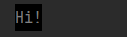
Image 1

You can also change the style/color/background of the text!

Following is a list of all color names you can use for both background and text:

  • black
  • red
  • green
  • yellow
  • blue
  • magenta
  • cyan
  • white

Note: You can also use HEX color values to color a text or background. Remember: HEX color values should have '#' before the main color value

Example Code:

import pyTextColor

pytext = pyTextColor.pyTextColor()

text = pytext.format_text(text="This text will be printed out in yellow color with red background", color="#ff0000",
                          bgcolor="#FFFF00")  # HEX values

print(text)  # Print the text

The output of the above code will be:

Image 2

Text Styles

There are many text styles you can use. Use the text_style parameter to change the text style. Example code:

import pyTextColor

pytext = pyTextColor.pyTextColor()

text = pytext.format_text(text="I am bold text", color="#ff0000",
                          bgcolor="#FFFF00", text_style="bold")  # bold text

print(text)  # Print the text

The output of the above program will be:

Image 3

There are many text styles you can use! See the list of available styles:

  • normal > for normal text
  • bold > for bold text
  • faint > for faint text
  • italic > for italic text
  • underline > for underlined text
  • blink > for blinking text
  • reverse > for reversed text. The color of the text will be changed to background color while the background color will be changed to text color
  • hidden > for hidden text
  • strikethrough > for strikethrough text

Print the documentation

To pretty print the documentation for this library, run the following code:

import pyTextColor

pytext = pyTextColor.pyTextColor()
pytext.pretty_print_help()  # Print the docs

The output will be:
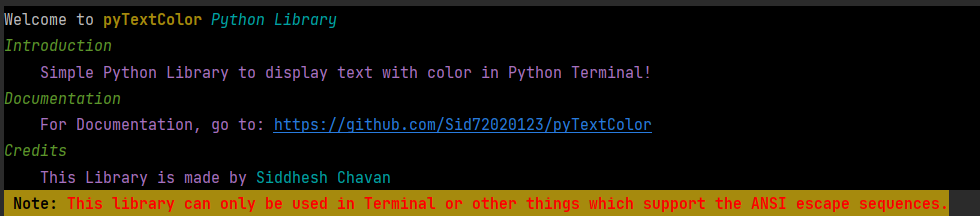
Image 4

Parameters of the format_text() function

The format_text() function has many parameters such as:

  • text > The text you want
  • color > The color you want
  • bgcolor > The background color you want
  • text_style > The text style you want
  • bg_full_line > Set this to True if you want the background color to be printed on full line

Make output fully customised?

See the following program to make the output fully customized:

import pyTextColor

pytext = pyTextColor.pyTextColor()

color = pytext.color  # Color Function
style = pytext.style  # Style Function
bg = pytext.background  # Background Function
reset = pytext.reset  # Reset Function (To reset all styles/colors/etc.)

name = "Siddhesh"
age = 15
hobby = "programming"

text = f"""{bg("black")}{color("#ffffff")}Hi! I am {color("magenta")}{name}{color("#ffffff")}. I am {color("magenta")}{age}{color("#ffffff")} years old. My favourite hobby is {color("green")}{style("italic")}{hobby}{reset()}"""  # Make an f-string and edit the text

print(text)  # Print the output

The output will be:

Image 5

Remember to use the reset() function or the normal text will be printed out with styles when you print a text below the styled text.

Thank you!

Owner
Siddhesh Chavan
I am a 15 year old boy who loves coding!
Siddhesh Chavan
xonsh is a Python-powered, cross-platform, Unix-gazing shell language and command prompt.

xonsh xonsh is a Python-powered, cross-platform, Unix-gazing shell language and command prompt. The language is a superset of Python 3.6+ with additio

xonsh 6.7k Jan 08, 2023
Powerful yet easy command line calculator.

Powerful yet easy command line calculator.

Cruisen 1 Jul 22, 2022
This is my fetch, with ascii arts from neofetch and internet

deadfetch This is my fetch, with ascii arts from neofetch and internet Installation First what you need its python Fedora sudo dnf install python3 sud

DedSec 8 Jan 20, 2022
A supercharged AWS command line interface (CLI).

SAWS Motivation AWS CLI Although the AWS CLI is a great resource to manage your AWS-powered services, it's tough to remember usage of: 70+ top-level c

Donne Martin 5.1k Jan 05, 2023
A python command line tool to calculate options max pain for a given company symbol and options expiry date.

Options-Max-Pain-Calculator A python command line tool to calculate options max pain for a given company symbol and options expiry date. Overview - Ma

13 Dec 26, 2022
A VIM-inspired filemanager for the console

ranger 1.9.3 ranger is a console file manager with VI key bindings. It provides a minimalistic and nice curses interface with a view on the directory

12.6k Dec 30, 2022
Tstock - Check stocks from the terminal

tstock - Check stocks from the terminal! 📈 tstock is a tool to easily generate stock charts from the command line. Just type tstock aapl to get a 3 m

Gabe Banks 502 Dec 30, 2022
A curated list of awesome things related to Textual

Awesome Textual | A curated list of awesome things related to Textual. Textual is a TUI (Text User Interface) framework for Python inspired by modern

Marcelo Trylesinski 5 May 08, 2022
Command line, configuration and persistence utilities

Zensols Utilities Command line, configuration and persistence utilities generally used for any more than basic application. This general purpose libra

Paul Landes 2 Nov 17, 2022
Basic python tools to generate shellcode runner in vba

vba_bin_runner Basic python tools to generate shellcode runner in vba. The stub use ZwAllocateVirtualMemory to allocate memory, RtlMoveMemory to write

4 Aug 24, 2021
This project contains the ClonedPerson dataset and code described in our paper "Cloning Outfits from Real-World Images to 3D Characters for Generalizable Person Re-Identification".

ClonedPerson This is the official repository for the ClonedPerson project, which contains the ClonedPerson dataset and code described in our paper "Cl

Yanan Wang 55 Dec 27, 2022
googler is a power tool to Google (web, news, videos and site search) from the command-line.

googler is a power tool to Google (web, news, videos and site search) from the command-line.

Terminator X 5.9k Jan 04, 2023
Command line tool for monitoring changes of File entities scoped in a Synapse File View

Synapse Monitoring Provides tools for monitoring and keeping track of File entity changes in Synapse with the use of File Views. Learn more about File

Sage Bionetworks 3 May 28, 2022
A simple cli tool to commit Conventional Commits

convmoji A simple cli tool to commit Conventional Commits. Requirements Install pip install convmoji convmoji --help Examples A conventianal commit co

3 Jul 04, 2022
Modern line-oriented terminal emulator without support for TUIs.

Modern line-oriented terminal emulator without support for TUIs.

10 Jun 12, 2022
A small system that allow you to manage hosts stored in your .ssh/config file

A small system that allow you to manage hosts stored in your .ssh/config using simple commands.

Simone Ostini 1 Jan 24, 2022
A user-friendly python CLI for Fmask 4.3 software (GERS Lab, UCONN).

pyFmask What is pyFmask pyFmask is a user-friendly python CLI for Fmask 4.3 software (GERS Lab, UCONN; https://github.com/GERSL/Fmask). Fmask (Zhu et

1 Jan 05, 2022
CLabel is a terminal-based cluster labeling tool that allows you to explore text data interactively and label clusters based on reviewing that data.

CLabel is a terminal-based cluster labeling tool that allows you to explore text data interactively and label clusters based on reviewing that

Peter Baumgartner 29 Aug 09, 2022
Open a file in your locally running Visual Studio Code instance from arbitrary terminal connections.

code-connect Open a file in your locally running Visual Studio Code instance from arbitrary terminal connections. Motivation VS Code supports opening

Christian Volkmann 56 Nov 19, 2022
Get Air Quality Index for your city/country 😷

Air Quality Index CLI Get Air Quality index for your City. Installation $ pip install air-quality-cli Contents Air Quality Index CLI Installation Cont

Yankee 40 Oct 21, 2022