

阴阳师后台全平台(使用网易 MuMu 模拟器)辅助。支持御魂,觉醒,御灵,结界突破,秘闻副本,地域鬼王。

Overview

阴阳师后台全平台辅助

screen

  • Python 版本:Python 3.8.3
  • 模拟器:网易 MuMu雷电模拟器
  • 模拟器分辨率:1024*576
  • 显卡渲染模式:兼容(OpenGL)
  • 兼容 Windows 系统和 MacOS 系统

思路:

利用 adb 截图后,使用 opencv 找图找色,模拟点击。使用 adb 操作模拟器,相当于后台操作。

我主要为了刷勾玉,所以此工具更侧重地域鬼王,结界突破和秘闻副本,御魂是用来刷突破券的。

为了防止收到鬼使黑的来信,所以增加随机等待的时间比较多,每次随机等待 2-3 秒,导致整体运行速度稍微慢了一些。

此工具适合放在后台干其他工作的同学使用。也比较符合我个人的使用。


地域鬼王需要先把姑获鸟,以津真天和山童收藏。
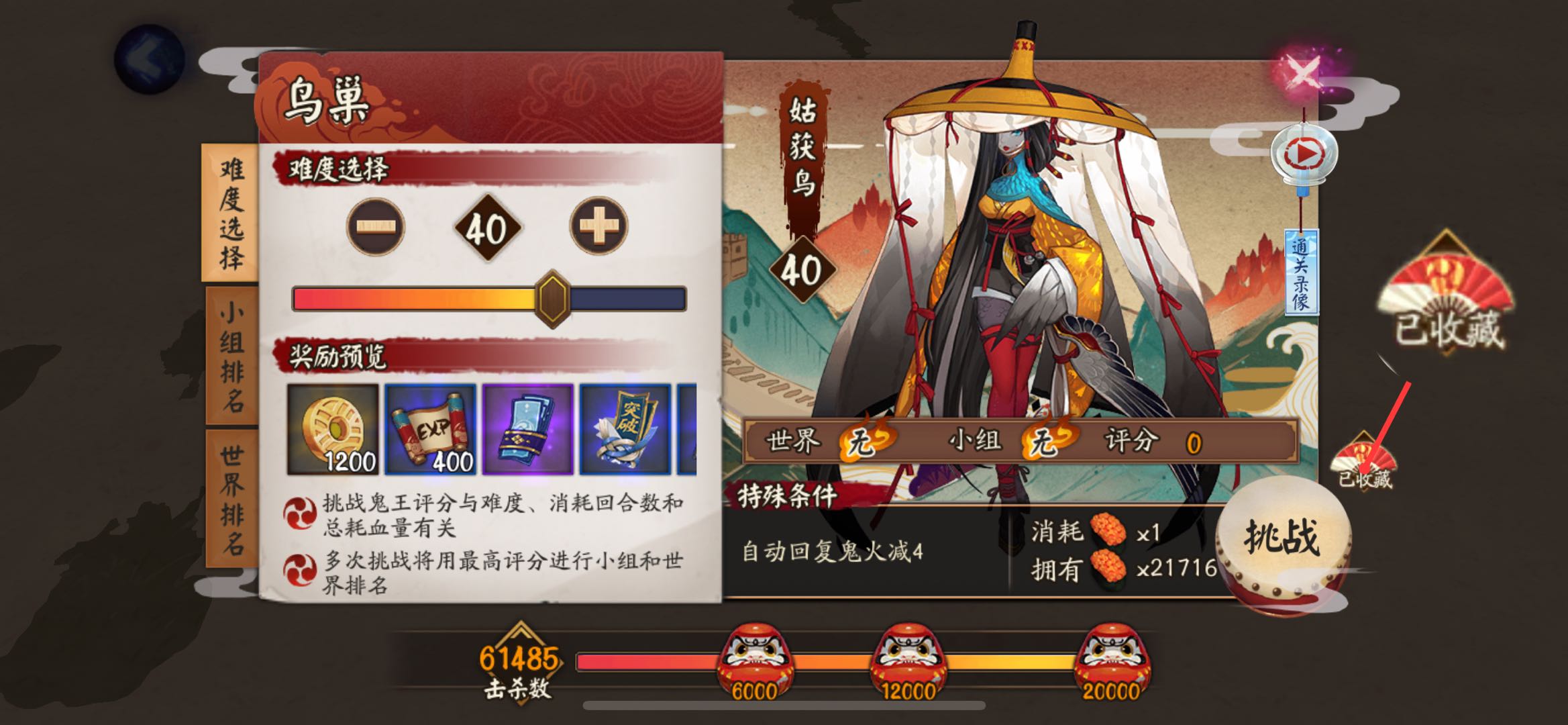
收藏

结界突破主要是把九宫格的坐标保存到列表,使用 shuffle 方法随机打乱,然后循环执行。

第一次进入突破会主动失败一次,失败的话难度不会增加,方便刷排名和勾玉使用。

每突破三次会领取一次奖励,等待九次全部完成后,会把右上角突破剩余数量截图上传到腾讯 OCR 识别接口,如果剩余次数大于等于九次,递归执行,否则停止执行。

腾讯 OCR 每月有一千次免费次数。如果只是识别结界券使用,应该是够用了,如果不够用可以按需付费或者自建字典识别。

突破剩余数量

这一步需要申请 腾讯云文字识别 OCR 的 secretId 和 secretKey。

然后新建文件 tencentcloudKeys.py,写入:

secretId = "AKI***********************aYHDtmaOw"
secretKey = "Sg**************************QdZ7X"

模拟器版

部分操作参考 网易 MuMu 开发者必备说明书【雷神命令】常用adb命令整理贴

建议直接看雷神模拟器社区的命令整理,比较详细。

运行阴阳师

如果不清楚应用的启动命令,可以先手动运行该程序,然后使用命令:

adb shell dumpsys window | findstr mCurrentFocus

查找正在运行的应用。

启动阴阳师的命令为:

adb shell am start -n com.netease.onmyoji.netease_simulator/com.netease.onmyoji.Client

因为我是 iOS,只能扫码登录,所以启动命令对我来说并不实用。

模拟点击

例如我们需要点击 500, 266 这个坐标:

adb shell input tap 500 266

模拟滑动

0, 0 滑动到 200, 200,耗时 0.5 秒:

adb shell input swipe 0 0 200 200 500

截图

需要先运行此命令:

adb shell screencap /data/screen.png

再将截图推送到电脑:

adb pull /data/screen.png .

注意:示例中的命令将图片保存到当前路径下。

找图

这里借助 opencv 库实现。

import cv2

def p():
    capture_img = ""  # 程序运行时的截图
    temp_img = ""  # 已经保存好的图片
    
    img1 = cv2.imread(capture_img)
    img2 = cv2.imread(temp_img)
    result = cv2.matchTemplate(img1, img2, cv2.TM_CCOEFF_NORMED)
    
    if result.max() > 0.9:
        return True

找色

如何在截图中获取某坐标的像素值?

import cv2

def p(x, y):
    capture_img = ""
    _img = cv2.imread(capture_img)
    img = cv2.cvtColor(_img, cv2.COLOR_BGR2RGB)
    r, g, b = img[y, x]  # 注意这里的坐标是相反的
    return r, g, b

裁剪图片

我们截图完成以后,如何从截图中获取剩余结界突破数量?

import cv2

capture_img = ""
img = cv2.imread(capture_img)
cv2.imwrite("new.png", img[12:30, 705:750])  # 裁剪坐标为 [y0:y1, x0:x1]

需要注意的是坐标都是 y, x。

双开应用切换

由于多开改版后(2.2.2x86/x64 版本之后)所有的多开应用和原应用都是同一个包名,所以需要通过 UserId 来控制多开的应用。

这里以网易云游戏为例,多开后分别获取包名,使用命令:

adb shell dumpsys window | findstr mCurrentFocus

全部都是 com.netease.android.cloudgame/com.netease.android.cloudgame.MainActivity

所以需要通过切换 UserId 来切换应用。

通过包名来获取对应 UserId:

adb shell ps|findstr com.netease.android.cloudgame

返回如下内容:

对应用户ID

可以看到原端应用的进程 id 是 u0_a36 ,看 _ 前面的 u0 就行,即 UserId=0; 在 MuMu 上一般原端的 UserId=0,多开端 #N1 的 UserId=10,如此类推 #N2 的 UserId=11,#N3 的 UserId=12,#N4 的 UserId=13

所以多开操作分为两步:

  1. 切换 UserId
  2. 打开应用

根据上边的截图,UserId 分别是 0 和 10,如果要在两个应用之间切换可以使用:

# 切换原应用
adb shell am start-user 0
adb shell am start --user 0 com.netease.android.cloudgame/com.netease.android.cloudgame.MainActivity

# 切换多开应用
adb shell am start-user 10
adb shell am start --user 10 com.netease.android.cloudgame/com.netease.android.cloudgame.MainActivity

切换之后就可以继续操作了。

赞赏
Owner
简讯
简讯
Small U-Net for vehicle detection

Small U-Net for vehicle detection Vivek Yadav, PhD Overview In this repository , we will go over using U-net for detecting vehicles in a video stream

Vivek Yadav 91 Nov 03, 2022
This GitHub Repository contains Data Analysis projects that I have completed so far! While most of th project are focused on Data Analysis, some of them are also put here to show off other skills that I have learned.

Welcome to my Data Analysis projects page! This GitHub Repository contains Data Analysis projects that I have completed so far! While most of th proje

Kyle Dini 1 Jan 31, 2022
Squidpy is a tool for the analysis and visualization of spatial molecular data.

Squidpy is a tool for the analysis and visualization of spatial molecular data. It builds on top of scanpy and anndata, from which it inherits modularity and scalability. It provides analysis tools t

Theis Lab 251 Dec 19, 2022
An open-source tool for visual and modular block programing in python

PyFlow PyFlow is an open-source tool for modular visual programing in python ! Although for now the tool is in Beta and features are coming in bit by

1.1k Jan 06, 2023
Generate SVG (dark/light) images visualizing (private/public) GitHub repo statistics for profile/website.

Generate daily updated visualizations of GitHub user and repository statistics from the GitHub API using GitHub Actions for any combination of private and public repositories, whether owned or contri

Adam Ross 2 Dec 16, 2022
University of Missouri - Kansas City: CS451R: Capstone

CS451RC University of Missouri - Kansas City: CS451R: Capstone Installation cd git clone https://github.com/ala2q6/CS451RC.git cd CS451RC pip3 instal

Alex Arbuckle 1 Nov 17, 2021
A curated list of awesome Dash (plotly) resources

Awesome Dash A curated list of awesome Dash (plotly) resources Dash is a productive Python framework for building web applications. Written on top of

Luke Singham 1.7k Jan 07, 2023
A GUI for Pandas DataFrames

About Demo Installation Usage Features More Info About PandasGUI is a GUI for viewing, plotting and analyzing Pandas DataFrames. Demo Installation Ins

Adam Rose 2.8k Dec 24, 2022
Analytical Web Apps for Python, R, Julia, and Jupyter. No JavaScript Required.

Dash Dash is the most downloaded, trusted Python framework for building ML & data science web apps. Built on top of Plotly.js, React and Flask, Dash t

Plotly 17.9k Dec 31, 2022
A toolkit to generate MR sequence diagrams

mrsd: a toolkit to generate MR sequence diagrams mrsd is a Python toolkit to generate MR sequence diagrams, as shown below for the basic FLASH sequenc

Julien Lamy 3 Dec 25, 2021
Matplotlib JOTA style for making figures

Matplotlib JOTA style for making figures This repo has Matplotlib JOTA style to format plots and figures for publications and presentation.

JOTA JORNALISMO 2 May 05, 2022
visualize_ML is a python package made to visualize some of the steps involved while dealing with a Machine Learning problem

visualize_ML visualize_ML is a python package made to visualize some of the steps involved while dealing with a Machine Learning problem. It is build

Ayush Singh 164 Dec 12, 2022
Mattia Ficarelli 2 Mar 29, 2022
3D Vision functions with end-to-end support for deep learning developers, written in Ivy.

Ivy vision focuses predominantly on 3D vision, with functions for camera geometry, image projections, co-ordinate frame transformations, forward warping, inverse warping, optical flow, depth triangul

Ivy 61 Dec 29, 2022
ScisorWiz: Differential Isoform Visualizer for Long-Read RNA Sequencing Data

ScisorWiz: Vizualizer for Differential Isoform Expression README ScisorWiz is a linux-based R-package for visualizing differential isoform expression

Alexander Stein 6 Oct 04, 2022
Visualizing weather changes across the world using third party APIs and Python.

WEATHER FORECASTING ACROSS THE WORLD Overview Python scripts were created to visualize the weather for over 500 cities across the world at varying di

G Johnson 0 Jun 12, 2021
🎨 Python Echarts Plotting Library

pyecharts Python ❤️ ECharts = pyecharts English README 📣 简介 Apache ECharts (incubating) 是一个由百度开源的数据可视化,凭借着良好的交互性,精巧的图表设计,得到了众多开发者的认可。而 Python 是一门富有表达

pyecharts 13.1k Jan 03, 2023
Flipper Zero documentation repo

Flipper Zero Docs Participation To fix a bug or add something new to this repository, you need to open a pull-request. Also, on every page of the site

Flipper Zero (All Repositories will be public soon) 114 Dec 30, 2022
Learning Convolutional Neural Networks with Interactive Visualization.

CNN Explainer An interactive visualization system designed to help non-experts learn about Convolutional Neural Networks (CNNs) For more information,

Polo Club of Data Science 6.3k Jan 01, 2023
A Bokeh project developed for learning and teaching Bokeh interactive plotting!

Bokeh-Python-Visualization A Bokeh project developed for learning and teaching Bokeh interactive plotting! See my medium blog posts about making bokeh

Will Koehrsen 350 Dec 05, 2022