Ipylivebash - Run shell script in Jupyter with live output

Overview

ipylivebash

ipylivebash is a library to run shell script in Jupyter with live output.

Example

%%livebash --save log.txt --save-timestamp

find .

Run find . and show the output in the Jupyter notebook and also save to log-${current_timestamp}.txt

%%livebash --ask-confirm --notify
set -e
deploy_script

Before running the deploy_script show a panel to ask for confirmation. Once it is finished, show a notification.

Features

  1. Run shell script in Jupyter with live output
  2. The output in the notebook cell is not saved in the notebook by default
  3. Support to save the output to a file. If the file already exists, it will pick another name automatically.
  4. Support to show a confirmation UI before executing the script
  5. Support to send a notification when the script finishes.

Usage

usage: livebash [-h] [--save OUTPUT_FILE] [--save-timestamp]
                [--line-limit LINE_LIMIT] [--height HEIGHT] [--ask-confirm]
                [--notify] [--keep-cell-output]

optional arguments:
  -h, --help
  --save OUTPUT_FILE    Save output to a file
  --save-timestamp      Add timestamp to the output file name
  --line-limit LINE_LIMIT
                        Restrict the no. of lines to be shown
  --height HEIGHT       Set the height of the output cell
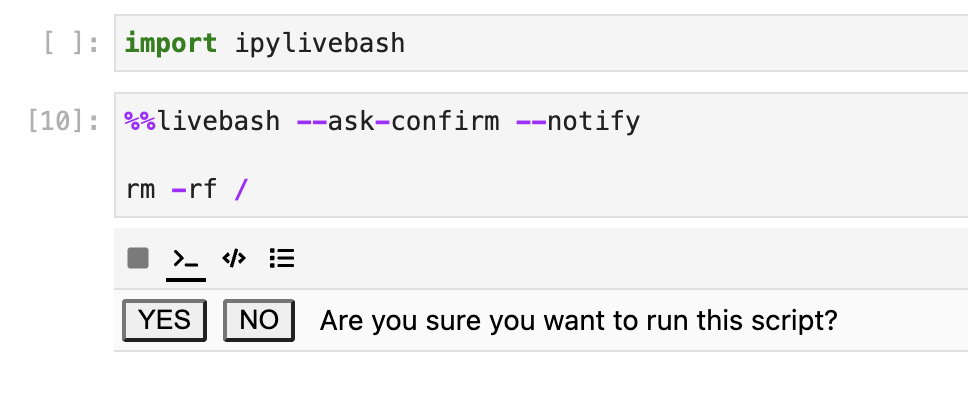
  --ask-confirm         Ask for confirmation before execution
  --notify              Send a notification when the script finished
  --keep-cell-output    Keep the cell output

Options

--save OUTPUT_FILE

Save the output to a file.

If the file name already exists, it will add a suffix to avoid overriding the original file.

--save-timestamp

Add timestamp to the output file name.

--line-limit LINE_LIMIT

If the no. of line output exceed the limit, it may be truncated. It will show the last 5 lines only.

--height HEIGHT

Set the height of the output cell

--ask-confirm

Ask for confirmation before execution

ask_confirm.png (392×80)

--notify

Send a notification when the script finished

--keep-cell-output

Keep the cell output such that it could be saved together with the notebook. It can't be used with other options like --line-limit.

Installation

You can install using pip:

pip install ipylivebash

If you are using Jupyter Notebook 5.2 or earlier, you may also need to enable the nbextension:

jupyter nbextension enable --py [--sys-prefix|--user|--system] ipylivebash

Development Installation

Create a dev environment:

conda create -n ipylivebash-dev -c conda-forge nodejs yarn python jupyterlab
conda activate ipylivebash-dev

Install the python. This will also build the TS package.

pip install -e ".[test, examples]"

When developing your extensions, you need to manually enable your extensions with the notebook / lab frontend. For lab, this is done by the command:

jupyter labextension develop --overwrite .
yarn run build

For classic notebook, you need to run:

jupyter nbextension install --sys-prefix --symlink --overwrite --py ipylivebash
jupyter nbextension enable --sys-prefix --py ipylivebash

Note that the --symlink flag doesn't work on Windows, so you will here have to run the install command every time that you rebuild your extension. For certain installations you might also need another flag instead of --sys-prefix, but we won't cover the meaning of those flags here.

How to see your changes

Typescript:

If you use JupyterLab to develop then you can watch the source directory and run JupyterLab at the same time in different terminals to watch for changes in the extension's source and automatically rebuild the widget.

# Watch the source directory in one terminal, automatically rebuilding when needed
yarn run watch
# Run JupyterLab in another terminal
jupyter lab

After a change wait for the build to finish and then refresh your browser and the changes should take effect.

Python:

If you make a change to the python code then you will need to restart the notebook kernel to have it take effect.

You might also like...
Output Analyzer for you terminal commands

Output analyzer (OZER) You can specify a few words inside config.yaml file and specify the color you want to be used. installing: Install command usin

Python Processing Tool for Vasp Ipnut/Output

PivotPy A Python Processing Tool for Vasp Input/Output. A CLI is available in Powershell, see Vasp2Visual. stylea{text-decoration: none !important;c

Runs a command in P4wnP1 and displays the output on OLED screen (SH1106)

p4wnp1-oled-terminal Runs a command in P4wnP1 and displays the output on OLED screen (SH1106) Works on Raspberry Pi Zero 2 W Tested successfully on RP

Tablicate - Python library for easy table creation and output to terminal

Tablicate Tablicate - Python library for easy table creation and output to terminal Features Column-wise justification alignment (left, right, center)

Format click help output nicely with rich.

rich-click Format click help output nicely with Rich. Click is a "Python package for creating beautiful command line interfaces". Rich is a "Python li

xonsh is a Python-powered, cross-platform, Unix-gazing shell

xonsh is a Python-powered, cross-platform, Unix-gazing shell language and command prompt.

adds flavor of interactive filtering to the traditional pipe concept of UNIX shell

percol __ ____ ___ ______________ / / / __ \/ _ \/ ___/ ___/ __ \/ / / /_/ / __/ / / /__/ /_/ / / / .__

xonsh is a Python-powered, cross-platform, Unix-gazing shell language and command prompt.

xonsh xonsh is a Python-powered, cross-platform, Unix-gazing shell language and command prompt. The language is a superset of Python 3.6+ with additio

Fetch is use to get information about anything on the shell using Wikipedia.

Fetch Search wikipedia article on command line [Why This?] [Support the Project] [Installation] [Configuration] Why this? Fetch helps you to quickly l

Comments
  • Problem in kubectl outputs

    Problem in kubectl outputs

    HI,

    first of all: thanks for this extesion, it helps a lot.

    But there seems to be an issue if the output comes too fast or something. It might be the debouncing? The output is only printed after I terminate the line or a new pod is created.

    %%livebash
    kubectl get pods -w
    

    It works if I use the following code:

    import subprocess
    import shlex
    def run_command(command):
        process = subprocess.Popen(shlex.split(command), stdout=subprocess.PIPE)
        while True:
            output = process.stdout.readline()
            if output == '' and process.poll() is not None:
                break
            if output:
                print(output.strip().decode("utf-8") )
        rc = process.poll()
        return rc
    
    run_command("kubectl get pods -w")
    
    opened by smerschjohann 2
Releases(release/0.1.2)
Owner
Ben Lau
Full Stack Developer
Ben Lau
This tool is a free and unlimited python CLI for google translate. based on google_trans_new.

GoTransPy A free and unlimited python CLI for google translate based on google_trans_new. It's very easy to use and solve the problem that the old api

Youssef Mohamed 2 Jan 10, 2022
A Python module and command line utility for working with web archive data using the WACZ format specification

py-wacz The py-wacz repository contains a Python module and command line utility for working with web archive data using the WACZ format specification

Webrecorder 14 Oct 24, 2022
Generate folder trees directly from the terminal.

Dir Tree Artist 🎨 🌲 Intro Easily view folder structure, with parameters to sieve out what you want. Choose to exclude files from being viewed (.git,

Glenda T 0 May 17, 2022
Tncli - TON smart contract command line interface

Tncli TON smart contract command line interface State Not working, in active dev

Disintar IO 100 Dec 18, 2022
Open a file in your locally running Visual Studio Code instance from arbitrary terminal connections.

code-connect Open a file in your locally running Visual Studio Code instance from arbitrary terminal connections. Motivation VS Code supports opening

Christian Volkmann 56 Nov 19, 2022
CLI utility for updating the EVE Online static data export in a postgres database

EVE SDE Postgres updater CLI utility for updating the EVE Online static data export postgres database. This has been tested with the Fuzzwork postgres

Markus Juopperi 1 Oct 29, 2021
🕰 The command line tool for scheduling Python scripts

hickory is a simple command line tool for scheduling Python scripts.

Max Humber 146 Dec 07, 2022
Modern line-oriented terminal emulator without support for TUIs.

Modern line-oriented terminal emulator without support for TUIs.

10 Jun 12, 2022
A python-based terminal application that displays current cryptocurrency prices

CryptoAssetPrices A python-based terminal application that displays current cryptocurrency prices. Covered Cryptocurrencies Bitcoin (BTC) Ethereum (ET

3 Apr 21, 2022
Python commandline tool for remembering linux/terminal commands

ehh Remember linux commands Commandline tool for remembering linux/terminal commands. It stores your favorite commands in ~/ehh.json in your homedir a

56 Nov 10, 2022
commandline version of wordle game and my auto solver.

Wordle Machine (and Wordle Game) (in commandline) My implementation of the Wordle game (inspired by https://www.powerlanguage.co.uk/wordle/) and my in

Kevin Xu 11 Jan 03, 2023
CLI/library to control FNIRSI DC Power Supply (DC-6006L, etc)

dc6006l - CLI/library to control FNIRSI DC Power Supply (DC-6006L, etc) What is this? FNIRSI DC6006L is a programmable DC power supply that is quite c

Taisuke Yamada 7 Sep 25, 2022
A handy command-line utility for generating and sending iCalendar events

A handy command-line utility for generating and sending iCalendar events This simple command-line utility is designed to generate an iCalendar event,

Baochun Li 17 Nov 21, 2022
Python command line tool and python engine to label table fields and fields in data files.

Python command line tool and python engine to label table fields and fields in data files. It could help to find meaningful data in your tables and data files or to find Personal identifable informat

APICrafter 22 Dec 05, 2022
🦎 A NeoVim plugin for highlighting visual selections like in a normal document editor!

🦎 HighStr.nvim A NeoVim plugin for highlighting visual selections like in a normal document editor! Demo TL;DR HighStr.nvim is a NeoVim plugin writte

Pocco81 222 Jan 03, 2023
AutoSub is a CLI application to generate subtitle files (.srt, .vtt, and .txt transcript) for any video file using Mozilla DeepSpeech.

AutoSub About Motivation Installation Docker How-to example How it works TO-DO Contributing References About AutoSub is a CLI application to generate

Abhiroop Talasila 414 Jan 06, 2023
Example of a CLI with python - know the extension of your files.

extensionCLI Example of a CLI with python - know the extension of your files. Usage: Install the CLI: pip3 install -e . Run the command with "ext" + t

ItanuRomero 5 Dec 29, 2022
Seamlessly run Python code in IPython from Vim

Seamlessly run Python code from Vim in IPython, including executing individual code cells similar to Jupyter notebooks and MATLAB. This plugin also supports other languages and REPLs such as Julia.

Hans Chen 269 Dec 20, 2022
A terminal written in Python.

PyDOS Read the title and then you'll figure out what this actually is. Running First, download or clone this repo. Next, run run.py. After this, you c

TechStudent10 2 Mar 01, 2022
Command line interface for testing internet bandwidth using speedtest.net

speedtest-cli Command line interface for testing internet bandwidth using speedtest.net Versions speedtest-cli works with Python 2.4-3.7 Installation

Matt Martz 12.4k Jan 08, 2023