🔎 Most Advanced Open Source Intelligence (OSINT) Framework for scanning IP Address, Emails, Websites, Organizations.

Overview

Most Advanced Open Source Intelligence (OSINT) Framework


ReconSpider

ReconSpider is most Advanced Open Source Intelligence (OSINT) Framework for scanning IP Address, Emails, Websites, Organizations and find out information from different sources.

ReconSpider can be used by Infosec Researchers, Penetration Testers, Bug Hunters and Cyber Crime Investigators to find deep information about their target.

ReconSpider aggregate all the raw data, visualize it on a dashboard and facilitate alerting and monitoring on the data.

Recon Spider also combines the capabilities of Wave, Photon and Recon Dog to do a comprehensive enumeration of attack surface.

Why it's called ReconSpider ?

ReconSpider = Recon + Spider

Recon = Reconnaissance

Reconnaissance is a mission to obtain information by various detection methods, about the activities and resources of an enemy or potential enemy, or geographic characteristics of a particular area.

Spider = Web crawler

A Web crawler, sometimes called a spider or spiderbot and often shortened to crawler, is an Internet bot that systematically browses the World Wide Web, typically for the purpose of Web indexing (web spidering).

Table Of Contents

  1. Version (beta)
  2. Overview of the tool
  3. Mind Map (v1)
  4. License Information
  5. ReconSpider Banner
  6. Documentation
  7. Setting up the environment
  8. Updating API Keys
  9. Usage
  10. Contact
  11. Wiki & How-to Guide
  12. Updates

Version (beta)

ReconSpider   :     1.0.7

Overview of the tool:

  • Performs OSINT scan on a IP Address, Emails, Websites, Organizations and find out information from different sources.
  • Correlates and collaborate the results, show them in a consolidated manner.
  • Use specific script / launch automated OSINT for consolidated data.
  • Currently available in only Command Line Interface (CLI).

Mind Map (v1)

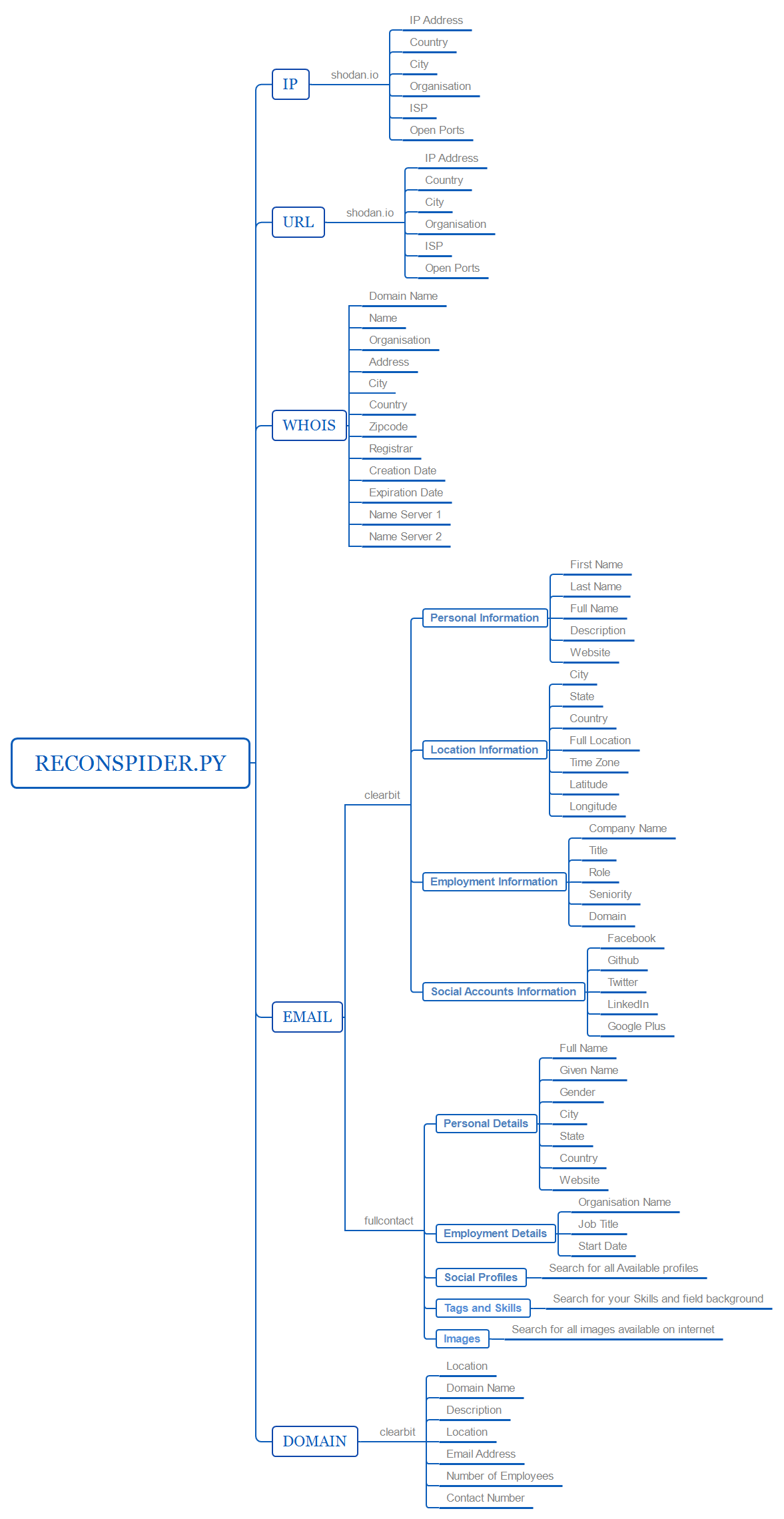
Check out our mind map to see visually organize information of this tool regarding api, services and techniques and more.

https://bhavsec.com/img/reconspider_map.png

License Information

ReconSpider and its documents are covered under GPL-3.0 (General Public License v3.0)

ReconSpider Banner

__________                               _________       __     ___            
\______   \ ____   ____  ____   ____    /   _____/_____ |__| __| _/___________
 |       _// __ \_/ ___\/  _ \ /    \   \_____  \\____ \|  |/ __ |/ __ \_  __ \
 |    |   \  ___/\  \__(  <_> )   |  \  /        \  |_> >  / /_/ \  ___/|  | \/
 |____|_  /\___  >\___  >____/|___|  / /_______  /   __/|__\____ |\___  >__|   
        \/     \/     \/           \/          \/|__|           \/    \/       


ENTER 0 - 13 TO SELECT OPTIONS

1.  IP                           Enumerate  information  from  IP Address
2.  DOMAIN                       Gather  information  about  given DOMAIN
3.  PHONENUMBER                  Gather  information  about   Phonenumber
4.  DNS MAP                      Map DNS  records associated  with target
5.  METADATA                     Extract all metadata of  the  given file
6.  REVERSE IMAGE SEARCH         Obtain domain name or IP address mapping
7.  HONEYPOT                     Check if it's honeypot or a real  system
8.  MAC ADDRESS LOOKUP           Obtain information about give Macaddress
9.  IPHEATMAP                    Draw  out  heatmap  of  locations  of IP
10. TORRENT                      Gather torrent download  history  of  IP
11. USERNAME                     Extract Account info. from social  media
12. IP2PROXY                     Check whether  IP  uses  any VPN / PROXY
13. MAIL BREACH                  Checks given domain  has  breached  Mail
99. UPDATE                       Update ReconSpider to its latest version

0. EXIT                         Exit from  ReconSpider  to your terminal

Documentation

Installing and using ReconSpider is very easy. Installation process is very simple.

  1. Downloading or cloning ReconSpider github repository.
  2. Installing all dependencies.
  3. Setting up the Database.

Let's Begin !!

Setting up the environment

Step 1 - Cloning ReconSpider on your linux system.

In order to download ReconSpider simply clone the github repository. Below is the command which you can use in order to clone ReconSpider repository.

git clone https://github.com/bhavsec/reconspider.git

Step 2 - Make sure python3 and python3-pip is installed on your system.

You can also perform a check by typing this command in your terminal.

sudo apt install python3 python3-pip

Step 3 - Installing all dependencies.

Once you clone and check python installation, you will find directory name as reconspider. Just go to that directory and install using these commands:

cd reconspider
sudo python3 setup.py install

Step 4 - Setting up the Database.

IP2Proxy Database

https://lite.ip2location.com/database/px8-ip-proxytype-country-region-city-isp-domain-usagetype-asn-lastseen

Download database, extract it and move to reconspider/plugins/ directory.

Updating API Keys

APIs included in ReconSpider are FREE and having limited & restricted usage per month, Please update the current APIs with New APIs in setup.py file, and re-install once done to reflect the changes.

Warning: Not updating the APIs can result in not showing the expected output or it may show errors.

You need to create the account and get the API Keys from the following websites.

Usage

ReconSpider is very handy tool and easy to use. All you have to do is just have to pass values to parameter. In order to start ReconSpider just type:

python3 reconspider.py

1. IP

This option gathers all the information of given IP Address from public resources.

ReconSpider >> 1
IP >> 8.8.8.8

2. DOMAIN

This option gathers all the information of given URL Address and check for vulneribility.

Reconspider >> 2
HOST (URL / IP) >> vulnweb.com
PORT >> 443

3. PHONENUMBER

This option allows you to gather information of given phonenumber.

Reconspider >> 3
PHONE NUMBER (919485247632) >>

4. DNS MAP

This option allows you to map an organizations attack surface with a virtual DNS Map of the DNS records associated with the target organization.

ReconSpider >> 4
DNS MAP (URL) >> vulnweb.com

5. METADATA

This option allows you to extract all metadat of the file.

Reconspider >> 5
Metadata (PATH) >> /root/Downloads/images.jpeg

6. REVERSE IMAGE SEARCH

This option allows you to obtain information and similar image that are available in internet.

Reconspider >> 6
REVERSE IMAGE SEARCH (PATH) >> /root/Downloads/images.jpeg
Open Search Result in web broser? (Y/N) : y

7. HONEYPOT

This option allows you to identify honeypots! The probability that an IP is a honeypot is captured in a "Honeyscore" value that can range from 0.0 to 1.0

ReconSpider >> 7
HONEYPOT (IP) >> 1.1.1.1

8. MAC ADDRESS LOOKUP

This option allows you to identify Mac address details who is manufacturer, address, country, etc.

Reconspider >> 8
MAC ADDRESS LOOKUP (Eg:08:00:69:02:01:FC) >>

9. IPHEATMAP

This option provided you heatmap of the provided ip or single ip, if connect all the provided ip location with accurate Coordinator.

Reconspider >> 9

    1) Trace single IP
    2) Trace multiple IPs
OPTIONS >>

10. TORRENT

This option allows you to gathers history of Torrent download history.

Reconspider >> 10
IPADDRESS (Eg:192.168.1.1) >>

11. USERNAME

This option allows you to gathers account information of the provided username from social media like Instagram, Twitter, Facebook.

Reconspider >> 11

1.Facebook
2.Twitter
3.Instagram

Username >>

12. IP2PROXY

This option allows you to identify whether IP address uses any kind of VPN / Proxy to hide his identify.

Reconspider >> 12
IPADDRESS (Eg:192.168.1.1) >>

13. MAIL BREACH

This option allows you to identify all breached mail ID from given domain.

Reconspider >> 13
DOMAIN (Eg:intercom.io) >>

99. UPDATE

This option allows you to check for updates. If a newer version will available, ReconSpider will download and merge the updates into the current directory without overwriting other files.

ReconSpider >> 99
Checking for updates..

0. EXIT

This option allows you to exit from ReconSpider Framework to your current Operating System's terminal.

ReconSpider >> 0
Bye, See ya again..

Contact Developer

Do you want to have a conversation in private?

Twitter:            @bhavsec
Facebook:           fb.com/bhavsec
Instagram:          instagram.com/bhavsec
LinkedIn:           linkedin.com/in/bhavsec
Email:              [email protected]
Website:            bhavsec.com

ReconSpider Full Wiki and How-to Guide

Please go through the ReconSpider Wiki Guide for a detailed explanation of each and every option and feature.

Frequent & Seamless Updates

ReconSpider is under development and updates for fixing bugs. optimizing performance & new features are being rolled. Custom error handling is also not implemented, and all the focus is to create required functionality.

Special Thanks & Contributors

Comments
  • error using Phone number option

    error using Phone number option

    When using phone number option, Program Terminates when the user enters a number

    Traceback (most recent call last): File "reconspider.py", line 39, in from core import repl_prompt File "/home/srk/Tools/Osint/reconspider/core/init.py", line 1, in from .repl_prompt import * File "/home/srk/Tools/Osint/reconspider/core/repl_prompt.py", line 153, in repl() File "/home/srk/Tools/Osint/reconspider/core/repl_prompt.py", line 64, in repl Phonenumber(ph) File "/home/srk/Tools/Osint/reconspider/plugins/Phonenumber.py", line 17, in Phonenumber print("Number: "+get['number']) KeyError: 'number'

    duplicate Issue Fixed ✓ 
    opened by srkadia 5
  • Still error on phonenumber option

    Still error on phonenumber option

    Still showing this error...

    please fix this asap,

    Traceback (most recent call last): File "reconspider.py", line 39, in from core import repl_prompt File "/home/srk/Tools/Osint/reconspider/core/init.py", line 1, in from .repl_prompt import * File "/home/srk/Tools/Osint/reconspider/core/repl_prompt.py", line 153, in repl() File "/home/srk/Tools/Osint/reconspider/core/repl_prompt.py", line 64, in repl Phonenumber(ph) File "/home/srk/Tools/Osint/reconspider/plugins/Phonenumber.py", line 17, in Phonenumber print("Number: "+get['number']) KeyError: 'number'

    duplicate 
    opened by srkadia 4
  • Error when using Phone Number option

    Error when using Phone Number option

    Describe the bug Error when using Phone Number option

    To Reproduce Steps to reproduce the behavior:

    1. Run python3 reconspider.py
    2. Input '3' when prompted
    3. Input the phone number - PHONE NUMBER (919485247632) >> 919485247632
    4. See error :
    Reconspider >> 3
    PHONE NUMBER (919485247632) >> 919485247632
    [+] Fetching Phonenumber Details...
    
    Traceback (most recent call last):
      File "reconspider.py", line 39, in <module>
        from core import repl_prompt
      File "/root/reconspider/core/__init__.py", line 1, in <module>
        from .repl_prompt import *
      File "/root/reconspider/core/repl_prompt.py", line 153, in <module>
        repl()
      File "/root/reconspider/core/repl_prompt.py", line 64, in repl
        Phonenumber(ph)
      File "/root/reconspider/plugins/Phonenumber.py", line 17, in Phonenumber
        print("Number: "+get['number'])
    KeyError: 'number'
    

    Desktop (please complete the following information):

    • OS: Ubuntu 20.04 LTS
    • Terminal
    Issue Fixed ✓ 
    opened by TamojitSaha 3
  • Email breach not work. (hunter.io reach upper limited)

    Email breach not work. (hunter.io reach upper limited)

    When I type https://api.hunter.io/v2/domain-search?domain=google.com&api_key=9f189e87e011a1d2f3013ace7b14045dec60f62c

    It returns

    {
      "errors": [
        {
          "id": "too_many_requests",
          "code": 429,
          "details": "You've reached the limit for the number of searches per billing period included in your plan."
        }
      ]
    }
    
    opened by hwygold 2
  • installing issue

    installing issue

    Describe the bug A clear and concise description of what the bug is.

    To Reproduce Steps to reproduce the behavior:

    1. Go to '...'
    2. Click on '....'
    3. Scroll down to '....'
    4. See error

    Expected behavior A clear and concise description of what you expected to happen.

    Screenshots If applicable, add screenshots to help explain your problem.

    Desktop (please complete the following information):

    • OS: [e.g. iOS]
    • Browser [e.g. chrome, safari]
    • Version [e.g. 22]

    Smartphone (please complete the following information):

    • Device: [e.g. iPhone6]
    • OS: [e.g. iOS8.1]
    • Browser [e.g. stock browser, safari]
    • Version [e.g. 22]

    Additional context Add any other context about the problem here. While installing showing the wheel package is not available

    opened by Mrunknownrs 2
  • Domain ports fails

    Domain ports fails

    Describe the bug Port unavaible: 443 Reconspider >> 2 HOST (URL / IP) >> nor3d.no PORT >> 443 Invalid port - Available(80,443) HOST (URL / IP) >>

    To Reproduce Reconspider >> 2 HOST (URL / IP) >> nor3d.no PORT >> 443 Invalid port - Available(80,443) HOST (URL / IP) >>

    Desktop (please complete the following information):

    • OS: Kali Linux
    • 5.10.0-kali7-amd64 #1 SMP Debian 5.10.28-1kali1 (2021-04-12) x86_64 GNU/Linux Python 3.9.2
    Issue Fixed ✓ 
    opened by azzarin 2
  • no module named 'pip'

    no module named 'pip'

    When running the installation I get to the command "sudo python setup.py install" Once I run this command I get this error: Traceback (most recent call last): File "setup.py", line 3, in import pip ImportError: No module named pip Anyone know a fix?

    Issue Fixed ✓ 
    opened by SupremeERG 2
  • I dosen't know what is this but after installation of reconspider it is saying me this

    I dosen't know what is this but after installation of reconspider it is saying me this

    /data/data/com.termux/files/usr/lib/python3.9/site-packages/Pillow-8.0.1-py3.9-linux-armv7l.egg/PIL/Image.py:115: RuntimeWarning: The _imaging extension was built for another version of Pillow or PIL: Core version: None Pillow version: 8.0.1 Traceback (most recent call last): File "/data/data/com.termux/files/home/reconspider/reconspider.py", line 39, in from core import repl_prompt File "/data/data/com.termux/files/home/reconspider/core/init.py", line 1, in from .repl_prompt import * File "/data/data/com.termux/files/home/reconspider/core/repl_prompt.py", line 11, in from plugins.metadata import gps_analyzer File "/data/data/com.termux/files/home/reconspider/plugins/metadata.py", line 2, in from PIL import Image File "", line 259, in load_module File "/data/data/com.termux/files/usr/lib/python3.9/site-packages/Pillow-8.0.1-py3.9-linux-armv7l.egg/PIL/Image.py", line 97, in ImportError: The _imaging extension was built for another version of Pillow or PIL: Core version: None Pillow version: 8.0.1

    wontfix 
    opened by Sarthak232121 2
  • Requirements.txt is not found

    Requirements.txt is not found

    Describe the bug once install runs it seems to run into the error of 'requirements.txt is not found'

    To Reproduce Steps to reproduce the behavior:

    1. git clone it
    2. run the install.py
    3. See error

    Expected behavior requirements.txt to be found

    Screenshots image

    Desktop (please complete the following information):

    • OS: ParrotOS (up to date)
    • Browser: Firefox
    • Version: latest
    Issue Fixed ✓ 
    opened by DR3DL0RD 2
  • tool to consider

    tool to consider

    Is your feature request related to a problem? Please describe. info gathering is a bit slow, plus sometimes i face bugs with whois.

    Describe the solution you'd like You could use spyse API for most searches like DNS, IP, Port, Whois etc...

    Additional context They regularly scan the web and add all the data to own DB so you don't need to wait for the results.

    i hope it will help

    Issue Fixed ✓ 
    opened by Luci-d 2
  • Cannot search Whois

    Cannot search Whois

    Describe the bug Cannot search whois, picture attacted below I can see few errors while installation, could you explain what is it please :)? writing manifest file 'ReconSpider.egg-info\SOURCES.txt' installing library code to build\bdist.win32\egg running install_lib warning: install_lib: 'build\lib' does not exist -- no Python modules to install Installed d:\program files\python\lib\site-packages\click_plugins-1.1.1-py3.7.egg error: The 'click' distribution was not found and is required by shodan

    To Reproduce Steps to reproduce the behavior:

    1. Follow the installation in documentation

    Expected behavior Whois data will be shown below

    Screenshots image

    Desktop (please complete the following information):

    • OS: [windows]
    • Browser [chrome]
    • Version [10]
    opened by Thomas0921 2
  • Update urllib3 module version

    Update urllib3 module version

    Module version is required urllib3 1.26.13 but it is installing non-dependent module version urllib3 2.0.0a2

    error: urllib3 2.0.0a2 is installed but urllib3<1.27,>=1.21.1 is required by {'requests'}
    
    opened by RAJANAGORI 0
  • Issue running setup.py

    Issue running setup.py

    Describe the bug When i run the install command "python3 setup.py install" i get the following output

    /usr/lib/python3/dist-packages/setuptools/_distutils/dist.py:264: UserWarning: Unknown distribution option: 'console' warnings.warn(msg) error: Multiple top-level packages discovered in a flat-layout: ['core', 'plugins'].

    To avoid accidental inclusion of unwanted files or directories, setuptools will not proceed with this build.

    If you are trying to create a single distribution with multiple packages on purpose, you should not rely on automatic discovery. Instead, consider the following options:

    1. set up custom discovery (find directive with include or exclude)
    2. use a src-layout
    3. explicitly set py_modules or packages with a list of names.

    To find more information, look for “package discovery” on setup tools docs. reconspidererror

    To Reproduce Steps to reproduce the behavior:

    1. run "python3 setup.py install" without the quotes of course 2.) see message described above

    Expected behavior the install script to run without issue

    Screenshots see attached image

    Desktop (please complete the following information):

    • OS: Kali Linux
    • Browser Firefox
    • Version: 2022.3

    Additional context i apologize if this was already covered somewhere but i didn't see it, but if not then I'm hoping someone could lend some advice or suggestions my way for some help on this

    opened by highrider0602 1
  • header

    header

    Describe the bug When I launch the program, I receive these errors.

    usr/share/reconspider/plugins/webosint/crawler.py:150: SyntaxWarning: "is not" with a literal. Did you mean "!="? if len(total) is not 0: /usr/share/reconspider/plugins/webosint/crawler.py:168: SyntaxWarning: "is not" with a literal. Did you mean "!="? if len(r_total) is not 0: /usr/share/reconspider/plugins/webosint/crawler.py:172: SyntaxWarning: "is not" with a literal. Did you mean "!="? if len(sm_total) is not 0: /usr/share/reconspider/plugins/webosint/crawler.py:176: SyntaxWarning: "is not" with a literal. Did you mean "!="? if len(css_total) is not 0: /usr/share/reconspider/plugins/webosint/crawler.py:180: SyntaxWarning: "is not" with a literal. Did you mean "!="? if len(js_total) is not 0: /usr/share/reconspider/plugins/webosint/crawler.py:184: SyntaxWarning: "is not" with a literal. Did you mean "!="? if len(int_total) is not 0: /usr/share/reconspider/plugins/webosint/crawler.py:188: SyntaxWarning: "is not" with a literal. Did you mean "!="? if len(ext_total) is not 0: /usr/share/reconspider/plugins/webosint/crawler.py:192: SyntaxWarning: "is not" with a literal. Did you mean "!="? if len(img_total) is not 0:

    To Reproduce use the syntax to launch "python3 reconspider.py"

    Expected behavior To launch without errors

    Screenshots If applicable, add screenshots to help explain your problem.

    Desktop (please complete the following information): up to date kali

    Smartphone (please complete the following information): NA

    Additional context Add any other context about the problem here.

    opened by MattStr11 0
  • I have a problem with the instalation, this appears:

    I have a problem with the instalation, this appears:

    ┌──(kali㉿kali)-[~/reconspider] └─$ sudo python3 setup.py install /usr/local/lib/python3.10/distutils/dist.py:274: UserWarning: Unknown distribution option: 'console' warnings.warn(msg) running install running bdist_egg running egg_info writing ReconSpider.egg-info/PKG-INFO writing dependency_links to ReconSpider.egg-info/dependency_links.txt writing requirements to ReconSpider.egg-info/requires.txt writing top-level names to ReconSpider.egg-info/top_level.txt reading manifest file 'ReconSpider.egg-info/SOURCES.txt' adding license file 'LICENSE' writing manifest file 'ReconSpider.egg-info/SOURCES.txt' installing library code to build/bdist.linux-x86_64/egg running install_lib warning: install_lib: 'build/lib' does not exist -- no Python modules to install

    creating build/bdist.linux-x86_64/egg creating build/bdist.linux-x86_64/egg/EGG-INFO copying ReconSpider.egg-info/PKG-INFO -> build/bdist.linux-x86_64/egg/EGG-INFO copying ReconSpider.egg-info/SOURCES.txt -> build/bdist.linux-x86_64/egg/EGG-INFO copying ReconSpider.egg-info/dependency_links.txt -> build/bdist.linux-x86_64/egg/EGG-INFO copying ReconSpider.egg-info/requires.txt -> build/bdist.linux-x86_64/egg/EGG-INFO copying ReconSpider.egg-info/top_level.txt -> build/bdist.linux-x86_64/egg/EGG-INFO zip_safe flag not set; analyzing archive contents... creating 'dist/ReconSpider-1.0.7-py3.10.egg' and adding 'build/bdist.linux-x86_64/egg' to it removing 'build/bdist.linux-x86_64/egg' (and everything under it) Processing ReconSpider-1.0.7-py3.10.egg Removing /usr/local/lib/python3.10/site-packages/ReconSpider-1.0.7-py3.10.egg Copying ReconSpider-1.0.7-py3.10.egg to /usr/local/lib/python3.10/site-packages ReconSpider 1.0.7 is already the active version in easy-install.pth

    Installed /usr/local/lib/python3.10/site-packages/ReconSpider-1.0.7-py3.10.egg Processing dependencies for ReconSpider==1.0.7 Searching for tweepy Reading https://pypi.org/simple/tweepy/ Download error on https://pypi.org/simple/tweepy/: unknown url type: https -- Some packages may not be found! Couldn't find index page for 'tweepy' (maybe misspelled?) Scanning index of all packages (this may take a while) Reading https://pypi.org/simple/ Download error on https://pypi.org/simple/: unknown url type: https -- Some packages may not be found! No local packages or working download links found for tweepy error: Could not find suitable distribution for Requirement.parse('tweepy')

    opened by sebassaldiviap 1
  • installation

    installation

    Is your feature request related to a problem? Please describe. message when i run the script: Seems like you haven't installed Requirements or You are not using python3 version, Please install using: python3 setup.py install

    Describe the solution you'd like i have python3 installed

    Describe alternatives you've considered A clear and concise description of any alternative solutions or features you've considered.

    Additional context Add any other context or screenshots about the feature request here.

    opened by ladoual 3
Releases(1.0.7)
  • 1.0.7(Aug 19, 2021)

  • 1.0.6(Apr 9, 2020)

    New Features

    • Tool has module involved to scrape social media account details from Instagram, Facebook and Twitter
    • It can find details about Phone number
    • Email data Breach
    • Domain module has various scans for domain check for vulneribility and spider crawlers
    • Metadata Analyser
    • Reverse Image Search
    • IP Heatmap generator
    • Mac Address finder of manufacturer
    • IP2Proxy checks whether provided ip uses any kind of Proxy/VPN if any then check for DNSLeaks
    • Torrent Download History
    • Tool is currently available only in Command Line Interface (CLI)
    Source code(tar.gz)
    Source code(zip)
  • 1.0.5(Dec 28, 2018)

    • Added Censys plugin for Location Information Gathering
    • Added new Portscan option to discover hosts and services
    • Added Honeypot detection plugin
    • All new shortcuts for using ReconSpider options
    • New Error-free Setup.py (support all devices)
    • WHOIS results output Fixed
    • Added NSLookup for domain name mapping
    • No API required
    • Totally Re-designed
    • Support for Python 2 and 3
    • No more time taking registerations for API
    • No extra installer for Termux
    • New colored outputs (under testing)

    Note: Email option will be added in next update.

    Source code(tar.gz)
    Source code(zip)
  • 1.0.2(Dec 24, 2018)

    • Use Server IP Address to find Location, Organization, Internet Service Provider (ISP)
    • Gather Personal, Employment, Location, Social Accounts Information
    • Find Open ports in websites
    • Email Enumeration
    • WHOIS Report
    • Python 3.7 support
    • Mind Map (v1)
    • New API Input Generator
    • Shodan, Clearbit, FullContact API Support
    • Termux support for Android phones
    • Works on Linux, Windows, Android
    Source code(tar.gz)
    Source code(zip)
Owner
BhavKaran
CEH | PCEP | NSE | Cyber Security Researcher | Penetration Tester
BhavKaran
CVE-2022-22965 : about spring core rce

CVE-2022-22965: Spring-Core-Rce EXP 特性: 漏洞探测(不写入 webshell,简单字符串输出) 自定义写入 webshell 文件名称及路径 不会追加写入到同一文件中,每次检测写入到不同名称 webshell 文件 支持写入 冰蝎 webshell 代理支持,可

东方有鱼名为咸 53 Nov 09, 2022
Tools to make working the Arch Linux Security Tracker easier

This is a collection of Python scripts to make working with the Arch Linux Security Tracker easier.

Jonas Witschel 6 Jul 13, 2022
This is tools hacking for scan vuln in port web, happy using

Xnuvers007 PortInjection this is tools hacking for scan vuln in port web, happy using view/show python 3.9 solo coder (tangerang) 19 y/o installation

XnuxersXploitXen 6 Dec 24, 2022
log4j-tools: CVE-2021-44228 poses a serious threat to a wide range of Java-based applications

log4j-tools Quick links Click to find: Inclusions of log4j2 in compiled code Calls to log4j2 in compiled code Calls to log4j2 in source code Overview

JFrog Ltd. 171 Dec 25, 2022
The Web Application Firewall Paranoia Level Test Tool.

Quick WAF "paranoid" Doctor Evaluation WAFPARAN01D3 The Web Application Firewall Paranoia Level Test Tool. — From alt3kx.github.io Introduction to Par

22 Jul 25, 2022
Safety checks your installed dependencies for known security vulnerabilities

Safety checks your installed dependencies for known security vulnerabilities. By default it uses the open Python vulnerability database Safety DB, but

pyup.io 1.4k Dec 30, 2022
Yesitsme - Simple OSINT script to find Instagram profiles by name and e-mail/phone

Simple OSINT script to find Instagram profiles by name and e-mail/phone

108 Jan 07, 2023
Industry ready custom API payload with an easy format for building Python APIs (Django/Django Rest Framework)

Industry ready custom API payload with an easy format for building Python APIs (Django/Django Rest Framework) Yosh! If you are a django backend develo

Abram (^o^) 7 Sep 30, 2022
Facebook account cloning/hacking advanced tool + dictionary attack added | Facebook automation tool

loggef Facebook automation tool, Facebook account hacking and cloning advanced tool + dictionary attack added Warning Use this tool for educational pu

Md Josif Khan 149 Aug 10, 2022
A GitHub action for organizations that enables advanced security code scanning on all new repos

Advanced-Security-Enforcer What this repository does This code is for an active GitHub Action written in Python to check (on a schedule) for new repos

Zack Koppert 30 May 17, 2022
HTTP Protocol Stack Remote Code Execution Vulnerability CVE-2022-21907

CVE-2022-21907 Description POC for CVE-2022-21907: HTTP Protocol Stack Remote Code Execution Vulnerability. create by antx at 2022-01-17. Detail HTTP

赛欧思网络安全研究实验室 365 Nov 30, 2022
An automated, reliable scanner for the Log4Shell (CVE-2021-44228) vulnerability.

Log4JHunt An automated, reliable scanner for the Log4Shell CVE-2021-44228 vulnerability. Video demo: Usage Here the help usage: $ python3 log4jhunt.py

RedHunt Labs 39 Nov 21, 2022
A simple multi-threaded distributed SSH brute-forcing tool written in Python.

OrbitalDump A simple multi-threaded distributed SSH brute-forcing tool written in Python. How it Works When the script is executed without the --proxi

K4YT3X 408 Jan 03, 2023
FTP-Exploits is a tool made in python that contains 4 diffrent types of ftp exploits that can be used in Penetration Testing.

FTP-exploits FTP-exploits is a tool which is used for Penetration Testing that can run many kinds of exploits on port 21(FTP) Commands and Exploits Ex

1 Dec 26, 2021
Tool ini berfungsi untuk membuat virus secara instan

vbug (ID) Tool ini berfungsi untuk membuat virus secara instan. Dengan begitu pengguna vbug maker dapat menggunakannya dengan mudah dan cepat. Di dala

OneTXz 3 Jun 05, 2022
对安卓APP注入MSF PAYLOAD,并且对手机管家进行BYPASS。

520_APK_HOOK 介绍 将msf生成的payload,注入到一个正常的apk文件中,重新打包后进行加固,bypass手机安全管家的检测。 项目地址: https://github.com/cleverbao/520apkhook 作者: BaoGuo 优点 相比于原始的msf远控,此版本ap

BaoGuo 368 Jan 02, 2023
Phoenix Framework is an environment for writing, testing and using exploit code.

Phoenix Framework is an environment for writing, testing and using exploit code. 🖼 Screenshots 🎪 Community PwnWiki Forums 🔑 Licen

42 Aug 09, 2022
Natural Language Processing - Sommer Semester 2022

Natural Language Processing (DIS25a/NLP) This course can be taken for the Bachelor Programm Data and Information Science (DIS25a) or the Master Progra

Classrooms of IR Group at Technische Hochschule Köln 19 Sep 07, 2022
Hack computer in the form of RAR files from all types of clients, even Linux

Program Features 📌 Hide malware 📌 Vulnerability software vulnerabilities RAR 📌 Creating malware 📌 Access client files 📌 Client Hacking 📌 Link Do

hack4lx 5 Nov 25, 2022
SeaSurf is a Flask extension for preventing cross-site request forgery (CSRF).

Flask-SeaSurf SeaSurf is a Flask extension for preventing cross-site request forgery (CSRF). CSRF vulnerabilities have been found in large and popular

Max Countryman 183 Dec 28, 2022