Packaged, Pytorch-based, easy to use, cross-platform version of the CRAFT text detector

Overview

CRAFT: Character-Region Awareness For Text detection

Downloads PyPI version Conda version CI

Packaged, Pytorch-based, easy to use, cross-platform version of the CRAFT text detector | Paper |

Overview

PyTorch implementation for CRAFT text detector that effectively detect text area by exploring each character region and affinity between characters. The bounding box of texts are obtained by simply finding minimum bounding rectangles on binary map after thresholding character region and affinity scores.

teaser

Getting started

Installation

  • Install using conda for Linux, Mac and Windows (preferred):
conda install -c fcakyon craft-text-detector
  • Install using pip for Linux and Mac:
pip install craft-text-detector

Basic Usage

# import Craft class
from craft_text_detector import Craft

# set image path and export folder directory
image_path = 'figures/idcard.png'
output_dir = 'outputs/'

# create a craft instance
craft = Craft(output_dir=output_dir, crop_type="poly", cuda=False)

# apply craft text detection and export detected regions to output directory
prediction_result = craft.detect_text(image_path)

# unload models from ram/gpu
craft.unload_craftnet_model()
craft.unload_refinenet_model()

Advanced Usage

# import craft functions
from craft_text_detector import (
    read_image,
    load_craftnet_model,
    load_refinenet_model,
    get_prediction,
    export_detected_regions,
    export_extra_results,
    empty_cuda_cache
)

# set image path and export folder directory
image_path = 'figures/idcard.png'
output_dir = 'outputs/'

# read image
image = read_image(image_path)

# load models
refine_net = load_refinenet_model(cuda=True)
craft_net = load_craftnet_model(cuda=True)

# perform prediction
prediction_result = get_prediction(
    image=image,
    craft_net=craft_net,
    refine_net=refine_net,
    text_threshold=0.7,
    link_threshold=0.4,
    low_text=0.4,
    cuda=True,
    long_size=1280
)

# export detected text regions
exported_file_paths = export_detected_regions(
    image_path=image_path,
    image=image,
    regions=prediction_result["boxes"],
    output_dir=output_dir,
    rectify=True
)

# export heatmap, detection points, box visualization
export_extra_results(
    image_path=image_path,
    image=image,
    regions=prediction_result["boxes"],
    heatmaps=prediction_result["heatmaps"],
    output_dir=output_dir
)

# unload models from gpu
empty_cuda_cache()
You might also like...
TextBoxes++: A Single-Shot Oriented Scene Text Detector

TextBoxes++: A Single-Shot Oriented Scene Text Detector Introduction This is an application for scene text detection (TextBoxes++) and recognition (CR

TextBoxes: A Fast Text Detector with a Single Deep Neural Network https://github.com/MhLiao/TextBoxes 基于SSD改进的文本检测算法,textBoxes_note记录了之前整理的笔记。

TextBoxes: A Fast Text Detector with a Single Deep Neural Network Introduction This paper presents an end-to-end trainable fast scene text detector, n

Use Convolutional Recurrent Neural Network to recognize the Handwritten line text image without pre segmentation into words or characters. Use CTC loss Function to train.

Handwritten Line Text Recognition using Deep Learning with Tensorflow Description Use Convolutional Recurrent Neural Network to recognize the Handwrit

Code related to "Have Your Text and Use It Too! End-to-End Neural Data-to-Text Generation with Semantic Fidelity" paper

DataTuner You have just found the DataTuner. This repository provides tools for fine-tuning language models for a task. See LICENSE.txt for license de

This can be use to convert text in a file to handwritten text.

TextToHandwriting This can be used to convert text to handwriting. Clone this project or download the code. Run TextToImage.py give the filename of th

python ocr using tesseract/ with EAST opencv detector

pytextractor python ocr using tesseract/ with EAST opencv text detector Uses the EAST opencv detector defined here with pytesseract to extract text(de

Augmenting Anchors by the Detector Itself

Augmenting Anchors by the Detector Itself Introduction It is difficult to determine the scale and aspect ratio of anchors for anchor-based object dete

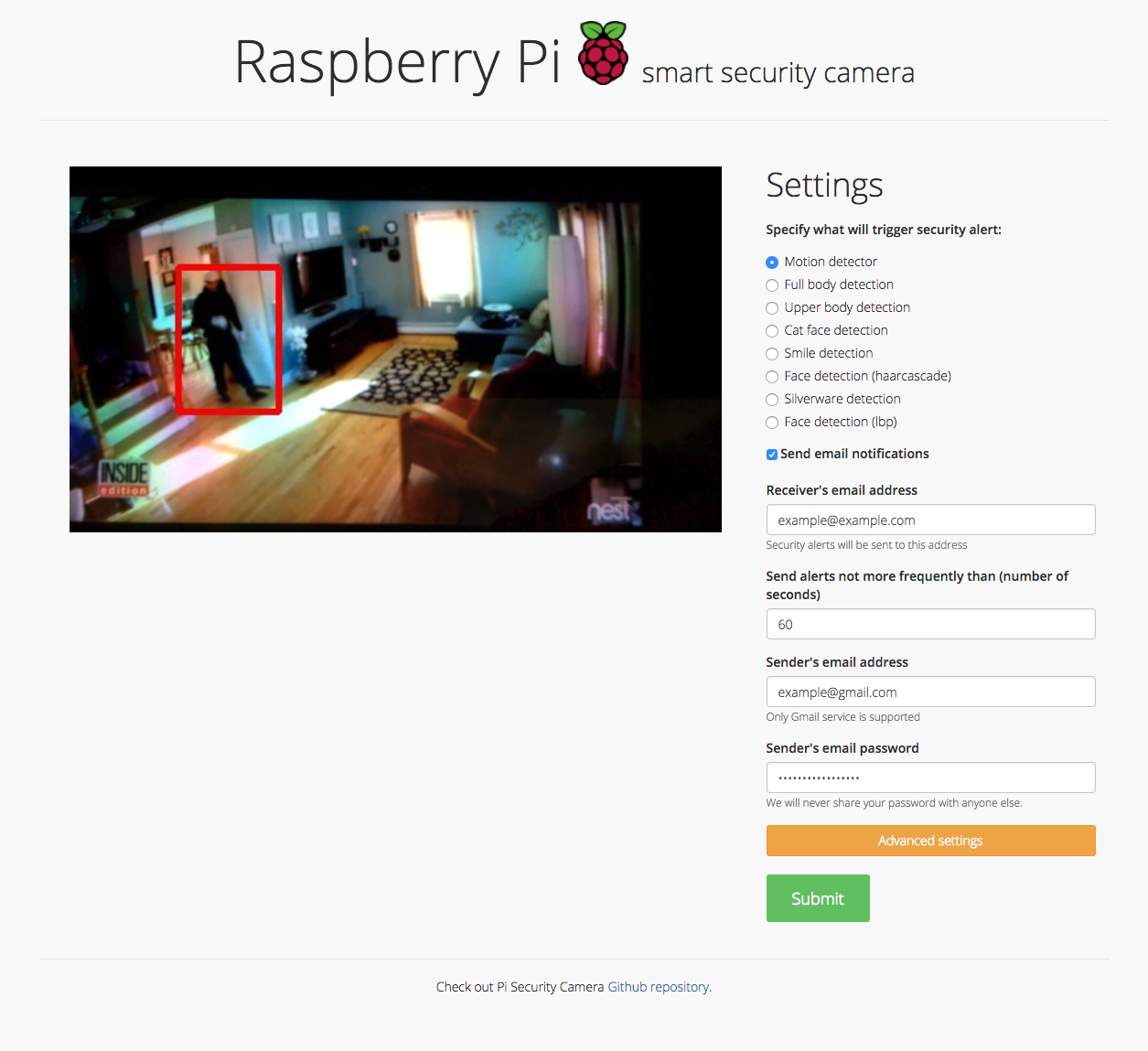
Motion detector, Full body detection, Upper body detection, Cat face detection, Smile detection, Face detection (haar cascade), Silverware detection, Face detection (lbp), and Sending email notifications

Security camera running OpenCV for object and motion detection. The camera will send email with image of any objects it detects. It also runs a server that provides web interface with live stream video.

Comments
  • Add more options for detect_text method

    Add more options for detect_text method

    Hi, sometime I don't want detect_text from file, I want detect_text directly from image in ndarray format, that will save more cost of I/O time. So I contribute this. Thanks for your work

    opened by ducviet00 2
  • Enable package to load model from local path

    Enable package to load model from local path

    When using the pypi package it should be allowed to use a model from a local path, because loading it from a remote location removes the control over what model is currently used. And might also result in pull limits being reached.

    enhancement 
    opened by TanjaBayer 1
  • Fix #8 - Fixing cuda issues in basic usage text detection

    Fix #8 - Fixing cuda issues in basic usage text detection

    Fixing issue #8

    In this quick-fix I referenced craft_net as a global variable. If this is not an acceptable workaround, then consider reorganizing the structure of the code.

    Have a nice day :)

    opened by gaborpelesz 1
  • accept customized weights path when loading models

    accept customized weights path when loading models

    path for the weight file can be specified by:

    load_craftnet_model(weight_path="path/to/weight")
    
    load_refinenet_model(weight_path="path/to/weight")
    
    opened by fcakyon 0
Releases(0.4.3)
  • 0.4.3(May 9, 2022)

    What's Changed

    • Enable package to load model from local path by @TanjaBayer in https://github.com/fcakyon/craft-text-detector/pull/53

    New Contributors

    • @TanjaBayer made their first contribution in https://github.com/fcakyon/craft-text-detector/pull/53

    Full Changelog: https://github.com/fcakyon/craft-text-detector/compare/0.4.2...0.4.3

    Source code(tar.gz)
    Source code(zip)
  • 0.4.2(Jan 6, 2022)

    What's Changed

    • fix opencv version by @fcakyon in https://github.com/fcakyon/craft-text-detector/pull/48

    Full Changelog: https://github.com/fcakyon/craft-text-detector/compare/0.4.1...0.4.2

    Source code(tar.gz)
    Source code(zip)
  • 0.4.1(Dec 20, 2021)

    What's Changed

    • fix crop export by @fcakyon in https://github.com/fcakyon/craft-text-detector/pull/45

    Full Changelog: https://github.com/fcakyon/craft-text-detector/compare/0.4.0...0.4.1

    Source code(tar.gz)
    Source code(zip)
  • 0.4.0(Jul 30, 2021)

  • 0.3.5(May 12, 2021)

  • 0.3.4(Apr 7, 2021)

    • add support for PIL and numpy images in addition to filepath. https://github.com/fcakyon/craft-text-detector/pull/28
    from PIL import Image
    import numpy
    
    # can be filepath, PIL image or numpy array
    image = 'figures/idcard.png' 
    image = Image.open("figures/idcard.png")
    image = numpy.array(Image.open("figures/idcard.png"))
    
    # apply craft text detection
    prediction_result = craft.detect_text(image)
    Source code(tar.gz)
    Source code(zip)
  • 0.3.3(Mar 2, 2021)

  • 0.3.2(Mar 2, 2021)

    path for the weight file can be specified by:

    load_craftnet_model(weight_path="path/to/weight")
    
    load_refinenet_model(weight_path="path/to/weight")
    
    Source code(tar.gz)
    Source code(zip)
  • v0.3.0(May 14, 2020)

    • updated basic usage for better device handling, now Craft instance should be created before calling detect_text:
    # import Craft class
    from craft_text_detector import Craft
    
    # set image path and export folder directory
    image_path = 'figures/idcard.png'
    output_dir = 'outputs/'
    
    # create a craft instance
    craft = Craft(output_dir=output_dir, crop_type="poly", cuda=False)
    
    # apply craft text detection and export detected regions to output directory
    prediction_result = craft.detect_text(image_path)
    
    # unload models from ram/gpu
    craft.unload_craftnet_model()
    craft.unload_refinenet_model()
    
    • some internal naming and styling changes
    Source code(tar.gz)
    Source code(zip)
  • v0.2.1(May 10, 2020)

  • v0.2.0a(Apr 22, 2020)

  • v0.2.0(Apr 22, 2020)

Owner
Senior Machine Learning Engineer, METU & Bilkent alum.
Go package for OCR (Optical Character Recognition), by using Tesseract C++ library

gosseract OCR Golang OCR package, by using Tesseract C++ library. OCR Server Do you just want OCR server, or see the working example of this package?

Hiromu OCHIAI 1.9k Dec 28, 2022
PyNeuro is designed to connect NeuroSky's MindWave EEG device to Python and provide Callback functionality to provide data to your application in real time.

PyNeuro PyNeuro is designed to connect NeuroSky's MindWave EEG device to Python and provide Callback functionality to provide data to your application

Zach Wang 45 Dec 30, 2022
Virtualdragdrop - Virtual Drag and Drop Using OpenCV and Arduino

Virtualdragdrop - Virtual Drag and Drop Using OpenCV and Arduino

Rizky Dermawan 4 Mar 10, 2022
Just a script for detecting the lanes in any car game (not just gta 5) with specific resolution and road design ( very basic and limited )

GTA-5-Lane-detection Just a script for detecting the lanes in any car game (not just gta 5) with specific resolution and road design ( very basic and

Danciu Georgian 4 Aug 01, 2021
A Screen Translator/OCR Translator made by using Python and Tesseract, the user interface are made using Tkinter. All code written in python.

About An OCR translator tool. Made by me by utilizing Tesseract, compiled to .exe using pyinstaller. I made this program to learn more about python. I

Fauzan F A 41 Dec 30, 2022
OpenMMLab Text Detection, Recognition and Understanding Toolbox

Introduction English | 简体中文 MMOCR is an open-source toolbox based on PyTorch and mmdetection for text detection, text recognition, and the correspondi

OpenMMLab 3k Jan 07, 2023
A synthetic data generator for text recognition

TextRecognitionDataGenerator A synthetic data generator for text recognition What is it for? Generating text image samples to train an OCR software. N

Edouard Belval 2.5k Jan 04, 2023
An organized collection of tutorials and projects created for aspriring computer vision students.

A repository created with the purpose of teaching students in BME lab 308A- Hanoi University of Science and Technology

Givralnguyen 5 Nov 24, 2021
Balabobapy - Using artificial intelligence algorithms to continue the text

Balabobapy - Using artificial intelligence algorithms to continue the text

qxtony 1 Feb 04, 2022
Simple app for visual editing of Page XML files

Name nw-page-editor - Simple app for visual editing of Page XML files. Version: 2021.02.22 Description nw-page-editor is an application for viewing/ed

Mauricio Villegas 27 Jun 20, 2022
Pure Javascript OCR for more than 100 Languages 📖🎉🖥

Version 2 is now available and under development in the master branch, read a story about v2: Why I refactor tesseract.js v2? Check the support/1.x br

Project Naptha 29.2k Jan 05, 2023
Dirty, ugly, and hopefully useful OCR of Facebook Papers docs released by Gizmodo

Quick and Dirty OCR of Facebook Papers Gizmodo has been working through the Facebook Papers and releasing the docs that they process and review. As lu

Bill Fitzgerald 2 Oct 28, 2021
How to detect objects in real time by using Jupyter Notebook and Neural Networks , by using Yolo3

Real Time Object Recognition From your Screen Desktop . In this post, I will explain how to build a simply program to detect objects from you desktop

Ruslan Magana Vsevolodovna 2 Sep 28, 2022
Document Image Dewarping

Document image dewarping using text-lines and line Segments Abstract Conventional text-line based document dewarping methods have problems when handli

Taeho Kil 268 Dec 23, 2022
ARU-Net - Deep Learning Chinese Word Segment

ARU-Net: A Neural Pixel Labeler for Layout Analysis of Historical Documents Contents Introduction Installation Demo Training Introduction This is the

128 Sep 12, 2022
Omdena-abuja-anpd - Automatic Number Plate Detection for the security of lives and properties using Computer Vision.

Omdena-abuja-anpd - Automatic Number Plate Detection for the security of lives and properties using Computer Vision.

Abdulazeez Jimoh 1 Jan 01, 2022
Hiiii this is the Spanish for Linux and win 10 and in the near future the english version of PortScan my new tool on which you can see what ports are Open only with the IP adress.

PortScanner-by-IIT PortScanner es una herramienta programada en Python3. Como su nombre indica esta herramienta escanea los primeros 150 puertos de re

5 Sep 19, 2022
Pre-Recognize Library - library with algorithms for improving OCR quality.

PRLib - Pre-Recognition Library. The main aim of the library - prepare image for recogntion. Image processing can really help to improve recognition q

Alex 80 Dec 30, 2022
Code for the paper STN-OCR: A single Neural Network for Text Detection and Text Recognition

STN-OCR: A single Neural Network for Text Detection and Text Recognition This repository contains the code for the paper: STN-OCR: A single Neural Net

Christian Bartz 496 Jan 05, 2023
A python program to block out your face

Readme This is a small program I threw together in about 6 hours to block out your face. It probably doesn't work very well, so be warned. By default,

1 Oct 17, 2021