MkPosters
Create posters using Markdown. Supports icons, admonitions, and LaTeX mathematics.
At the moment it is restricted to the specific layout of two-columns-with-banner-at-the-top, as that's what I tend to use. (Pull requests are welcome if you want to make this tool more general.) The poster can be either portrait or landscape.
The library operates by parsing your Markdown into HTML, styling it with CSS, and then opening a webpage that you can export to PDF.
Example
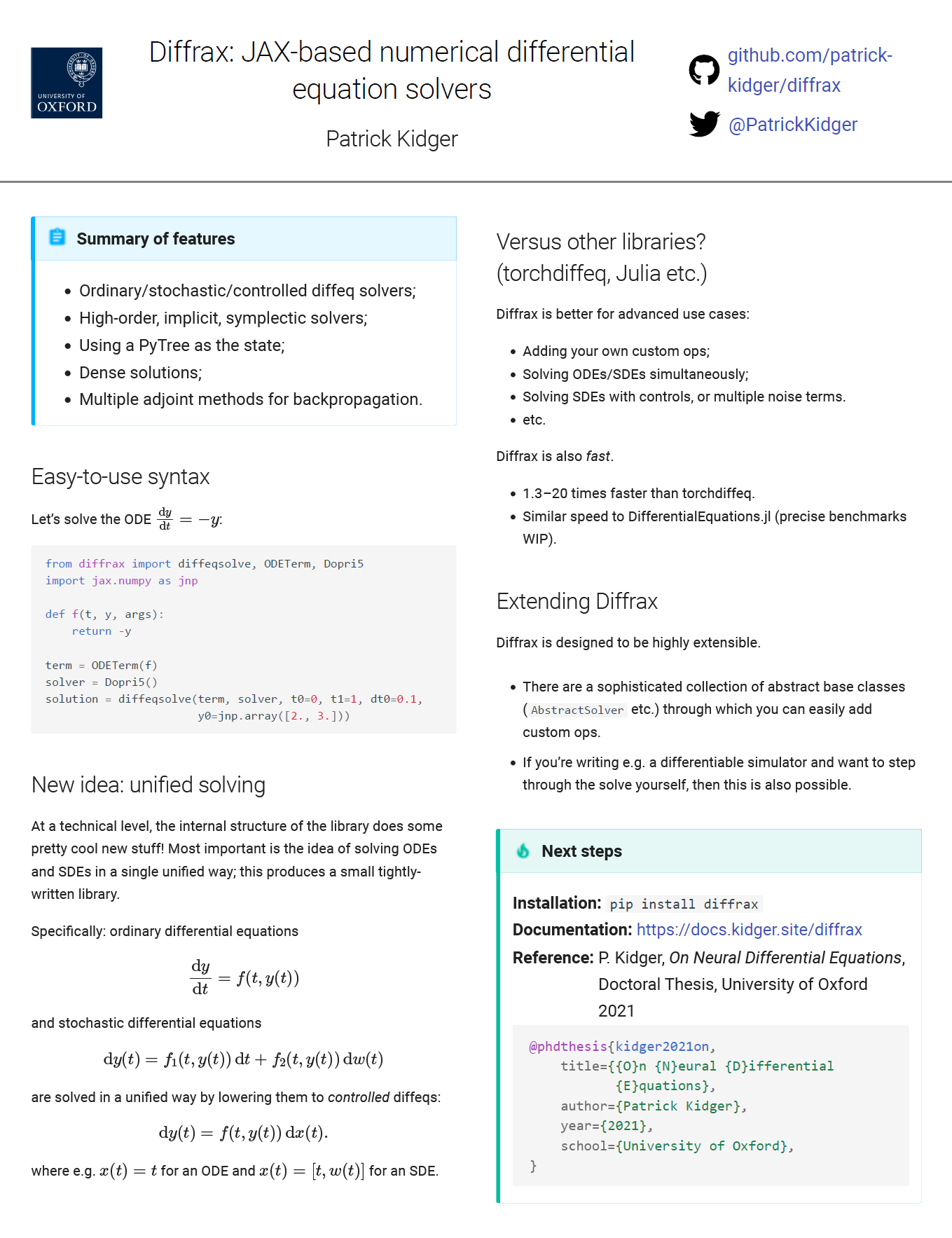
The "source code" for this example is here.
Assumptions
Assumes you have:
- Linux (WSL is fine) or macOS
- Firefox
- Python
Compatibility with other operating systems is probably possible by switching out the version of Dart Sass being used internally.
Compatibility with other browsers is unlikely.
You'll need to be relatively familiar with HTML and (S)CSS to make best use of MkPosters.
Installation
pip install mkposters
Usage instructions
- Create the appropriate directory structure
foo/
    poster.md
    ...any other assets e.g. images...
- Lay out your poster
poster.md should be formatted in three sections, with a literal "--split--" between each section.
...whatever you want in the banner at the top...

--split--

...whatever you want in the left column...

--split--

...whatever you want in the right column...
- Build poster
Run from the directory containing foo:
bash> python -m mkposters foo
(The first time you do this MkPosters will attempt to automatically detect system architecture and install the appropriate required build of dart-sass. This was tested working on both an Apple M1 and Ubuntu x86_64 machine.)
- View poster
Now open Firefox (not Chrome etc.) and navigate to localhost:8000/poster.html.
What you see will be based on the size of your current browser window and may differ from the PDF version. So next hit Control-P and select "Save to PDF". What you see in the print preview is what you'll actually end up with!
Make all your edits until you're happy with the result. Now let's save the result to PDF.
- Save to PDF
Saving to PDF can be quite finickity, and in general depends on choice of browser etc. (For what it's worth the following is tested using Firefox on Windows 10 with mkposters running on Ubuntu 20.04 on WSL2.)
In the print dialog window we opened above:
- Destination: "Save to PDF". Do not use "Microsoft Print to PDF".
- Orientation: (portrait or landscape, as desired)
- Pages: Custom: 1
- Paper size: (whatever is desired; current styling works best on paper roughly A4 sized)
- Margins: None
- Options: uncheck "Print headers and footers"
Once again, make sure you're using Firefox. Using other browsers (e.g. Chrome) or other PDF exporters (e.g. WeasyPrint) can introduce a variety of issues, such as saving text as images (which are unselectable in the PDF, and appear slightly pixelated), missing parts of the styling, or having faded colours (looking at you, Chrome).
Functionality
MkPosters comes with a few extra pieces of functionality built in.
Icons
Recalling that Markdown can embed HTML, then icons can be embedded via e.g.
<img style="height: 20pt; width: 20pt" src="icons/fontawesome/brands/github.svg">
where the list of available icons is here.
Mathematics
You can use LaTeX-formatted mathematics. This is done via
\\(inline math\\)
\\[display math\\]
Note the double backslash.
Admonitions
Admonitions can be added using the syntax
!!! admonition_type "Your title here"

    Your text here
where admonition_type is any of these types, e.g. info, tip, etc.
HTML
The Markdown format allows you use arbitrary HTML inside of it.
- The banner section often contains information (titles, authors, logos, URLs etc.) laid out in complicated ways. Directly writing HTML with embedded
styleattributes is simplest here. See the start of this example. - HTML can be (ab)used to modify spacing like so. (Analogous to those little
\vspaces you definitely never use in LaTeX documents.) In this example we move the content up by 10 points.
<div style="margin-top: -10pt;">
...your content here...
</div>
Future plans?
It'd be nice to support:
- Custom per-poster SCSS;
- Other poster layouts;
- Handling other paper sizes;
- Optionally automatically generating the PDF. (Practically speaking probably by automating the Firefox interaction through Selenium.)
- Reducing package size by not including all of the
mkposters/third_party/iconsdirectory by default?
Pull requests welcome! See CONTRIBUTING.md.
Similar tools
These all support some kind of conversion Markdown -> something.
- For documentation: MkDocs with mkdocs-material.
- For presentations: reveal.js
- For static sites: Hugo or Jekyll

 2 Oct 27, 2022
 6 Jan 25, 2022
 8.3k Jan 08, 2023
 9 Dec 12, 2022
 0 Sep 05, 2021
 1 Jan 06, 2022
 6 Jan 07, 2023
 396 Dec 31, 2022
 7 Mar 19, 2022
 1.5k Jan 06, 2023
 188 Dec 30, 2022
 1 Jun 18, 2022
 2 Dec 19, 2022
 217 Dec 06, 2022
 1 Jan 12, 2022
 4 Dec 04, 2021
 15.6k Jan 02, 2023
 2 Nov 12, 2022
 216 Nov 25, 2022
 2 Jan 21, 2022