A python script for Homeassistant that counts down the days to birthdays, anniversaries etc

Overview

Date Countdown

A python script for Homeassistant that counts down the days to birthdays, anniversaries etc

hacs_badge

Important note

I no longer use homeassistant so if this script stops being compatible with homeassistant that will be the end of the line. That said, it hasn't needed any maintenence in over a year and was working well so it will probably be fine to use for a long while yet.

How it works

This script creates a sensor that a counts down to the next occurrence of a date, like a birthday or anniversary and gives the number of years as an attribute.

You can optionally reverse the counter so it counts up from the last occurrence of a date, such as when you quit smoking.

Requires python_script: to be enabled in your configuration

Installation

Copy the Python script in to your /config/python_scripts directory or install via HACS.

Script arguments

key required type description
name: True string Name of the date (eg. John)
type: True string Type of date (eg. Birthday)
date: True string Date, in format DD/MM/YYYY
friendly_name: False string Display name of the sensor
append_year: False boolean Appends the number of years to the friendly name
icon: False string Icon of the sensor, defaults to 'mdi:calendar-star'
reverse: False boolean Reverses the sensor to count up instead of down. (Defaults to False)

The date can be in the future if you want to countdown to the date itself, and then the anniversaries thereafter.

Usage

Each sensor requires:

name: NAME_OF_DATE
type: TYPE_OF_DATE
date: DD/MM/YYYY_OF DATE

You can also customize the sensor icon and friendly names :

icon: "mdi:ICON_OF_DATE"
friendly_name: FRIENDLY_NAME_OF_DATE
append_year: True

And you can reverse the sensor so it counts up from a date:

reverse: True

examples:

name: John
type: birthday
date: 17/08/1971

or

name: Our wedding
type: anniversary
date: 14/02/1994
icon: "mdi:ring"
append_year: True

or

name: Quit Smoking
type: celebration
date: 01/10/2008
reverse: True

Generated sensors

Each sensor is given the following automatically:

entity_id: sensor.<type>_<name>
friendly_name: <name> <type>
state: <Days to the date from today>
nextoccur: <Date of next occurance>
years: <Number of years it will be>

So, the three sensors we created above would come out as:

sensor.birthday_john
friendly_name: John’s birthday
state: However many days it is until 17th August
nextoccur: 17/08/YYYY (either this year or next year as appropriate)
years: However old John will be on his next birthday

sensor.anniversary_our_wedding
friendly_name: Our wedding anniversary (20)
state: However many days to 14th February
nextoccur: 14/02/YYYY (either this year or next year as appropriate)
years: How many years you will have been married on that day

sensor.celebration_quit_smoking
friendly_name: Quit smoking celebration
state: However many days SINCE 1st October
nextOccur: 01/10/YYYY (either this year or next year as appropriate)
years: How many years SINCE you quit smoking

Note that if the type is 'birthday' the sensor will automatically add an apostrophe.

Example configuration.yaml entry

An example automation to create and refresh the above three sensors daily would be:

automation:
  - alias: Reminder - Refresh date countdown sensors
    trigger:
      - platform: time
        at: '00:00:01'
      - platform: homeassistant
        event: start
    action:
      - service: python_script.date_countdown
        data:
          name: John
          type: birthday
          date: 17/08/1971
      - service: python_script.date_countdown
        data:
          name: Our wedding
          type: anniversary
          date: 14/02/1994
          icon: "mdi:ring"
          append_year: True
      - service: python_script.date_countdown
        data:
          name: Quit smoking
          type: celebration
          date: 01/10/2008
          reverse: True

Example automation

An example automation to remind you of an event 7 days before it occurs would be:

automation:
  - alias: Reminder - John's birthday is coming up
    trigger:
      - platform: state
        entity_id: sensor.birthday_john
        to: '7'
    action:
      - wait_template: "{{ states('sensor.time') == '10:00' }}"
      - service: notify.notify
        data:
          message: "John's birthday is only a week away!"

Example Lovelace representation

Utilising the attributes provided and the custom lovelace card for adding secondary info to an entity row.

type: entities
show_header_toggle: false
title: Our Events
entities:
  - entity: sensor.anniversary_our_wedding
    secondary_info: '[[ {entity}.attributes.nextoccur ]]  ( [[ {entity}.attributes.years ]] Years )'
    type: 'custom:secondaryinfo-entity-row'

Will provide the following lovelace representation:
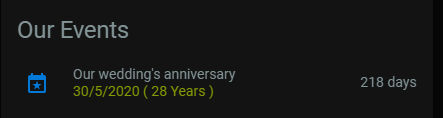
Lovelace example

Credits

Thanks to @myle for the idea for the extra attributes and the lovelace presentation.

Thanks to AJax2012 for the PR that caters for future dates, and makes the apostrophes in the friendly names only append to birthday sensors.

Thanks to Cyrosy for adding customization options and fixing some bugs.

Comments
  • Æ/Ø/Å breaks sensors

    Æ/Ø/Å breaks sensors

    Thanks for a awesome script.

    When using Danish unique letters (Æ, Ø & Å) the sensor breaks. I'm not sure if there exists a official way to handle that issue regarding writing codes, but Home Assistant transform them to: æ: ae ø: o å: aa

    Config

    ---
    # https://github.com/mf-social/ps-date-countdown
    alias: "[System] Date Countdown"
    trigger:
      - platform: time
        at: '00:00:01'
      - platform: homeassistant
        event: start
    action:
      - service: python_script.date_countdown
        data:
          name: Juleaften
          type: anniversary
          date: 24/12/1981
          icon: "mdi:pine-tree"
      - service: python_script.date_countdown
        data:
          name: 'Nytårsaften'
          type: anniversary
          date: 31/12/1981
          icon: "mdi:pine-tree"
    

    Log

    Log Details (ERROR)
    Logger: homeassistant.components.python_script.date_countdown.py
    Source: core.py:736
    Integration: Python Scripts (documentation, issues)
    First occurred: 4:01:51 PM (1 occurrences)
    Last logged: 4:01:51 PM
    
    Error executing script: Invalid entity id encountered: sensor.anniversary_nytårsaften. Format should be <domain>.<object_id>
    Traceback (most recent call last):
      File "/usr/src/homeassistant/homeassistant/components/python_script/__init__.py", line 205, in execute
        exec(compiled.code, restricted_globals)
      File "date_countdown.py", line 50, in <module>
      File "/usr/src/homeassistant/homeassistant/core.py", line 954, in set
        context,
      File "/usr/local/lib/python3.7/concurrent/futures/_base.py", line 435, in result
        return self.__get_result()
      File "/usr/local/lib/python3.7/concurrent/futures/_base.py", line 384, in __get_result
        raise self._exception
      File "/usr/src/homeassistant/homeassistant/util/async_.py", line 53, in run_callback
        future.set_result(callback(*args))
      File "/usr/src/homeassistant/homeassistant/core.py", line 994, in async_set
        state = State(entity_id, new_state, attributes, last_changed, None, context)
      File "/usr/src/homeassistant/homeassistant/core.py", line 736, in __init__
        f"Invalid entity id encountered: {entity_id}. "
    homeassistant.exceptions.InvalidEntityFormatError: Invalid entity id encountered: sensor.anniversary_nytårsaften. Format should be <domain>.<object_id>
    

    I'm aware of the use of friendly_name, but many names in Denmark fx have special letters.

    opened by allanpersson 18
  • Negative number of years

    Negative number of years

    Hi there,

    since last update for some reason the "years" attribute became a negative value. image

    I have checked now the configuration and documentation to see if there was something new I wasn't aware of but it doesn't look like.

    The config it's fairly simple, the only difference is that I am using the secret file to store the dates:

      - service: python_script.date_countdown
        data:
          name: Andrea
          type: birthday
          date: !secret andrea_birthday
    

    Any clue?

    Thanks :) Andrea

    opened by SeLLeRoNe 12
  • Please provide more detailed example

    Please provide more detailed example

    It’s not clear to me exactly how I define the birthdays... I see from the readme which fields you expect but what’s not clear to me is where I define these... Do they go in the configuration.yaml ?

    opened by johntdyer 12
  • Error python 3.9.0

    Error python 3.9.0

    HA 0.116.4 with python 3.9.0 Reminder - Refresh date countdown sensors: Error executing script. Unexpected error for call_service at pos 1: Unknown slice type: <ast.Constant object at 0x51578490> While executing automation automation.reminder_refresh_date_countdown_sensors

    opened by MARIOP69 7
  • Feature Request: Ability to add 'years' to sensors friendly_name

    Feature Request: Ability to add 'years' to sensors friendly_name

    Hello, I think it would be great to allow appending 'years' to a sensors friendly_name, so for example... John's Birthday - 122 days would become... John's Birthday (50) - 122 days This way it's easier to spot milestone events

    Cheers, James

    opened by jimbob1001 6
  • Small Updates

    Small Updates

    Just made some small updates:

    • If the date of event is more than 1 year in the future (like 2021 if current year is 2019), use the event date to calculate distance to event.
    • add apostrophe to the friendly name of the sensor only if the event type is birthday. easy to change if desired.
    opened by AJax2012 2
  • Example automation is confusing...

    Example automation is confusing...

    Having

          - platform: time
            at: '00:00:01'
    

    In the example automation means the sensor isn't created until that time. Best to remove that and have the sensor created on HA restart. Helpful for noobs like me.

    opened by rv-kip 1
  • fix: past events won't get negative year anymore

    fix: past events won't get negative year anymore

    With this commit, years will never be negative again.

    • If the date is in the past, the diffrence between the next occurence year and the initial year is the number of years
    • If the date is in the future, it has never happened so years will always be 0

    Should fix #8

    opened by cyrosy 0
Releases(v6.0)
Owner
Marc Forth
Marc Forth
Segger Embedded Studio project for building & debugging Flipper Zero firmware.

Segger Embedded Studio project for Flipper Zero firmware Установка Добавить данный репозиторий в качестве сабмодуля в корень локальной копии репозитор

25 Dec 28, 2022
EuroPi: A reprogrammable Eurorack project based on the Raspberry Pi Pico

EuroPi The EuroPi is a fully user reprogrammable module based on the Raspberry Pi Pico, which allows users to process inputs and controls to produce o

Allen Synthesis 218 Jan 01, 2023
Trajectory optimization package for Mini-Pupper robot

Trajectory optimization package for Mini-Pupper robot Purpose of this repository is to provide low-torque and low-impact trajectory for Mini-Pupper qu

Sotaro Katayama 38 Aug 17, 2022
rPico KMK powered macropad with IPS screen

MacroPact rPico KMK powered macropad with IPS screen Idea/Desing: Sean Yin Build/Coding: kbjunky ( In case of any problems hit me up on Discord kbjunk

81 Dec 21, 2022
Universal Xiaomi MIoT integration for Home Assistant

Xiaomi MIoT Raw 简体中文 | English MIoT 协议是小米智能家居从 2018 年起推行的智能设备通信协议规范,此后凡是可接入米家的设备均通过此协议进行通信。此插件按照 MIoT 协议规范与设备通信,实现对设备的状态读取及控制。

1.9k Jan 02, 2023
A flexible data historian based on InfluxDB, Grafana, MQTT and more. Free, open, simple.

Kotori Telemetry data acquisition and sensor networks for humans. Documentation: https://getkotori.org/ Source Code: https://github.com/daq-tools/koto

83 Nov 26, 2022
Raspberry Pi Pico as a Rubber Ducky

Raspberry-Pi-Pico-as-a-Rubber-Ducky Kurulum Raspberry Pi Pico cihazınız için CircuitPython'u indirin. Boot düğmesine basılı tutarken cihazı bir USB ba

Furkan Enes POLATOĞLU 6 Dec 13, 2022
Ha-rpi gpio - Home Assistant Raspberry Pi GPIO Integration

Home Assistant Raspberry Pi GPIO custom integration This is a spin-off from the

Shay Levy 98 Dec 24, 2022
gdsfactory is an EDA (electronics design automation) tool to Layout Integrated Circuits.

gdsfactory 3.5.5 gdsfactory is an EDA (electronics design automation) tool to Layout Integrated Circuits. It is build on top of phidl gdspy and klayou

147 Jan 04, 2023
A iot Bike sytem based on RaspberryPi, Ardiuino

Cyclic 's Kernel ---- A iot Bike sytem based on RaspberryPi, Ardiuino, etc 0x1 What is This? Cyclic 's Kernel is an independent System With self-produ

Retr0mous 2 Oct 09, 2022
Testing additional addon devices, and their working scripts

ESP32-addon-devices-potpurri Testing additional addon devices, and their micropython working scripts 📑 List of device addons tested so far Ethernet P

f-caro 0 Nov 26, 2022
Pinion — Nice-looking interactive diagrams for KiCAD PCBs

Pinion — Nice-looking interactive diagrams for KiCAD PCBs Pinion is a simple tool that allows you to make a nice-looking pinout diagrams for your PCBs

Jan Mrázek 297 Jan 06, 2023
Classes and functions for animated text and graphics on an LED display

LEDarcade A collection of classes and functions for animated text and graphics on an Adafruit LED Matrix.

datagod 31 Jan 04, 2023
Shotgrid Toolkit Engine for Gaffer

Shotgun toolkit engine for Gaffer Contact : Diego Garcia Huerta Overview Implementation of a shotgun engine for Gaffer. It supports the classic bootst

Diego Garcia Huerta 12 May 21, 2022
A python library written for the raspberry pi.

A python package for using certain components on the raspberry pi.

Builder212 1 Nov 09, 2021
OPNsense integration with Home Assistant

hass-opnsense Join OPNsense with home-assistant! hass-opnsense uses the built-in xmlrpc service of OPNsense for all interactions. This project is curr

Travis Glenn Hansen 54 Jan 03, 2023
Volkswagen ID component for Home Assistant

Volkswagen ID component for Home Assistant This folder contains both a generic Python 3 library for the Volkswagen ID API and a component for Home Ass

55 Jan 07, 2023
A IC scan test interface for Arduino

ICSCAN_ARDUINO Prerequisites Python 3.6 or higher arduino uno or nano what is this It is a bitstream tranceiver to test IC chip It sends bitstream to

Nifty Chips Laboratory 0 Sep 15, 2022
Example code and projects for FeatherS2 and FeatherS2 Neo

FeatherS2 & FeatherS2 Neo This repo is a collection of code, firmware, and files

Unexpected Maker 5 Jan 01, 2023
Python apps to assist with Gas Blending

Welcome to DiveTools Gas Blending This tool is for testing and educational use. It is not intended to confirm the mix of breathing gases. If this tool

Tucker 7 Sep 18, 2022