BackgroundRemover lets you Remove Background from images and video with a simple command line interface

Overview

BackgroundRemover

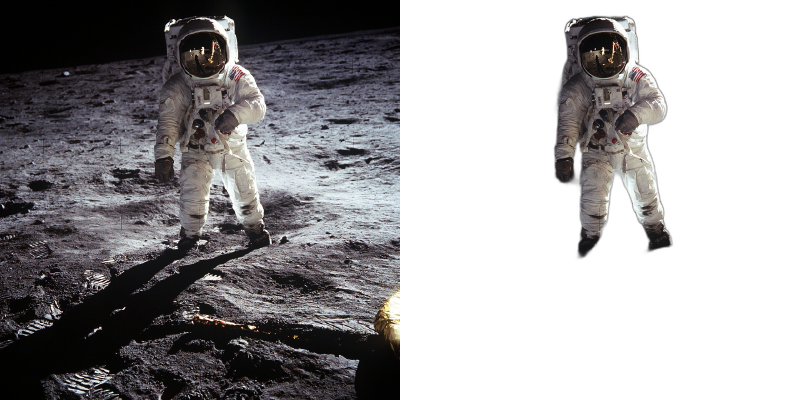
Background Remover background remover video
BackgroundRemover is a command line tool to remove background from video and image, made by nadermx to power https://BackgroundRemover.app. If you wonder why it was made read this short blog post.

Requirements

  • python <= 3.6
  • python3.6-dev #or what ever version of python you using
  • torch and torchvision stable version (https://pytorch.org)
  • ffmpeg 4.4+

How to install torch and fmpeg

Go to https://pytorch.org and scroll down to INSTALL PYTORCH section and follow the instructions.

For example:

PyTorch Build: Stable (1.7.1)
Your OS: Windows
Package: Pip
Language: Python
CUDA: None

To install ffmpeg and python-dev

sudo apt install ffmpeg python3.6-dev

Installation

To Install backgroundremover, install it from pypi

pip install --upgrade pip
pip install backgroundremover

Please note that when you first run the program, it will check to see if you have the u2net models, if you do not, it will get them from u2net's google drive, as they say too here, and in this repo the code that pulls it is here

Usage as a cli

Image

Remove the background from a local file image

backgroundremover -i "/path/to/image.jpeg" -o "output.png"

Advance usage for image background removal

Sometimes it is possible to achieve better results by turning on alpha matting. Example:

backgroundremover -i "/path/to/image.jpeg" -a -ae 15 -o "output.png"

change the model for diferent background removal methods between u2netp, u2net, or u2net_human_seg

backgroundremover -i "/path/to/image.jpeg" -m "u2net_human_seg" -o "output.png"

Video

remove background from video and make transparent mov

backgroundremover -i "/path/to/video.mp4" -tv -o "output.mov"

remove background from local video and overlay it over other video

backgroundremover -i "/path/to/video.mp4" -tov -tv "/path/to/videtobeoverlayed.mp4" -o "output.mov"

remove background from video and make transparent gif

backgroundremover -i "/path/to/video.mp4" -tg -o "output.gif"

Make matte key file (green screen overlay)

Make a matte file for premier

backgroundremover -i "/path/to/video.mp4" -mk -o "output.matte.mp4"

Advance usage for video

Change the framerate of the video (default is set to 30)

backgroundremover -i "/path/to/video.mp4" -fr 30 -tv -o "output.mov"

Change the gpu batch size of the video (default is set to 1)

backgroundremover -i "/path/to/video.mp4" -gb 4 -tv -o "output.mov"

Change the number of workers working on video (default is set to 1)

backgroundremover -i "/path/to/video.mp4" -wn 4 -tv -o "output.mov"

change the model for diferent background removal methods between u2netp, u2net, or u2net_human_seg

backgroundremover -i "/path/to/video.mp4" -m "u2net_human_seg"-tv -o "output.mov"

Todo

  • convert logic from video to image to utilize more GPU on image removal
  • clean up documentation a bit more
  • add ability to adjust and give feedback images or videos to datasets
  • add ability to realtime background removal for videos, for streaming
  • finish flask server api
  • add ability to use other models than u2net, ie your own.
  • other

Pull requests

Accepted

If you like this library

Give a link to our project BackgroundRemover.app or this git, telling people that you like it or use it.

Reason for project

We made it our own package after merging together parts of others, adding in a few features of our own via posting parts as bounty questions on superuser, etc. As well as asked on hackernews earlier to open source the image part, so decided to add in video, and a bit more.

References

License

Licensed under MIT License

Comments
  • JSONDecodeError: Expecting value: line 2 column 1 (char 1)

    JSONDecodeError: Expecting value: line 2 column 1 (char 1) "Remove the background from a video"

    Hello

    Thanks for this great effort!

    I am running the below code to remove a background from a video, but I am getting the below error.

    JSONDecodeError: Expecting value: line 2 column 1 (char 1)

    import requests

    file_names = ["/path/to/file.mp4"] api_key = '<YOUR_API_KEY>'

    domain = 'https://video.backgroundremover.app' api_version = 'api/v1/' headers = {'Authorization': api_key} def videos(): files = [('video', open(f, 'rb')) for f in file_names] r = requests.post("%s/%svideo/" % (domain, api_version), files=files, headers=headers) return r.json()

    def get_results(job_name, count, type): r = requests.post("%s/%sresults/" % (domain, api_version), data={'job_name': job_name, 'count': count, "type": type}) return r.json()

    def download_file(url): local_filename = url.split('/')[-1] with requests.get(url, stream=True) as r: r.raise_for_status() with open(local_filename, 'wb') as f: for chunk in r.iter_content(chunk_size=8192): f.write(chunk)

    image = videos() if not image.get('error'): results = get_results(image['job_name'], image['count'], image['type']) while not results['finished'] or not results['error']: results = get_results(word['job_name'], word['count'], word['type']) results['finished'] = results['finished'] time.sleep(5) if results['finished']: print(results['finished']) break for f in results['files']: file = download_file(f[0]) print(file)

    opened by AhmedEwis 19
  • -tov/--transparentvideoovervideo: invalid <lambda> value:

    -tov/--transparentvideoovervideo: invalid value:

    Hi, I tried multiple way to get a -tv working an example video to work with a background and it always throws the error in the title.

    For instance, backgroundremover -i "./stress.mp4" -tov "vert.mp4" -o "output.mp4" results in: backgroundremover: error: argument -tov/--transparentvideoovervideo: invalid <lambda> value: 'vert.mp4'

    Weirdly enough backgroundremover -i "./stress.mp4" -tov -o "output.mp4" "works" ... but there's no overlay video input so I get: /<stdin>: No such file or directory Process finished

    Any idea?

    opened by j2l 16
  • Installation succeeds, running fails

    Installation succeeds, running fails

    After successfully installing backroundremover, I am running into the following issue when running it:

    [[email protected]:bgRemove]% backgroundremover -i 'input.jpg' 'out.png'
    Failed to import ahead-of-time-compiled modules.
    This is expected on first import.
    Compiling modules and trying again.
    This might take a minute.
    Traceback (most recent call last):
      File "/home/arjan/.local/lib/python3.7/site-packages/pymatting_aot/cc.py", line 36, in <module>
        import pymatting_aot.aot
    ModuleNotFoundError: No module named 'pymatting_aot.aot'
    
    During handling of the above exception, another exception occurred:
    
    Traceback (most recent call last):
      File "/home/arjan/.local/bin/backgroundremover", line 5, in <module>
        from backgroundremover.cmd.cli import main
      File "/home/arjan/.local/lib/python3.7/site-packages/backgroundremover/cmd/cli.py", line 5, in <module>
        from .. import utilities
      File "/home/arjan/.local/lib/python3.7/site-packages/backgroundremover/utilities.py", line 10, in <module>
        from .bg import DEVICE, Net, iter_frames, remove_many
      File "/home/arjan/.local/lib/python3.7/site-packages/backgroundremover/bg.py", line 6, in <module>
        from pymatting.alpha.estimate_alpha_cf import estimate_alpha_cf
      File "/home/arjan/.local/lib/python3.7/site-packages/pymatting/__init__.py", line 2, in <module>
        import pymatting_aot.cc
      File "/home/arjan/.local/lib/python3.7/site-packages/pymatting_aot/cc.py", line 54, in <module>
        compile_modules()
      File "/home/arjan/.local/lib/python3.7/site-packages/pymatting_aot/cc.py", line 8, in compile_modules
        cc = CC("aot")
      File "/home/arjan/.local/lib/python3.7/site-packages/numba/pycc/cc.py", line 65, in __init__
        self._toolchain = Toolchain()
      File "/home/arjan/.local/lib/python3.7/site-packages/numba/pycc/platform.py", line 78, in __init__
        self._raise_external_compiler_error()
      File "/home/arjan/.local/lib/python3.7/site-packages/numba/pycc/platform.py", line 121, in _raise_external_compiler_error
        raise RuntimeError(msg)
    RuntimeError: Attempted to compile AOT function without the compiler used by `numpy.distutils` present. If using conda try:
    
    #> conda install gcc_linux-64 gxx_linux-64
    

    Any idea? I'm on a Debian 10 system. gcc is installed.

    opened by av01d 13
  • transparentvideo mode is not working

    transparentvideo mode is not working

    thank you for share this code and model.

    I tested with a single image and it worked. but when i tested in video, it failed. (use -tv option). output video have 0kb.

    I try to upgrade ffmpeg version to 4.4.1 but it isn't work...

    ubuntu 18.04 python3.6 torch 1.10.1 cuda 11.3

    opened by Mombin 12
  • [Windows] no file output after ffmpeg frame conversion complete

    [Windows] no file output after ffmpeg frame conversion complete

    backgroundremover -i t1.mp4 -tv -o t2.mp4

    FINISHED ALL FRAMES (135)! Starting alphamerge after call

    on windows after completing all frames and about to merge nothing happens. temp dir is cleaned. no error occurs but the user is thrown out of the program from the terminal and the output file remains empty at 0 bytes. its like the program forgot to actually write the data to the output location before ending

    image

    opened by Chad90b 11
  • using the -tv argument does not work from WSL

    using the -tv argument does not work from WSL

    Hi, I've been trying to use the soft from WSL, the mask creation with -mk argument seems fine, but everytime I try to remove background with the -tv argument, the output file weighs 0kB.

    I don't have error in the console, or anything like that, how do you think I can fix this?

    opened by edouard-mangel 11
  • Error: Trimap did not contain foreground values

    Error: Trimap did not contain foreground values

    failing out while removing background image

    uname -a 
    5.8.0-3-amd64 #1 SMP Debian 5.8.14-1~mx19+2 (2020-10-25) x86_64 GNU/Linux
    
    backgroundremover -i ./final_sign.jpeg -a  -ae 15 -o final_sig4.png 
    
    
    final_sig4.png
    [W NNPACK.cpp:80] Could not initialize NNPACK! Reason: Unsupported hardware.
    Traceback (most recent call last):
      File "/home/xyz/.asdf/installs/python/3.8.0/bin/backgroundremover", line 8, in <module>
        sys.exit(main())
      File "/home/xyz/.asdf/installs/python/3.8.0/lib/python3.8/site-packages/backgroundremover/cmd/cli.py", line 241, in main
        remove(
      File "/home/xyz/.asdf/installs/python/3.8.0/lib/python3.8/site-packages/backgroundremover/bg.py", line 187, in remove
        cutout = alpha_matting_cutout(
      File "/home/xyz/.asdf/installs/python/3.8.0/lib/python3.8/site-packages/backgroundremover/bg.py", line 147, in alpha_matting_cutout
        alpha = estimate_alpha_cf(img_normalized, trimap_normalized)
      File "/home/xyz/.asdf/installs/python/3.8.0/lib/python3.8/site-packages/pymatting/alpha/estimate_alpha_cf.py", line 51, in estimate_alpha_cf
        is_fg, is_bg, is_known, is_unknown = trimap_split(trimap)
      File "/home/xyz/.asdf/installs/python/3.8.0/lib/python3.8/site-packages/pymatting/util/util.py", line 495, in trimap_split
        raise ValueError(
    ValueError: Trimap did not contain foreground values (values >= 0.900000)


    opened by byteshiva 8
  • why does it access google driver?

    why does it access google driver?

    File "d:\prog\python\36\lib\site-packages\backgroundremover\utilities.py", line 295, in download_file_from_google_drive gdown.download(URL, path, quiet=False) File "d:\prog\python\36\lib\site-packages\gdown\download.py", line 114, in download res = sess.get(url, headers=headers, stream=True) File "d:\prog\python\36\lib\site-packages\requests\sessions.py", line 555, in get return self.request('GET', url, **kwargs) File "d:\prog\python\36\lib\site-packages\requests\sessions.py", line 542, in request resp = self.send(prep, **send_kwargs) File "d:\prog\python\36\lib\site-packages\requests\sessions.py", line 655, in send r = adapter.send(request, **kwargs) File "d:\prog\python\36\lib\site-packages\requests\adapters.py", line 516, in send raise ConnectionError(e, request=request) requests.exceptions.ConnectionError: HTTPSConnectionPool(host='drive.google.com', port=443): Max retries exceeded with url: /uc?id=1ao1ovG1Qtx4b7EoskHXmi2E9rp5CHLcZ (Caused by NewConnectionError('<urllib3.connection.HTTPSConnection object at 0x000002225602D4E0>: Failed to establish a new connection: [WinError 10060] 由于连接方在一段时间后没有正确答复或连接的主机没有反应,连接尝试失败。',))

    opened by OsmondGao 7
  • API docs or JavaScript example

    API docs or JavaScript example

    I'm trying to use the service from the browser with JavaScript and am having trouble understanding the API from the Python example. Would it be possible to add a JavaScript example using fetch or perhaps general http request documentation. Thanks

    opened by aubergene 5
  • How does it work?

    How does it work?

    How does it work?

    Would it be possible to add a paragraph to the main README.md?

    I am not looking for a detailed 1:1 source code explanation, but just the main gist of how the correct pixels are determined and whether the program may also pick the "wrong pixels" (I assume some backgrounds will be harder). If you have some time in the future, a paragraph would be nice in this regard - does not have to be overly long eithers. Thanks for reading!

    opened by rubyFeedback 4
  • Intermittently, an image will yield the error:

    Intermittently, an image will yield the error: "cannot identify image file"

    Traceback (most recent call last):
      File "/home/me/.local/bin/backgroundremover", line 8, in <module>
        sys.exit(main())
      File "/home/me/.local/lib/python3.10/site-packages/backgroundremover/cmd/cli.py", line 241, in main
        remove(
      File "/home/me/.local/lib/python3.10/site-packages/backgroundremover/bg.py", line 183, in remove
        img = Image.open(io.BytesIO(data)).convert("RGB")
      File "/home/me/.local/lib/python3.10/site-packages/PIL/Image.py", line 2958, in open
        raise UnidentifiedImageError(
    PIL.UnidentifiedImageError: cannot identify image file <_io.BytesIO object at 0x7fd279fa6520>
    

    I wonder what could cause this? It's caused by the same set of images on every run (reproducible.) The resulting file size is 0 bytes.

    PS: Thanks for sharing this awesome project!

    opened by Slapbox 3
  • Error

    Error

    The headers or library files could not be found for jpeg, a required dependency when compiling Pillow from source.

      Please see the install instructions at:
         https://pillow.readthedocs.io/en/latest/installation.html
      
      
      [end of output]
    

    note: This error originates from a subprocess, and is likely not a problem with pip. error: legacy-install-failure

    × Encountered error while trying to install package. ╰─> Pillow

    note: This is an issue with the package mentioned above, not pip. hint: See above for output from the failure.
    opened by hakxcore 0
  • unable to install

    unable to install

    DEPRECATION: Pillow is being installed using the legacy 'setup.py install' method, because it does not have a 'pyproject.toml' and the 'wheel' package is not installed. pip 23.1 will enforce this behaviour change. A possible replacement is to enable the '--use-pep517' option. Discussion can be found at https://github.com/pypa/pip/issues/8559 Running setup.py install for Pillow ... error error: subprocess-exited-with-error

    × Running setup.py install for Pillow did not run successfully. │ exit code: 1 ╰─> [192 lines of output] running install C:\Apps\Python310\lib\site-packages\setuptools\command\install.py:34: SetuptoolsDeprecationWarning: setup.py install is deprecated. Use build and pip and other standards-based tools. warnings.warn( running build running build_py creating build creating build\lib.win-amd64-cpython-310 creating build\lib.win-amd64-cpython-310\PIL copying src\PIL\BdfFontFile.py -> build\lib.win-amd64-cpython-310\PIL copying src\PIL\BlpImagePlugin.py -> build\lib.win-amd64-cpython-310\PIL copying src\PIL\BmpImagePlugin.py -> build\lib.win-amd64-cpython-310\PIL copying src\PIL\BufrStubImagePlugin.py -> build\lib.win-amd64-cpython-310\PIL copying src\PIL\ContainerIO.py -> build\lib.win-amd64-cpython-310\PIL copying src\PIL\CurImagePlugin.py -> build\lib.win-amd64-cpython-310\PIL copying src\PIL\DcxImagePlugin.py -> build\lib.win-amd64-cpython-310\PIL copying src\PIL\DdsImagePlugin.py -> build\lib.win-amd64-cpython-310\PIL copying src\PIL\EpsImagePlugin.py -> build\lib.win-amd64-cpython-310\PIL copying src\PIL\ExifTags.py -> build\lib.win-amd64-cpython-310\PIL copying src\PIL\features.py -> build\lib.win-amd64-cpython-310\PIL copying src\PIL\FitsStubImagePlugin.py -> build\lib.win-amd64-cpython-310\PIL copying src\PIL\FliImagePlugin.py -> build\lib.win-amd64-cpython-310\PIL copying src\PIL\FontFile.py -> build\lib.win-amd64-cpython-310\PIL copying src\PIL\FpxImagePlugin.py -> build\lib.win-amd64-cpython-310\PIL copying src\PIL\FtexImagePlugin.py -> build\lib.win-amd64-cpython-310\PIL copying src\PIL\GbrImagePlugin.py -> build\lib.win-amd64-cpython-310\PIL copying src\PIL\GdImageFile.py -> build\lib.win-amd64-cpython-310\PIL copying src\PIL\GifImagePlugin.py -> build\lib.win-amd64-cpython-310\PIL copying src\PIL\GimpGradientFile.py -> build\lib.win-amd64-cpython-310\PIL copying src\PIL\GimpPaletteFile.py -> build\lib.win-amd64-cpython-310\PIL copying src\PIL\GribStubImagePlugin.py -> build\lib.win-amd64-cpython-310\PIL copying src\PIL\Hdf5StubImagePlugin.py -> build\lib.win-amd64-cpython-310\PIL copying src\PIL\IcnsImagePlugin.py -> build\lib.win-amd64-cpython-310\PIL copying src\PIL\IcoImagePlugin.py -> build\lib.win-amd64-cpython-310\PIL copying src\PIL\Image.py -> build\lib.win-amd64-cpython-310\PIL copying src\PIL\ImageChops.py -> build\lib.win-amd64-cpython-310\PIL copying src\PIL\ImageCms.py -> build\lib.win-amd64-cpython-310\PIL copying src\PIL\ImageColor.py -> build\lib.win-amd64-cpython-310\PIL copying src\PIL\ImageDraw.py -> build\lib.win-amd64-cpython-310\PIL copying src\PIL\ImageDraw2.py -> build\lib.win-amd64-cpython-310\PIL copying src\PIL\ImageEnhance.py -> build\lib.win-amd64-cpython-310\PIL copying src\PIL\ImageFile.py -> build\lib.win-amd64-cpython-310\PIL copying src\PIL\ImageFilter.py -> build\lib.win-amd64-cpython-310\PIL copying src\PIL\ImageFont.py -> build\lib.win-amd64-cpython-310\PIL copying src\PIL\ImageGrab.py -> build\lib.win-amd64-cpython-310\PIL copying src\PIL\ImageMath.py -> build\lib.win-amd64-cpython-310\PIL copying src\PIL\ImageMode.py -> build\lib.win-amd64-cpython-310\PIL copying src\PIL\ImageMorph.py -> build\lib.win-amd64-cpython-310\PIL copying src\PIL\ImageOps.py -> build\lib.win-amd64-cpython-310\PIL copying src\PIL\ImagePalette.py -> build\lib.win-amd64-cpython-310\PIL copying src\PIL\ImagePath.py -> build\lib.win-amd64-cpython-310\PIL copying src\PIL\ImageQt.py -> build\lib.win-amd64-cpython-310\PIL copying src\PIL\ImageSequence.py -> build\lib.win-amd64-cpython-310\PIL copying src\PIL\ImageShow.py -> build\lib.win-amd64-cpython-310\PIL copying src\PIL\ImageStat.py -> build\lib.win-amd64-cpython-310\PIL copying src\PIL\ImageTk.py -> build\lib.win-amd64-cpython-310\PIL copying src\PIL\ImageTransform.py -> build\lib.win-amd64-cpython-310\PIL copying src\PIL\ImageWin.py -> build\lib.win-amd64-cpython-310\PIL copying src\PIL\ImImagePlugin.py -> build\lib.win-amd64-cpython-310\PIL copying src\PIL\ImtImagePlugin.py -> build\lib.win-amd64-cpython-310\PIL copying src\PIL\IptcImagePlugin.py -> build\lib.win-amd64-cpython-310\PIL copying src\PIL\Jpeg2KImagePlugin.py -> build\lib.win-amd64-cpython-310\PIL copying src\PIL\JpegImagePlugin.py -> build\lib.win-amd64-cpython-310\PIL copying src\PIL\JpegPresets.py -> build\lib.win-amd64-cpython-310\PIL copying src\PIL\McIdasImagePlugin.py -> build\lib.win-amd64-cpython-310\PIL copying src\PIL\MicImagePlugin.py -> build\lib.win-amd64-cpython-310\PIL copying src\PIL\MpegImagePlugin.py -> build\lib.win-amd64-cpython-310\PIL copying src\PIL\MpoImagePlugin.py -> build\lib.win-amd64-cpython-310\PIL copying src\PIL\MspImagePlugin.py -> build\lib.win-amd64-cpython-310\PIL copying src\PIL\PaletteFile.py -> build\lib.win-amd64-cpython-310\PIL copying src\PIL\PalmImagePlugin.py -> build\lib.win-amd64-cpython-310\PIL copying src\PIL\PcdImagePlugin.py -> build\lib.win-amd64-cpython-310\PIL copying src\PIL\PcfFontFile.py -> build\lib.win-amd64-cpython-310\PIL copying src\PIL\PcxImagePlugin.py -> build\lib.win-amd64-cpython-310\PIL copying src\PIL\PdfImagePlugin.py -> build\lib.win-amd64-cpython-310\PIL copying src\PIL\PdfParser.py -> build\lib.win-amd64-cpython-310\PIL copying src\PIL\PixarImagePlugin.py -> build\lib.win-amd64-cpython-310\PIL copying src\PIL\PngImagePlugin.py -> build\lib.win-amd64-cpython-310\PIL copying src\PIL\PpmImagePlugin.py -> build\lib.win-amd64-cpython-310\PIL copying src\PIL\PsdImagePlugin.py -> build\lib.win-amd64-cpython-310\PIL copying src\PIL\PSDraw.py -> build\lib.win-amd64-cpython-310\PIL copying src\PIL\PyAccess.py -> build\lib.win-amd64-cpython-310\PIL copying src\PIL\SgiImagePlugin.py -> build\lib.win-amd64-cpython-310\PIL copying src\PIL\SpiderImagePlugin.py -> build\lib.win-amd64-cpython-310\PIL copying src\PIL\SunImagePlugin.py -> build\lib.win-amd64-cpython-310\PIL copying src\PIL\TarIO.py -> build\lib.win-amd64-cpython-310\PIL copying src\PIL\TgaImagePlugin.py -> build\lib.win-amd64-cpython-310\PIL copying src\PIL\TiffImagePlugin.py -> build\lib.win-amd64-cpython-310\PIL copying src\PIL\TiffTags.py -> build\lib.win-amd64-cpython-310\PIL copying src\PIL\WalImageFile.py -> build\lib.win-amd64-cpython-310\PIL copying src\PIL\WebPImagePlugin.py -> build\lib.win-amd64-cpython-310\PIL copying src\PIL\WmfImagePlugin.py -> build\lib.win-amd64-cpython-310\PIL copying src\PIL\XbmImagePlugin.py -> build\lib.win-amd64-cpython-310\PIL copying src\PIL\XpmImagePlugin.py -> build\lib.win-amd64-cpython-310\PIL copying src\PIL\XVThumbImagePlugin.py -> build\lib.win-amd64-cpython-310\PIL copying src\PIL_binary.py -> build\lib.win-amd64-cpython-310\PIL copying src\PIL_tkinter_finder.py -> build\lib.win-amd64-cpython-310\PIL copying src\PIL_util.py -> build\lib.win-amd64-cpython-310\PIL copying src\PIL_version.py -> build\lib.win-amd64-cpython-310\PIL copying src\PIL_init_.py -> build\lib.win-amd64-cpython-310\PIL copying src\PIL_main_.py -> build\lib.win-amd64-cpython-310\PIL running egg_info writing src\Pillow.egg-info\PKG-INFO writing dependency_links to src\Pillow.egg-info\dependency_links.txt writing top-level names to src\Pillow.egg-info\top_level.txt reading manifest file 'src\Pillow.egg-info\SOURCES.txt' reading manifest template 'MANIFEST.in' warning: no files found matching '.c' warning: no files found matching '.h' warning: no files found matching '.sh' warning: no previously-included files found matching '.appveyor.yml' warning: no previously-included files found matching '.coveragerc' warning: no previously-included files found matching '.editorconfig' warning: no previously-included files found matching '.readthedocs.yml' warning: no previously-included files found matching 'codecov.yml' warning: no previously-included files matching '.git' found anywhere in distribution warning: no previously-included files matching '.pyc' found anywhere in distribution warning: no previously-included files matching '.so' found anywhere in distribution no previously-included directories found matching '.ci' adding license file 'LICENSE' writing manifest file 'src\Pillow.egg-info\SOURCES.txt' running build_ext

      The headers or library files could not be found for zlib,
      a required dependency when compiling Pillow from source.
    
      Please see the install instructions at:
         https://pillow.readthedocs.io/en/latest/installation.html
    
      Traceback (most recent call last):
        File "C:\Users\Senpai\AppData\Local\Temp\pip-install-gd05bu7l\pillow_2e009652622f47769adc0b882b02cfc5\setup.py", line 865, in <module>
          setup(
        File "C:\Apps\Python310\lib\site-packages\setuptools\__init__.py", line 87, in setup
          return distutils.core.setup(**attrs)
        File "C:\Apps\Python310\lib\site-packages\setuptools\_distutils\core.py", line 177, in setup
          return run_commands(dist)
        File "C:\Apps\Python310\lib\site-packages\setuptools\_distutils\core.py", line 193, in run_commands
          dist.run_commands()
        File "C:\Apps\Python310\lib\site-packages\setuptools\_distutils\dist.py", line 968, in run_commands
          self.run_command(cmd)
        File "C:\Apps\Python310\lib\site-packages\setuptools\dist.py", line 1217, in run_command
          super().run_command(command)
        File "C:\Apps\Python310\lib\site-packages\setuptools\_distutils\dist.py", line 987, in run_command
          cmd_obj.run()
        File "C:\Apps\Python310\lib\site-packages\setuptools\command\install.py", line 68, in run
          return orig.install.run(self)
        File "C:\Apps\Python310\lib\site-packages\setuptools\_distutils\command\install.py", line 695, in run
          self.run_command('build')
        File "C:\Apps\Python310\lib\site-packages\setuptools\_distutils\cmd.py", line 317, in run_command
          self.distribution.run_command(command)
        File "C:\Apps\Python310\lib\site-packages\setuptools\dist.py", line 1217, in run_command
          super().run_command(command)
        File "C:\Apps\Python310\lib\site-packages\setuptools\_distutils\dist.py", line 987, in run_command
          cmd_obj.run()
        File "C:\Apps\Python310\lib\site-packages\setuptools\command\build.py", line 24, in run
          super().run()
        File "C:\Apps\Python310\lib\site-packages\setuptools\_distutils\command\build.py", line 131, in run
          self.run_command(cmd_name)
        File "C:\Apps\Python310\lib\site-packages\setuptools\_distutils\cmd.py", line 317, in run_command
          self.distribution.run_command(command)
        File "C:\Apps\Python310\lib\site-packages\setuptools\dist.py", line 1217, in run_command
          super().run_command(command)
        File "C:\Apps\Python310\lib\site-packages\setuptools\_distutils\dist.py", line 987, in run_command
          cmd_obj.run()
        File "C:\Apps\Python310\lib\site-packages\setuptools\command\build_ext.py", line 79, in run
          _build_ext.run(self)
        File "C:\Apps\Python310\lib\site-packages\Cython\Distutils\old_build_ext.py", line 186, in run
          _build_ext.build_ext.run(self)
        File "C:\Apps\Python310\lib\site-packages\setuptools\_distutils\command\build_ext.py", line 339, in run
          self.build_extensions()
        File "C:\Users\Senpai\AppData\Local\Temp\pip-install-gd05bu7l\pillow_2e009652622f47769adc0b882b02cfc5\setup.py", line 702, in build_extensions
          raise RequiredDependencyException(f)
      __main__.RequiredDependencyException: zlib
    
      During handling of the above exception, another exception occurred:
    
      Traceback (most recent call last):
        File "<string>", line 2, in <module>
        File "<pip-setuptools-caller>", line 34, in <module>
        File "C:\Users\Senpai\AppData\Local\Temp\pip-install-gd05bu7l\pillow_2e009652622f47769adc0b882b02cfc5\setup.py", line 922, in <module>
          raise RequiredDependencyException(msg)
      __main__.RequiredDependencyException:
    
      The headers or library files could not be found for zlib,
      a required dependency when compiling Pillow from source.
    
      Please see the install instructions at:
         https://pillow.readthedocs.io/en/latest/installation.html
    
    
      C:\Users\Senpai\AppData\Local\Temp\pip-install-gd05bu7l\pillow_2e009652622f47769adc0b882b02cfc5\setup.py:44: RuntimeWarning: Pillow 8.1.1 does not support Python 3.10 and does not provide prebuilt Windows binaries. We do not recommend building from source on Windows.
        lambda: warnings.warn(
      [end of output]
    

    note: This error originates from a subprocess, and is likely not a problem with pip. Rolling back uninstall of Pillow Moving to c:\apps\python310\lib\site-packages\pil
    from C:\Apps\Python310\Lib\site-packages~il Moving to c:\apps\python310\lib\site-packages\pillow-9.3.0.dist-info
    from C:\Apps\Python310\Lib\site-packages~illow-9.3.0.dist-info error: legacy-install-failure

    × Encountered error while trying to install package. ╰─> Pillow

    note: This is an issue with the package mentioned above, not pip. hint: See above for output from the failure.

    opened by Praveensenpai 0
  • Alpha channel lags behind video

    Alpha channel lags behind video

    With some videos, the generated alpha channel is out of sync with the image. Example in this image. 2022-12-11-210847_1920x1080_scrot You can see at the legs and head, the alpha mask is in the shape it should have been a handful of frames ago.

    Command used: ~/.local/bin/backgroundremover -i '568925567_3AXGeHborlS4Ew02v_Source.mp4' -tv -o test.mov and mpv test.mov - so far only mpv seems able to play these back at all.

    opened by RenaKunisaki 0
  • ModuleNotFoundError: No module named 'backgroundremover'

    ModuleNotFoundError: No module named 'backgroundremover'

    When I run

    backgroundremover -i "c:/temp/maxresdefault.jpg" -o "output.png"

    getting following error....

    Traceback (most recent call last): File "C:\Users\CorreaJ\AppData\Local\Programs\Python\Python310\Scripts\backgroundremover-script.py", line 33, in sys.exit(load_entry_point('backgroundremover==0.2.0', 'console_scripts', 'backgroundremover')()) File "C:\Users\CorreaJ\AppData\Local\Programs\Python\Python310\Scripts\backgroundremover-script.py", line 25, in importlib_load_entry_point return next(matches).load() File "C:\Users\CorreaJ\AppData\Local\Programs\Python\Python310\lib\importlib\metadata_init_.py", line 171, in load module = import_module(match.group('module')) File "C:\Users\CorreaJ\AppData\Local\Programs\Python\Python310\lib\importlib_init_.py", line 126, in import_module return _bootstrap._gcd_import(name[level:], package, level) File "", line 1050, in _gcd_import File "", line 1027, in _find_and_load File "", line 992, in _find_and_load_unlocked File "", line 241, in _call_with_frames_removed File "", line 1050, in _gcd_import File "", line 1027, in _find_and_load File "", line 992, in _find_and_load_unlocked File "", line 241, in _call_with_frames_removed File "", line 1050, in _gcd_import File "", line 1027, in _find_and_load File "", line 1004, in _find_and_load_unlocked ModuleNotFoundError: No module named 'backgroundremover'

    opened by jcdives 0
  • Video/gif output not working.

    Video/gif output not working.

    Been playing around with it for a couple hours now and I'm not having any luck outputting video or gif files. Every time it returns a 0kb file. Using ffmpeg 5.1.1. I'm happy to provide any other details you need, but I can say that when I run the command there's no apparent errors.

    opened by LuckyDarms 6
Releases(v0.1.9)
Generative Modelling of BRDF Textures from Flash Images [SIGGRAPH Asia, 2021]

Neural Material Official code repository for the paper: Generative Modelling of BRDF Textures from Flash Images [SIGGRAPH Asia, 2021] Henzler, Deschai

Philipp Henzler 80 Dec 20, 2022
Square Root Bundle Adjustment for Large-Scale Reconstruction

RootBA: Square Root Bundle Adjustment Project Page | Paper | Poster | Video | Code Table of Contents Citation Dependencies Installing dependencies on

Nikolaus Demmel 205 Dec 20, 2022
Pytorch code for "DPFM: Deep Partial Functional Maps" - 3DV 2021 (Oral)

DPFM Code for "DPFM: Deep Partial Functional Maps" - 3DV 2021 (Oral) Installation This implementation runs on python = 3.7, use pip to install depend

Souhaib Attaiki 29 Oct 03, 2022
Predict bus arrival time using VertexAI and Nvidia's Jetson Nano

bus_prediction predict bus arrival time using VertexAI and Nvidia's Jetson Nano imagenet the command for imagenet.py look like this python3 /path/to/i

10 Dec 22, 2022
Robotics with GPU computing

Robotics with GPU computing Cupoch is a library that implements rapid 3D data processing for robotics using CUDA. The goal of this library is to imple

Shirokuma 625 Jan 07, 2023
ATAC: Adversarially Trained Actor Critic

ATAC: Adversarially Trained Actor Critic Adversarially Trained Actor Critic for Offline Reinforcement Learning by Ching-An Cheng*, Tengyang Xie*, Nan

Microsoft 41 Dec 08, 2022
Toward Spatially Unbiased Generative Models (ICCV 2021)

Toward Spatially Unbiased Generative Models Implementation of Toward Spatially Unbiased Generative Models (ICCV 2021) Overview Recent image generation

Jooyoung Choi 88 Dec 01, 2022
A best practice for tensorflow project template architecture.

A best practice for tensorflow project template architecture.

Mahmoud Gamal Salem 3.6k Dec 22, 2022
Face and Body Tracking for VRM 3D models on the web.

Kalidoface 3D - Face and Full-Body tracking for Vtubing on the web! A sequal to Kalidoface which supports Live2D avatars, Kalidoface 3D is a web app t

Rich 257 Jan 02, 2023
Official codebase for Legged Robots that Keep on Learning: Fine-Tuning Locomotion Policies in the Real World

Legged Robots that Keep on Learning Official codebase for Legged Robots that Keep on Learning: Fine-Tuning Locomotion Policies in the Real World, whic

Laura Smith 70 Dec 07, 2022
Code for our paper "Multi-scale Guided Attention for Medical Image Segmentation"

Medical Image Segmentation with Guided Attention This repository contains the code of our paper: "'Multi-scale self-guided attention for medical image

Ashish Sinha 394 Dec 28, 2022
Kaggle-titanic - A tutorial for Kaggle's Titanic: Machine Learning from Disaster competition. Demonstrates basic data munging, analysis, and visualization techniques. Shows examples of supervised machine learning techniques.

Kaggle-titanic This is a tutorial in an IPython Notebook for the Kaggle competition, Titanic Machine Learning From Disaster. The goal of this reposito

Andrew Conti 800 Dec 15, 2022
The lightweight PyTorch wrapper for high-performance AI research. Scale your models, not the boilerplate.

The lightweight PyTorch wrapper for high-performance AI research. Scale your models, not the boilerplate. Website • Key Features • How To Use • Docs •

Pytorch Lightning 21.1k Jan 08, 2023
MagFace: A Universal Representation for Face Recognition and Quality Assessment

MagFace MagFace: A Universal Representation for Face Recognition and Quality Assessment in IEEE Conference on Computer Vision and Pattern Recognition

Qiang Meng 523 Jan 05, 2023
wlad 2 Dec 19, 2022
LightningFSL: Pytorch-Lightning implementations of Few-Shot Learning models.

LightningFSL: Few-Shot Learning with Pytorch-Lightning In this repo, a number of pytorch-lightning implementations of FSL algorithms are provided, inc

Xu Luo 76 Dec 11, 2022
PyTorch code accompanying the paper "Landmark-Guided Subgoal Generation in Hierarchical Reinforcement Learning" (NeurIPS 2021).

HIGL This is a PyTorch implementation for our paper: Landmark-Guided Subgoal Generation in Hierarchical Reinforcement Learning (NeurIPS 2021). Our cod

Junsu Kim 20 Dec 14, 2022
The implementation code for "DAGAN: Deep De-Aliasing Generative Adversarial Networks for Fast Compressed Sensing MRI Reconstruction"

DAGAN This is the official implementation code for DAGAN: Deep De-Aliasing Generative Adversarial Networks for Fast Compressed Sensing MRI Reconstruct

TensorLayer Community 159 Nov 22, 2022
Using Clinical Drug Representations for Improving Mortality and Length of Stay Predictions

Using Clinical Drug Representations for Improving Mortality and Length of Stay Predictions Usage Clone the code to local. https://github.com/tanlab/MI

Computational Biology and Machine Learning lab @ TOBB ETU 3 Oct 18, 2022
Pytorch implementation of Integrating Tree Path in Transformer for Code Representation

This is an official Pytorch implementation of the approaches proposed in: Han Peng, Ge Li, Wenhan Wang, Yunfei Zhao, Zhi Jin “Integrating Tree Path in

Han Peng 16 Dec 23, 2022