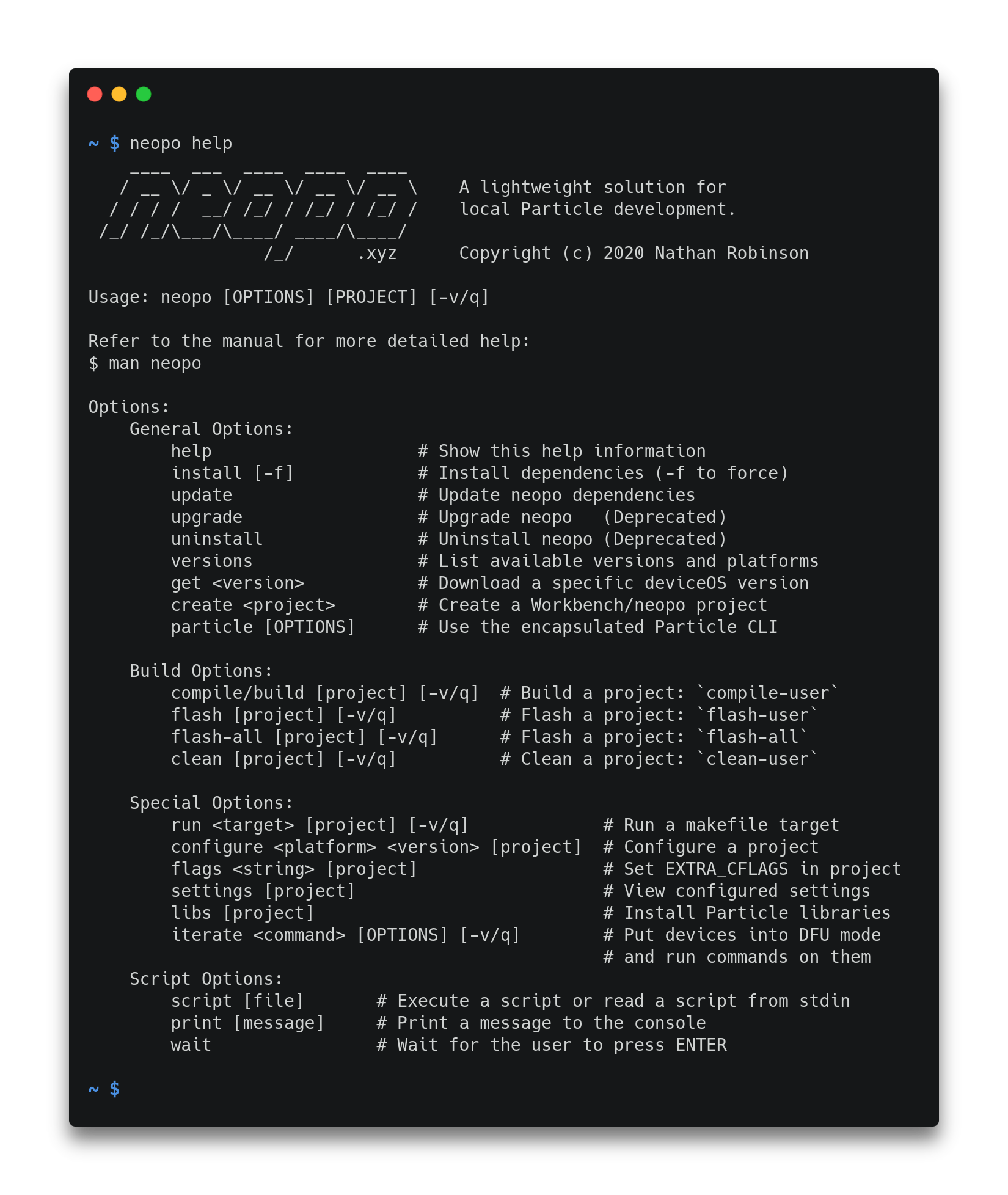
A lightweight solution for local Particle development.

Overview

GitHub Actions Status Build Status Docker Cloud Build Status AUR package Particle Community

neopo

A lightweight solution for local Particle development.

Neopo Screenshot

Features

  • Builds Particle projects locally without any overhead.
  • Compatible with Particle Workbench and Particle CLI.
  • Installs and manages necessary Particle dependencies.
  • Built with Python using only the standard library.
  • Supports Linux, macOS, Windows, and Raspberry Pi.
  • Supports tab completion to assist development.

Installation

Universal Installer (Linux/macOS):

$ bash <(curl -sL neopo.xyz/install)

Install from AUR:

$ yay -S neopo-git
$ neopo install

Install from source (pip):

$ git clone https://github.com/nrobinson2000/neopo
$ cd neopo
$ sudo python3 -m pip install .
$ neopo install

Docker container:

$ docker pull nrobinson2000/neopo
$ docker run -it nrobinson2000/neopo

For more installation information, please refer to the Installation tutorial.

Usage

To get started with neopo, please refer to the Quick Reference.

For descriptions of all available commands, please refer to the Complete Reference.

Comments
  • [BUG] Neopo Broken in Debian 10.8 WSL

    [BUG] Neopo Broken in Debian 10.8 WSL

    Describe the bug Neopo commands not working.

    Error Output

    $ neopo build Traceback (most recent call last): File "/usr/local/sbin/neopo", line 1026, in main commandsargs[1] File "/usr/local/sbin/neopo", line 741, in compile_command buildCommand("compile-user", 2, args) File "/usr/local/sbin/neopo", line 656, in buildCommand build(project, command, False, verbosity) File "/usr/local/sbin/neopo", line 589, in build devicePlatform, firmwareVersion = getSettings(projectPath) File "/usr/local/sbin/neopo", line 503, in getSettings data = json.loads(settings.read()) File "/usr/lib/python3.7/json/init.py", line 348, in loads return _default_decoder.decode(s) File "/usr/lib/python3.7/json/decoder.py", line 337, in decode obj, end = self.raw_decode(s, idx=_w(s, 0).end()) File "/usr/lib/python3.7/json/decoder.py", line 353, in raw_decode obj, end = self.scan_once(s, idx) json.decoder.JSONDecodeError: Expecting property name enclosed in double quotes: line 10 column 1 (char 271) An unexpected error occurred! To report this error on GitHub, please open an issue: https://github.com/nrobinson2000/neopo/issues

    $ neopo install Installing neopo... Finding Workbench extension URL... Downloading Workbench extension... Traceback (most recent call last): File "/usr/local/sbin/neopo", line 1026, in main commandsargs[1] File "/usr/local/sbin/neopo", line 753, in install_command installOrUpdate(True, force) File "/usr/local/sbin/neopo", line 313, in installOrUpdate data = getDeps() File "/usr/local/sbin/neopo", line 185, in getDeps manifest = getFile(extension, extensionFiles["manifest"]) File "/usr/local/sbin/neopo", line 131, in getFile return file.read(path) File "/usr/lib/python3.7/zipfile.py", line 1428, in read with self.open(name, "r", pwd) as fp: File "/usr/lib/python3.7/zipfile.py", line 1467, in open zinfo = self.getinfo(name) File "/usr/lib/python3.7/zipfile.py", line 1395, in getinfo 'There is no item named %r in the archive' % name) KeyError: "There is no item named 'extension/src/compiler/manifest.json' in the archive" An unexpected error occurred! To report this error on GitHub, please open an issue: https://github.com/nrobinson2000/neopo/issues

    Desktop:

    • OS: Debian 10.8 running under WSL

    Additional context Neopo was working for me fine around a week ago, but I started experiencing this issue when I tried using it yesterday.

    bug 
    opened by TrikkStar 13
  • Add

    Add "legacy" commands for serial & DFU mode management w/ baud-switcher

    Adds appropriate wrapper fns for serial open/close and dfu open/close as subcommands for the "legacy" command. Also adds docs / help strings.

    tested and working on linux

    only thing that may need to still be added is an update to "completion.py" to account for the new fns but it was unclear if the overall format would need to be changed to support doing so, so this was left off this commit

    opened by justicefreed 8
  • [BUG] No such file or directory: '~/.neopo/cache/manifest.json'

    [BUG] No such file or directory: '~/.neopo/cache/manifest.json'

    Describe the bug Script throws python error

    To Reproduce Steps to reproduce the behavior:

    1. python3 <(curl -SL https://raw.githubusercontent.com/nrobinson2000/neopo/master/bin/install.py)
    2. neopo create blink-led
    Initializing project in directory /mnt/data/particle/blink-led...
    > A new project has been initialized in directory /mnt/data/particle/blink-led
    Initialized empty Git repository in /mnt/data/particle/blink-led/.git/
    Traceback (most recent call last):
      File "/home/tom/bin/neopo", line 947, in main
        commands[args[1]](args)
      File "/home/tom/bin/neopo", line 666, in create_command
        create(os.path.dirname(projectPath), os.path.basename(projectPath))
      File "/home/tom/bin/neopo", line 423, in create
        version = loadManifest(False)["deviceOS"]
      File "/home/tom/bin/neopo", line 220, in loadManifest
        with open(jsonFiles["manifest"], "r") as file:
    FileNotFoundError: [Errno 2] No such file or directory: '/home/tom/.neopo/cache/manifest.json'
    An unexpected error occurred!
    To report this error on GitHub, please open an issue:
    https://github.com/nrobinson2000/neopo/issues
    

    Expected behavior It works

    Desktop (please complete the following information):

    • OS: Void Linux
    bug 
    opened by toluschr 7
  • [BUG] Error building on Linux

    [BUG] Error building on Linux

    Describe the bug I am unable to build an existing Particle project. It looks like this is because of missing gcc-arm

    $ neopo build
    Traceback (most recent call last):
      File "/usr/local/sbin/neopo", line 943, in main
        commands[args[1]](args)
      File "/usr/local/sbin/neopo", line 677, in compile_command
        buildCommand("compile-user", 2, args)
      File "/usr/local/sbin/neopo", line 606, in buildCommand
        build(project, command, False, verbosity)
      File "/usr/local/sbin/neopo", line 523, in build
        compilerVersion, scriptVersion, toolsVersion, firmwareVersion = loadManifest(True)
      File "/usr/local/sbin/neopo", line 227, in loadManifest
        data["gcc-arm"],
    KeyError: 'gcc-arm'
    An unexpected error occurred!
    

    Desktop (please complete the following information):

    • OS: Ubuntu 18.04 LTS
    bug 
    opened by pierrep 7
  • Error on link, missing libfl.so

    Error on link, missing libfl.so

    Describe the bug While compiling my project I get the error described below.

    To Reproduce In my project I do "neopo compile" and the following error occurs. A compile using the cloud particle-cli does not produce any problems. If you require all my code to observe this yourself, I will provided.

    Screenshots

    image

    Desktop (please complete the following information):

    • OS: raspberrypi 4
    bug 
    opened by rvnash 5
  • Errors while installing on MacOS

    Errors while installing on MacOS

    Thx for that project. I've been working a long while with po-util and really loved it; seems that there is an Issue with Apple SIP (...?)

    Describe the bug installation on MacOS is terminated with error

    copying man/neopo.1 -> /usr/share/man/man1 error: could not create '/usr/share/man/man1/neopo.1': Operation not permitted

    To Reproduce bash <(curl -sL neopo.xyz/install)

    same problem with installation via pip...

    Expected behavior clear installation

    Screenshots

    Desktop (please complete the following information): MacOS 11.4 Big Sur

    Additional context M1 Chip Python 3.9 installed, latest Version (via brew) local Particle CLI for maintaining local Particle Server

    bug 
    opened by mf42 4
  • Debuggable Builds [FEATURE]

    Debuggable Builds [FEATURE]

    ~~Problem~~ ~~I cannot use neopo to build debuggable builds for use with the vscode particle debugger~~ ~~Neopo is much faster than the built-in vscode compile / flash commands from the Particle Workbench~~ ~~Neopo is readily usable in CI/CD environments (thank you so much)~~ ~~I use a gitlab job to automate and archive builds with neopo, but I have no way of automating builds for debuggable versions. Currently debug builds are not available from the neopo build /path/to/project command~~

    Problem

    When I read the neopo docs, I thought it was not possible to build debug builds. The "flags" examples show how to do this, but they do not explain that the result of neopo flags "-D DEBUG_BUILD" will be that the build will work with the VSCode Particle Workbench Debugger. My initial reaction to this, as someone only becoming familiar with the particle ecosystem, was that it was a custom flag with only relevance to some specific project.

    Suggested Solution

    neopo build -d /path/to/project Use a neopo cli flag like -d to request a debug build

    Alternatives

    • edit the docs https://neopo.xyz/docs/full-docs to indicate that neopo flags "-D DEBUG_BUILD" will enable compatibility with the VSCode Particle Workbench Debugger. Add this line of text beneath that example: Note: the 'DEBUG_ENABLED' flag will enable compatibility with the VSCode Particle Workbench Debugger
    enhancement 
    opened by briveramelo 4
  • Invalid Firmware Version - neopo Docker

    Invalid Firmware Version - neopo Docker

    Specifically within docker neopo, Im getting the following error on all of my builds lately

    Invalid deviceOS version 5.1.0! Firmware related error! Invalid firmware version!

    I've literally reran successful bitbucket pipeline builds with exact configuration as before but now it fails.

    bug 
    opened by ajowsey 3
  • [BUG] deviceOS 3.1.0 not supported

    [BUG] deviceOS 3.1.0 not supported

    Describe the bug deviceOS 3.1.0 not supported

    To Reproduce Steps to reproduce the behavior:

    1. enter neopo get 3.1.0 into the cli and receive an error "Invalid firmware version!"

    Expected behavior Neopo will retrieve and operate commands with the deviceOS 3.1.0 firmware

    Desktop (please complete the following information):

    • OS: Ubuntu, macOS

    Additional context I am able to get this working locally by adding the missing config objects to some ~/.neopo/cache json files.

    compilers.json

    windowsx64
    {
                    "name": "gcc-arm",
                    "version": "10.2.1",
                    "main": "./bin",
                    "url": "https://binaries.particle.io/gcc-arm/windows/x64/gcc-arm-v10.2.1.tar.gz",
                    "sha256": "81d51a85dae99dd64012f620306ff14b55b38b66e4af1697b9f71cc08b63e6f8"
                },
    ...
    darwinx64
    {
                    "name": "gcc-arm",
                    "version": "10.2.1",
                    "main": "./bin",
                    "url": "https://binaries.particle.io/gcc-arm/darwin/x64/gcc-arm-v10.2.1.tar.gz",
                    "sha256": "c340f722c06f5768320bb02a1e9cb654b6f824649c17554cbff82b337b0b43af"
                },
    ...
    linuxx64
    {
                    "name": "gcc-arm",
                    "version": "10.2.1",
                    "main": "./bin",
                    "url": "https://binaries.particle.io/gcc-arm/linux/x64/gcc-arm-v10.2.1.tar.gz",
                    "sha256": "b6ce735c36c79caa02a95aaefc6d829e7d265c68eda73ac6e5afcd6cd6ba68a1"
                },
    

    firmware.json

    {
            "name": "deviceOS",
            "version": "3.1.0",
            "main": ".",
            "url": "https://binaries.particle.io/device-os/v3.1.0.tar.gz",
            "sha256": "704a908ab4a72942c0e89952ace93ac4a51a27790421b7515019ede40284d66e"
        },
    

    scripts.json

    windowsx64
    {
                    "name": "buildscripts",
                    "version": "1.10.0",
                    "main": ".",
                    "url": "https://binaries.particle.io/buildscripts/windows/x64/buildscripts-v1.10.0.tar.gz",
                    "sha256": "66a78bcd13e7cf08e9a8cab09a7ad3a1b179183b9391adbf0b39424c939f433b"
                },
    ...
    darwinx64
    {
                    "name": "buildscripts",
                    "version": "1.10.0",
                    "main": ".",
                    "url": "https://binaries.particle.io/buildscripts/darwin/x64/buildscripts-v1.10.0.tar.gz",
                    "sha256": "66a78bcd13e7cf08e9a8cab09a7ad3a1b179183b9391adbf0b39424c939f433b"
                },
    ...
    linuxx64
    {
                    "name": "buildscripts",
                    "version": "1.10.0",
                    "main": ".",
                    "url": "https://binaries.particle.io/buildscripts/linux/x64/buildscripts-v1.10.0.tar.gz",
                    "sha256": "66a78bcd13e7cf08e9a8cab09a7ad3a1b179183b9391adbf0b39424c939f433b"
                },
    

    toolchains.json

    {
            "platforms": [
                6,
                8,
                10,
                12,
                13,
                23,
                25,
                26
            ],
            "firmware": "[email protected]",
            "compilers": "[email protected]",
            "tools": "[email protected]",
            "scripts": "[email protected]",
            "debuggers": "[email protected]"
        },
    

    I also received this error after making these additions: ~/.particle/toolchains/deviceOS/3.1.0/build/arm-tools.mk:73: *** "ARM gcc version 10.2.1 or later required, but found 9.3.1". Stop. This was strange because I had uninstalled all other toolchains and their gcc versions with the vscode particle workbench. Still, I was able to resolve this by editing the .particle/toolchains/deviceOS/3.1.0/build/common-tools.mk file by adding this line: GCC_ARM_PATH = ~/.particle/toolchains/gcc-arm/10.2.1/bin/

    bug 

    opened by briveramelo 1
  • Windows testing/support: Help wanted

    Windows testing/support: Help wanted

    One of the many shortcomings of my previous Particle utilities was that they lacked Windows support. This is mainly because I don't use Windows and I don't have a Windows machine to test with. Since one of my goals when creating neopo was to make local Particle development as accommodating as possible, I think Windows support would be of great utility.

    Installing neopo inside WSL should be straightforward and installing neopo inside Cygwin should also be feasible since I believe this is how Particle Workbench manages its dependencies on Windows.

    If anyone in the community is interested in developing Windows support for neopo I'm sure many other developers would appreciate it.

    enhancement help wanted good first issue 
    opened by nrobinson2000 1
  • CVE-2007-4559 Patch

    CVE-2007-4559 Patch

    Patching CVE-2007-4559

    Hi, we are security researchers from the Advanced Research Center at Trellix. We have began a campaign to patch a widespread bug named CVE-2007-4559. CVE-2007-4559 is a 15 year old bug in the Python tarfile package. By using extract() or extractall() on a tarfile object without sanitizing input, a maliciously crafted .tar file could perform a directory path traversal attack. We found at least one unsantized extractall() in your codebase and are providing a patch for you via pull request. The patch essentially checks to see if all tarfile members will be extracted safely and throws an exception otherwise. We encourage you to use this patch or your own solution to secure against CVE-2007-4559. Further technical information about the vulnerability can be found in this blog.

    If you have further questions you may contact us through this projects lead researcher Kasimir Schulz.

    opened by TrellixVulnTeam 0
Releases(0.0.3)
Owner
Nathan Robinson
Undergraduate Computer Science student studying at Wentworth Institute of Technology
Nathan Robinson
This code makes the logs provided by Fiddler proxy of the Google Analytics events coming from iOS more readable.

GA-beautifier-iOS This code makes the logs provided by Fiddler proxy of the Google Analytics events coming from iOS more readable. To run it, create a

Rafael Machado 3 Feb 02, 2022
FCurve-Cleaner: Tries to clean your dense mocap graphs like an animator would

Tries to clean your dense mocap graphs like an animator would! So it will produce a usable artist friendly result while maintaining the original graph.

wiSHFul97 5 Aug 17, 2022
Python library to interact with Move Hub / PoweredUp Hubs

Python library to interact with Move Hub / PoweredUp Hubs Move Hub is central controller block of LEGO® Boost Robotics Set. In fact, Move Hub is just

Andrey Pokhilko 499 Jan 04, 2023
Ellipitical Curve Table Generator

Ellipitical-Curve-Table-Generator This script generates a table of elliptical po

Nishaant Goswamy 1 Jan 02, 2022
This script is written with Python for selling steam community items automatically.

SteamCommunityItemAutoSell Description This script is written with Python for selling steam community items automatically. Install git clone https://g

14 Oct 26, 2022
Monochrome's API, implemented with Deta Base and Deta Drive.

Monochrome Monochrome's API, implemented with Deta Base and Deta Drive. Create a free account on Deta to test this out! Most users will prefer the Mon

Monochrome 5 Sep 22, 2022
A repo to record how I prepare my Interview, and really hope it can help you as well. Really appreciate Kieran's help in the pattern's part.

Project Overview The purpose of this repo is to help others to find solutions and explaintion I will commit a solution and explanation to every proble

Vincent Zhenhao ZHAO 1 Nov 29, 2021
Insights in greek football league 2020-2021 and bookmaker's accuracy

Greek_Football_League_Analysis_2020_2021 Aim of Project: This project aims in deriving useful insights from greek football league 2020-2021 by mean st

2 Jan 16, 2022
Dotfiles for my configurations!

Dotfiles Repo Welcome! Over here, you can find my dotfiles for various applications, including QTile, Alacritty, Kitty, LunarVim, and more! Make sure

class PythonAddict 3 Jan 10, 2022
A calculator developed in Python.

Calculadora Uma simples calculadora... ( + − × ÷ ) 💻 Situação do projeto: Projeto finalizado ✔️ 🛠 Tecnologias: Python Tkinter (GUI) ⚙️ Pré-requisito

Arthur V.B.S. 1 Jan 27, 2022
Parametric Bottle in CADQuery

Parametric Bottle using CADQuery The proposed code makes it possible to generate different types and sizes of 3D bottles in order to train Pixel2mesh

Ayoub EL HOUDRI 1 May 22, 2022
Pipenv-local-deps-repro - Reproduction of a local transitive dependency on pipenv

Reproduction of the pipenv bug with transitive local dependencies. Clone this re

Lucas Duailibe 2 Jan 11, 2022
Unofficial package for fetching users information based on National ID Number (Tanzania)

Nida Unofficial package for fetching users information based on National ID Number made by kalebu Installation You can install it directly or using pi

Jordan Kalebu 57 Dec 28, 2022
JimShapedCoding Python Crash Course 2021

Python CRASH Course by JimShapedCoding - Click Here to Start! This Repository includes the code and MORE exercises on each section of the entire cours

Jim Erg 64 Dec 23, 2022
A refresher for PowerBI Desktop documents

PowerBI_Refresher-NPP Informació Per executar el programa s'ha de tenir instalat el python versio 3 o mes. Requeriments a requirements.txt. El fitxer

Nil Pujol 1 May 02, 2022
API to summarize input text

summaries API to summarize input text normal run $ docker-compose exec web python -m pytest disable warnings $ docker-compose exec web python -m pytes

Brad 1 Sep 08, 2021
Estimate the Market Size for Electic and Plug-In Hybrid Vehicles In Africa

Estimate the Market Size for Electic and Plug-In Hybrid Vehicles In Africa The goal of this repository is to use open data repositories to answer the

Leonce Nshuti 0 Feb 21, 2022
DG - A(n) (unusual) programming language

DG - A(n) (unusual) programming language General structure There are no infix-operators (i.e. 1 + 1) Each operator takes 2 parameters When there are m

1 Mar 05, 2022
This is a working model for which I have used python.

Jarvis_voiceAssistance This is a working model for which I have used python. This model can: 1)Play a video or song on youtube. 2)Tell us time. 3)Tell

Hardik Jain 1 Jan 30, 2022
Get you an ultimate lexer generator using Fable; port OCaml sedlex to FSharp, Python and more!

NOTE: currently we support interpreted mode and Python source code generation. It's EASY to compile compiled_unit into source code for C#, F# and othe

Taine Zhao 15 Aug 06, 2022