MMGEN-FaceStylor


English | 简体中文
Introduction
This repo is an efficient toolkit for Face Stylization based on the paper "AgileGAN: Stylizing Portraits by Inversion-Consistent Transfer Learning". We note that since the training code of AgileGAN is not released yet, this repo merely adopts the pipeline from AgileGAN and combines other helpful practices in this literature.
This project is based on MMCV and MMGEN, star and fork is welcomed

Requirements
- CUDA 10.0 / CUDA 10.1
- Python 3
- PyTorch >= 1.6.0
- MMCV-Full >= 1.3.15
- MMGeneration >= 0.3.0
Setup
Step-1: Create an Environment
First, we should build a conda virtual environment and activate it.
conda create -n facestylor python=3.7 -y
conda activate facestylor
Suppose you have installed CUDA 10.1, you need to install the prebuilt PyTorch with CUDA 10.1.
conda install pytorch=1.6.0 cudatoolkit=10.1 torchvision -c pytorch
pip install requirements.txt
Step-2: Install MMCV and MMGEN
We can run the following command to install MMCV.
pip install mmcv-full -f https://download.openmmlab.com/mmcv/dist/cu101/torch1.6.0/index.html
Of course, you can also refer to the MMCV Docs to install it.
Next, we should install MMGEN containing the basic generative models that will be used in this project.
# Clone the MMGeneration repository.
git clone https://github.com/open-mmlab/mmgeneration.git
cd mmgeneration
# Install build requirements and then install MMGeneration.
pip install -r requirements.txt
pip install -v -e .  # or "python setup.py develop"
cd ..
Step-3: Clone repo and prepare the data and weights
Now, we need to clone this repo first.
git clone https://github.com/open-mmlab/MMGEN-FaceStylor.git
For convenience, we suggest that you make these folders under MMGEN-FaceStylor.
cd MMGEN-FaceStylor
mkdir data
mkdir work_dirs
mkdir work_dirs/experiments
mkdir work_dirs/pre-trained
Then, you can put or create the soft-link for your data under data folder, and store your experiments under work_dirs/experiments.
For testing and training, you need to download some necessary data provided by AgileGAN and put them under data folder. Or just run this:
wget --no-check-certificate 'https://docs.google.com/uc?export=download&id=1AavRxpZJYeCrAOghgtthYqVB06y9QJd3' -O data/shape_predictor_68_face_landmarks.dat
We also provide some pre-trained weights.
Play with MMGEN-FaceStylor
If you have followed the aforementioned steps, we can start to investigate FaceStylor!
Quick Try
To quickly try our project, please run the command below
python demo/quick_try.py demo/src.png --style toonify
Then, you can check the result in work_dirs/demos/agile_result.png.
- If you want to play with your own photos, you can replace
demo/src.pngwith your photo. - If you want to switch to another style, change
toonifywith other styles. Now, supported styles includetoonify,oil,sketch,bitmoji,cartoon,comic.
Inversion
The inversion task will adopt a source image as input and return the most similar image that can be generated by the generator model.
For inversion, you can directly use agilegan_demo like this
python demo/agilegan_demo.py SOURCE_PATH CONFIG [--ckpt CKPT] [--device DEVICE] [--save-path SAVE_PATH]
Here, you should set SOURCE_PATH to your image path, CONFIG to the config file path, and CKPT to checkpoint path.
Take Celebahq-Encoder as an example, you need to download the weights to work_dirs/pre-trained/agile_encoder_celebahq1024x1024_lr_1e-4_150k.pth, put your test image under data run
python demo/agilegan_demo.py demo/src.png configs/agilegan/agile_encoder_celebahq1024x1024_lr_1e-4_150k.py --ckpt work_dirs/pre-trained/agile_encoder_celebahq_lr_1e-4_150k.pth
You will find the result work_dirs/demos/agile_result.png.
Stylization
Since the encoder and decoder of stylization can be trained from different configs, you're supposed to set their ckpts' path in config file. Take Metface-oil as an example, you can see the first two lines in config file.
encoder_ckpt_path = xxx
stylegan_weights = xxx
You should keep your actual weights path in line with your configs. Then run the same command without specifying CKPT.
python demo/agilegan_demo.py SOURCE_PATH CONFIG [--device DEVICE] [--save-path SAVE_PATH]
Train
Here I will tell you how to fine-tune with your own datasets. With only 100-200 images and less than one hour, you can train your own StyleGAN2. The only thing you need to do is to copy an agile_transfer config, like this one. Then modify the imgs_root with your actual data root, choose one of the two commands below to train your own model.
# For distributed training
bash tools/dist_train.sh ${CONFIG_FILE} ${GPUS_NUMBER} \
    --work-dir ./work_dirs/experiments/experiments_name \
    [optional arguments]
# For slurm training
bash tools/slurm_train.sh ${PARTITION} ${JOB_NAME} ${CONFIG} ${WORK_DIR} \
    [optional arguments]
Training Details
In this part, I will explain some training details, including ADA setting, layer freeze, and losses.
ADA Setting
To use ADA in your discriminator, you can use ADAStyleGAN2Discriminator as your discriminator, and adjust ADAAug setting as follows:
model = dict(
    discriminator=dict(
                 type='ADAStyleGAN2Discriminator',
                 data_aug=dict(type='ADAAug',
                 aug_pipeline=aug_kwargs, # This and below arguments can be set by yourself.
                 update_interval=4,
                 augment_initial_p=0.,
                 ada_target=0.6,
                 ada_kimg=500,
                 use_slow_aug=False)))
Layer Freeze Setting
FreezeD can be used for small data fine-tuning.
FreezeG can be used for pseudo translation.
model = dict(
  freezeD=5, # set to -1 if not need
  freezeG=4 # set to -1 if not need
  )
Losses Setting
In AgileGAN, to preserve the recognizable identity of the generated image, they introduce a similarity loss at the perceptual level. You can adjust the lpips_lambda as follows:
model = dict(lpips_lambda=0.8)
Generally speaking, the larger lpips_lambda is, the better the recognizable identity can be kept.
Datasets Link
To make it easier for you to train your own models, here are some links to publicly available datasets.
| Dataset Links |
|---|
| MetFaces |
| AFHQ |
| Toonify |
| photo2cartoon |
| selfie2anime |
| face2comics v2 |
| High-Resolution Anime Face |
| Bitmoji |
Applications
We also provide LayerSwap and DNI apps for the trade-off between the structure of the original image and the stylization degree. To this end, you can adjust some parameters to get your desired result.
LayerSwap
When Layer Swapping is applied, the generated images have a higher similarity to the source image than AgileGAN's results.

Run this command line to perform layer swapping:
python apps/layerSwap.py source_path modelA modelB \
      [--swap-layer SWAP_LAYER] [--device DEVICE] [--save-path SAVE_PATH]
Here, modelA is set to an PSPEncoderDecoder(config starts with agile_encoder) with FFHQ-StyleGAN2 as the decoder, modelB is set to an PSPEncoderDecoder(config starts with agile_encoder) with desired style generator as the decoder. Generally, the deeper you set swap-layer, the better structure of the original image will be kept.
We also provide a blending script to create and save the mixed weights.
python modelA modelB [--swap-layer SWAP_LAYER] [--show-input SHOW_INPUT] [--device DEVICE] [--save-path SAVE_PATH]
Here, modelA is the base model, where only the deep layers of its decoder will be replaced with modelB's counterpart.
DNI

For more precise stylization control, you can try DNI with following commands:
python apps/dni.py source_path modelA modelB [--intervals INTERVALS] [--device DEVICE] [--save-folder SAVE_FOLDER]
Here, modelA and modelB are supposed to be PSPEncoderDecoder(configs start with agile_encoder) with decoders of different stylization degrees. INTERVALS is supposed to be the interpolation numbers.
You can also try applications in MMGEN, like interpolation and SeFA.
Interpolation

Indeed, we have provided an application script to users. You can use apps/interpolate_sample.py with the following commands for unconditional models’ interpolation:
python apps/interpolate_sample.py \
    ${CONFIG_FILE} \
    ${CHECKPOINT} \
    [--show-mode ${SHOW_MODE}] \
    [--endpoint ${ENDPOINT}] \
    [--interval ${INTERVAL}] \
    [--space ${SPACE}] \
    [--samples-path ${SAMPLES_PATH}] \
    [--batch-size ${BATCH_SIZE}] \
For more details, you can read related Docs.
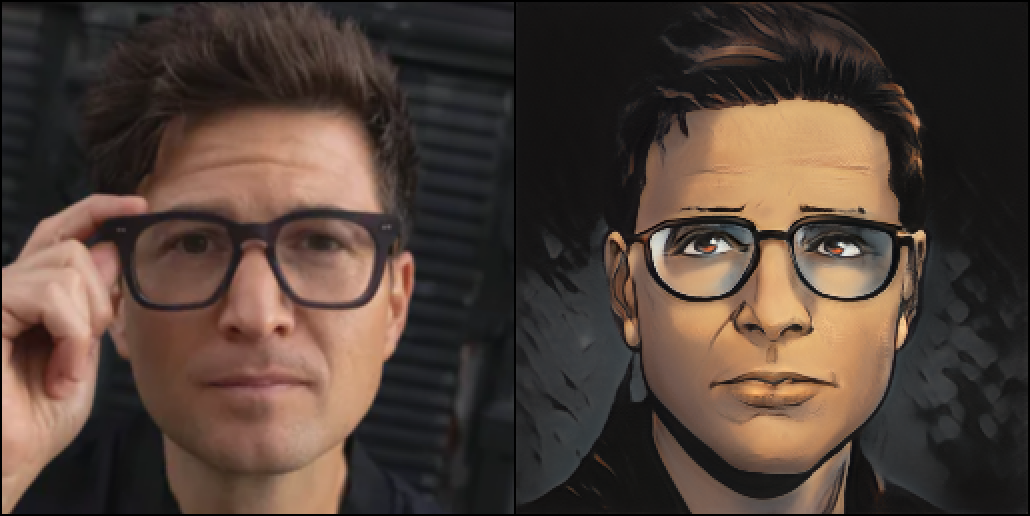
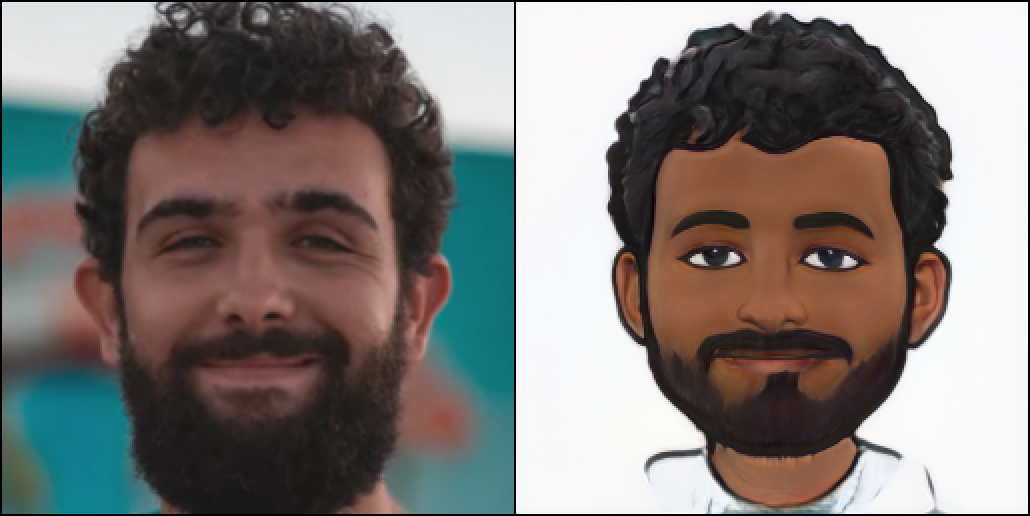
Galary
Toonify


Oil


Cartoon

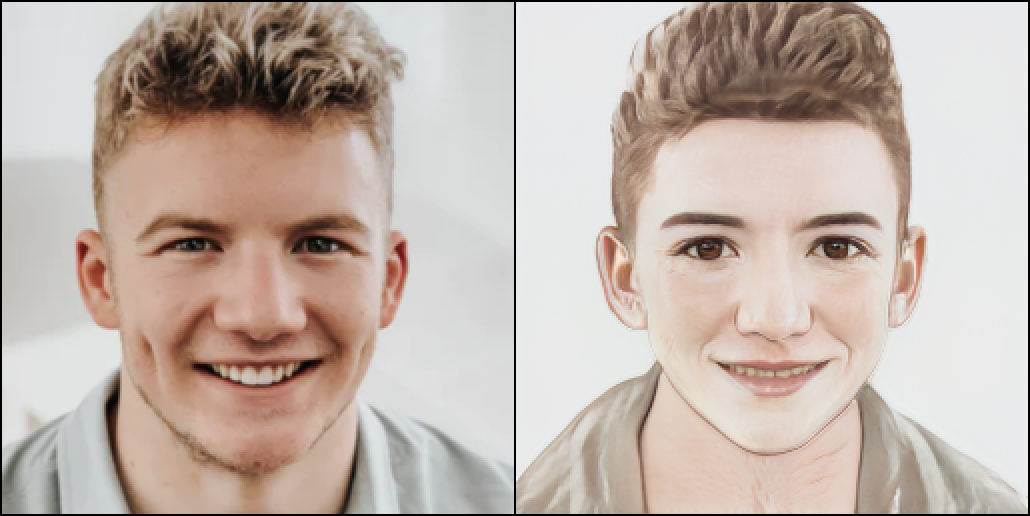

Comic


Bitmoji


Notions and TODOs
- For encoder, I experimented with vae-encoder but found no significant improvement for inversion. I follow the "encoding into z plus space" way as the author does. I will release the vae-encoder version later, but I only offer a vanilla encoder this time.
- For generator, I released vanilla stylegan2-generator, and
attribute-aware generatorwill be released in next version. - For training settings, the parameters have slight difference from the paper. And I also tried
ADA,freezeDand other methods not mentioned in paper. - More styles will be available in the next version.
- More applications will be available in the next version.
- We are also considering a web-side application.
- Further code clean jobs.
Acknowledgments
Codes reference:
- https://github.com/open-mmlab/mmcv
- https://github.com/open-mmlab/mmgeneration
- https://github.com/GuoxianSong/AgileGAN
- https://github.com/flyingbread-elon/AgileGAN
- https://github.com/eladrich/pixel2style2pixel
- https://github.com/happy-jihye/Cartoon-StyleGAN
- https://github.com/NVlabs/stylegan2-ada-pytorch
- https://github.com/sangwoomo/FreezeD
- https://github.com/bryandlee/FreezeG
- https://github.com/justinpinkney/toonify
Display photos from: https://unsplash.com/t/people
Web demo powered by: https://gradio.app/
License
This project is released under the Apache 2.0 license. Some implementation in MMGEN-FaceStylor are with other licenses instead of Apache2.0. Please refer to LICENSES.md for the careful check, if you are using our code for commercial matters.

 60 Dec 20, 2022
 290 Dec 29, 2022
 5 Jul 26, 2022
 50 Jan 07, 2023
 15 May 21, 2022
 140 Dec 05, 2022
 338 Dec 28, 2022
 0 Nov 21, 2022
 97 Dec 02, 2022
 11 Jun 11, 2021
 143 Dec 29, 2022
 6 Oct 24, 2022
 16 Dec 14, 2022
 13 Nov 27, 2022
 3 Dec 27, 2022
 506 Dec 28, 2022
 1k Nov 29, 2022
 1 Jan 03, 2022
 146 Dec 18, 2022
 36 Oct 19, 2022