๐Ÿ“š A collection of Jupyter notebooks for learning and experimenting with OpenVINO ๐Ÿ‘“

Overview

๐Ÿ“š OpenVINO Notebooks

๐Ÿšง Notebooks are currently in beta. We plan to publish a stable release this summer. Please submit issues on GitHub, start a discussion or join our Unofficial Developer Discord Server* to stay in touch.

A collection of ready-to-run Python* notebooks for learning and experimenting with OpenVINO developer tools. The notebooks are meant to provide an introduction to OpenVINO basics and teach developers how to leverage our APIs for optimized deep learning inference in their applications.

๐Ÿ’ป Getting Started

The notebooks are designed to run almost anywhere โ€” your laptop, a cloud VM, or even a Docker container. Here's what you need to get started:

  • CPU (64-bit)
  • Windows*, Linux* or macOS*
  • Python* 3.6-3.8

Before you proceed to the Installation Guide, please review the detailed System Requirements below.

โš™๏ธ System Requirements

The table below lists the supported operating systems and Python versions required to run the OpenVINO notebooks.

Supported Operating System Python* Version (64-bit)
Ubuntu* 18.04 LTS, 64-bit 3.6, 3.7, 3.8
Ubuntu* 20.04 LTS, 64-bit 3.6, 3.7, 3.8
Red Hat* Enterprise Linux* 8, 64-bit 3.6, 3.8
CentOS* 7, 64-bit 3.6, 3.7, 3.8
macOS* 10.15.x versions 3.6, 3.7, 3.8
Windows 10*, 64-bit Pro, Enterprise or Education editions 3.6, 3.7, 3.8
Windows Server* 2016 or higher 3.6, 3.7, 3.8

๐Ÿ“ Installation Guide

NOTE: If OpenVINO is installed globally, please do not run any of these commands in a terminal where setupvars.bat or setupvars.sh are sourced. For Windows, we recommend using Command Prompt (cmd.exe), not PowerShell.

Step 1: Clone the Repository

git clone https://github.com/openvinotoolkit/openvino_notebooks.git

Step 2: Create a Virtual Environment

# Linux and macOS may require typing python3 instead of python
cd openvino_notebooks
python -m venv openvino_env

Step 3: Activate the Environment

For Linux and macOS:

source openvino_env/bin/activate

For Windows:

openvino_env\Scripts\activate

Step 4: Install the Packages

Installs OpenVINO tools and dependencies like Jupyter Lab:

# Upgrade pip to the latest version.
# Use pip's legacy dependency resolver to avoid dependency conflicts
python -m pip install --upgrade pip
pip install -r requirements.txt --use-deprecated=legacy-resolver

Step 5: Install the virtualenv Kernel in Jupyter

python -m ipykernel install --user --name openvino_env

Step 6: Launch the Notebooks!

# To launch a single notebook
jupyter notebook <notebook_filename>

# To launch all notebooks in Jupyter Lab
jupyter lab notebooks

In Jupyter Lab, select a notebook from the file browser using the left sidebar. Each notebook is located in a subdirectory within the notebooks directory.

๐Ÿงน Cleaning Up

Shut Down Jupyter Kernel

To end your Jupyter session, press Ctrl-c. This will prompt you to Shutdown this Jupyter server (y/[n])? enter y and hit Enter.

Deativate Virtual Environment

To deactivate your virtualenv, simply run deactivate from the terminal window where you activated openvino_env. This will deactivate your environment.

To reactivate your environment, simply repeat Step 3 from the Install Guide.

Delete Virtual Environment (Optional)

To remove your virtual environment, simply delete the openvino_env directory:

On Linux and macOS:

rm -rf openvino_env

On Windows:

rmdir /s openvino_env

Remove openvino_env Kernel from Jupyter

jupyter kernelspec remove openvino_env

โš ๏ธ Troubleshooting

  • On Ubuntu, if you see the error "libpython3.7m.so.1.0: cannot open shared object file: No such object or directory" please install the required package using apt install libpython3.7-dev

  • If you get an ImportError, doublecheck that you installed the kernel in Step 5. If necessary, choose the openvinoenv kernel from the _Kernel->Change Kernel menu)

  • On Linux and macOS you may need to type python3 instead of python when creating your virtual environment

  • On Linux and macOS you may need to install pip and/or python-venv (depending on your Linux distribution)

  • On Windows, if you have installed multiple versions of Python, use py -3.7 when creating your virtual environment to specify a supported version (in this case 3.7)

  • On Fedora*, Red Hat and Amazon* Linux you may need to install the OpenGL (Open Graphics Library) to use OpenCV. Please run yum install mesa-libGL before launching the notebooks.

  • For macOS systems with Apple* M1, please see community discussion about using Rosetta* 2.


* Other names and brands may be claimed as the property of others.

Comments
  • 406 Human Pose Estimation 3D

    406 Human Pose Estimation 3D

    3D Human Pose Estimation with OpenVINO

    This demo contains 3D multi-person pose estimation demo. Intel OpenVINOโ„ข backend can be used for fast inference on CPU. It is based on Lightweight OpenPose and Single-Shot Multi-Person 3D Pose Estimation From Monocular RGB papers.
    The implementation of this demo starts with the ideas I originally wrote about in my blog There are two options involved in this pull request. One is to use WebGL, which interacts with the browser, and the other is to use the less dependent OpenCV, which implements a basic 3D visual library.

    406-human-pose-estimation-3d

    threejs This demo allows you to use the mouse to change the angle of view from which you view an object.

    406-opencv-human-pose-estimation-3d

    OpenCV This example allows you to use the keyboard to move your camera and press ESC to exit.(You need to set use_popup=True firstly)

    new notebook 
    opened by spencergotowork 34
  • Added pose estimation live demo

    Added pose estimation live demo

    I fixed a lot of things, added documentation and removed big files from the git history. Hence, I create a new PR.

    The picture has the proper licence, as it comes from COCO - https://cocodataset.org/#explore?id=166392

    new notebook 
    opened by adrianboguszewski 22
  • 222 Image Colorization using OpenVINO model tutorial notebook

    222 Image Colorization using OpenVINO model tutorial notebook

    This PR adds demo notebook for grayscale image colorization using colorization-v2 model from Open Model Zoo

    Pending Tasks:

    • [x] - ~~Handle video input to colorize~~
    • [x] - Add explanation (markdown) to the notebook cells
    • [x] - Complete README.md
    • [x] - Follow up with suggestions and reviews
    gsoc wip 
    opened by Davidportlouis 18
  • Add comparison of INT8 and FP32 models

    Add comparison of INT8 and FP32 models

    Added the following features to PyTorch and Tensorflow quantization aware training notebooks

    • fine-tuning of float32 model the same way as int8 model is finetuned
    • accuracy comparison between fine-tuned int8 and fine-tuned float32 models

    Note: nbval fails, however it also seems to fail for the main branch

    opened by nikita-savelyevv 15
  • Add PaddleGAN AnimeGAN notebook

    Add PaddleGAN AnimeGAN notebook

    AnimeGAN notebook with model from https://github.com/PaddlePaddle/PaddleGAN

    Convert PaddleGAN model to ONNX and then to IR, and show inference results.

    PaddlePaddle requirements are installed in the notebook, with !pip. This requires that users activated the openvino_env environment and kernel - which they do if they follow our instructions.

    Converting this model was not completely straightforward. I added some steps to the notebook that show how to go about this, for example to do predictor.run?? to show the source of the function, to see how to preprocess and postprocess the model output.

    image

    This is a Draft PR - a README should be added and the descriptions in the notebook should be updated before merging.

    The notebook currently fails in the CI for Windows. I'll look into that - it seems to be a resource issue. It works on my Windows laptop.

    opened by helena-intel 15
  • ssdlite_mobilenet_v2.xml cannot be opened!

    ssdlite_mobilenet_v2.xml cannot be opened!

    Describe the bug I followed notebook 401-object-detection and it works. Then I wanted to reuse the converted model within a python script with the same command line : ie_core = Core() model = ie_core.read_model(model=root + converted_model_path) where "root" is path to openvino_notebooks

    But I get openvino_notebooks/notebooks/401-object-detection-webcam/model/public/ssdlite_mobilenet_v2/FP16/ssdlite_mobilenet_v2.xml cannot be opened!

    Expected behavior I hope I can reuse the converted model from my script

    Screenshots If applicable, add screenshots to help explain your problem.

    Installation instructions (Please mark the checkbox) [ x ] I followed the installation guide at https://github.com/openvinotoolkit/openvino_notebooks#-installation-guide to install the notebooks. I did it twice !

    ** Environment information ** Pip version: 22.1 OpenVINO source: /home/fenaux/openvino_env/lib/python3.9/site-packages/openvino OpenVINO IE version: 2022.1.0-7019-cdb9bec7210-releases/2022/1 OpenVINO environment activated: OK Jupyter kernel installed for openvino_env: NOT OK Python version: 3.9 OK OpenVINO pip package installed: OK OpenVINO import succeeds: OK OpenVINO development tools installed: OK OpenVINO not installed globally: OK No broken requirements: OK

    Thanks for your help

    opened by fenaux 13
  • Webcam Hello World

    Webcam Hello World

    Here is a webcam version of hello world. It uses the same model as the 001-hello-world but we use a webcam feed as the input. The main issue is how we can do CI with this at all, and that's why I'm thinking we have to put this under a 4xx series as it will have hardware dependencies.

    However, I will push a pull request here and see what we think about it and so at least I have this somewhere. :)

    opened by raymondlo84 12
  • 	223-text-prediction

    223-text-prediction

    Interactive Text Prediction with OpenVINO

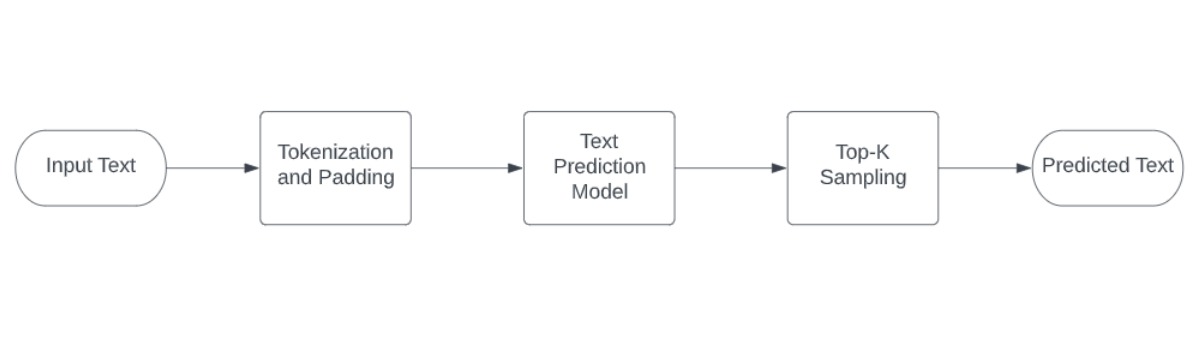
    This is a demo for text prediction using gpt-2 model The complete pipeline of this demo's notebook is shown below.

    image2


    This is an interactive demonstration in which the user can type text into the input bar and generate predicted text. This procedure can be repeated as many times as the user desires.

    image3

    gsoc wip 
    opened by dwipddalal 11
  • [GSOC] 226-yolo-v4-tf object detection notebook.

    [GSOC] 226-yolo-v4-tf object detection notebook.

    A notebook that implements Yolo-v4-tiny-tf and yolo-v4-tf. Compared to the 401 object detection notebook, changes had to be made to the output processing to find bounding boxes and to resize the image while preserving the aspect ratio for improved performance. yolov4 model

    What's left: Some documentation / explanation.

    Something I found that needs to be confirmed is that Cx, Cy (cell index) and w, h (bounding box width/height), from the documentation, needs to have order changed to Cy, Cx and h, w respectively. Converted model input documentation should also become B, H, W, C, instead of B, C, H, W which gives an error. Whether or not the input is BGR or RGB isn't too clear yet considering the model goes by original input for dimensions.

    Edit: New Documentation is consistent with the current inputs I have. So BHWC is correct (using BGR).

    gsoc wip 
    opened by thavens 11
  • Known Issues with OpenVINO 2022.3 + OpenVINO Notebooks

    Known Issues with OpenVINO 2022.3 + OpenVINO Notebooks

    Here is a list of known issues for using OpenVINO 2022.3 and OpenVINO Notebooks. You can compile and obtain the 2022.3 from here.

    https://github.com/openvinotoolkit/openvino/wiki

    Known issues (Ubuntu 22.04 + Python 3.10):

    1. Python 3.10 and torch 1.8.1 dependencies is conflicting. (ERROR: Could not find a version that satisfies the requirement torch==1.8.1+cpu)
    2. PaddlePaddle 2.2 is also conflicting/missing. (ERROR: Could not find a version that satisfies the requirement paddlepaddle==2.2.*)
    3. Tensorflow 2.5.3 (ERROR: Could not find a version that satisfies the requirement tensorflow==2.5.3)
    opened by raymondlo84 10
  • Fix Deprecation/Future Warnings in Notebook 211-Speech-to-Text

    Fix Deprecation/Future Warnings in Notebook 211-Speech-to-Text

    In the committed version, Imports are at the top of the notebook.

    • librosa.filters.mel in audio_to_mel

      FutureWarning: Pass sr=16000, n_fft=512 as keyword args. From version 0.10 passing these as positional arguments will result in an error.

    Question

    The original pull requeset did NOT add librosa (the audio analysis package used here) into requirements.txt or .docker/Pipfile. Is it on purpose? Should I tell how to install it in the notebook?

    opened by YDX-2147483647 10
  • not able to read my custom model .xml file

    not able to read my custom model .xml file

    im using yolov7 226 yolo optimisation notebook,

    i trained my model using yolov7x.cfg which has 40 classes, I did all respectivate changes according to model .

    i am able to generate -onnx & .XML file , its inference is also working but when I was planning for converting it into int8 format . I'm not able to load it

    from openvino.runtime import Core
    core = Core()
    # read converted model
    model = core.read_model('model/best_veh_withbgnew.xml')
    # load model on CPU device
    compiled_model = core.compile_model(model, 'CPU')


    I'm getting this error

    ---------------------------------------------------------------------------
    RuntimeError                              Traceback (most recent call last)
    <ipython-input-10-db161e3ad74f> in <module>
          2 core = Core()
          3 # read converted model
    ----> 4 model = core.read_model('model/best_veh_withbgnew.xml')
          5 # load model on CPU device
          6 compiled_model = core.compile_model(model, 'CPU')
    
    RuntimeError: Check 'false' failed at C:\Jenkins\workspace\private-ci\ie\build-windows-vs2019\b\repos\openvino\src\frontends\common\src\frontend.cpp:54:
    Converting input model
    Incorrect weights in bin file!
    
    
    opened by akashAD98 1
  • 226-yolov7-optimization on Ubuntu

    226-yolov7-optimization on Ubuntu

    When I run this notebook on Ubuntu with a successful setup of the virtual env and requirements.txt install...the kernel dies on my machine half way through every time...would you have tips to try?

    Its this block of code towards the end...where it does run I can see the process go from 0 to 100% but after a 100% is met the Kernel dies and I cant make it any further.

    mp, mr, map50, map, maps, num_images, labels = test(data=data, model=compiled_model, dataloader=dataloader, names=NAMES)
    # Print results
    s = ('%20s' + '%12s' * 6) % ('Class', 'Images', 'Labels', 'Precision', 'Recall', '[email protected]', '[email protected]:.95')
    print(s)
    pf = '%20s' + '%12i' * 2 + '%12.3g' * 4  # print format
    print(pf % ('all', num_images, labels, mp, mr, map50, map))
    

    Any options to try greatly appreciated.

    opened by bbartling 22
  • Duplicated images in the repository

    Duplicated images in the repository

    I found there are many duplicates in the repository e.g coco.jpg. It increases cloning time and space usage. It would be good to create a "central directory" with images and videos to use across all notebooks.

    I propose:

    1. Create the "data" dir in the root dir
    2. Move all images and videos from specific notebooks, remove duplicates
    3. Update links to media in all notebooks
    4. Update contributing guide
    enhancement 
    opened by adrianboguszewski 1
Releases(v0.1.0)
Owner
OpenVINO Toolkit
OpenVINO Toolkit
Code for "Reconstructing 3D Human Pose by Watching Humans in the Mirror", CVPR 2021 oral

Reconstructing 3D Human Pose by Watching Humans in the Mirror Qi Fang*, Qing Shuai*, Junting Dong, Hujun Bao, Xiaowei Zhou CVPR 2021 Oral The videos a

ZJU3DV 178 Dec 13, 2022
Here I will explain the flow to deploy your custom deep learning models on Ultra96V2.

Xilinx_Vitis_AI This repo will help you to Deploy your Deep Learning Model on Ultra96v2 Board. Prerequisites Vitis Core Development Kit 2019.2 This co

Amin Mamandipoor 1 Feb 08, 2022
Code for "Learning Structural Edits via Incremental Tree Transformations" (ICLR'21)

Learning Structural Edits via Incremental Tree Transformations Code for "Learning Structural Edits via Incremental Tree Transformations" (ICLR'21) 1.

NeuLab 40 Dec 23, 2022
The open source code of SA-UNet: Spatial Attention U-Net for Retinal Vessel Segmentation.

SA-UNet: Spatial Attention U-Net for Retinal Vessel Segmentation(ICPR 2020) Overview This code is for the paper: Spatial Attention U-Net for Retinal V

Changlu Guo 151 Dec 28, 2022
The mini-AlphaStar (mini-AS, or mAS) - mini-scale version (non-official) of the AlphaStar (AS)

A mini-scale reproduction code of the AlphaStar program. Note: the original AlphaStar is the AI proposed by DeepMind to play StarCraft II.

Ruo-Ze Liu 216 Jan 04, 2023
Civsim is a basic civilisation simulation and modelling system built in Python 3.8.

Civsim Introduction Civsim is a basic civilisation simulation and modelling system built in Python 3.8. It requires the following packages: perlin_noi

17 Aug 08, 2022
Improving Factual Completeness and Consistency of Image-to-text Radiology Report Generation

Improving Factual Completeness and Consistency of Image-to-text Radiology Report Generation The reference code of Improving Factual Completeness and C

46 Dec 15, 2022
Using a Seq2Seq RNN architecture via TensorFlow to predict future Bitcoin prices

Recurrent Bitcoin Network A Data Science Thesis Project About This repository contains the source code for implementing Bitcoin price prediciton using

Frizu 6 Sep 08, 2022
Code for the paper "Relation of the Relations: A New Formalization of the Relation Extraction Problem"

This repo contains the code for the EMNLP 2020 paper "Relation of the Relations: A New Paradigm of the Relation Extraction Problem" (Jin et al., 2020)

YYY 27 Oct 26, 2022
Koopman operator identification library in Python

pykoop pykoop is a Koopman operator identification library written in Python. It allows the user to specify Koopman lifting functions and regressors i

DECAR Systems Group 34 Jan 04, 2023
potpourri3d - An invigorating blend of 3D geometry tools in Python.

A Python library of various algorithms and utilities for 3D triangle meshes and point clouds. Managed by Nicholas Sharp, with new tools added lazily as needed. Currently, mainly bindings to C++ tools

Nicholas Sharp 295 Jan 05, 2023
End-to-end Temporal Action Detection with Transformer. [Under review]

TadTR: End-to-end Temporal Action Detection with Transformer By Xiaolong Liu, Qimeng Wang, Yao Hu, Xu Tang, Song Bai, Xiang Bai. This repo holds the c

Xiaolong Liu 105 Dec 25, 2022
Offcial implementation of "A Hybrid Video Anomaly Detection Framework via Memory-Augmented Flow Reconstruction and Flow-Guided Frame Prediction, ICCV-2021".

HF2-VAD Offcial implementation of "A Hybrid Video Anomaly Detection Framework via Memory-Augmented Flow Reconstruction and Flow-Guided Frame Predictio

76 Dec 21, 2022
CVPR 2020 oral paper: Overcoming Classifier Imbalance for Long-tail Object Detection with Balanced Group Softmax.

Overcoming Classifier Imbalance for Long-tail Object Detection with Balanced Group Softmax โš ๏ธ Latest: Current repo is a complete version. But we delet

FishYuLi 341 Dec 23, 2022
Totally Versatile Miscellanea for Pytorch

Totally Versatile Miscellania for PyTorch Thomas Viehmann [email protected] Thi

Thomas Viehmann 428 Dec 28, 2022
Implementation of the ivis algorithm as described in the paper Structure-preserving visualisation of high dimensional single-cell datasets.

Implementation of the ivis algorithm as described in the paper Structure-preserving visualisation of high dimensional single-cell datasets.

beringresearch 285 Jan 04, 2023
Code for EMNLP2021 paper "Allocating Large Vocabulary Capacity for Cross-lingual Language Model Pre-training"

VoCapXLM Code for EMNLP2021 paper Allocating Large Vocabulary Capacity for Cross-lingual Language Model Pre-training Environment DockerFile: dancingso

Bo Zheng 15 Jul 28, 2022
Activating More Pixels in Image Super-Resolution Transformer

HAT [Paper Link] Activating More Pixels in Image Super-Resolution Transformer Xiangyu Chen, Xintao Wang, Jiantao Zhou and Chao Dong BibTeX @article{ch

XyChen 270 Dec 27, 2022
Implementation of Bidirectional Recurrent Independent Mechanisms (Learning to Combine Top-Down and Bottom-Up Signals in Recurrent Neural Networks with Attention over Modules)

BRIMs Bidirectional Recurrent Independent Mechanisms Implementation of the paper Learning to Combine Top-Down and Bottom-Up Signals in Recurrent Neura

Sarthak Mittal 26 May 26, 2022
Pytorch implementation of Deep Recursive Residual Network for Super Resolution (DRRN)

DRRN-pytorch This is an unofficial implementation of "Deep Recursive Residual Network for Super Resolution (DRRN)", CVPR 2017 in Pytorch. [Paper] You

yun_yang 192 Dec 12, 2022