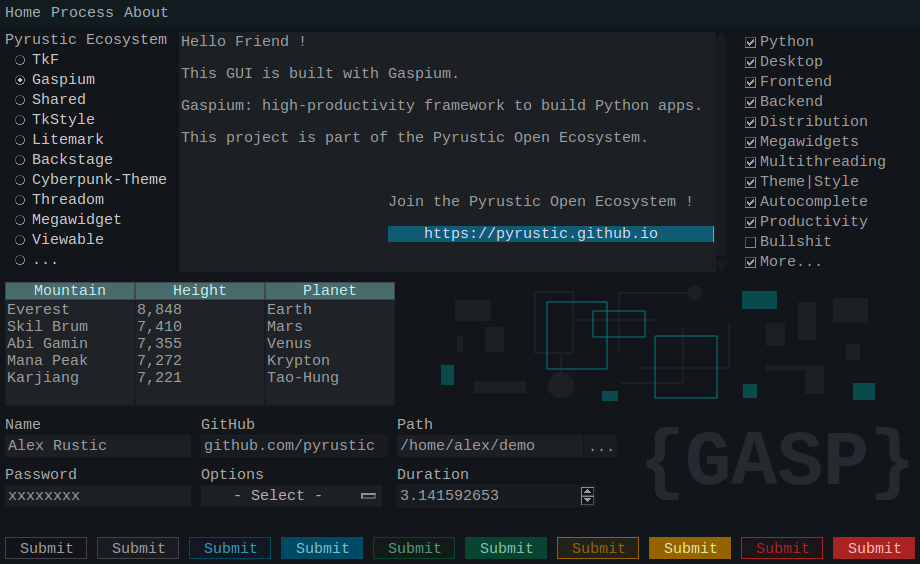
Gaspium
Python framework to build apps with the GASP metaphor
This project is part of the Pyrustic Open Ecosystem.
Installation | Documentation | Latest
Table of contents
Overview
Gaspium is a framework that allows you to create applications with the GASP metaphor. To understand the GASP metaphor, please read this white paper.
In short, we define pages to which we add graphical components. Then we add these pages to an instance of the App class. The first page added is de facto the home page and it will be open when the application is started. Adding a page makes it automatically referenced in the application's navigation bar. Each graphical component can be identified with a unique identifier in order to be able to read its content or update it. Each page has a unique identifier assigned automatically or manually. You can open an arbitrary page directly from the command line.
Gaspium is suitable for:
- building internal tools;
- teaching GUI programming;
- building GUI wrapper for command line scripts;
- prototyping;
- building utilities for yourself or other programmers;
- lightweight commercial apps;
- et cetera.
App
It is the main class of the framework.
Here's a code snippet:
from gaspium import App

app = App()
# by default the app is initialized with:
# title="Application", width=800, height=500,
# theme=Cyberpunk(), caching=False,
# resizable=(False, True), on_exit=None"""

# ...
# here you add pages to the app
# and the first page is considered the home page
# ...

# The last line starts the app (mainloop)
# The home page will open automatically
app.start()
Read the documentation of gaspium.App.
Page
A page is a view that is added to the instance of the App class.
Here's a code snippet:
from gaspium import App, Page


app = App()

# Define and add Page A (de facto, the home page)
page_a = Page(name="Page-A")
app.add(page_a)

# Define and add Page B.
# Assign 'page-b' as page id (pid) to this page
page_b = Page(name="Page-B", pid="page-b")
app.add(page_b)

# Define and add Page C
# The pid automatically assigned to a page
# can be retrieved via the page property 'pid'
page_c = Page(name="Page-C")
app.add(page_c)

# The home page will open automatically
app.start()
Read the documentation of gaspium.Page.
Component
A graphical component is a widget or group of widgets that you add to a page and with which the user interacts.
Here's a code snippet:
from gaspium import App, Page
from gaspium.component import Label, Entry, Button


def login(info):
    # We can retrieve via 'info' the content of the form (username, password)
    # and then process it, update the content of the page (add another component, ...),
    # pop-up some information to the user, programmatically open another page, et cetera.
    pass


def get_page():
    page = Page()
    # Add the Label graphical component
    page.add(Label, text="Login")
    # You can change the default layout config
    # with the parameters 'parent', 'side', 'anchor', 'fill', and 'expand'
    page.add(Entry, title="Username")
    page.add(Entry, title="Password", secretive=True)
    page.add(Button, on_click=login)
    return page


app = App()

page = get_page()
app.add(page)

app.start()
Read the documentation of gaspium.Component.
Demo
You can copy paste this code snippet and run it as it:
Click to expand or collapse
from gaspium import App, Page
from gaspium.component import Frame, Label, Entry, Button
from cyberpunk_theme.widget.button import get_button_red_style


def login(info):
    # We can retrieve via the named tuple 'info' the content of the form (username, password)
    # and then process it, update the content of the page (add another component, ...),
    # pop-up some information to the user, programmatically open another page, et cetera.
    app = info.app
    page = info.page
    username = page.read("username")
    password = page.read("password")
    accepted = False
    if not username or not password:
        msg = "Please submit fill the form !"
    else:
        accepted = True
        msg = "Hello {}".format(username)
    # the parameter 'blocking' tells if you want this toast to block the execution flow or not
    page.toast(msg, blocking=True)
    if accepted:
        # You can retrieve the linked data from the on_open callback associated
        # to the page 'welcome'
        app.open("welcome", data=username)


def get_page_a(app):
    page = Page(name="Home")
    # A Frame is container that fills the width of the page by default, like a row.
    # When you add a Frame to the page, it becomes implicitly the parent
    # of the next components except the next Frames
    page.add(Frame)
    # By default, components (except Frames) are packed from left to right
    # on the previously added Frame. You can change change the parent of a component
    # by using the keyword argument 'parent' that takes a component id (cid)
    page.add(Label, text="Login", color="gray")
    # The next Frame will be the container of the form
    page.add(Frame)
    # The two next lines are entries (the form)
    page.add(Entry, cid="username", title="Username")
    page.add(Entry, cid="password", title="Password", secretive=True)
    # This Frame will be the container of the next Button
    page.add(Frame)
    # add the Quit button
    on_click = lambda info, app=app: app.exit()
    page.add(Button, text="Quit", on_click=on_click, style=get_button_red_style())
    # add the login button
    page.add(Button, on_click=login)
    return page


def get_page_b():
    page = Page(pid="welcome")
    page.add(Label, text="Welcome !")
    return page


def get_page_c():
    page = Page(name="Documentation")
    page.add(Label, text="Documentation")
    return page


def get_page_d():
    page = Page(name="About")
    page.add(Label, text="About")
    return page


app = App(title="Login Demo", width=500, height=300)

# get page_a (de facto the home page)
page_a = get_page_a(app)
# add page_a
app.add(page_a)

# get page_b
page_b = get_page_b()
# this page won't be referenced in the navigation bar
app.add(page_b, indexable=False)

# get page_c
page_c = get_page_c()
# add page_c (referenced in the navigation bar under the dropdown menu 'Help')
app.add(page_c, category="Help")

# get page_d
page_d = get_page_d()
# add page_d (referenced in the navigation bar under the dropdown menu 'Help')
app.add(page_d, category="Help")

# start the app
app.start()

Demo
Installation
Gaspium is cross platform and versions under 1.0.0 will be considered Beta at best. It is built on Ubuntu with Python 3.8 and should work on Python 3.5 or newer.
For the first time
pip install gaspium
Upgrade
$ pip install gaspium --upgrade --upgrade-strategy eager
Default Components
The following components are included by default in the Gaspium framework: Button Choice Editor Entry Frame Image Label Litemark OptionMenu PathField SpinBox Table
Read the documentation !
Work in progress...

 156 Sep 28, 2022
 2 Oct 23, 2021
 1 Dec 23, 2021
 3 Jun 23, 2022
 2 Mar 24, 2022
 12 Sep 21, 2022
 15 Oct 19, 2022
 6 Jul 03, 2022
 623 Dec 10, 2022
 64 Dec 17, 2022
 59 Dec 28, 2022
 1 Dec 22, 2021
 96 Dec 15, 2022
 3 Sep 18, 2022
 1 Jan 12, 2022
 207 Dec 30, 2022
 95 Dec 21, 2022
 154 Jan 06, 2023
 5 Apr 21, 2022
 1 Jan 20, 2022