E2VID_ROS
Introduce
We extend E2VID to a real-time system. Because Python ROS callback has a large delay, we use dvs_event_server to transport "dvs/events" ROS topic to Python.
Install with Anaconda
In addition to dependencies E2VID needs, some packages are needed. Enter the E2VID conda environment, and then
pip install rospkg
pip install pyzmq
pip install protobuf
Usage
Adjust the event camera parameter according to your camera and surroundings in run_reconstruction_ros.py
self.width = 346
self.height = 260
self.event_window_size = 30000
Adjust the event topic name and the event window size in dvs_event_server.launch
<param name="/event_topic_name" type="str" value="/dvs/events"/>
<param name="/event_window_size" type="int" value="30000" />
Make sure the ip address and the port are the same as the dvs_event_server.launch in run_reconstruction_ros.py
self.socket.connect('tcp://127.0.0.1:10001')
<param name="/ip_address" type="str" value="127.0.0.1" />
<param name="/port" type="str" value="10001" />
First run dvs_event_server
roslaunch dvs_event_server dvs_event_server.launch
And then run E2VID_ROS (when closing, run_reconstruction_ros.py should be closed before dvs_event_server)
python run_reconstruction_ros.py
You can play the rosbag or use your own camera
rosbag play example.bag
You can use dvs_renderer or dv_ros to compare the reconstructed frame with the event frame.
You can use rqt_image_view or rviz to visualize the /e2vid/image topic

High Speed and High Dynamic Range Video with an Event Camera
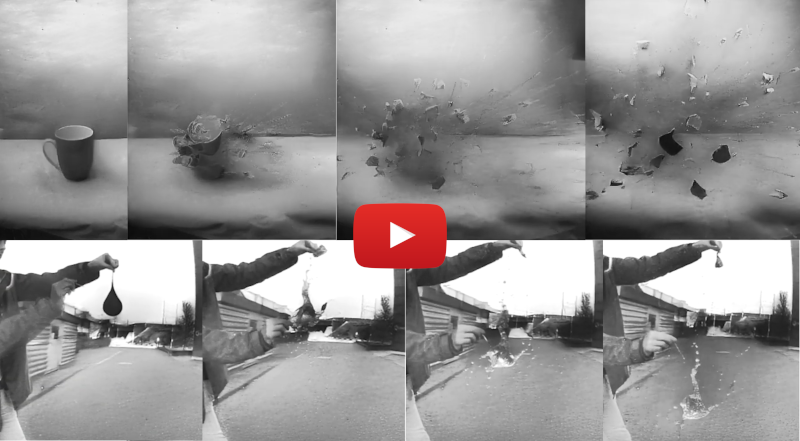
This is the code for the paper High Speed and High Dynamic Range Video with an Event Camera by Henri Rebecq, Rene Ranftl, Vladlen Koltun and Davide Scaramuzza:
You can find a pdf of the paper here. If you use any of this code, please cite the following publications:
@Article{Rebecq19pami,
  author        = {Henri Rebecq and Ren{\'{e}} Ranftl and Vladlen Koltun and Davide Scaramuzza},
  title         = {High Speed and High Dynamic Range Video with an Event Camera},
  journal       = {{IEEE} Trans. Pattern Anal. Mach. Intell. (T-PAMI)},
  url           = {http://rpg.ifi.uzh.ch/docs/TPAMI19_Rebecq.pdf},
  year          = 2019
}
@Article{Rebecq19cvpr,
  author        = {Henri Rebecq and Ren{\'{e}} Ranftl and Vladlen Koltun and Davide Scaramuzza},
  title         = {Events-to-Video: Bringing Modern Computer Vision to Event Cameras},
  journal       = {{IEEE} Conf. Comput. Vis. Pattern Recog. (CVPR)},
  year          = 2019
}
Install
Dependencies:
Install with Anaconda
The installation requires Anaconda3. You can create a new Anaconda environment with the required dependencies as follows (make sure to adapt the CUDA toolkit version according to your setup):
conda create -n E2VID
conda activate E2VID
conda install pytorch torchvision cudatoolkit=10.0 -c pytorch
conda install pandas
conda install -c conda-forge opencv
Run
- Download the pretrained model:
wget "http://rpg.ifi.uzh.ch/data/E2VID/models/E2VID_lightweight.pth.tar" -O pretrained/E2VID_lightweight.pth.tar
- Download an example file with event data:
wget "http://rpg.ifi.uzh.ch/data/E2VID/datasets/ECD_IJRR17/dynamic_6dof.zip" -O data/dynamic_6dof.zip
Before running the reconstruction, make sure the conda environment is sourced:
conda activate E2VID
- Run reconstruction:
python run_reconstruction.py \
  -c pretrained/E2VID_lightweight.pth.tar \
  -i data/dynamic_6dof.zip \
  --auto_hdr \
  --display \
  --show_events
Parameters
Below is a description of the most important parameters:
Main parameters
--window_size/-N(default: None) Number of events per window. This is the parameter that has the most influence of the image reconstruction quality. If set to None, this number will be automatically computed based on the sensor size, as N = width * height * num_events_per_pixel (see description of that parameter below). Ignored if--fixed_durationis set.--fixed_duration(default: False) If True, will use windows of events with a fixed duration (i.e. a fixed output frame rate).--window_duration/-T(default: 33 ms) Duration of each event window, in milliseconds. The value of this parameter has strong influence on the image reconstruction quality. Its value may need to be adapted to the dynamics of the scene. Ignored if--fixed_durationis not set.--Imin(default: 0.0),--Imax(default: 1.0): linear tone mapping is performed by normalizing the output image as follows:I = (I - Imin) / (Imax - Imin). If--auto_hdris set to True,--Iminand--Imaxwill be automatically computed as the min (resp. max) intensity values.--auto_hdr(default: False) Automatically compute--Iminand--Imax. Disabled when--coloris set.--color(default: False): if True, will perform color reconstruction as described in the paper. Only use this with a color event camera such as the Color DAVIS346.
Output parameters
--output_folder: path of the output folder. If not set, the image reconstructions will not be saved to disk.--dataset_name: name of the output folder directory (default: 'reconstruction').
Display parameters
--display(default: False): display the video reconstruction in real-time in an OpenCV window.--show_events(default: False): show the input events side-by-side with the reconstruction. If--output_folderis set, the previews will also be saved to disk in/path/to/output/folder/events.
Additional parameters
--num_events_per_pixel(default: 0.35): Parameter used to automatically estimate the window size based on the sensor size. The value of 0.35 was chosen to correspond to ~ 15,000 events on a 240x180 sensor such as the DAVIS240C.--no-normalize(default: False): Disable event tensor normalization: this will improve speed a bit, but might degrade the image quality a bit.--no-recurrent(default: False): Disable the recurrent connection (i.e. do not maintain a state). For experimenting only, the results will be flickering a lot.--hot_pixels_file(default: None): Path to a file specifying the locations of hot pixels (such a file can be obtained with this tool for example). These pixels will be ignored (i.e. zeroed out in the event tensors).
Example datasets
We provide a list of example (publicly available) event datasets to get started with E2VID.
- High Speed (gun shooting!) and HDR Dataset
- Event Camera Dataset
- Bardow et al., CVPR'16
- Scherlinck et al., ACCV'18
- Color event sequences from the CED dataset Scheerlinck et al., CVPR'18
Working with ROS
Because PyTorch recommends Python 3 and ROS is only compatible with Python2, it is not straightforward to have the PyTorch reconstruction code and ROS code running in the same environment. To make things easy, the reconstruction code we provide has no dependency on ROS, and simply read events from a text file or ZIP file. We provide convenience functions to convert ROS bags (a popular format for event datasets) into event text files. In addition, we also provide scripts to convert a folder containing image reconstructions back to a rosbag (or to append image reconstructions to an existing rosbag).
Note: it is not necessary to have a sourced conda environment to run the following scripts. However, ROS needs to be installed and sourced.
rosbag -> events.txt
To extract the events from a rosbag to a zip file containing the event data:
python scripts/extract_events_from_rosbag.py /path/to/rosbag.bag \
  --output_folder=/path/to/output/folder \
  --event_topic=/dvs/events
image reconstruction folder -> rosbag
python scripts/image_folder_to_rosbag.py \
  --datasets dynamic_6dof \
  --image_folder /path/to/image/folder \
  --output_folder /path/to/output_folder \
  --image_topic /dvs/image_reconstructed
Append image_reconstruction_folder to an existing rosbag
cd scripts
python embed_reconstructed_images_in_rosbag.py \
  --rosbag_folder /path/to/rosbag/folder \
  --datasets dynamic_6dof \
  --image_folder /path/to/image/folder \
  --output_folder /path/to/output_folder \
  --image_topic /dvs/image_reconstructed
Generating a video reconstruction (with a fixed framerate)
It can be convenient to convert an image folder to a video with a fixed framerate (for example for use in a video editing tool). You can proceed as follows:
export FRAMERATE=30
python resample_reconstructions.py -i /path/to/input_folder -o /tmp/resampled -r $FRAMERATE
ffmpeg -framerate $FRAMERATE -i /tmp/resampled/frame_%010d.png video_"$FRAMERATE"Hz.mp4
Acknowledgements
This code borrows from the following open source projects, whom we would like to thank:

 0 Feb 17, 2022
 46 Dec 24, 2022
 201 Dec 28, 2022
 54 Jan 06, 2023
 14 Oct 11, 2022
 32 Dec 13, 2022
 4 Nov 07, 2022
 19 Oct 14, 2022
 8 Jul 27, 2022
 5 Dec 21, 2022
 133 Dec 21, 2022
 39 Nov 14, 2022
 44 Dec 27, 2022
 44 Dec 29, 2022
 5 Oct 20, 2022
 58 Oct 26, 2022
 44 Dec 23, 2022
 0 Aug 05, 2022
 101 Nov 01, 2022
 413 Dec 01, 2022