Weather-API-GUI-Tkinter - A weather tool made using tkinter which works by fetching query city weather using an API

Overview

Weather-API-GUI-Tkinter ☁️ ❄️

version- 1️⃣ . 0️⃣ . 0️⃣

This repo contains a weather forecasting tool made using tkinter which works by fetching query made city's weather using an API.

so what is an API?

  • API is the acronym for Application Programming Interface, which is a software intermediary that allows two applications to talk to each other. Each time you use an app like Facebook, send an instant message, or check the weather on your phone, you’re using an API.
  • When you use an application on your mobile phone, the application connects to the Internet and sends data to a server. The server then retrieves that data, interprets it, performs the necessary actions and sends it back to your phone. The application then interprets that data and presents you with the information you wanted in a readable way. This is what an API is - all of this happens via API.
  • Coming to our weather api project, Weather APIs are Application Programming Interfaces that provide access to current & historical weather data on a global scale. There are several public weather APIs like OpenWeatherMap API, Dark Sky API, & Visual Crossing Weather API.

Here is a illustration of api:
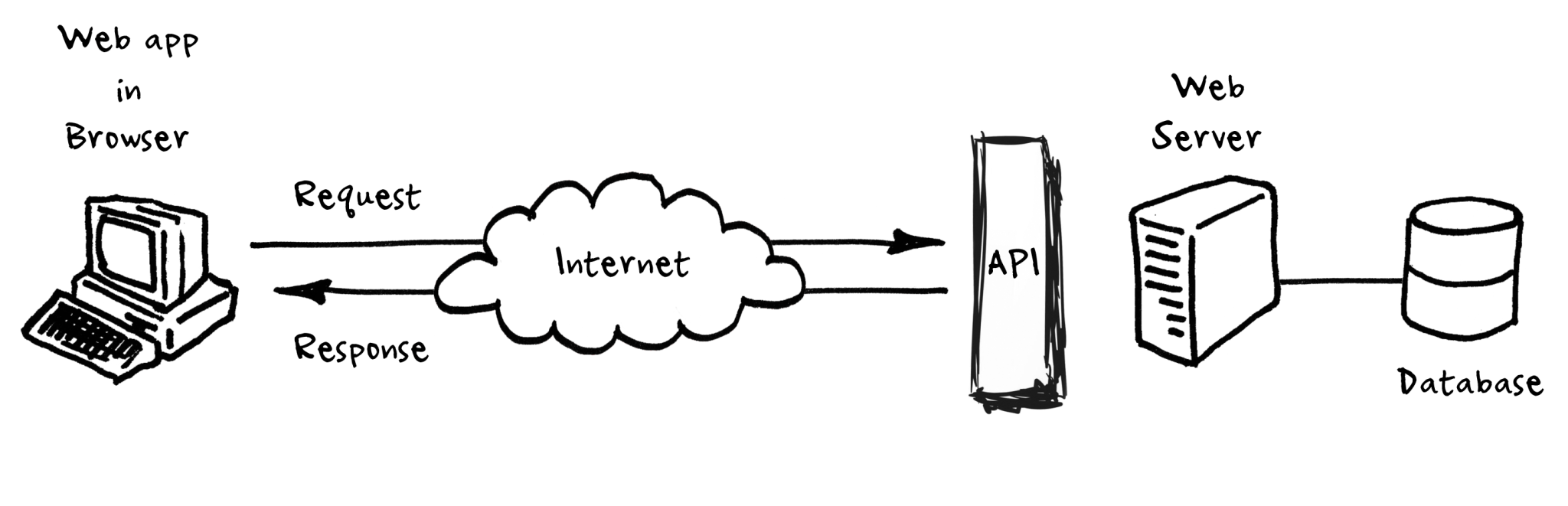
image1-2

Top 10 Weather api are as follows:

  • OpenWeatherMap API
  • Dark Sky API
  • Weather API
  • Simple Weather API
  • Weather2020 API
  • Air Quality API
  • Weather by Location API
  • Visual Crossing Weather API
  • AccuWeather API
  • AerisWeather API

In this project an APi of OpenWeather is used to request weather of a city by sending a query to the api.
query looks like this:

url :  http://api.openweathermap.org/data/2.5/weather
{"q":cityy_name.get(),'units':'metric','appid':api_key }

in the url the city name along with my api id and unit system are comined and sent as an https request using the request modules's request() method, the output is in the format of json file.

the response from the api looks something like this:

{'coord': {'lon': -71.06, 'lat': 42.36}, 'weather': [{'id': 500, 'main': 'Rain', 'description': 'light rain', 'icon': '10d'}], 'base': 'stations', 
    'main': {'temp': 298.88, 'feels_like': 302.56, 'temp_min': 298.15, 'temp_max': 299.82, 'pressure': 1010, 'humidity': 85}, 'visibility': 10000, 
    'wind': {'speed': 2.24, 'deg': 151, 'gust': 4.47}, 'rain': {'1h': 0.25}, 'clouds': {'all': 82}, 'dt': 1596407271, 'sys': {'type': 3, 'id': 2005683, 
    'country': 'US', 'sunrise': 1596361095, 'sunset': 1596412955}, 'timezone': -14400, 'id': 4930956, 'name': 'Boston', 'cod': 200} 

which is then this data is formatted into the gui application by using appropiate dictionary methods.

The GUI application looks like this:

(the GUi is made using frames,canvas,entry methods in tkinter)

(colors are choosen from colorhunt )

  • Any city around the globe can be sent as query and it's current weather condition data can be retrieved and displayed.

imports used in this project are

from tkinter import *
import tkinter,requests
from tkinter.font import BOLD
from urllib import response
from tkinter import BOTH
from PIL import ImageTk, Image
from io import BytesIO
from cv2 import FONT_HERSHEY_COMPLEX

Not just the weather data, even the icon of the weather condition can be retrieved from openweather api, its free to use and faster compared to other api's.

Note:

  • System must be connected to the internet for the app to work.
  • No spelling mistakes must be made while sening query.
  • Enter city name (not country,continent name) then hit submit.

The main intention behind this project is to learn how to work with api's, gathering/retrieving information from web , formatting and producing it in a GUi application which looks good, minimal and easy to use. Feel free to fork the repo and imporve it by changing ui,colors or add more functionality. You can find detailed code xplanation for every line in comments in source, I will also be posting line to line instructions along with xplanation how to build this application along with other very basic GUi applications in learn-tkinter-with-me repo, do check that and it's been a lot of hardwork, struggle making this app work as intended at the same time look good, a lot of trial and error has been made for the colors to make ui look good so leave a star if u like this project.

Owner
SasiVatsal
open source enthusiast.🧑🏼‍💻 Just a teen interest in unix/linux 💻,android📱platforms, intermediate in python, js, c/c++.
SasiVatsal
Mini is a web browser application based on the Python PyQt web engine, made in 290 lines of code.

Mini Mini is a web browser application based on the Python PyQt web engine, made in 290 lines of code. The code is written and published as is, so the

Dmitry Karpenko 6 Nov 07, 2022
Edifice: a declarative GUI library for Python

Edifice is a Python library for building reactive UI, inspired by modern Javascript libraries such as React.

David Ding 193 Dec 11, 2022
PyQt QGraphicsView with selection box. User can move vertical border of the box horizontally.

pyqt-horizontal-selection-square-graphics-view PyQt QGraphicsView with selection box. User can move vertical border of the box horizontally. Requireme

Jung Gyu Yoon 3 Nov 07, 2022
Dear PyGui: A fast and powerful Graphical User Interface Toolkit for Python with minimal dependencies

(This library is available under a free and permissive license however, if you Enjoy Dear PyGui please consider becoming a Sponsor) Dear PyGui is a si

Jonathan Hoffstadt 9.4k Jan 07, 2023
TkArt - A repository created to explore geometry and art creation using TkInter

tkArt A repository created to explore geometry and art creation using TkInter, a

Jayant Sogikar 18 Oct 01, 2022
Quebra cabeça - Utilizando biblioteca do python: PyQt5

Puzzle 3x3 PyQt5 - Windows Quebra cabeça - Utilizando biblioteca do python: PyQt5 Para testar este quebra cabeça na sua maquina, primeiramente faça o

Matheus Marsal 1 Dec 21, 2021
The Python-Weather-App is a service that provides weather data

The Python-Weather-App is a service that provides weather data, including current weather data to the developers of web services and mobile applications.

Sayed Tabish 1 Dec 13, 2021
Project made in Qt Designer + Python, for evaluation in the subject Introduction to Programming in IFPE - Paulista campus.

Project made in Qt Designer + Python, for evaluation in the subject Introduction to Programming in IFPE - Paulista campus.

Paola Rodrigues 2 Apr 13, 2022
Key Cast - Cast your key presses and mouse clicks on the screen, while casting your favorite application on the screen. Better than the rest.

Key Cast Screen cast your keyboard and mouse clicks in style Project Homepage » View Demo · Report Bug · Request Feature Table of Contents Introductio

Mehul Singh Teya 13 Dec 23, 2022
pyglet is a cross-platform windowing and multimedia library for Python, for developing games and other visually rich applications.

pyglet pyglet is a cross-platform windowing and multimedia library for Python, intended for developing games and other visually rich applications. It

1.3k Jan 01, 2023
Useful PDF-related productivity tool.

Luftmensch 1.4.7 (Español) | 1.4.3 (English) Version 1.4.7 (Español) released in October 2021. Version 1.4.3 (English) released in September 2021. 🏮

8 Dec 29, 2022
A simple todo GUI applicaiton

simple_todo_gui A simple todo GUI applicaiton To create an .exe file, run 'Python setup.py build' after installing PyQt5 and cx_Freeze with pip. Then

Dhammike Piyumal 2 Nov 11, 2021
A small GUI random roll call program made by Python.

A small GUI random roll call program made by Python.

Yuchen Ren 0 Feb 21, 2022
PyQt Custom Frameless Main Window (Enable to move and resize)

pyqt-custom-frameless-mainwindow PyQt Custom Frameless Main Window (Enable to move and resize) Requirements PyQt5 = 5.8 Setup pip3 install git+https:

Jung Gyu Yoon 1 Jan 13, 2022
Python Screen Recorder using Python

PY-Screen-Recorder Python Screen Recorder using Python Requirement: pip install cv2 pip install pyautogui pip install numpy How to reach me? You can r

SonLyte 8 Nov 08, 2021
Bank-Project - A bank ATM simulator recreated in python

Bank-Project A bank ATM simulator recreated in python. NOTE: this repo is a translation of Rasphy2009/Proyecto-Banco Requirements (.py only) 🐍 Python

Rasphy 2 Jan 02, 2022
Delphi's FireMonkey framework as a Python module for Windows, MacOS, Linux, and Android GUI development.

DelphiFMX4Python Delphi's FireMonkey framework as a Python module for Windows, MacOS, Linux, and Android GUI development. About: The delphifmx library

Embarcadero Technologies 191 Jan 09, 2023
Firefox 96 Webapps for Gnome 3

mozapp Do you prefer Firefox to Chrome? Me too! But ever since Firefox dropped support for standalone web applications, I've resorted to using Chrome

Marten de Vries 8 Oct 31, 2022
A Windows Dock Widget Written In Pure Python

VEПUS A Windows Dock Widget Written In Pure Python What is Venus? Venus is a Dock Widget for your desktops interface. It adds a couple of really cool

Secrets 18 Dec 30, 2022
Py3editor - A text editor written in Python and Tkinter

Py3Editor My text editor written in Python and Tkinter! Contains a basic set of

JaydenDev 1 Mar 05, 2022