PowerApps-docstring is a console based, pipeline ready application that automatically generates user and technical documentation for Power Apps.

Overview

powerapps-docstring

PowerApps-docstring is a console based, pipeline ready application that automatically generates user and technical documentation for PowerApps.

A first version of a Power Apps Documentation Guideline is available here: Power Apps Documentation Guideline

Purpose of this application

Documentation of Microsoft Power Apps is an important building block in the software lifecycle. As in the traditional software development process, the developed Power App should also be documented propperly to ensure further development/support and maintenance as well as onboarding of new developers.

Unfortunately, it is currently not possible to automatically create documentation for a Power App "out of the box" based on the App (code) itself. Resolving in either hours of manual documentation work or a lack of propper documentation at all.

This application shall solve this problem by providing a way to:

  • create Power Apps documentation based on the code and docstrings provided inside the app development process itself
  • integrate the documentation creation process into the ci/cd pipeline aswell as
  • create documentation based on an exported app

Example

The example [Meeting Capture Demo-doc.md](example/Meeting Capture Demo-doc.md) is based on the template "Meeting Capture App" provided by Microsoft. The app has not been modified except docstrings have been added within the OnVisible propperties of each screen as well as OnStart. The source files are also available in the example folder.

PowerApps_Docstring_demo

Getting started

Windows based GUI

Download the pa-docstring.exe file from dist folder or release page and run it to start the GUI. You have to provide:

  • source path (absolute or relative) to the source folder
  • output path where the documentation shall be stored
  • config file is optional if no file is provided, a standard file will be used
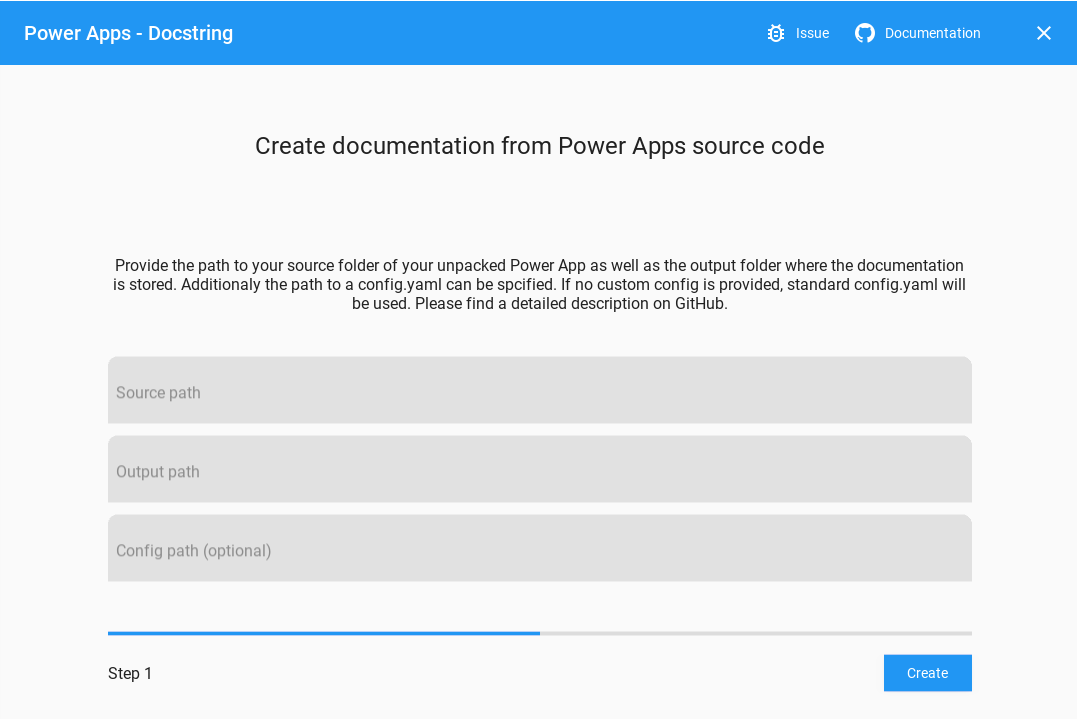
GUI

Windows based CLI

The .exe file can also be used as a CLI. In this case you need to provide at leas the parameter -s and -o (see python CLI) pa-docstring.exe -s example\src\meetingcapturedemo -o example

Working with python based CLI or integration into CI

  1. clone repository git clone https://github.com/sebastian-muthwill/powerapps-docstring.git and change into directory cd powerapps-docstring
  2. install requirements with pip install -r requirements.txt
  3. run with python3 main.py --source example\src\meetingcapturedemo\ --output example\

Once the application finished successfully the documentation file is created in the specified folder in markdown format.

Known issues / optimizations

  • mermaid graph looks wierd whe to many screens and is not displayed in github since github currently does not support mermaid
  • currently not tested with modell driven apps

Feature ideas

If you would like to submit your idea, feel free to create an issue.

  • screen descriptions from comments
  • screenflow from navigations
  • used functions (configurable)
  • used connections
  • output
    • user and technical documentation
    • markdown
    • html
    • pdf
  • handle following formats:
    • zip
    • mssap
    • src
  • usable via Azure DevOps CI-CD pipeline

Follow this topic

Get in touch with me on: Twitter

#powerapps_docstring #PowerAtelier #CloudCouchRocks

Comments
  • UnboundLocalError: local variable 'canvas_manifest' referenced before assignment

    UnboundLocalError: local variable 'canvas_manifest' referenced before assignment

    An issue in the pipeline step in Azure DevOps: Config:

    image

    YAML Config of the above configuration:

    #Your build pipeline references an undefined variable named ‘BuildStagingDirectory’. Create or edit the build pipeline for this YAML file, define the variable on the Variables tab. See https://go.microsoft.com/fwlink/?linkid=865972 #Your build pipeline references an undefined variable named ‘SolutionName’. Create or edit the build pipeline for this YAML file, define the variable on the Variables tab. See https://go.microsoft.com/fwlink/?linkid=865972 #Your build pipeline references an undefined variable named ‘BuildStagingDirectory’. Create or edit the build pipeline for this YAML file, define the variable on the Variables tab. See https://go.microsoft.com/fwlink/?linkid=865972 #Your build pipeline references an undefined variable named ‘SolutionName’. Create or edit the build pipeline for this YAML file, define the variable on the Variables tab. See https://go.microsoft.com/fwlink/?linkid=865972

    steps:

    • task: [email protected] displayName: 'powerapps-docstring' inputs: scriptPath: 'powerapps-docstring/main.py' arguments: '--source $(BuildStagingDirectory)$(SolutionName)\managed\ --output $(BuildStagingDirectory)$(SolutionName)\managed\ --config powerapps-docstring\config.yaml' continueOnError: true

    OUTPUT:

    2021-11-07T16:05:32.8040424Z ##[section]Starting: powerapps-docstring 2021-11-07T16:05:32.8327632Z ============================================================================== 2021-11-07T16:05:32.8327960Z Task : Python script 2021-11-07T16:05:32.8328195Z Description : Run a Python file or inline script 2021-11-07T16:05:32.8328433Z Version : 0.182.0 2021-11-07T16:05:32.8328748Z Author : Microsoft Corporation 2021-11-07T16:05:32.8329065Z Help : https://docs.microsoft.com/azure/devops/pipelines/tasks/utility/python-script 2021-11-07T16:05:32.8329462Z ============================================================================== 2021-11-07T16:05:33.1525497Z [command]C:\hostedtoolcache\windows\Python\3.9.7\x64\python.exe D:\a\1\s\powerapps-docstring\main.py --source build\SolutionDemo\managed\ --output build\SolutionDemo\managed\ --config config.yaml 2021-11-07T16:05:33.2411939Z build\SolutionDemo\managed/ 2021-11-07T16:05:33.2412839Z Traceback (most recent call last): 2021-11-07T16:05:33.2413325Z File "D:\a\1\s\powerapps-docstring\main.py", line 86, in 2021-11-07T16:05:33.2413942Z main(sys.argv[1:]) 2021-11-07T16:05:33.2414362Z File "D:\a\1\s\powerapps-docstring\main.py", line 79, in main 2021-11-07T16:05:33.2414816Z docstring = Docstring(pa_src_path, output_path, config) 2021-11-07T16:05:33.2415299Z File "D:\a\1\s\powerapps-docstring\powerapps_docstring\documentation.py", line 15, in init 2021-11-07T16:05:33.2415796Z self.manifest_file = self.parser.get_canvas_manifest() 2021-11-07T16:05:33.2416293Z File "D:\a\1\s\powerapps-docstring\powerapps_docstring\parser.py", line 44, in get_canvas_manifest 2021-11-07T16:05:33.2416744Z return canvas_manifest 2021-11-07T16:05:33.2417163Z UnboundLocalError: local variable 'canvas_manifest' referenced before assignment 2021-11-07T16:05:33.2524300Z ##[error]The process 'C:\hostedtoolcache\windows\Python\3.9.7\x64\python.exe' failed with exit code 1 2021-11-07T16:05:33.2731262Z ##[section]Finishing: powerapps-docstring

    question 
    opened by frederikbisback 5
  • Azure DevOps pipeline - ModuleNotFoundError: No module named 'yaml'

    Azure DevOps pipeline - ModuleNotFoundError: No module named 'yaml'

    Dear,

    I am adding the Python script to the Azure DevOps pipeline. I cannot install the YAML module; see the message. ModuleNotFoundError: No module named 'yaml'

    image

    Thanks for the feedback.

    Frederik

    question 
    opened by frederikbisback 3
  • Add StartScreen to AppInfo

    Add StartScreen to AppInfo

    As the StartScreen app variable is now available it should be documented.

    In the attached documentation.py I have added the following;

    start_screen = app_screen[1]["App As appinfo"].get("StartScreen")
    

    at line 172 and the following in the # write app info block

      if start_screen != None:
                appinfo = self._extract_parts_from_propperty(start_screen)
                if appinfo[1] != None:
                    self.md_file.new_paragraph(appinfo[1])
                self.md_file.new_line("")
                self.md_file.new_header(level=2, title="StartScreen")
                self.md_file.insert_code(appinfo[2],language='typescript')
                self.md_file.new_line("")
    

    This also has some updates to Mermaid to work OOTB with Docusaurus, namely ==> becomes --> and screen names cannot have spaces, well I haven't worked out how to yet. Working on Datasources and Tests next :)

    documentation - Copy.txt

    fixed 
    opened by P3N-101 2
  • Screenflow optimization needed

    Screenflow optimization needed

    The screenflow visualization is currently overloaded, when there are to many navigations from one screen to another e.g. nested in If-statements etc. Screenflow_example

    • [ ] A possible solution could be to filter out multiple (same) navigations an reduce them to one.

    Also Back() navigations are currently not tracked at all.

    opened by sebastian-muthwill 2
  • Introduce early alpha version

    Introduce early alpha version

    The early alpha should at least include:

    • basic programm structure
    • basic documentation output
    • running on the src folder

    This shall be considered as a prof of concept version.

    • needs to be checked within a pipeline
    opened by sebastian-muthwill 1
  • Mermaid prefix differes depending on implementation

    Mermaid prefix differes depending on implementation

    The prefix/suffix differes depending on implementation.

    In Azure DevOps ::: is used. In chrome extension for github ``` is used.

    This needs to be reflected via customizable prefix/suffix via config.

    opened by sebastian-muthwill 0
  • Code Fails in case of commeted Set Function with European structure

    Code Fails in case of commeted Set Function with European structure

    If I have an element with a Set function which is commented aside the script runs into an error. OnSelect = Back() //Set(varNav;true) This is hardly avoidable if you are working with a German Browser.

    bug 
    opened by PowerDoc365 0
  • Add file/path picker to gui

    Add file/path picker to gui

    Currently the file path needs to be copied into the fields.

    For the fileds:

    • [ ] Source path
    • [ ] Output path
    • [ ] Config file

    a file picker needs to be implemented, so the user can select the path/file instead of copy pasting it.

    GUI 
    opened by sebastian-muthwill 0
  • Possibility to add additional information to documentation

    Possibility to add additional information to documentation

    Since a proper documentation should contain more information that can't be extracted from the source code, this needs to be provided separately. This could be achieved by providing this content on separated MD files that will be pulled into the documentation file.

    opened by sebastian-muthwill 1
Releases(v0.4.1)
  • v0.4.1(Nov 15, 2021)

    What's Changed

    Features

    • add global variable handling by @sebastian-muthwill in https://github.com/sebastian-muthwill/powerapps-docstring/pull/53
    • adds support for different mermaid implementations #54 by @sebastian-muthwill in https://github.com/sebastian-muthwill/powerapps-docstring/pull/55

    Fixes

    • #patch adds workflows for CI by @sebastian-muthwill in https://github.com/sebastian-muthwill/powerapps-docstring/pull/56
    • add workflow and some enhancements by @sebastian-muthwill in https://github.com/sebastian-muthwill/powerapps-docstring/pull/57
    • change workflows to yml by @sebastian-muthwill in https://github.com/sebastian-muthwill/powerapps-docstring/pull/58
    • change workflow path to workflows by @sebastian-muthwill in https://github.com/sebastian-muthwill/powerapps-docstring/pull/59
    • add pytest to requirements by @sebastian-muthwill in https://github.com/sebastian-muthwill/powerapps-docstring/pull/60
    • fix bug with test on ubuntu by @sebastian-muthwill in https://github.com/sebastian-muthwill/powerapps-docstring/pull/61
    • change name of workflow by @sebastian-muthwill in https://github.com/sebastian-muthwill/powerapps-docstring/pull/62
    • removes alpha tag from releases

    Full Changelog: https://github.com/sebastian-muthwill/powerapps-docstring/compare/v0.4.0-alpha...v0.4.1

    Source code(tar.gz)
    Source code(zip)
  • v0.4.0-alpha(Nov 10, 2021)

    What's Changed

    New Features

    • add StartScreen support #47
    • check if CanvasManifest.json is in source folder and give hint for path in cli #46
    • remove exe file from dist folder to reduce repository size
    • guideline extended

    Fixes

    • small fixes for path handling in gui and cli by @sebastian-muthwill in https://github.com/sebastian-muthwill/powerapps-docstring/pull/39
    • fix: catch exception on GUI close
    • fix mermaid to conform with mermaid syntax #47
    • adds sys.exit and console log for cli #45

    Full Changelog: https://github.com/sebastian-muthwill/powerapps-docstring/compare/v0.3.0-alpha...v0.4.0-alpha

    Source code(tar.gz)
    Source code(zip)
    pa-docstring.exe(35.80 MB)
  • v0.3.0-alpha(Nov 4, 2021)

    This release introduces a GUI on Windows as well as some small features and fixes.

    What's Changed

    • First version of GUI by @sebastian-muthwill in https://github.com/sebastian-muthwill/powerapps-docstring/pull/37
    • Customization options for output file based on config. (The order of chapters can be arranged) #7
    • Some small fixes

    Full Changelog: https://github.com/sebastian-muthwill/powerapps-docstring/compare/v0.2.3-alpha...v0.3.0-alpha

    Source code(tar.gz)
    Source code(zip)
    pa-docstring.exe(35.80 MB)
  • v0.2.3-alpha(Oct 27, 2021)

    Fixes issues with blank screens and screen names containing blanks.

    What's Changed

    • handling screen names with blanks by @sebastian-muthwill in https://github.com/sebastian-muthwill/powerapps-docstring/pull/30
    • fix: ads handling for empty screens #31 by @sebastian-muthwill in https://github.com/sebastian-muthwill/powerapps-docstring/pull/32

    Full Changelog: https://github.com/sebastian-muthwill/powerapps-docstring/compare/v0.2.2-alpha...v0.2.3-alpha

    Source code(tar.gz)
    Source code(zip)
  • v0.2.2-alpha(Oct 18, 2021)

    Features

    Adds some minor improvements with screen flows:

    • the screen order is now arranged based on the order in studio (from CanvasManifest file)

    • screens can now be excluded from screen flow via config file

    • multiple lines are removed from screen flow

    • adds test cases for parser

    Known issues

    • currently not tested with model driven apps
    Source code(tar.gz)
    Source code(zip)
  • v0.2.1-alpha(Oct 13, 2021)

    Features

    • create documentation based on Power Apps source files
    • create used connections
    • add screen descriptions from docstrings
    • create screenflow from navigations
    • content of the documentation output is customizable via config file

    Known issues / optimizations

    • screens are not in the order as in Power Apps Studio see: #10
    • mermaid graph looks wierd when to many screens and is not displayed in github since github currently does not support mermaid
    • currently not tested with modell driven apps
    Source code(tar.gz)
    Source code(zip)
  • v0.2.0-alpha(Oct 13, 2021)

  • v0.1.0-alpha(Oct 12, 2021)

    This is the alpha version for powerapps-docstring.

    Features

    • generates a basic documentation output based on a source folder "src" run with:
    python main.py -s src/appname -o /example/output/folder
    
    • output can be customized via config.yaml

    Known limitations

    • .msapp needs to be unpacked bevore (currently no handling for this)
    • only tested on canvas apps
    Source code(tar.gz)
    Source code(zip)
Owner
Sebastian Muthwill
Sebastian Muthwill
Python-samples - This project is to help someone need some practices when learning python language

Python-samples - This project is to help someone need some practices when learning python language

Gui Chen 0 Feb 14, 2022
A Collection of Cheatsheets, Books, Questions, and Portfolio For DS/ML Interview Prep

Here are the sections: Data Science Cheatsheets Data Science EBooks Data Science Question Bank Data Science Case Studies Data Science Portfolio Data J

James Le 2.5k Jan 02, 2023
Sphinx Bootstrap Theme

Sphinx Bootstrap Theme This Sphinx theme integrates the Bootstrap CSS / JavaScript framework with various layout options, hierarchical menu navigation

Ryan Roemer 584 Nov 16, 2022
Create docsets for Dash.app-compatible API browser.

doc2dash: Create Docsets for Dash.app and Clones doc2dash is an MIT-licensed extensible Documentation Set generator intended to be used with the Dash.

Hynek Schlawack 498 Dec 30, 2022
Fun interactive program to sort a list :)

LHD-Build-Sort-a-list Fun interactive program to sort a list :) Inspiration LHD Build Write a script to sort a list. What it does It is a menu driven

Ananya Gupta 1 Jan 15, 2022
LotteryBuyPredictionWebApp - Lottery Purchase Prediction Model

Lottery Purchase Prediction Model Objective and Goal Predict the lottery type th

Wanxuan Zhang 2 Feb 14, 2022
Soccerdata - Efficiently scrape soccer data from various sources

SoccerData is a collection of wrappers over soccer data from Club Elo, ESPN, FBr

Pieter Robberechts 195 Jan 04, 2023
Literate-style documentation generator.

888888b. 888 Y88b 888 888 888 d88P 888 888 .d8888b .d8888b .d88b. 8888888P" 888 888 d88P" d88P" d88""88b 888 888 888

Pycco 808 Dec 27, 2022
Hjson for Python

hjson-py Hjson, a user interface for JSON Hjson works with Python 2.5+ and Python 3.3+ The Python implementation of Hjson is based on simplejson. For

Hjson 185 Dec 13, 2022
Zero configuration Airflow plugin that let you manage your DAG files.

simple-dag-editor SimpleDagEditor is a zero configuration plugin for Apache Airflow. It provides a file managing interface that points to your dag_fol

30 Jul 20, 2022
Code and pre-trained models for "ReasonBert: Pre-trained to Reason with Distant Supervision", EMNLP'2021

ReasonBERT Code and pre-trained models for ReasonBert: Pre-trained to Reason with Distant Supervision, EMNLP'2021 Pretrained Models The pretrained mod

SunLab-OSU 29 Dec 19, 2022
OpenTelemetry Python API and SDK

Getting Started • API Documentation • Getting In Touch (GitHub Discussions) Contributing • Examples OpenTelemetry Python This page describes the Pytho

OpenTelemetry - CNCF 1.1k Jan 08, 2023
Run `black` on python code blocks in documentation files

blacken-docs Run black on python code blocks in documentation files. install pip install blacken-docs usage blacken-docs provides a single executable

Anthony Sottile 460 Dec 23, 2022
A curated list of python programming language blogs

Python Blogs A curated list of python programming language blogs Contribute Companies/Organization # A B C D E F G H I J K L M N O P Q R S T U V W X Y

Rizky D. Onto 48 Nov 15, 2022
Plotting and analysis tools for ARTIS simulations

Artistools Artistools is collection of plotting, analysis, and file format conversion tools for the ARTIS radiative transfer code. Installation First

ARTIS Monte Carlo Radiative Transfer 8 Nov 07, 2022
A course-planning, course-map rendering and GPA-calculation web service, designed for the SFU (Simon Fraser University) student.

SFU Course Planner What is the overall goal of the project (i.e. what does it do, or what problem is it solving)? As the title suggests, this project

Ash Peng 1 Oct 21, 2021
A `:github:` role for Sphinx

sphinx-github-role A github role for Sphinx. Usage Basic usage MyST: :caption: index.md See {github}`astrojuanlu/sphinx-github-role#1`. reStructuredT

Juan Luis Cano Rodríguez 4 Nov 22, 2022
Tampilan - Change Termux Appearance With Python

Tampilan Gambar usage pkg update && pkg upgrade pkg install git && pkg install f

Creator Lord-Botz 1 Jan 31, 2022
An introduction course for Python provided by VetsInTech

Introduction to Python This is an introduction course for Python provided by VetsInTech. For every "boot camp", there usually is a pre-req, but becaus

Vets In Tech 2 Dec 02, 2021
Always know what to expect from your data.

Great Expectations Always know what to expect from your data. Introduction Great Expectations helps data teams eliminate pipeline debt, through data t

Great Expectations 7.8k Jan 05, 2023