] } "> {
"name" : "
"
,
"value" : < value > ,
"children": [
< Object >
]
} The burn CLI tool can convert multiple file formats to this hierarchical data structure.
Interacting with entriesInternally, the data is transformed into a d3 hierarchy . Functions like onClick, label and zoom expose individual entries as hierarchy Nodes, which wrap the provided data and add more properties:
, "parent":
, "children": [
], "x1":
, // x2 - x1 is the size of this node, as a fraction of the root. "x2":
} ">
{
  "data":

           ,
  "parent":

            ,
  "children": [


  ],
  "x1":

              ,  // x2 - x1 is the size of this node, as a fraction of the root.
  "x2":

                }
This is a breaking change from previous versions of d3-flame-graph, which were based on version 3 of the d3 library. See d3-hierarchy .
API Reference# flamegraph()
Create a new Flame Graph.
# flamegraph.selfValue ([enabled] )
Defines if the plugin should use the self value logic to calculate the node value for the Flame Graph frame size. If set to true, it will assume the node value from the input callgraph represents only the internal node value, or self value, not the sum of all children. If set to false it will assume the value includes the chidren values too. Defaults to false if not explicitely set, which if the same behavior 1.x had.
# flamegraph.width ([size] )
Graph width in px. Defaults to 960px if not set. If size is specified, it will set the graph width, otherwise it will return the current graph width.
# flamegraph.height ([size] )
Graph height in px. Defaults to the number of cell rows times cellHeight size is specified, it will set the cell height, otherwise it will return the current graph height. If minHeight
# flamegraph.minHeight ([size] )
Minumum graph height in px. If size is specified, and higher than the provided or calculated height , it will override it.
# flamegraph.cellHeight ([size] )
Cell height in px. Defaults to 18px if not set. If size is specified, it will set the cell height, otherwise it will return the current cell height.
# flamegraph.minFrameSize ([size] )
Minimum size of a frame, in px, to be displayed in the flame graph. Defaults to 0px if not set. If size is specified, it will set the minimum frame size, otherwise it will return the current minimum frame size.
# flamegraph.title ([title] )
Title displayed on top of graph. Defaults to empty if not set. If title is specified, it will set the title displayed on the graph, otherwise it will return the current title.
# flamegraph.tooltip ([function] )
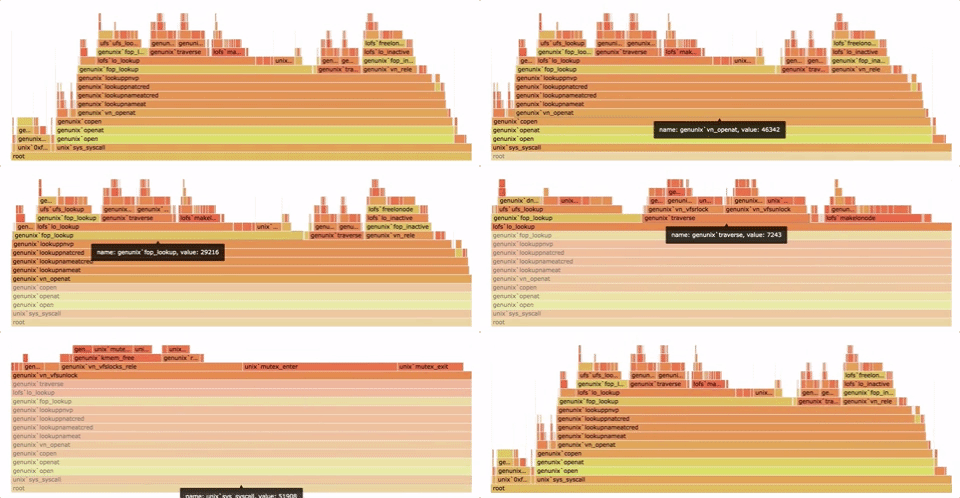
Sets a tooltip for the flamegraph frames. The tooltip function should implement two methods, .show(d) and .hide(), that will be called when the tooltip should be made visible or hidden respectively. The .show method takes a single argument, which is the flamegraph frame. The d3-flame-graph package includes a simple tooltip function, flamegraph.tooltip.defaultFlamegraphTooltip().
">
< script type ="text/javascript " src ="d3-flamegraph-tooltip.js "> script >
var tip = flamegraph . tooltip . defaultFlamegraphTooltip ( )
. html ( function ( d ) { return "name: " + d . data . name + ", value: " + d . data . value ; } ) ;
flamegraph . tooltip ( tip ) The tooltip d3-tip . This was the default library until version 2.1.10 .
">
< script src ="https://cdnjs.cloudflare.com/ajax/libs/d3-tip/0.9.1/d3-tip.min.js "> script >
var tip = d3 . tip ( )
. attr ( 'class' , 'd3-flame-graph-tip' )
. html ( function ( d ) { return "name: " + d . data . name + ", value: " + d . data . value ; } ) ;
flamegraph . tooltip ( tip ) # flamegraph.transitionDuration ([duration] )
Specifies transition duration in milliseconds. The default duration is 750ms. If duration is not specified, returns the current transition duration.
See d3.duration .
# flamegraph.transitionEase ([ease] )
Specifies the transition easing function. The default easing function is d3.easeCubic.
See d3-ease .
# flamegraph.label ([function] )
Adds a function that returns a formatted label. Example:
flamegraph . label ( function ( d ) {
return "name: " + d . name + ", value: " + d . value ;
} ) ; # flamegraph.sort ([enabled] )
Enables/disables sorting of children frames. Defaults to true if not set to sort in ascending order by frame's name. If set to a function, the function takes two frames (a,b) and returns -1 if frame a is less than b, 1 if greater, or 0 if equal. If a value is specified, it will enable/disable sorting, otherwise it will return the current sort configuration.
# flamegraph.inverted ([bool] )
Invert the flame graph direction. A top-down visualization of the flame graph, also known as icicle plot. Defaults to false if not set. If a value is specified, it will enable/disable the inverted flame graphs direction, otherwise it will return the current inverted configuration.
# flamegraph.computeDelta ([bool] )
If enabled, computes delta for all nodes. Delta value of each node is a sum of its own value from the getDelta(node) function, plus its children. Defaults to false if not set. If a value is specified, it will enable/disable the delta computation, otherwise it will return the current computeDelta configuration.
# flamegraph.resetZoom ()
Resets the zoom so that everything is visible.
# flamegraph.onClick ([function] )
Adds a function that will be called when the user clicks on a frame. Example:
flamegraph . onClick ( function ( d ) {
console . info ( "You clicked on frame " + d . data . name ) ;
} ) ; If called with no arguments, onClick will return the click handler.
# flamegraph.onHover ([function] )
Adds a function that will be called when the user hovers on a frame. Example:
flamegraph . onHover ( function ( d ) {
console . info ( "You hovered over frame " + d . data . name ) ;
} ) ; If called with no arguments, onHover will return the hover handler.
# flamegraph.setDetailsElement ([element] )
Sets the element that should be updated with the focused sample details text. Example:
"> < div id ="details ">
div >
flamegraph . setDetailsElement ( document . getElementById ( "details" ) ) ; If called with no arguments, setDetailsElement will return the current details element.
# flamegraph.setDetailsHandler ([function] )
Sets the handler function that is called when the details element needs to be updated. The function receives a single paramenter, the details text to be set. Example:
let detailsHandler = function (d) { if (detailsElement) { if (d) { detailsElement.innerHTML = d } else { if (typeof searchDetails === 'function') { searchDetails() } else { detailsElement.innerHTML = '' } } } }
flamegraph . setDetailsHandler (
function ( d ) {
if ( detailsElement ) {
if ( d ) {
detailsElement . innerHTML = d
} else {
detailsElement . innerHTML = ''
}
}
}
) ; If not set, setDetailsHandler will default to the above function.
If called with no arguments, setDetailsHandler will reset the details handler function.
# flamegraph.setSearchHandler ([function] )
Sets the handler function that is called when search results are returned. The function receives a three paramenters, the search results array, the search sample sum, and root value, Example:
let searchHandler = function (searchResults, searchSum, totalValue) { searchDetails = () => { if (detailsElement) { detailsElement.innerHTML = 'search: ' + searchSum + ' of ' + totalValue + ' total samples ( ' + format('.3f')(100 * (searchSum / totalValue), 3) + '%)' } } searchDetails() }
flamegraph . setSearchHandler (
( searchResults , searchSum , totalValue ) => {
searchDetails = ( ) => { // searchDetails is a global variable
if ( detailsElement ) {
detailsElement . innerHTML = 'search: ' + searchSum + ' of ' + totalValue + ' total samples ( ' + format ( '.3f' ) ( 100 * ( searchSum / totalValue ) , 3 ) + '%)'
}
}
searchDetails ( )
}
) ; If not set, setSearchHandler will default to the above function.
If called with no arguments, setSearchHandler will reset the search handler function.
# flamegraph.setColorMapper ([function] )
Replaces the built-in node color hash function. Function takes two arguments, the node data structure and the original color string for that node. It must return a color string. Example:
// Purple if highlighted, otherwise the original color
flamegraph . setColorMapper ( function ( d , originalColor ) {
return d . highlight ? "#E600E6" : originalColor ;
} ) ; If called with no arguments, setColorMapper will reset the color hash function.
# flamegraph.setColorHue ([string] )
Sets the flame graph color hue. Options are warm, cold, red, orange, yellow, green and aqua.
If called with no arguments, setColorHue will reset the color hash function.
# flamegraph.setSearchMatch ([function] )
Replaces the built-in node search match function. Function takes three arguments, the node data structure, the search term and an optional boolean argument to ignore case during search. If the third argument is not provided, the search will be case-sensitive by default. The function must return a boolean. Example:
flamegraph . setSearchMatch ( function ( d , term , true ) {
// Non-regex implementation of the search function
return d . data . name . indexOf ( term ) != 0 ;
} ) If called with no arguments, setSearchMatch will return reset the search match function.
# flamegraph.merge (date )
Merges the current data with the given data.
# flamegraph.update ([data] )
Updates the current chart. If the data parameters is passed, replaces the current data.
# flamegraph.destroy ()
Removes the flamegraph.
All API functions will return the flame graph object if no other behavior is specified in the function details.
IssuesFor bugs, questions and discussions please use the GitHub Issues .
ContributingWe love contributions! But in order to avoid total chaos, we have a few guidelines.
If you found a bug, have questions or feature requests, don't hesitate to open an issue .
If you're working on an issue, please comment on it so we can assign you to it.
If you have code to submit, follow the general pull request format. Fork the repo, make your changes, and submit a pull request .
BuildThis plugin uses Webpack as build system. It includes a development server with live refresh on any changes. To start it, just execute the serve npm script.
$ git clone https://github.com/spiermar/d3-flame-graph.git
$ cd d3-flame-graph
$ npm install
$ npm run serve
TemplateA standalone template with all JavaScript and CSS inlined gets built at dist/templates/d3-flamegraph-base.html. It contains a placeholder /** @flamegraph_params **/ which needs to be replaced with the stacks in the format described in Input Format .
LicenseCopyright 2018 Martin Spier. All Rights Reserved.
Licensed under the Apache License, Version 2.0 (the “License”); you may not use this file except in compliance with the License. You may obtain a copy of the License at
http://www.apache.org/licenses/LICENSE-2.0
Unless required by applicable law or agreed to in writing, software distributed under the License is distributed on an “AS IS” BASIS, WITHOUT WARRANTIES OR CONDITIONS OF ANY KIND, either express or implied. See the License for the specific language governing permissions and limitations under the License.

 29 Jul 05, 2022
 107 Dec 14, 2022
 2 May 06, 2022
 27 Nov 06, 2022
 4 Jun 07, 2022
 2 Nov 17, 2021
 5 Jun 02, 2022
 7 Dec 28, 2022
 3 Jul 02, 2022
 6k Jan 08, 2023
 2 Dec 24, 2021
 22 Oct 31, 2022
 1 Jul 12, 2022
 0 Jun 12, 2021
 234 Dec 31, 2022
 207 Dec 30, 2022
 105 Dec 15, 2022
 209 Dec 21, 2022
 9.2k Dec 30, 2022
 1.3k Dec 26, 2022