E2Calib: How to Calibrate Your Event Camera
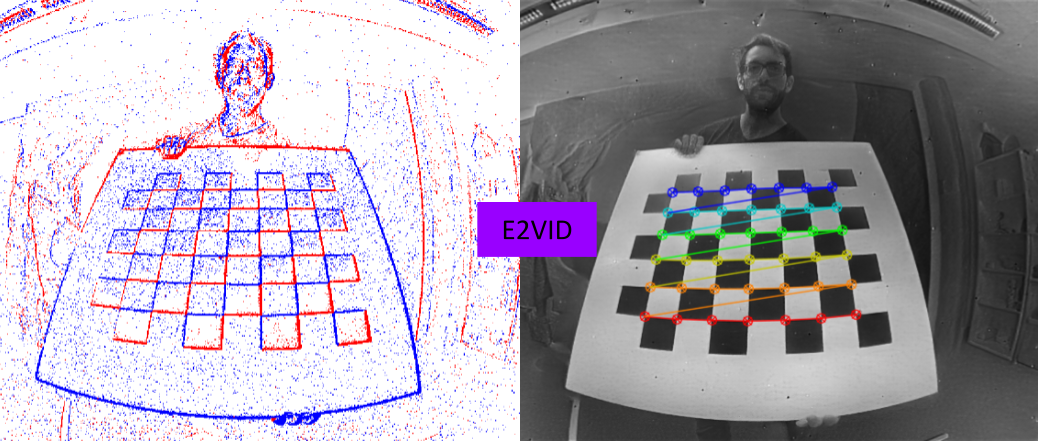
This repository contains code that implements video reconstruction from event data for calibration as described in the paper Muglikar et al. CVPRW'21.
If you use this code in an academic context, please cite the following work:
Manasi Muglikar, Mathias Gehrig, Daniel Gehrig, Davide Scaramuzza, "How to Calibrate Your Event Camera", Computer Vision and Pattern Recognition Workshops (CVPRW), 2021
@InProceedings{Muglikar2021CVPR,
  author = {Manasi Muglikar and Mathias Gehrig and Daniel Gehrig and Davide Scaramuzza},
  title = {How to Calibrate Your Event Camera},
  booktitle = {{IEEE} Conf. Comput. Vis. Pattern Recog. Workshops (CVPRW)},
  month = {June},
  year = {2021}
}
Installation
The installation procedure is divided into two parts. First, installation of packages for the conversion code that must be completed outside of any virtual environment for compatibility reasons. Second, installation of packages in a conda environment to run the reconstruction code.
Conversion to H5
Our current conversion code supports 2 event file formats:
- Rosbags with dvs_msgs
- Prophesee raw format using Metavision 2.2
Regardeless of the event file format:
pip3 install --no-cache-dir -r requirements.txt
pip3 install dataclasses # if your system Python version is < 3.7
- If you want to convert Prophesee raw format, install Metavision 2.2.
- If you want to convert Rosbags, install:
pip3 install --extra-index-url https://rospypi.github.io/simple/ rospy rosbag
Image Reconstruction
For running the reconstruction code, we create a new conda environment. Use an appropriate cuda version.
cuda_version=10.1

conda create -y -n e2calib python=3.7
conda activate e2calib
conda install -y -c anaconda numpy scipy
conda install -y -c conda-forge h5py opencv tqdm
conda install -y -c pytorch pytorch torchvision cudatoolkit=$cuda_version
The reconstruction code uses events saved in the h5 file format to reconstruct images with E2VID.
Reconstructions to Rosbag
If you want to use kalibr, you may want to create a rosbag from the reconstructed images. To achieve this, additionally install (outside of the conda environment)
pip3 install tqdm opencv-python
pip3 install --extra-index-url https://rospypi.github.io/simple/ sensor-msgs
Calibration Procedure
The calibration procedure is based on three steps:
- Conversion of different event data files into a common hdf5 format.
- Reconstruction of images at a certain frequency from this file. Requires the activation of the conda environment
e2calib. - Calibration using your favorite image-based calibration toolbox.
Conversion to H5
The conversion script simply requires the path to the event file and optionally a ros topic in case of a rosbag.
Reconstruction
The reconstruction requires the h5 file to convert events to frames. Additionally, you also need to specify the height and width of the event camera and the frequency or timestamps at which you want to reconstruct the frames. As an example, to run the image reconstruction code on one of the example files use the following command:
  cd python
  python offline_reconstruction.py  --h5file file --freq_hz 5 --upsample_rate 4 --height 480 --width 640
The images will be written by default in the python/frames/e2calib folder.
Fixed Frequency
Reconstruction can be performed at a fixed frequency. This is useful for intrinsic calibration. The argument --freq_hz specifies the frequency at which the image reconstructions will be saved.
Specified Timestamps
You can also specify the timestamps for image reconstruction from a text file. As an example, these timestamps can be trigger signals that synchronize the event camera with the exposure time of a frame-based camera. In this scenario, you may want to reconstruct images from the event camera at the trigger timestamps for extrinsic calibration. The argument --timestamps_file must point to a text file containing the timestamps in microseconds for this option to take effect.
We provide a script to extract trigger signals from a prophesee raw file.
Upsampling
We provide the option to multiply the reconstruction rate by a factor via the --upsample_rate argument. For example, setting this value to 3 will lead to 3 times higher reconstruction rate but does not influence the final number of reconstructed images that will be saved. This parameter can be used to finetune the reconstruction performance. For example setting --freq_hz to 5 without upsampling can lead to suboptimal performance because too many events are fed to E2VID. Instead, it is often a good start to work with 20 Hz reconstruction, thus setting the upsampling rate to 4.
Calibration
Once the reconstructed images are ready, you can use any image calibration toolbox. We provide a script to convert the reconstructed images to rosbag, that can be used with kalibr calibration toolbox for intrinsic calibration. Please use this script outside the conda environment.
cd python
python3 images_to_rosbag.py --rosbag_folder python/frames/ --image_folder  python/frames/e2calib --image_topic /dvs/image_reconstructed
In case you would like to combine images with other sensors for extrinsics calibration, please take a look at the kalibr bagcreator script
Example Files
For each file, we provide the original event file format (raw or rosbag) but also the already converted h5 file.
Prophesee Gen 3
Without Triggers:
wget https://download.ifi.uzh.ch/rpg/e2calib/prophesee/without_triggers/data.raw
wget https://download.ifi.uzh.ch/rpg/e2calib/prophesee/without_triggers/data.h5
Reconstruction Example
To reconstruct images from events at a fixed frequency, you can follow this example command:
  conda activate e2calib
  cd python
  python offline_reconstruction.py  --freq_hz 10 --upsample_rate 2 --h5file data.h5 --output_folder gen3_no_trigger --height 480 --width 640

With Triggers:
We also extracted the trigger signals using the provided script and provide them in the triggers.txt file.
wget https://download.ifi.uzh.ch/rpg/e2calib/prophesee/with_triggers/data.raw
wget https://download.ifi.uzh.ch/rpg/e2calib/prophesee/with_triggers/data.h5
wget https://download.ifi.uzh.ch/rpg/e2calib/prophesee/with_triggers/triggers.txt
Reconstruction Example
To reconstruct images from events at the trigger time, you can follow this example command:
  conda activate e2calib
  cd python
  python offline_reconstruction.py  --upsample_rate 2 --h5file data.h5 --output_folder gen3_with_trigger/ --timestamps_file triggers.txt --height 480 --width 640
Samsung Gen 3
Without Triggers:
wget https://download.ifi.uzh.ch/rpg/e2calib/samsung/samsung.bag
wget https://download.ifi.uzh.ch/rpg/e2calib/samsung/samsung.h5
Reconstruction Example
To reconstruct images from events at fixed frequency, you can follow this example command:
  conda activate e2calib
  cd python
  python offline_reconstruction.py --freq_hz 5 --upsample_rate 4 --h5file samsung.h5 --output_folder samsung_gen3 --height 480 --width 640

 302 Dec 14, 2022
 3 Oct 15, 2022
 36 Dec 02, 2022
 76 Jan 07, 2023
 136 Dec 28, 2022
 62 Dec 07, 2022
 108 Dec 28, 2022
 272 Nov 01, 2022
 11 Dec 11, 2022
 1 Nov 22, 2021
 491 Jan 03, 2023
 11 Sep 22, 2022
 998 Dec 29, 2022
 53 Dec 27, 2022
 20 Oct 17, 2022
 527 Dec 04, 2022
 594 Jan 05, 2023
 1 Jan 22, 2022
 23 Nov 21, 2022
 2 Mar 04, 2022