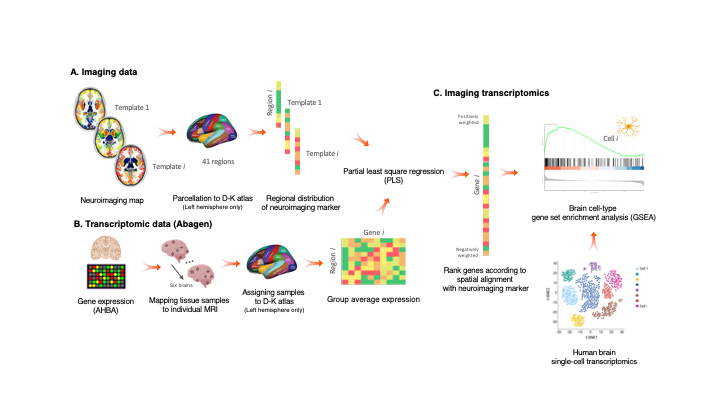
A package, and script, to perform imaging transcriptomics on a neuroimaging scan.

Overview

Imaging Transcriptomics

DOI License: GPL v3 Maintainer Generic badge Documentation Status

Imaging-transcriptomics_overwiew

Imaging transcriptomics is a methodology that allows to identify patterns of correlation between gene expression and some property of brain structure or function as measured by neuroimaging (e.g., MRI, fMRI, PET).


The imaging-transcriptomics package allows performing imaging transcriptomics analysis on a neuroimaging scan (e.g., PET, MRI, fMRI...).

The software is implemented in Python3 (v.3.7), its source code is available on GitHub, it can be installed via Pypi and is released under the GPL v3 license.

NOTE Versions from v1.0.0 are or will be maintained. The original script linked by the BioRxiv preprint (v0.0) is still available on GitHub but no changes will be made to that code. If you have downloaded or used that script please update to the newer version by installing this new version.

Installation

NOTE We recommend to install the package in a dedicated environment of your choice (e.g., venv or anaconda). Once you have created your environment and you have activated it, you can follow the below guide to install the package and dependencies. This process will avoid clashes between conflicting packages that could happen during/after the installation.

To install the imaging-transcriptomics Python package, first you will need to install a packages that can't be installed directly from PyPi, but require to be downloaded from GitHub. The package to install is pypyls. To install this package you can follow the installation on the documentation for the package or simply run the command

pip install -e git+https://github.com/netneurolab/pypyls.git/#egg=pyls

to download the package, and its dependencies directly from GitHub by using pip.

Once this package is installed you can install the imaging-transcriptomics package by running

pip install imaging-transcriptomics

Usage

Once installed the software can be used in two ways:

  • as standalone script
  • as part of some python script

WARNING Before running the script make sure the Pyhton environment where you have installed the package is activated.

Standalone script


To run the standalone script from the terminal use the command:

imagingtranscriptomics options

The options available are:

  • -i (--input): Path to the imaging file to analise. The path should be given to the program as an absolute path (e.g., /Users/myusername/Documents/my_scan.nii, since a relative path could raise permission errors and crashes. The script only accepts imaging files in the NIfTI format (.nii, .nii.gz).
  • -v (--variance): Amount of variance that the PLS components must explain. This MUST be in the range 0-100.

    NOTE: if the variance given as input is in the range 0-1 the script will treat this as 30% the same way as if the number was in the range 10-100 (e.g., the script treats the inputs -v 30 and -v 0.3 in the exact same way and the resulting components will explain 30% of the variance).

  • -n (--ncomp): Number of components to be used in the PLS regression. The number MUST be in the range 1-15.
  • --corr: Run the analysis using Spearman correlation instead of PLS.

    NOTE: if you run with the --corr command no other input is required, apart from the input scan (-i).

  • -o (--output) (optional): Path where to save the results. If none is provided the results will be saved in the same directory as the input scan.

WARNING: The -i flag is MANDATORY to run the script, and so is one, and only one, of the -n or -v flags. These last two are mutually exclusive, meaning that ONLY one of the two has to be given as input.

Part of Python script


When used as part of a Python script the library can be imported as:

import imaging_transcriptomics as imt

The core class of the package is the ImagingTranscriptomics class which gives access to the methods used in the standalone script. To use the analysis in your scripts you can initialise the class and then simply call the ImagingTranscriptomics().run() method.

import numpy as np
import imaging_transcriptomics as imt
my_data = np.ones(41)  # MUST be of size 41 
                       # (corresponds to the regions in left hemisphere of the DK atlas)

analysis = imt.ImagingTranscriptomics(my_data, n_components=1)
analysis.run()
# If instead of running PLS you want to analysze the data with correlation you can run the analysis with:
analysis.run(method="corr")

Once completed the results will be part of the analysis object and can be accessed with analysis.gene_results.

The import of the imaging_transcriptomics package will import other helpful functions for input and reporting. For a complete explanation of this please refer to the official documentation of the package.

Documentation

The documentation of the script is available at imaging-transcriptomics.rtfd.io/.

Troubleshooting

For any problems with the software you can open an issue in GitHub or contact the maintainer) of the package.

Citing

If you publish work using imaging-transcriptomics as part of your analysis please cite:

Imaging transcriptomics: Convergent cellular, transcriptomic, and molecular neuroimaging signatures in the healthy adult human brain. Daniel Martins, Alessio Giacomel, Steven CR Williams, Federico Turkheimer, Ottavia Dipasquale, Mattia Veronese, PET templates working group. bioRxiv 2021.06.18.448872; doi: https://doi.org/10.1101/2021.06.18.448872

Imaging-transcriptomics: Second release update (v1.0.2).Alessio Giacomel, & Daniel Martins. (2021). Zenodo. https://doi.org/10.5281/zenodo.5726839

Comments
  • pip installation can not resolve enigmatoolbox dependencies

    pip installation can not resolve enigmatoolbox dependencies

    After pip install -e git+https://github.com/netneurolab/pypyls.git/#egg=pyls and pip install imaging-transcriptomics in a new conda environment with Python=3.8, an error was occurred when import imaging-transcriptomics package that it can't find the module named enigmatoolbox. I figured out that the enigmatoolbox package seems can not be resolve by pip installation automatically, so I have to install the enigmatoolbox package from Github manually, with the code bellow according to the document of enigmatoolbox:

    git clone https://github.com/MICA-MNI/ENIGMA.git
    cd ENIGMA
    python setup.py install
    
    opened by YCHuang0610 4
  • DK atlas regions

    DK atlas regions

    Dear alegiac95,

    thanks for providing the scripts! I have just gone through the paper and description of this GitHub repo and I want to adapt your software to my project. However, I use the typical implementation of the DK from Freesurfer with 34 cortical DK ROIs instead of the 41 ROIs that you have used and, if I'm not mistaken, 41 ROIs are required to implement the script as ist is. Is it possible to change the input to other cortical parcellations as well (i.e., DK-34)?

    Cheers, Melissa

    enhancement 
    opened by Melissa1909 3
  • Script not calling the correct python version

    Script not calling the correct python version

    The script in version v1.0.0 is invoking the #!/usr/bin/env python interpreter, which could generate some issue if you default python is python2 (e.g., in older MacOS versions).

    bug 
    opened by alegiac95 1
  • Version 1.1.0

    Version 1.1.0

    Updated the scripts with:

    • support for both full brain analysis and cortical regions only
    • GSEA analysis (both during the analysis and as a separate script)
    • pdf report of the analysis
    opened by alegiac95 0
  • clean code and fix test

    clean code and fix test

    This commit does an extensive code cleaning following the PEP8 standard. It also fixes a test that was most probably intended for previous unstable versions of the software.

    Still to do:

    • Remove logging
    opened by matteofrigo 0
  • Add mathematical background on PLS

    Add mathematical background on PLS

    A more detailed explanation on PLS model and regression is required in the docs.

    • [ ] Add a general mathematical formulation of PLS
    • [ ] Use of PLS in neuroimaging applications
    • [ ] Description of the SIMPLS algorithm used by pypls

    In addition provide some background on correlation, since it is now added to the methods available in the python package/script

    documentation 
    opened by alegiac95 0
Releases(v.1.1.8)
Composable transformations of Python+NumPy programsComposable transformations of Python+NumPy programs

Chex Chex is a library of utilities for helping to write reliable JAX code. This includes utils to help: Instrument your code (e.g. assertions) Debug

DeepMind 506 Jan 08, 2023
Контрольная работа по математическим методам машинного обучения

ML-MathMethods-Test Контрольная работа по математическим методам машинного обучения. Вычисление основных статистик, диаграмм и графиков, проверка разл

Stas Ivanovskii 1 Jan 06, 2022
Image Segmentation Animation using Quadtree concepts.

QuadTree Image Segmentation Animation using QuadTree concepts. Usage usage: quad.py [-h] [-fps FPS] [-i ITERATIONS] [-ws WRITESTART] [-b] [-img] [-s S

Alex Eidt 29 Dec 25, 2022
RADIal is available now! Check the download section

Latest news: RADIal is available now! Check the download section. However, because we are currently working on the data anonymization, we provide for

valeo.ai 55 Jan 03, 2023
Cobalt Strike teamserver detection.

Cobalt-Strike-det Cobalt Strike teamserver detection. usage: cobaltstrike_verify.py [-l TARGETS] [-t THREADS] optional arguments: -h, --help show this

TimWhite 17 Sep 27, 2022
Codebase for INVASE: Instance-wise Variable Selection - 2019 ICLR

Codebase for "INVASE: Instance-wise Variable Selection" Authors: Jinsung Yoon, James Jordon, Mihaela van der Schaar Paper: Jinsung Yoon, James Jordon,

Jinsung Yoon 50 Nov 11, 2022
EfficientNetV2 implementation using PyTorch

EfficientNetV2-S implementation using PyTorch Train Steps Configure imagenet path by changing data_dir in train.py python main.py --benchmark for mode

Jahongir Yunusov 86 Dec 29, 2022
Animate molecular orbital transitions using Psi4 and Blender

Molecular Orbital Transitions (MOT) Animate molecular orbital transitions using Psi4 and Blender Author: Maximilian Paradiz Dominguez, University of A

3 Feb 01, 2022
TextureGAN in Pytorch

TextureGAN This code is our PyTorch implementation of TextureGAN [Project] [Arxiv] TextureGAN is a generative adversarial network conditioned on sketc

Patsorn 147 Dec 14, 2022
EvoJAX is a scalable, general purpose, hardware-accelerated neuroevolution toolkit

EvoJAX: Hardware-Accelerated Neuroevolution EvoJAX is a scalable, general purpose, hardware-accelerated neuroevolution toolkit. Built on top of the JA

Google 598 Jan 07, 2023
This repository contains small projects related to Neural Networks and Deep Learning in general.

ILearnDeepLearning.py Description People say that nothing develops and teaches you like getting your hands dirty. This repository contains small proje

Piotr Skalski 1.2k Dec 22, 2022
Recursive Bayesian Networks

Recursive Bayesian Networks This repository contains the code to reproduce the results from the NeurIPS 2021 paper Lieck R, Rohrmeier M (2021) Recursi

Robert Lieck 11 Oct 18, 2022
Efficient semidefinite bounds for multi-label discrete graphical models.

Low rank solvers #################################### benchmark/ : folder with the random instances used in the paper. ############################

1 Dec 08, 2022
Official implementation of the paper Chunked Autoregressive GAN for Conditional Waveform Synthesis

PyEmits, a python package for easy manipulation in time-series data. Time-series data is very common in real life. Engineering FSI industry (Financial

Descript 150 Dec 06, 2022
Code for "Adversarial attack by dropping information." (ICCV 2021)

AdvDrop Code for "AdvDrop: Adversarial Attack to DNNs by Dropping Information(ICCV 2021)." Human can easily recognize visual objects with lost informa

Ranjie Duan 52 Nov 10, 2022
Distance correlation and related E-statistics in Python

dcor dcor: distance correlation and related E-statistics in Python. E-statistics are functions of distances between statistical observations in metric

Carlos Ramos Carreño 108 Dec 27, 2022
2 Jul 19, 2022
CRISCE: Automatically Generating Critical Driving Scenarios From Car Accident Sketches

CRISCE: Automatically Generating Critical Driving Scenarios From Car Accident Sketches This document describes how to install and use CRISCE (CRItical

Chair of Software Engineering II, Uni Passau 2 Feb 09, 2022
A Pytorch Implementation for Compact Bilinear Pooling.

CompactBilinearPooling-Pytorch A Pytorch Implementation for Compact Bilinear Pooling. Adapted from tensorflow_compact_bilinear_pooling Prerequisites I

169 Dec 23, 2022
PyTorch Implementations for DeeplabV3 and PSPNet

Pytorch-segmentation-toolbox DOC Pytorch code for semantic segmentation. This is a minimal code to run PSPnet and Deeplabv3 on Cityscape dataset. Shor

Zilong Huang 746 Dec 15, 2022