Convert tables stored as images to an usable .csv file

Overview

Convert an image of numbers to a .csv file

This Python program aims to convert images of array numbers to corresponding .csv files. It uses OpenCV for Python to process the given image and Tesseract for number recognition.
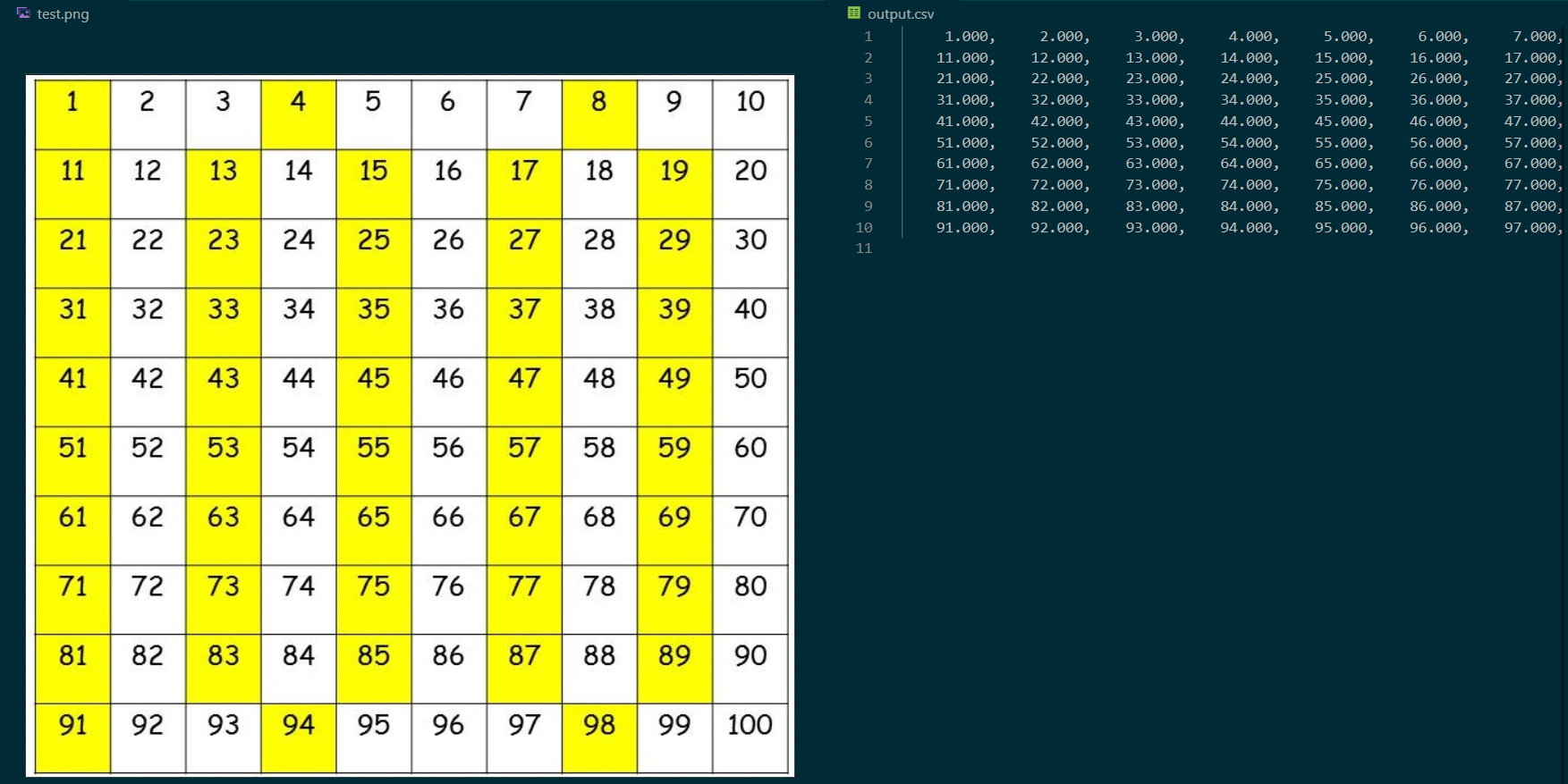
Output Example

The repository includes:

  • the source code of image2csv.py,
  • the tools.py file where useful functions are implemented,
  • the grid_detector.py file to perform automatic grid detection,
  • a folder with some files used for test.

The code is not well documented nor fully efficient as I'm a beginner in programming, and this project is a way for me to improve my skills, in particular in Python programming.

How to use the program

First of all, the user must install the needed packages:

$ pip install -r requirements.txt   

as well as Tesseract.

Then, in a python terminal, use the command line:

$ python image2csv.py --image path/to/image

There are a few optionnal arguments:

  • --path path/to/output/csv/file
  • --grid [False]/True
  • --visualization [y]/n
  • --method [fast]/denoize

and one can find their usage using the command line:

$ python image2csv.py --help

By default, the program will try to detect a grid automatically. This detection uses OpenCV's Hough transformation and Canny detection, so the user can tweak a few parameters for better processing in the grid_detector.py file.

When then program is running with manual grid detection, the user has to interact with it via its mouse and the terminal :

  1. the image is opened in a window for the user to draw a rectangle around the first (top left) number. As this rectangle is used as a base to create a grid afterward, keep in mind that all the numbers should fit into the box.
  2. A new window is opened showing the image with the drawn rectangle. Press any key to close and continue.
  3. Based on the drawn rectangle, a grid is created to extract each number one by one. This grid is controlled by the user via two "offset" values. The user has to enter those values in the terminal, then the image is opened in a window with the created grid. Press any key to close and continue. If the numbers does not fit into the grid, the user can change the offset values and repeat this step. When the grid matches the user's expectations, he can set both of the offset values to 0 to continue.
  4. The numbers are extracted from the image and the results are shown in the terminal. (be carefoul though, the indicated number of errors represents the number of errors encountered by Tesseract, but Tesseract can identify a wrong number which will not be counted as an error !)
  5. The .csv file is created with the numbers identified by Tesseract. If Tesseract finds an error, it will show up on the .csv file as an infinite value.

Hypothesis and limits

For the program to run correctly, the input image must verify some hypothesis (just a few simple ones):

  • for manual selection, the line and row width must be constants, as the build grid is just a repetition of the initial rectangle with offsets;
  • to use automatic grid detection, a full and clear grid, with external borders, must be visible;
  • it is recommended to have a good input image resolution, to control the offsets more easily.

At last, this program is not perfect (I know you thought so, with its smooth workflow and simple hypothesis, sorry to disappoint...) and does not work with decimal numbers... But does a great job on negatives ! Also the user must be careful with the slashed zero which seems to be identified by Tesseract as a six.

Credits

For image pre-processing in the tool.py file I used a useful function implemented by @Nitish9711 for his Automatic-Number-plate-detection (https://github.com/Nitish9711/Automatic-Number-plate-detection.git).

Owner
Beginning in the programming world with the help of @29jm, holy builder of the very special SnowflakeOS. Student at the Γ‰cole Centrale de Lille (FR).
Data Competition: automated systems that can detect whether people are not wearing masks or are wearing masks incorrectly

Table of contents Introduction Dataset Model & Metrics How to Run Quickstart Install Training Evaluation Detection DATA COMPETITION The COVID-19 pande

Thanh Dat Vu 1 Feb 27, 2022
Python scripts aim to use a Random Forest machine learning algorithm to predict the water affinity of Metal-Organic Frameworks

The following Python scripts aim to use a Random Forest machine learning algorithm to predict the water affinity of Metal-Organic Frameworks (MOFs). The training set is extracted from the Cambridge S

1 Jan 09, 2022
Stochastic Gradient Trees implementation in Python

Stochastic Gradient Trees - Python Stochastic Gradient Trees1 by Henry Gouk, Bernhard Pfahringer, and Eibe Frank implementation in Python. Based on th

John Koumentis 2 Nov 18, 2022
An orchestration platform for the development, production, and observation of data assets.

Dagster An orchestration platform for the development, production, and observation of data assets. Dagster lets you define jobs in terms of the data f

Dagster 6.2k Jan 08, 2023
Datashredder is a simple data corruption engine written in python. You can corrupt anything text, images and video.

Datashredder is a simple data corruption engine written in python. You can corrupt anything text, images and video. You can chose the cha

2 Jul 22, 2022
Python ELT Studio, an application for building ELT (and ETL) data flows.

The Python Extract, Load, Transform Studio is an application for performing ELT (and ETL) tasks. Under the hood the application consists of a two parts.

Schlerp 55 Nov 18, 2022
Convert monolithic Jupyter notebooks into Ploomber pipelines.

Soorgeon Join our community | Newsletter | Contact us | Blog | Website | YouTube Convert monolithic Jupyter notebooks into Ploomber pipelines. soorgeo

Ploomber 65 Dec 16, 2022
signac-flow - manage workflows with signac

signac-flow - manage workflows with signac The signac framework helps users manage and scale file-based workflows, facilitating data reuse, sharing, a

Glotzer Group 44 Oct 14, 2022
Wafer Fault Detection - Wafer circleci with python

Wafer Fault Detection Problem Statement: Wafer (In electronics), also called a slice or substrate, is a thin slice of semiconductor, such as a crystal

Avnish Yadav 14 Nov 21, 2022
A library to create multi-page Streamlit applications with ease.

A library to create multi-page Streamlit applications with ease.

Jackson Storm 107 Jan 04, 2023
statDistros is a Python library for dealing with various statistical distributions

StatisticalDistributions statDistros statDistros is a Python library for dealing with various statistical distributions. Now it provides various stati

1 Oct 03, 2021
Bamboolib - a GUI for pandas DataFrames

Community repository of bamboolib bamboolib is joining forces with Databricks. For more information, please read our announcement. Please note that th

Tobias Krabel 863 Jan 08, 2023
Open-Domain Question-Answering for COVID-19 and Other Emergent Domains

Open-Domain Question-Answering for COVID-19 and Other Emergent Domains This repository contains the source code for an end-to-end open-domain question

7 Sep 27, 2022
Detailed analysis on fraud claims in insurance companies, gives you information as to why huge loss take place in insurance companies

Insurance-Fraud-Claims Detailed analysis on fraud claims in insurance companies, gives you information as to why huge loss take place in insurance com

1 Jan 27, 2022
TheMachineScraper πŸ±β€πŸ‘€ is an Information Grabber built for Machine Analysis

TheMachineScraper πŸ±β€πŸ‘€ is a tool made purely for analysing machine data for any reason.

doop 5 Dec 01, 2022
MapReader: A computer vision pipeline for the semantic exploration of maps at scale

MapReader A computer vision pipeline for the semantic exploration of maps at scale MapReader is an end-to-end computer vision (CV) pipeline designed b

Living with Machines 25 Dec 26, 2022
pipeline for migrating lichess data into postgresql

How Long Does It Take Ordinary People To "Get Good" At Chess? TL;DR: According to 5.5 years of data from 2.3 million players and 450 million games, mo

Joseph Wong 182 Nov 11, 2022
MEAD: A Large-scale Audio-visual Dataset for Emotional Talking-face Generation [ECCV2020]

MEAD: A Large-scale Audio-visual Dataset for Emotional Talking-face Generation [ECCV2020] by Kaisiyuan Wang, Qianyi Wu, Linsen Song, Zhuoqian Yang, Wa

112 Dec 28, 2022
ToeholdTools is a Python package and desktop app designed to facilitate analyzing and designing toehold switches, created as part of the 2021 iGEM competition.

ToeholdTools Category Status Repository Package Build Quality A library for the analysis of toehold switch riboregulators created by the iGEM team Cit

0 Dec 01, 2021
An Aspiring Drop-In Replacement for NumPy at Scale

Legate NumPy is a Legate library that aims to provide a distributed and accelerated drop-in replacement for the NumPy API on top of the Legion runtime. Using Legate NumPy you do things like run the f

Legate 502 Jan 03, 2023