A blender import/export system for Defold

Overview

defold-blender-export

A Blender export system for the Defold game engine.

Setup Notes

There are no exhaustive documents for this tool yet. Its just not complete, so everything is very much 'in flux'.

Note: The Sync Tool is now a Blender Only addon. This makes building Defold resource collections much simpler.

To use the tool follow the guide below.

  1. Copy the blender/addons/sync_tool folder to the blender addons folder. See blender docs for this.
  2. Or.. you can copy the blender/addons/sync_tool/* files into the folder where your blender source file is, and the scripts should work from there.
  3. Open the blender file you want to work in (or open the test.blend to see an example already setup)
  4. Open the text editor in blender and loadin in the script "defoldSynUI.py"
  5. Run this file. You should see "bpy.ops.text.run_script()" in the Info Window in blender.
  6. Open the 3D layout window in blender and ensure you are in "Object Mode".
  7. Examine the Tools menu on the right side of the Layout 3D View (see below) alt text
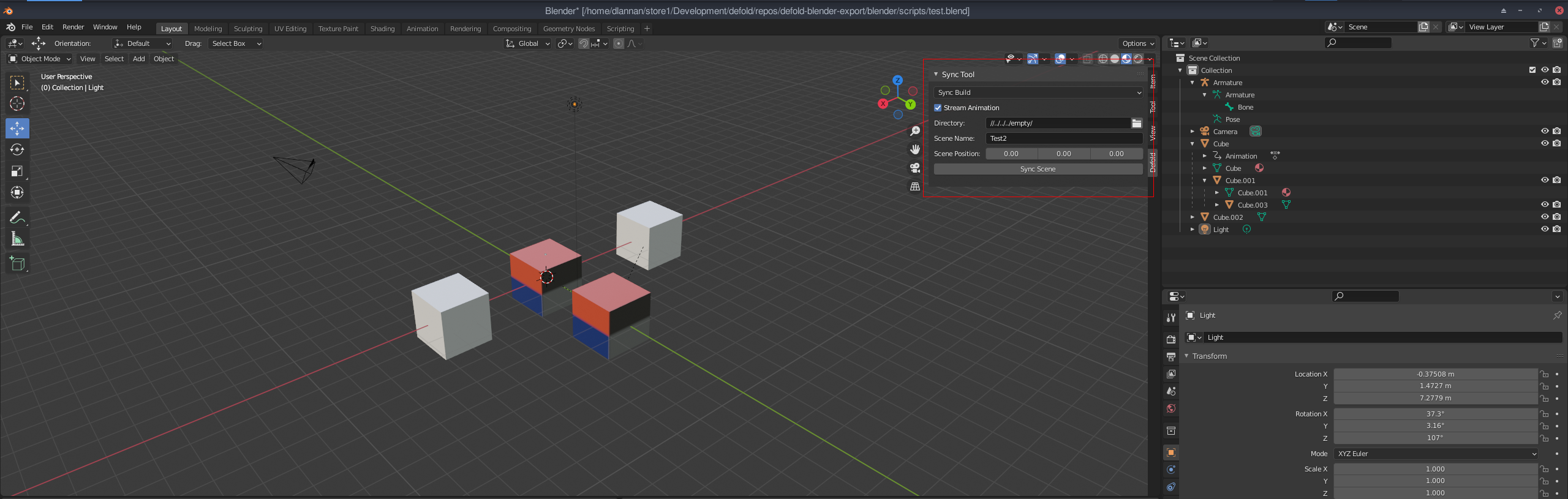
  8. Enter the appropriate properties for Scene Name and Directory (project directory to save into).
  9. Select "Sync Build" for the scene mode and press the "Sync Scene" button when ready.

A folder will be created in the target project directory with all the resources needed to load the scene into Defold.

At a minimum you should see a collection file and some gameobjects (in the gameobjects folder). You can open this project and open the collection. While the "Sync" tickbox is enabled, data will be written to the collection file - do not save new objects into it while Sync is on - they will be overwritten. Sync can be unticked at any time and the data will stop pushing to the collection.

Once this is setup you can add/edit the blender scene as you need and any Sync's you do, will update the meshes, textures and object positions in Defold.

Issues

There are a number of odd issues using this system. It is early days, so they will be ironed out. Some limitations on what Blender can stream:

  • Only single texture for each object is used (this is a Defold thing).
  • Object materials only use model materials at the moment. This might change to PBR materials.
  • Lights and Camera are added in Defold, but they are not yet setup to operate correctly (TBD)
  • Many features are only partially functional. Tread carefully :)
Comments
  • The addon just don't work

    The addon just don't work

    I properly set up everything, gave admin permission to both blender and the interpreter, but still, when I click to sync it doesnt do anything. Thats my scene: image

    opened by Caue-Aron 3
  • Support multiple UV coords

    Support multiple UV coords

    Based on discussion here with Ivan_Lytkin: https://forum.defold.com/t/building-a-sync-tool-for-blender-to-defold/69920

    Potentially add a new stream for texcoord1 in the buffer files. This could allow multiple coord access in the material.

    To be tested.

    opened by dlannan 2
  • Alpha channel in Blender BSDF mapped to Albedo texture

    Alpha channel in Blender BSDF mapped to Albedo texture

    Now that tools are available to merge texture channels together to minimise the number of samplers in the Simple PBR shader, it is planned to add the Alpha channel in blender bsdf material into the output Albedo alpha channel. This will produce more consistent alpha sync results without the need for render script changes.

    enhancement 
    opened by dlannan 1
  • Add error reporting and logging

    Add error reporting and logging

    Due to requirements for correct scene and material construction to have a successful export, I need to add some logging and reporting so users can determine what issues there might be. image

    This has been added. Included this issue so that I can track specific enhancements.

    enhancement 
    opened by dlannan 0
  • Remove root rotation for Defold world space transform.

    Remove root rotation for Defold world space transform.

    The current sync tool adds a root node with a rotational transform to get the Blender world space into the Defold world space.

    The problem with applying a complete transform is animations and some object hierarchies. I need to spend some time make a suitable solution (preferably in the lua side of things) to do this vertex + object + anim transform correctly.

    The current system is not ideal because images may come out flipped on a surface (due to the rotation).

    enhancement 
    opened by dlannan 0
  • Simple PBR lighting

    Simple PBR lighting

    The lighting in Simple PBR is essentially the same as the Defold default model lighting - very rudimentary. It is intended that up to 4 dynamic lights are supported. With possibly Point, Spot and Directional types supported.

    This issue is to research some of this and maintain documentation on the process. The solving of this feature will be needed before shadows and some GI solutions are attempted.

    enhancement 
    opened by dlannan 1
  • Split animations into per action dae's with no meshes.

    Split animations into per action dae's with no meshes.

    The current animation export is messy and can be difficult to get right with multiple animations within a scene. The goal is:

    • Output meshes individually. And identify animated meshes. These will be tagged as "Defold models" but still use a mesh buffer.
    • Detect all animation actions and save them out as animation only dae files containing only the skeletons and the skins. No meshes.
    • Export script info (into the meta data table) that allows easy access to available animations, and how to play them (maybe with correct timing and configs too).

    Once complete, it should allow multiple animations in a scene to be easily exported to Defold and easily run in Defold.

    enhancement 
    opened by dlannan 1
Releases(v1.3.1)
  • v1.3.1(Nov 2, 2022)

  • v1.3.0(Oct 29, 2022)

    A sizable upgrade. Including new LightMapping capabilities.

    Features:

    • LightMapper support (with modifications)
    • General Blender LightMap support.
    • New PBR Lightmap material for Defold.
    • Lightmap and Simple material support in the same scene

    Details on the forum about the new features.

    Source code(tar.gz)
    Source code(zip)
    defender.zip(1.58 MB)
  • v1.2.0(Sep 20, 2022)

    Thanks to Aronimo and Makaber for all the testing and digging a Windows issue has finally been resolved (hence 1.2)

    • Windows utf8 to wide char support in file paths.
    • Some cleanup in the code.

    OSX and Linux have not been heavily tested with this release. Debian 11 seems ok so far (need to add some auto tests).

    Source code(tar.gz)
    Source code(zip)
    defender.zip(1.53 MB)
  • v1.1.1(Sep 3, 2022)

    Added new logging system which begins to provide feedback to the user about scene related issues. Currently supports:

    • Material type checking
    • Collection checking (for existence)
    • Luajit permissions levels (reports where file cannot be executed from).
    • Outputs log report that can be sent to me.

    The main aim of the logging is to catch more and more anomalies that are unsupported in Blender when converting to Defold.

    Source code(tar.gz)
    Source code(zip)
    defender.zip(1.49 MB)
  • v1.1.0(Aug 28, 2022)

    Release supporting incoming changes to Defold for support with gltf and glb mesh and animation data.

    • Added selection for gltf and glb
    • Added updates to export gltf and glb
    • Minor bug fixes for mesh construction
    • Change to new name Defender
    Source code(tar.gz)
    Source code(zip)
    defender.zip(1.49 MB)
  • v1.0.8(Apr 13, 2022)

  • v1.0.6(Mar 16, 2022)

    New fixes for Windows platforms.

    • Pathing was broken on both the blender python side and lua export side.
    • Fixed a number of issues with catching script errors.

    Working on OSX and animation action naming (multiple daes per model - 1 for each action).

    Source code(tar.gz)
    Source code(zip)
    sync_tool.zip(1.36 MB)
  • v1.0.5(Feb 28, 2022)

    Added a new automatic creation of an alpha channel from the Blender Alpha channel in Principled BSDF materials. Important notes of this new feature:

    • If the base color has an alpha channel, and you want to use that, set the Alpha channel to 1.0 value.
    • If you use an Alpha of anything other than 1.0 without a texture then the whole alpha for the material will use that value.
    • To set an alpha mask, simply add it as a texture to the material Alpha channel.

    Alpha textures must be greyscale or all the rgba channels are the same. When merged with the base color, the alpha is merged into a single 8 bit channel for Defold.

    Source code(tar.gz)
    Source code(zip)
    sync_tool.zip(1.34 MB)
  • v1.0.4(Feb 26, 2022)

    Release notes:

    • New ao + metallic + roughness map (as per Khronos GLTF PBR)
    • Fixes to pbr simple material params
    • Bug fixes
    • New png texture merging tools. This will allow alpha merge from alpha channel into the Albedo + Alpha texture (TBD)
    Source code(tar.gz)
    Source code(zip)
    sync_tool.zip(1.34 MB)
  • v1.0.3(Feb 23, 2022)

  • v1.0.2(Feb 22, 2022)

  • v1.0.1(Feb 22, 2022)

  • v1.0.0(Feb 22, 2022)

    Release 1.0 Initial module release for Blender 2.8 and above. Follow install guide on github. Main features:

    • Sync static meshes with hierarchy
    • Sync directly to a Defold project folder
    • Support Animation
    • Lights and Camera - early support
    • Meta Data supported
    • Builtin model material
    • Custom Simple PBR material

    Note: Uses luajit to execute scripts. See install guide.

    Source code(tar.gz)
    Source code(zip)
    sync_tool.zip(1.16 MB)
Owner
David Lannan
David Lannan
Use Perspective to create the chart for the trader’s dashboard

Task Overview | Installation Instructions | Link to Module 3 Introduction Experience Technology at JP Morgan Chase Try out what real work is like in t

Abdulazeez Jimoh 1 Jan 22, 2022
A simple agent-based model used to teach the basics of OOP in my lectures

Pydemic A simple agent-based model of a pandemic. This is used to teach basic principles of object-oriented programming to master students. It is not

Fabien Maussion 2 Jun 08, 2022
Graphing communities on Twitch.tv in a visually intuitive way

VisualizingTwitchCommunities This project maps communities of streamers on Twitch.tv based on shared viewership. The data is collected from the Twitch

Kiran Gershenfeld 312 Jan 07, 2023
Sprint planner considering JIRA issues and google calendar meetings schedule.

Sprint planner Sprint planner is a Python script for planning your Jira tasks based on your calendar availability. Installation Use the package manage

Apptension 2 Dec 05, 2021
Open-questions - Open questions for Bellingcat technical contributors

Open questions for Bellingcat technical contributors These are difficult, long-term projects that would contribute to open source investigations at Be

Bellingcat 234 Dec 31, 2022
YOPO is an interactive dashboard which generates various standard plots.

YOPO is an interactive dashboard which generates various standard plots.you can create various graphs and charts with a click of a button. This tool uses Dash and Flask in backend.

ADARSH C 38 Dec 20, 2022
Visualizations for machine learning datasets

Introduction The facets project contains two visualizations for understanding and analyzing machine learning datasets: Facets Overview and Facets Dive

PAIR code 7.1k Jan 07, 2023
An easy to use burndown chart generator for GitHub Project Boards.

Burndown Chart for GitHub Projects An easy to use burndown chart generator for GitHub Project Boards. Table of Contents Features Installation Assumpti

Joseph Hale 15 Dec 28, 2022
ecoglib: visualization and statistics for high density microecog signals

ecoglib: visualization and statistics for high density microecog signals This library contains high-level analysis tools for "topos" and "chronos" asp

1 Nov 17, 2021
Chem: collection of mostly python code for molecular visualization, QM/MM, FEP, etc

chem: collection of mostly python code for molecular visualization, QM/MM, FEP,

5 Sep 02, 2022
This tool is designed to help administrators get an overview of their Active Directory structure.

This tool is designed to help administrators get an overview of their Active Directory structure. In the group view you can see all elements of an AD (OU, USER, GROUPS, COMPUTERS etc.). In the user v

deexno 2 Oct 30, 2022
Epagneul is a tool to visualize and investigate windows event logs

epagneul Epagneul is a tool to visualize and investigate windows event logs. Dep

jurelou 190 Dec 13, 2022
This is a sorting visualizer made with Tkinter.

Sorting-Visualizer This is a sorting visualizer made with Tkinter. Make sure you've installed tkinter in your system to use this visualizer pip instal

Vishal Choubey 7 Jul 06, 2022
Visualizations of some specific solutions of different differential equations.

Diff_sims Visualizations of some specific solutions of different differential equations. Heat Equation in 1 Dimension (A very beautiful and elegant ex

2 Jan 13, 2022
WhatsApp Chat Analyzer is a WebApp and it can be used by anyone to analyze their chat. 😄

WhatsApp-Chat-Analyzer You can view the working project here. WhatsApp chat Analyzer is a WebApp where anyone either tech or non-tech person can analy

Prem Chandra Singh 26 Nov 02, 2022
An animation engine for explanatory math videos

Powered By: An animation engine for explanatory math videos Hi there, I'm Zheer 👋 I'm a Software Engineer and student!! 🌱 I’m currently learning eve

Zaheer ud Din Faiz 2 Nov 04, 2021
metedraw is a project mainly for data visualization projects of Atmospheric Science, Marine Science, Environmental Science or other majors

It is mainly for data visualization projects of Atmospheric Science, Marine Science, Environmental Science or other majors.

Nephele 11 Jul 05, 2022
Fast scatter density plots for Matplotlib

About Plotting millions of points can be slow. Real slow... 😴 So why not use density maps? ⚡ The mpl-scatter-density mini-package provides functional

Thomas Robitaille 473 Dec 12, 2022
termplotlib is a Python library for all your terminal plotting needs.

termplotlib termplotlib is a Python library for all your terminal plotting needs. It aims to work like matplotlib. Line plots For line plots, termplot

Nico Schlömer 553 Dec 30, 2022
Visualization Data Drug in thailand during 2014 to 2020

Visualization Data Drug in thailand during 2014 to 2020 Data sorce from ข้อมูลเปิดภาครัฐ สำนักงาน ป.ป.ส Inttroducing program Using tkinter module for

Narongkorn 1 Jan 05, 2022