Learning from Synthetic Humans (SURREAL)
Gül Varol, Javier Romero, Xavier Martin, Naureen Mahmood, Michael J. Black, Ivan Laptev and Cordelia Schmid, Learning from Synthetic Humans, CVPR 2017.
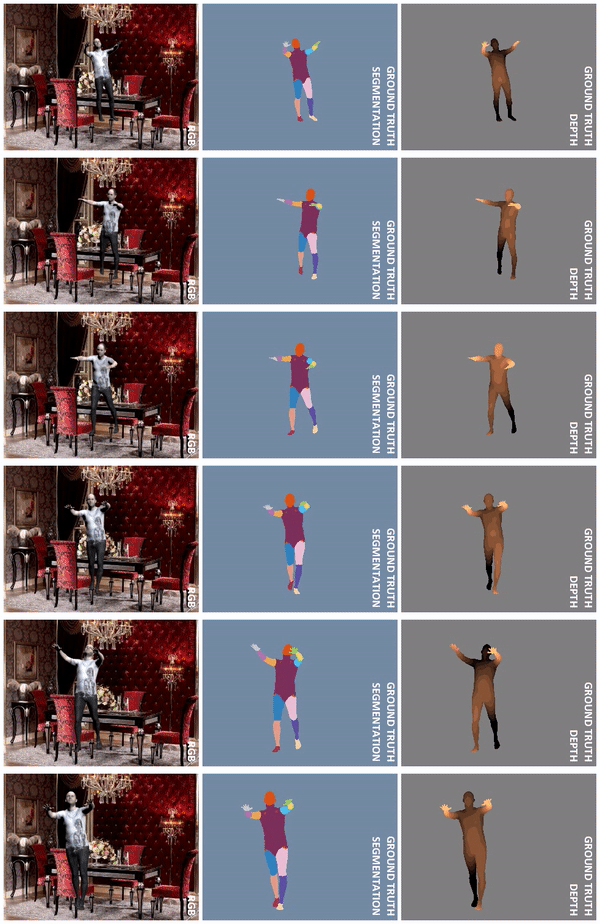
Contents
- 1. Download SURREAL dataset
- 2. Create your own synthetic data
- 3. Training models
- 4. Storage info
- Citation
- License
- Acknowledgements
1. Download SURREAL dataset
In order to download SURREAL dataset, you need to accept the license terms. The links to license terms and download procedure are available here:
https://www.di.ens.fr/willow/research/surreal/data/
Once you receive the credentials to download the dataset, you will have a personal username and password. Use these either to download the dataset excluding optical flow data from here: (SURREAL_v1.tar.gz, 86GB) or download individual files with the download/download_surreal.sh script as follows:
./download_surreal.sh /path/to/dataset yourusername yourpassword
You can check Storage info for how much disk space they require and can do partial download.
Find under datageneration/misc/3Dto2D scripts that explain the projective relations between joints2D and joints3D variables. And here, some issues about the joints are explained.
The structure of the folders is as follows:
SURREAL/data/
------------- cmu/  # using MoCap from CMU dataset
-------------------- train/
-------------------- val/ # small subset of test
-------------------- test/
----------------------------  run0/ #50% overlap
----------------------------  run1/ #30% overlap
----------------------------  run2/ #70% overlap
------------------------------------  <sequenceName>/ #e.g. 01_01
--------------------------------------------------  <sequenceName>_c%04d.mp4        # RGB - 240x320 resolution video
--------------------------------------------------  <sequenceName>_c%04d_depth.mat  # Depth
#     depth_1,   depth_2, ...  depth_T [240x320 single] - in meters
--------------------------------------------------  <sequenceName>_c%04d_segm.mat   # Segmentation
#     segm_1,     segm_2, ...   segm_T [240x320 uint8]  - 0 for background and 1..24 for SMPL body parts
--------------------------------------------------  <sequenceName>_c%04d_gtflow.mat # Ground truth optical flow
#     gtflow_1, gtflow_2, ... gtflow_T [240x320x2 single]
--------------------------------------------------  <sequenceName>_c%04d_info.mat   # Remaining annotation
#     bg           [1xT cell]      - names of background image files
#     camDist      [1 single]      - camera distance
#     camLoc       [3x1 single]    - camera location
#     clipNo       [1 double]      - clip number of the full sequence (corresponds to the c%04d part of the file)
#     cloth        [1xT cell]      - names of texture image files
#     gender       [Tx1 uint8]     - gender (0: 'female', 1: 'male')
#     joints2D     [2x24xT single] - 2D coordinates of 24 SMPL body joints on the image pixels
#     joints3D     [3x24xT single] - 3D coordinates of 24 SMPL body joints in real world meters
#     light        [9x100 single]  - spherical harmonics lighting coefficients
#     pose         [72xT single]   - SMPL parameters (axis-angle)
#     sequence     [char]          - <sequenceName>_c%04d
#     shape        [10xT single]   - body shape parameters
#     source       [char]          - 'cmu'
#     stride       [1 uint8]       - percent overlap between clips, 30 or 50 or 70
#     zrot         [Tx1 single]    - rotation in Z (euler angle)

# *** T is the number of frames, mostly 100.
Note: There are some monster shapes in the dataset which were not cleaned before training. Some subjects spotted by visual inspection are 18, 19, 143_21.
2. Create your own synthetic data
Note June 2021: Check the surreact repository for code that works with more recent versions of libraries (e.g., Blender 2.92).
2.1. Preparation
2.1.1. SMPL data
a) You need to download SMPL for MAYA from http://smpl.is.tue.mpg.de in order to run the synthetic data generation code. Once you agree on SMPL license terms and have access to downloads, you will have the following two files:
basicModel_f_lbs_10_207_0_v1.0.2.fbx
basicModel_m_lbs_10_207_0_v1.0.2.fbx
Place these two files under datageneration/smpl_data folder.
b) With the same credentials as with the SURREAL dataset, you can download the remaining necessary SMPL data and place it in datageneration/smpl_data.
./download_smpl_data.sh /path/to/smpl_data yourusername yourpassword
smpl_data/
------------- textures/ # folder containing clothing images (also available at lsh.paris.inria.fr/SURREAL/smpl_data/textures.tar.gz)
------------- (fe)male_beta_stds.npy
------------- smpl_data.npz # 2.5GB
 # trans*           [T x 3]     - (T: number of frames in MoCap sequence)
 # pose*            [T x 72]    - SMPL pose parameters (T: number of frames in MoCap sequence)
 # maleshapes       [1700 x 10] - SMPL shape parameters for 1700 male scans
 # femaleshapes     [2103 x 10] - SMPL shape parameters for 2103 female scans
 # regression_verts [232]
 # joint_regressor  [24 x 232]
Note: SMPL pose parameters are MoSh'ed from CMU MoCap data. Note that these are not the most recent MoSh results. For any questions regarding MoSh, please contact [email protected] instead. Here, we only provide the pose parameters for MoCap sequences, not their shape parameters (they are not used in this work, we randomly sample body shapes).
2.1.2. Background images
We only provide names of the background images we used. They are downloaded from LSUN dataset using this code. You can download images from this dataset or use any other images.
2.1.3. Blender
You need to download Blender and install scipy package to run the first part of the code. The provided code was tested with Blender2.78, which is shipped with its own python executable as well as distutils package. Therefore, it is sufficient to do the following:
# Install pip
/blenderpath/2.78/python/bin/python3.5m get-pip.py
# Install scipy
/blenderpath/2.78/python/bin/python3.5m pip install scipy
get-pip.py is downloaded from pip. Replace the blenderpath with your own and set BLENDER_PATH.
Known problem: Blender2.78a has problems with pip. You can try with new versions of Blender. Otherwise, you can install the dependencies such as scipy to a new python3.5 environment and add this environment's site-packages to PYTHONPATH before running Blender.
2.1.4. FFMPEG
If you want to save the rendered images as videos, you will need ffmpeg library. Build it and set the FFMPEG_PATH to the directory that contains lib/ and bin/ folders. Additionally, if you want to use H.264 codec as it is done in the current version of the code, you need to have the x264 libraries compiled. In that case, set X264_PATH to your build. If you use another codec, you don't need X264_PATH variable and you can remove -c:v h264 from main_part1.py.
This is how the ffmpeg was built:
# x264
./configure  --prefix=/home/gvarol/tools/ffmpeg/x264_build --enable-static --enable-shared --disable-asm
make
make install

# ffmpeg
./configure --prefix=/home/gvarol/tools/ffmpeg/ffmpeg_build_sequoia_h264 --enable-avresample --enable-pic --disable-doc --disable-static --enable-shared --enable-gpl --enable-nonfree --enable-postproc --enable-libxcb --disable-yasm --enable-libx264 --extra-ldflags="-I/home/gvarol/tools/ffmpeg/x264_build/include -L/home/gvarol/tools/ffmpeg/x264_build/lib" --extra-cflags="-I/home/gvarol/tools/ffmpeg/x264_build/include"
make
make install
2.1.5. OpenEXR
The file type for some of the temporary outputs from Blender will be EXR images. In order to read these images, the code uses OpenEXR bindings for Python. These bindings are available for python 2, the second part of the code (main_part2.py) needs this library.
Note: OpenEXR now exists for python 3, therefore you can run pip install openexr and merge main_part1.py and main_part2.py to get rid of the python 2 requirements.
2.2. Running the code
Copy the config.copy into config and edit the bg_path, tmp_path, output_path and openexr_py2_path with your own paths.
-
bg_pathcontains background images and two filestrain_img.txtandtest_img.txt. The ones used for SURREAL dataset can be found indatageneration/misc/LSUN. Note that the folder structure is flattened for each room type. -
tmp_pathstores temporary outputs and is deleted afterwards. You can use this for debugging. -
output_pathis the directory where we store all the final outputs of the rendering. -
openexr_py2_pathis the path to libraries for OpenEXR bindings for Python.
run.sh script is ran for each clip. You need to set FFMPEG_PATH, X264_PATH (optional), PYTHON2_PATH, and BLENDER_PATH variables. -t 1 option can be removed to run on multi cores, it runs faster.
# When you are ready, type:
./run.sh
3. Training models
Here, we provide code to train models on the synthetic data to predict body segmentation or depth. You can also find the models pre-trained on synthetic data.
3.1. Preparation
3.1.1. Requirements
- Install Torch with cuDNN support.
- Install matio by
luarocks install matio - Install OpenCV-Torch by
luarocks install cv - Download SURREAL
Tested on Linux with cuda v8 and cudNN v5.1. Let me know if there are other major dependencies that I forgot to include.
3.1.2. Setup paths
Place the data under ~/datasets/SURREAL or change the opt.dataRoot in opts.lua. The outputs will be written to ~/cnn_saves/<datasetname>/<experiment>, you can change the opt.logRoot to change the cnn_saves location.
3.2. Running the code
3.2.1. Train
There are sample scripts under training/exp/train directory that are self-explanatory. Those are used for the 'Synth' experiments in the paper. Check opts.lua script to see what options are available.
3.2.2. Visualize
A few display functionalities are implemented to debug and visualize results. Example usage:
./training/exp/vis.sh 1 30 cmu eval val
3.2.3. Evaluate
To obtain the final results, you can run ./training/exp/eval.sh 1 30 cmu test, by setting the experiment number, model number, dataset and evaluation set. You can save the outputs to a text file by removing -saveScores option.
3.2.4. Use pre-trained models
We provide 4 pre-trained models for segmentation and depth, either trained using lossless renderings (png) or using the compressed videos (mp4).
./download_models.sh /path/to/models yourusername yourpassword
# model_segm_png.t7
# model_segm_mp4.t7
# model_depth_png.t7
# model_depth_mp4.t7
Use the demo script to apply these models on sample images.
qlua demo/demo.lua
You can also use demo/demo.m Matlab script to produce the visualizations in the paper.
4. Storage info
You might want to do a partial download depending on your needs.
| Dataset | *_info.mat | *.mp4 | *_segm.mat | *_depth.mat | *_gtflow.mat | Total |
|---|---|---|---|---|---|---|
| SURREAL (cmu) | 3.8G | 3.3G | 6.0G | 82.5G | 179G | 275G |
Citation
If you use this code, please cite the following:
@INPROCEEDINGS{varol17_surreal,
  title     = {Learning from Synthetic Humans},
  author    = {Varol, G{\"u}l and Romero, Javier and Martin, Xavier and Mahmood, Naureen and Black, Michael J. and Laptev, Ivan and Schmid, Cordelia},
  booktitle = {CVPR},
  year      = {2017}
}
License
Please check the license terms before downloading and/or using the code, the models and the data. http://www.di.ens.fr/willow/research/surreal/data/license.html
Acknowledgements
The data generation code is built by Javier Romero, Gul Varol and Xavier Martin.
The training code is written by Gul Varol and is largely built on the ImageNet training example https://github.com/soumith/imagenet-multiGPU.torch by Soumith Chintala, and Stacked Hourglass Networks by Alejandro Newell.

 1.7k Dec 29, 2022
 39 Dec 09, 2022
 15 Oct 27, 2022
 1.6k Dec 27, 2022
 3 Feb 15, 2022
 20 Dec 09, 2022
 35 Jan 03, 2023
 39 Dec 26, 2022
 78 Dec 27, 2022
 113 Dec 19, 2022
 29 Dec 11, 2022
 0 Oct 26, 2021
 1 Oct 30, 2021
 0 Nov 17, 2021
 2.7k Jan 01, 2023
 97 Dec 20, 2022
 86 Dec 23, 2022
 516 Dec 21, 2022
 1 Nov 17, 2021
 305 Dec 19, 2022