Lightweight Markdown dialect for Python desktop apps

Overview

This project is part of the Pyrustic Open Ecosystem.

Usage | Installation

Litemark

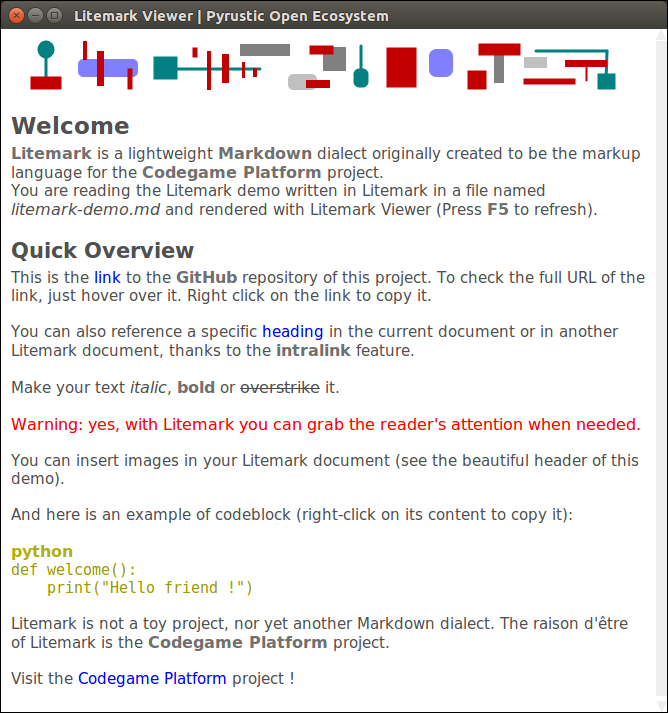
Litemark is a lightweight Markdown dialect originally created to be the markup language for the Codegame Platform project. When you run litemark from the command line interface without any arguments, the Litemark Viewer opens and displays the rendered demo.
Figure

Litemark demo rendered in the Litemark Viewer

Figure

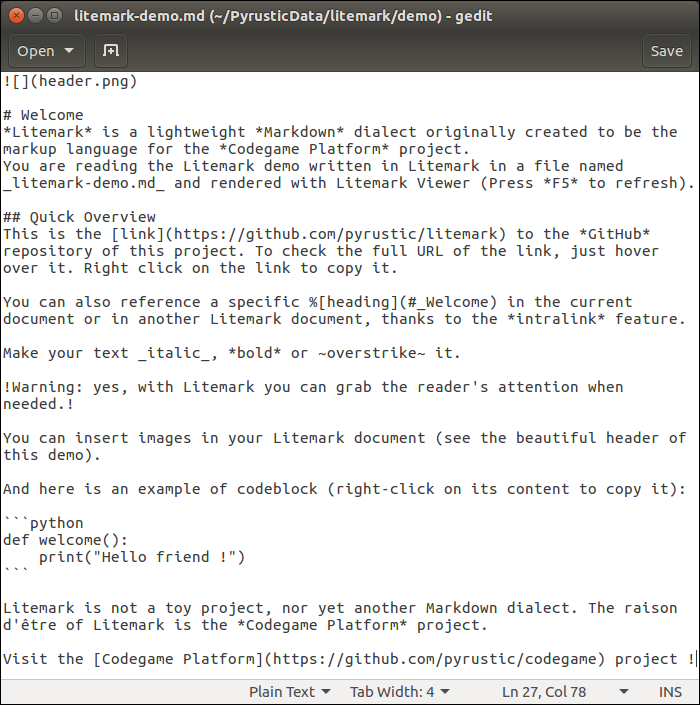
litemark-demo.md (plain text)

Usage

The name Litemark refers to both the markup language and the distribution package.

The distribution package comes with an API, a command line interface, and a graphical viewer.

API

It is easy to break an arbitrary plain text into a flat list of tokens:

import litemark


plain_text = """Hello *World* ! Visit the [repository](https://github.com/pyrustic/litemark) !"""

for token in litemark.scan(plain_text):
    # a token instance is a named tuple with 2 fields: name and data 
    print(token)

The output:

Token(name='STRING', data='Hello ')
Token(name='BOLD', data='World')
Token(name='STRING', data=' ')
Token(name='STRING', data='! ')
Token(name='STRING', data='Visit ')
Token(name='STRING', data='the ')
Token(name='LINK', data=('repository', 'https://github.com/pyrustic/litemark', ''))
Token(name='STRING', data=' ')
Token(name='STRING', data='!')
Token(name='STRING', data='')

The formal names of the tokens are defined in litemark.Element:

class Element:
    CODEBLOCK = "CODEBLOCK"
    HEADING = "HEADING"
    BOLD = "BOLD"
    ITALIC = "ITALIC"
    WARNING = "WARNING"
    OVERSTRIKE = "OVERSTRIKE"
    IMAGE = "IMAGE"
    INTRALINK = "INTRALINK"
    LINK = "LINK"

The token's data field represents a string for all elements except the following:

  • Element.CODEBLOCK: 2-tuple (str-title, str-content)
  • Element.HEADING: 2-tuple (int-level, str-content)
  • Element.IMAGE: 3-tuple (str-inline, str-path, str-alt)
  • Element.INTRALINK: 3-tuple (str-inline, str-path, str-alt)
  • Element.LINK: 3-tuple (str-inline, str-URL, str-alt)

Command line interface

To open litemark-demo.md in the graphical Viewer:

$ litemark

To open a specific litemark file in the graphical Viewer:

$ cd /path/to/root
$ litemark my-file.md

Note:

Litemark is created for use in a desktop application. Thus, the Litemark Scanner assumes that the images referenced in a litemark document are relative to the root directory. The root directory is simply the current working directory. For this reason, you must first do a cd (change directory) to the root before rendering a document.

Graphical Viewer

It is easy to embed a Litemark Viewer in your Python desktop app:

import litemark
import tkinter as tk

root_directory = "/home/alex/demo"
litemark_filename = "/home/alex/demo/document.md"

# your GUI
gui = tk.Tk()
gui.geometry("500x500+0+0")
# let's embed a Litemark Viewer in this GUI
# -- text widget
text_widget = tk.Text(gui)
text_widget.pack(expand=1, fill=tk.BOTH)
# -- the viewer instance
viewer = litemark.Viewer(widget=text_widget, root=root_directory)
viewer.open(litemark_filename)
viewer.readonly = True
# done !
gui.mainloop()

This is a work in progress. A reference documentation will be released soon.

Installation

Install for the first time

pip install litemark

Upgrade

pip install litemark --upgrade --upgrade-strategy eager

Related projects

  • Codegame Platform: create, distribute, and run codegames
  • shared: library to store, expose, read, and edit collections of data

This is a work in progress...

Owner
Pyrustic Open Ecosystem to develop and distribute Python apps
A markdown extension for converting Leiden+ epigraphic text to TEI XML/HTML

LeidenMark $ pip install leidenmark A Python Markdown extension for converting Leiden+ epigraphic text to TEI XML/HTML. Inspired by the Brill plain te

André van Delft 2 Aug 04, 2021
😸Awsome markdown readme for your profile or your portfolio

GitHub Profile Readme Description That's a simple and minimalist README.md for your profile Usage You can download or copy to your repository and make

0 Jul 24, 2022
A markdown generation library for Python.

Welcome to SnakeMD SnakeMD is your ticket to generating Markdown in Python. To prove it to you, we've generated this entire README using SnakeMD. See

The Renegade Coder 22 Dec 08, 2022
Extensions for Python Markdown

PyMdown Extensions Extensions for Python Markdown. Documentation Extension documentation is found here: https://facelessuser.github.io/pymdown-extensi

Isaac Muse 685 Jan 01, 2023
Awesome Django Markdown Editor, supported for Bootstrap & Semantic-UI

martor Martor is a Markdown Editor plugin for Django, supported for Bootstrap & Semantic-UI. Features Live Preview Integrated with Ace Editor Supporte

659 Jan 04, 2023
A super simple script which uses the GitHub API to convert your markdown files to GitHub styled HTML site.

A super simple script which uses the GitHub API to convert your markdown files to GitHub styled HTML site.

Çalgan Aygün 213 Dec 22, 2022
An interactive, terminal-based markdown presenter

lookatme lookatme is an interactive, extensible, terminal-based markdown presentation tool. TOC TOC Features Tour Navigating the Presentation CLI Opti

James Johnson 1.4k Jan 01, 2023
A Python library to retrieve annotations and notes from Zotero and save them into Markdown files.

Zotero to Markdown Generate Markdown files from Zotero annotations and notes. With new Zotero PDF Reader, all highlights are saved in the Zotero datab

Essi Alizadeh 20 Nov 03, 2022
Lightweight Markdown dialect for Python desktop apps

Litemark is a lightweight Markdown dialect originally created to be the markup language for the Codegame Platform project. When you run litemark from the command line interface without any arguments,

10 Apr 23, 2022
Mdformat is an opinionated Markdown formatter that can be used to enforce a consistent style in Markdown files

Mdformat is an opinionated Markdown formatter that can be used to enforce a consistent style in Markdown files. Mdformat is a Unix-style command-line tool as well as a Python library.

Executable Books 180 Jan 06, 2023
A fast yet powerful Python Markdown parser with renderers and plugins.

Mistune v2 A fast yet powerful Python Markdown parser with renderers and plugins. NOTE: This is the re-designed v2 of mistune. Check v1 branch for ear

Hsiaoming Yang 2.2k Jan 04, 2023
Markdown journal template.

Markdown Journal Template Description This project contains a script which creates a markdown journal template for the current year by creating a mark

Stephen McAleese 2 Mar 06, 2022
Notedown - Markdown <=> IPython Notebook

Python 2/3 and IPython 4 / Jupyter compatible! Convert IPython Notebooks to markdown (and back) notedown is a simple tool to create IPython notebooks

Aaron O'Leary 840 Jan 04, 2023
A automated python script that creates mark-down files to read for the aes keys and other useful information.

Archive A automated python script that creates mark-down files to read for the aes keys and other useful information. Table of Contents Benbot Automat

Tector 13 Dec 14, 2022
Read a list in markdown and do something with it!

Markdown List Reader A simple tool for reading lists in markdown. Usage Begin by running the mdr.py file and input either a markdown string with the -

Esteban Garcia 3 Sep 13, 2021
Markdown Presentations for Tech Conferences, Training, Developer Advocates, and Educators.

March 1, 2021: Service on gitpitch.com has been shutdown permanently. GitPitch 4.0 Docs Twitter About Watch the Introducing GitPitch 4.0 Video Visit t

David Russell 5.4k Jan 05, 2023
A Discord Bot for rendering Markdown

Markdown to PDF Bot A discord bot that accepts markdown files (or messages) and displays them as images. Prerequisite To install, you must have have :

1 Oct 21, 2021
Yuque2md - Offline download the markdown file and image from yuque

yuque2md 按照语雀知识库里的目录,导出语雀知识库中所有的markdown文档,并离线图片到本地 使用 安装 Python3.x clone 项目 下载依

JiaJianHuang 4 Oct 30, 2022
Rich-cli is a command line toolbox for fancy output in the terminal

Rich CLI Rich-cli is a command line toolbox for fancy output in the terminal, built with Rich. Rich-cli can syntax highlight a large number of file ty

Textualize 2.5k Jan 02, 2023
WyPyPlus is a minimal wiki in 42 lines of Python code.

🍦 WyPyPlus: A personal wiki in 42 lines of code 🍦 WyPyPlus (pronounced "whippy plus") is a minimalist wiki server in 42 lines of code based on wypy

Leo Chen 8 Apr 07, 2022